Portable Photo Printers: Dye-Sub vs Zink Compared
Canon’s SELPHY CP1500 wins for durable, water-resistant prints at a low cost per photo, using true dye-sublimation. Kodak’s Dock Plus matches that quality with easy phone docking. Want something pocketable instead? The HP Sprocket trades detail for a truly pocket sized zink printer built for quick sticker prints.
Canon SELPHY CP1500 leads for crisp, long-lasting prints, Kodak Dock Plus matches that dye-sub quality for less, and HP Sprocket wins on true pocket size for instant sharing. Each serves a different priority: durability, value, or portability.
Two unrelated technologies share the same product category, which confuses most buyers. Dye-sublimation heats ribbon dye into paper for smooth, photo-lab results, while zink zero-ink units skip cartridges entirely but print softer images. We weighed print quality, cost per print, physical size and how painless the phone connection is, rather than headline specs alone.
How to choose
Dye-sub versus zink, explained simply Dye-sublimation heats ribbon dye into paper, producing smooth tones and a durable coating close to lab prints. Zink zero-ink units embed color crystals directly in the paper, staying tiny and inkless but softer looking. Choose dye-sub for keepsakes and zink for pocket fun.
Picking the right print size and format Think about the print’s destination before buying a printer. Postcard 4 by 6 suits frames and albums, square formats fit social crops, and 2 by 3 sticker prints suit casual sharing. Most mini printers lock you to one size, so choose the format used most.
Counting the real cost per print A cheap printer can turn expensive once cartridges, film or paper packs enter the math. Dye-sub packs usually deliver a lower and steadier cost per print, while instant film formats cost the most per shot. Estimate expected print volume and price the consumables before deciding.
Connection type and battery life Nearly every model prints from a phone app over Bluetooth or Wi-Fi, so confirm the app supports your phone first. Pocket printers rely on internal batteries for true portability, while desktop dye-sub units often want mains power or an optional battery pack for travel.
What we recommend

Canon SELPHY CP1500
A protective coating resists water and fading on every postcard-size print this dye-sub printer produces. Running costs stay low and predictable pack after pack. The simple screen and companion app keep setup quick for first time users.
Pros
- Durable, water resistant lab-style prints
- Low and predictable cost per print
- Simple screen and app workflow
Cons
- Larger than pocket zink printers
- Needs mains power or a battery pack

Kodak Dock Plus 4PASS
Docking a phone directly onto the unit starts a print without fumbling through an app menu. The same 4PASS dye-sub process produces smooth 4 by 6 prints with a laminated finish. Cartridge pricing undercuts many rivals here.
Pros
- Smooth, long lasting photo finish
- Dock charges and prints in one step
- Competitive cartridge pricing
Cons
- Bulkier than mini printers
- App feels dated to some users

HP Sprocket 2nd Edition
A true pocket printer produces 2 by 3 sticker backed prints straight from a phone over Bluetooth. Detail trails dye-sub output, but portability and instant party sharing make up for it. No ink cartridges ever need replacing.
Pros
- Fits in a jacket pocket easily
- Peel and stick prints add instant fun
- No ink cartridges to buy
Cons
- Softer detail than dye-sub printers
- Limited to one small print size
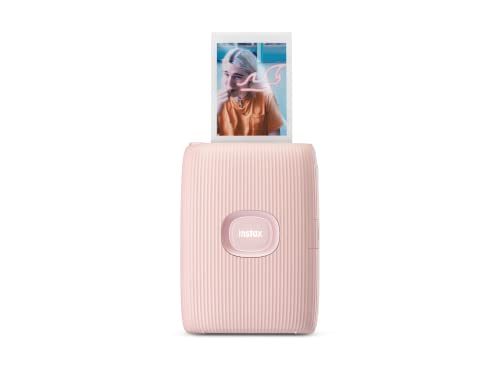
Fujifilm Instax Mini Link 2
Phone photos print onto genuine Instax mini film here, not paper, keeping that recognizable instant camera aesthetic. Playful AR effects and frame options live inside the companion app. The credit card sized keepsake format stays compact for pockets and albums.
Pros
- Genuine Instax film character
- Fun app effects and frames
- Compact and lightweight body
Cons
- Film cost per shot runs higher
- Tiny print size limits detail

Canon SELPHY Square QX10
Dye-sub quality comes packed into a compact, battery powered body built for one job: square prints. A 2.7 inch adhesive sticker backing suits scrapbooks and social feeds that favor the square crop. Cartridges only cover this single format.
Pros
- Dye sub quality in a small body
- Adhesive square prints stick anywhere
- Runs on a built in battery
Cons
- Only prints the square size
- Cartridges limited to one format

Polaroid Hi-Print 2×3
Dye sublimation inside a pocket sized body outperforms zink rivals at the same 2 by 3 print size. Peel off sticker backing turns each print into a label. A rechargeable battery keeps the unit fully cordless on the go.
Pros
- Better detail than zink at this size
- Pocketable and battery powered
- Sticker backing for easy display
Cons
- Cartridge cost per print adds up
- Limited to the small format only

Kodak Step Instant Printer
Zink technology needs zero ink, keeping this the lowest cost printer to run in the lineup. Sticker backed 2 by 3 prints come out fast enough for kids and casual snapshots. Image quality stays basic next to any dye-sub rival.
Pros
- Very low cost to run long term
- No ink cartridges ever needed
- Sturdy, kid friendly design
Cons
- Basic image quality overall
- Prints look flat next to dye-sub
Side by side
| # | Model | Print type | Best for | Score | Price |
|---|---|---|---|---|---|
| 1 | Canon SELPHY CP1500 | Dye sublimation | Best overall | 9.4 | Check price |
| 2 | Kodak Dock Plus 4PASS | Dye sublimation | Best value | 9.2 | Check price |
| 3 | HP Sprocket 2nd Edition | Zink zero ink | Best budget | 9.0 | Check price |
| 4 | Fujifilm Instax Mini Link 2 | Instax mini film | Best for instant film look | 8.8 | Check price |
| 5 | Canon SELPHY Square QX10 | Dye sublimation | Best for square prints | 8.6 | Check price |
| 6 | Polaroid Hi-Print 2×3 | Dye sublimation | Best for pocket carry | 8.3 | Check price |
| 7 | Kodak Step Instant Printer | Zink zero ink | Best for stickers | 8.0 | Check price |
Good to know
What is the difference between dye-sub and zink?
Dye-sub melts dye into paper for smooth, durable prints, while zink uses inkless heat-activated paper that is smaller and cheaper but softer looking. Dye-sub wins on quality every time.
Which portable printer gives the best photo quality?
Dye-sublimation models like the Canon SELPHY CP1500 and Kodak Dock Plus produce the closest thing to lab prints, with water-resistant coatings and rich, accurate color.
Do these printers work with any phone?
Most connect over Bluetooth or Wi-Fi with iOS and Android apps. Confirm your phone’s software version is still supported before buying, since older apps can lag behind updates.
How much does each print cost to make?
It varies by format. Dye-sub prints usually carry a modest, steady cost per photo, while instant film formats cost the most per shot. Factor consumables into the total before buying.
Can these printers make stickers?
Yes. Zink models and several dye-sub minis use adhesive-backed paper, so finished prints peel off and stick to notebooks, walls or gifts.
Do I need to buy ink for a photo printer?
Zink printers use no ink at all. Dye-sub models need ribbon-and-paper packs, and film based units need actual film, so budget for whichever consumable matches your pick.
Are portable printer prints waterproof?
Dye-sub prints add a protective layer that resists water and fading well. Zink prints resist smudging reasonably but hold up less well over time in damp conditions.
What print size should I choose?
Pick 4 by 6 for albums and frames, square for social crops, and 2 by 3 for quick sharing or stickers. Match the format to how the photo will actually be displayed.
Which printer suits a party or event photo booth?
Zink models like the HP Sprocket or Kodak Step handle guest volume cheaply since there is no ink to restock. Dye-sub units cost more per print but hold up better as keepsakes.
Our pick
The Canon SELPHY CP1500 remains the printer to recommend first for durable prints and low running costs. Want the same dye-sub quality for less? Step down to the Kodak Dock Plus. Need true pocket size and instant sharing instead? The HP Sprocket trades detail for portability.
Marcus Chen
Marcus covered consumer electronics for enthusiast tech publications for six years before joining ChoiceCrest. He specializes in translating manufacturer spec sheets into plain-language buying advice, with a focus on audio, computing accessories and smart-home gear.
You might also need

How to Pick a Portable Scanner for Documents and Photos
Action Cameras Compared for Stabilization and Battery Life

Tablets Compared for Students, Professionals and Families
