How to Pick a Portable Scanner for Documents and Photos
Brother’s DS-640 leads on pure portability and USB powered simplicity. Fujitsu’s ScanSnap iX100 wins for wireless scanning straight to a phone, and Epson’s WorkForce ES-50 offers the most affordable route into reliable single sheet capture for receipts and letters.
Brother’s DS-640 suits most people who want a portable scanner, with Fujitsu’s ScanSnap iX100 leading on wireless freedom and Epson’s WorkForce ES-50 covering simple budget scanning.
Listing pages make portable scanners look interchangeable, yet they split sharply on duplex support, power source, and how good the bundled OCR really is. We compared published specifications, page throughput figures, and what owners report about jamming and software setup to rank these seven.
The best picks, ranked

Brother DS-640 Compact Mobile Document Scanner
A single USB-C cable runs the entire DS-640, removing the battery and power brick problem that makes other mobile scanners awkward. Owners report consistently clean text capture on letters, receipts and thicker card stock. Bundled software handles OCR to searchable PDF with no subscription required.
Pros
- No separate power supply needed
- Handles card stock and receipts well
- Included OCR creates searchable PDFs
Cons
- Single sided scanning only
- No wireless option

Fujitsu ScanSnap iX100 Wireless Mobile Scanner
A rechargeable battery and its own Wi-Fi connection let the iX100 scan directly to a phone or laptop with no computer attached. Roughly 260 scans per charge is the figure the specifications state. ScanSnap’s software stands out for automatic cropping and orientation correction.
Pros
- True cordless scanning
- Excellent automatic image cleanup
- Scans straight to mobile devices
Cons
- Simplex only
- Wi-Fi setup can take patience
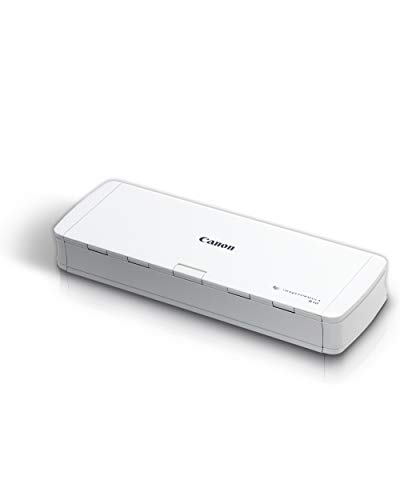
Canon imageFORMULA R10 Portable Document Scanner
A 20 sheet automatic feeder plus duplex scanning make the R10 one of the few genuinely portable units built for stacks of paperwork. Software lives on the device itself, so there is no installer to chase. Owners report it is the easiest of this group to hand to a colleague.
Pros
- Automatic feeder saves real time
- Onboard software needs no install
- Two sided scanning in one pass
Cons
- Bulkier than sheetfed rivals
- Feeder can misgrab mixed paper sizes

Brother DSmobile DS-940DW Wireless Duplex Scanner
Duplex scanning, a battery and Wi-Fi combine in a DS-940DW body that still fits a laptop bag. A microSD slot lets it scan without any paired device at all, suiting site visits and client meetings. Specifications list it as the most flexible mobile scanner Brother currently sells.
Pros
- Scans to card with no computer
- Two sided capture
- Battery powered for field work
Cons
- Slower than USB only models
- Card and app workflow takes learning

Epson WorkForce ES-50 Portable Sheetfed Document Scanner
One job defines the ES-50, feeding a single page at a time over USB with no battery to maintain. It is the lightest unit here, and owners report it holds up well to daily receipt scanning. Epson’s ScanSmart software handles filing and OCR competently.
Pros
- Very light and slim
- Straightforward software
- Reliable with receipts
Cons
- No duplex or wireless
- One page at a time only
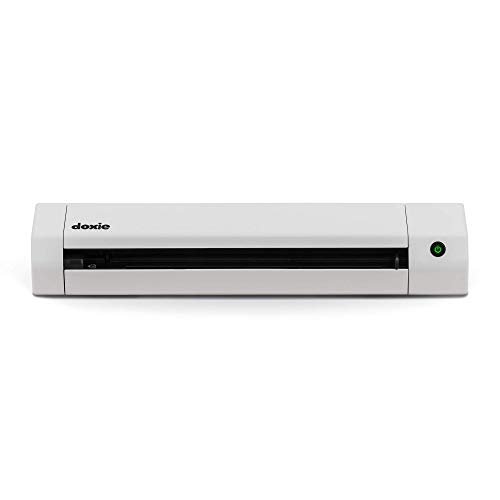
Doxie Go SE Wireless Scanner
Onboard memory lets the Doxie Go SE store scans and sync later, so it works in a car, a storage unit, or anywhere without power. Its companion app pushes files to cloud services once reconnected. Per page speed trails mains powered rivals as the tradeoff.
Pros
- Works with no computer nearby
- Good cloud syncing options
- Long battery life per charge
Cons
- Slower scanning speed
- Simplex only

Plustek MobileOffice S410 Plus Document Scanner
ID cards, business cards and insurance documents are the target for the S410 Plus, with a feed path that tolerates embossed plastic. Bundled business card software pulls contact details into a database. Connectivity stays basic, but pricing suits a second desk rather than a primary setup.
Pros
- Handles plastic cards reliably
- Useful card capture software
- Compact desk footprint
Cons
- No wireless or battery
- Interface feels dated
How to choose
Do you actually need duplex scanning Duplex scanning captures both sides of a page in a single pass, and it matters more than raw speed for contracts, forms or double sided invoices. Simplex models stay lighter and cheaper, but flipping every page manually gets old fast. Duplex is worth paying for once more than a quarter of your paperwork is two sided.
Match the power source to where you scan USB bus powered scanners work best when a laptop sits nearby at all times. Battery models cost more and need charge management, yet they are the only realistic option for site visits, client offices or scanning inside a vehicle. Wireless connectivity adds convenience and setup friction in roughly equal measure.
Software decides more than the hardware does A scanner only captures the image; bundled software decides whether the result is a searchable PDF, a clean crop and a sensible filename. ScanSnap and Epson ScanSmart both perform strongly here. Check whether OCR ships outright or sits behind a subscription before committing to a purchase.
How paper condition and size change the result Crumpled receipts, thermal paper and thick card behave differently inside a narrow feed path. A straight through feed path handles stiff media better than a tight U shaped one. A carrier sheet is a cheap accessory worth owning for anyone scanning small or damaged originals often.
Side by side
| # | Model | Scan speed | Best for | Score | Price |
|---|---|---|---|---|---|
| 1 | Brother DS-640 Compact Mobile Document Scanner | Up to 16 pages per minute | Best overall | 9.4 | Check price |
| 2 | Fujitsu ScanSnap iX100 Wireless Mobile Scanner | Wi-Fi and USB | Best for wireless use | 9.2 | Check price |
| 3 | Canon imageFORMULA R10 Portable Document Scanner | 20 sheet automatic document feeder | Best for batch scanning | 9.0 | Check price |
| 4 | Brother DSmobile DS-940DW Wireless Duplex Scanner | Yes | Best for two sided documents | 8.8 | Check price |
| 5 | Epson WorkForce ES-50 Portable Sheetfed Document Scanner | About 5.5 seconds per page | Best value | 8.6 | Check price |
| 6 | Doxie Go SE Wireless Scanner | Onboard memory plus SD support | Best for scanning away from a desk | 8.3 | Check price |
| 7 | Plustek MobileOffice S410 Plus Document Scanner | Documents, ID and business cards | Best budget pick | 8.0 | Check price |
Frequently asked questions
Do portable scanners work without a computer?
Some do. Models with onboard storage or a microSD slot, such as the Doxie Go SE and Brother DS-940DW, capture and store scans standalone, then sync later. USB bus powered units always need a host device connected.
Is 600 dpi enough for scanning documents?
Yes. Text documents need only 300 dpi for accurate OCR, and 600 dpi adds headroom for small print or photos. Higher resolutions mostly inflate file size without improving readability.
Can a portable scanner handle receipts reliably?
All seven models here accept receipt sized paper, though thermal receipts fade over time and scan best while fresh. Owners report straight path sheetfed models handle curled receipts more reliably than tight paper turns.
What is the difference between simplex and duplex scanning?
Simplex captures one side of a page. Duplex uses two sensors to capture both sides in a single pass, saving considerable time on forms and contracts at the cost of added weight and price.
Do portable scanners come with OCR software included?
Most do. Brother, Epson, Canon and Fujitsu all bundle software that converts scans into searchable PDFs. Check whether the licence is perpetual or trial based, since some bundles expire after a set period.
Can I scan directly to cloud storage from a portable scanner?
Wireless models can. ScanSnap, Doxie and Brother’s mobile apps all support sending scans to services like Google Drive and Dropbox. USB only scanners rely on the connected computer’s own sync folder instead.
Will a portable scanner replace a flatbed scanner?
Not entirely. Sheetfed portables cannot scan books, bound documents or fragile originals. Keep a flatbed for those and use the portable unit for loose paper.
How many pages can a portable scanner realistically handle per day?
Portable scanners suit light duty, typically a few hundred pages per day at most. Continuous high volume work calls for a desktop scanner with a larger feeder and higher duty cycle instead.
Which portable scanner is best for scanning ID and business cards?
The Plustek MobileOffice S410 Plus is built specifically for embossed plastic cards and pairs with business card recognition software. Most sheetfed portables handle a card occasionally but are not optimized for it.
Final word
Brother’s DS-640 suits most people, since bus power removes the biggest annoyance of mobile scanning and image quality holds up from receipts to card stock. Choose Fujitsu’s ScanSnap iX100 for scanning without a nearby computer, or Canon’s imageFORMULA R10 when stacks of paper, not single sheets, are the real problem.
Marcus Chen
Marcus covered consumer electronics for enthusiast tech publications for six years before joining ChoiceCrest. He specializes in translating manufacturer spec sheets into plain-language buying advice, with a focus on audio, computing accessories and smart-home gear.


