Is a Mini PC Actually Powerful Enough to Replace a Full Desktop?
Modern mini PCs built around mobile processors like AMD Ryzen or Intel’s U and H series chips can comfortably replace a desktop for office work, web browsing, streaming, and even moderate photo editing. They hit real limits with sustained heavy workloads like serious gaming, video rendering, or anything needing a dedicated graphics card, because their small chassis cannot handle the heat or power draw a full desktop tower can manage with ease.
What mini PCs are actually built around
Most mini PCs use the same mobile-class processors found in laptops rather than the desktop-class chips in a full tower, paired with integrated graphics built into that same chip in the vast majority of models. This keeps power draw and heat output low enough to fit everything into a chassis the size of a paperback book, but it also means the ceiling on sustained performance is set by laptop-grade components, not desktop-grade ones.
Where mini PCs match or beat a desktop
For everyday productivity work, document editing, web browsing, video calls, and media streaming, a current mini PC performs essentially the same as a mid-range desktop, often while using a fraction of the electricity and running silently or near-silently. Their small footprint also makes them a genuinely better fit for a cramped desk or a living room media setup where a full tower would be impractical.
Where mini PCs fall short
Sustained CPU or GPU load, like long video exports, 3D rendering, or demanding modern games, pushes a mini PC’s compact thermal design toward throttling, where the chip deliberately slows itself down to avoid overheating in a space with limited airflow. A full desktop tower, with larger fans, more airflow, and often liquid cooling options, can sustain peak performance for far longer under the same kind of workload.
Upgradability is a bigger long-term difference than raw speed
A desktop tower is built around the expectation that you will eventually swap the graphics card, add storage drives, or upgrade the power supply, keeping the system relevant for years through incremental parts changes. Most mini PCs offer limited internal access, often just a RAM slot or two and a single storage bay, and many budget models solder the RAM or storage directly to the board with no upgrade path at all.
The dedicated graphics card gap
The lack of room for a discrete graphics card in nearly all mini PCs is the single biggest practical limitation for gaming and GPU-accelerated creative work, since integrated graphics, even strong modern ones, still trail a dedicated card by a wide margin in demanding titles and professional rendering software.
An external GPU as a partial workaround
Some higher-end mini PCs support Thunderbolt or USB4 connections capable of driving an external graphics card enclosure, which can meaningfully close the gaming and rendering gap without giving up the mini PC’s small form factor at the desk. This adds real cost and a second box to the setup, so it suits people specifically motivated to keep the small footprint rather than being a default solution.

Beelink SER5 Mini PC
A compact mini PC built around an AMD Ryzen mobile processor, positioned as a desktop replacement for everyday productivity and light creative work.
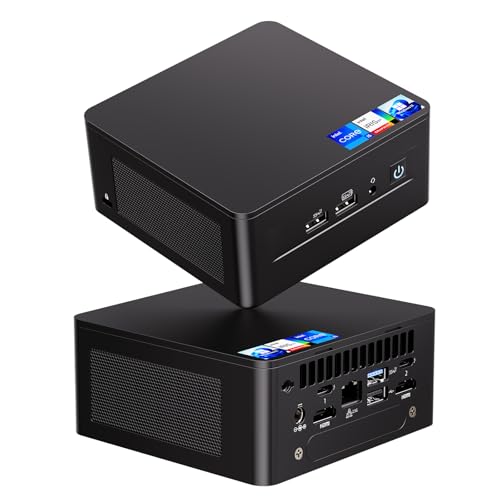
Intel NUC
A long-running line of compact Intel-based mini PCs aimed at office, home theater, and general computing use rather than sustained heavy gaming or rendering.
Frequently asked questions
Can a mini PC run modern AAA games at playable settings?
Lighter or older games generally run fine at reduced settings on a mini PC’s integrated graphics, but demanding current-generation titles at higher settings usually need either a dedicated graphics card a mini PC cannot house, or an external GPU enclosure.
Is a mini PC good enough for video editing work?
Light to moderate video editing, especially with hardware-accelerated codecs the integrated graphics can handle, works reasonably well, but long, GPU-intensive export and rendering sessions will generally run slower and hotter than on a desktop with a dedicated card.
Do mini PCs use significantly less electricity than a full desktop tower?
Yes, this is one of their clearer advantages, since mobile-class processors are specifically designed around lower power draw, often using a fraction of what a desktop tower with a dedicated graphics card consumes under similar workloads.
Can you add more RAM or storage to a mini PC later?
Some models allow this through accessible RAM slots and an M.2 storage bay, but many budget mini PCs solder RAM and storage directly to the motherboard, so checking a specific model’s upgrade path before buying matters more than with a typical desktop.
Are mini PCs quieter than desktop towers?
Generally yes, since their lower power components generate less heat and often use smaller, slower-spinning fans, with some fanless models running completely silently, though this comes with the tradeoff of lower sustained performance ceilings.
Can a mini PC support multiple monitors like a desktop can?
Yes, most current mini PCs support two or more external displays through a combination of HDMI, DisplayPort, and USB-C ports, which covers the needs of most multi-monitor office setups.
Do mini PCs overheat more easily than desktops during long work sessions?
Their smaller chassis has less room for airflow and cooling capacity, so under sustained heavy load they are more prone to thermal throttling than a desktop tower, though for typical office workloads this rarely becomes noticeable.
Is a mini PC a good fit for a home server or media center setup?
Yes, this is one of their strongest use cases, since low power draw, quiet operation, and a small footprint all suit a device meant to run continuously in a living room or closet.
Can you connect an external graphics card to any mini PC?
No, only models with a sufficiently fast Thunderbolt or USB4 port support an external GPU enclosure, and even then the connection’s bandwidth is narrower than a desktop’s internal graphics card slot, so performance does not fully match a true desktop setup.
Do mini PCs cost less than building an equivalent desktop?
It depends on the comparison point, since a mini PC with integrated graphics is often cheaper than a desktop with a dedicated graphics card, but comparing against a similarly basic desktop without a discrete GPU often shows closer pricing.
Is a mini PC reliable enough to use as a primary everyday computer?
Yes, for the majority of everyday computing tasks a current mini PC is a fully capable primary computer, and the reliability concerns come up specifically around sustained heavy workloads rather than general day-to-day stability.
Can a mini PC’s integrated graphics handle multiple 4K displays?
Many recent integrated graphics chips can drive two or more 4K displays for general desktop use, though running demanding graphical applications across multiple high-resolution screens simultaneously will tax integrated graphics more than it would a dedicated card.
Do mini PCs typically come with Windows pre-installed like most desktops?
Most consumer mini PCs ship with Windows pre-installed similar to a typical desktop, though a number of models are also sold barebones or with Linux specifically for users building a custom setup.
Is a mini PC a good choice for a small business office setup?
Yes, for standard office software, video conferencing, and web-based tools, mini PCs are a practical fit for office environments where desk space, noise, and power consumption matter alongside raw computing power.
Our take
A mini PC genuinely replaces a desktop for the kind of computing most people do most of the time, and the tradeoff only becomes a real problem for workloads that lean on sustained CPU or GPU power. Anyone whose actual use case includes serious gaming or heavy rendering should treat a mini PC as a secondary or specialized device rather than a full replacement.
Marcus Chen
Marcus covered consumer electronics for enthusiast tech publications for six years before joining ChoiceCrest. He specializes in translating manufacturer spec sheets into plain-language buying advice, with a focus on audio, computing accessories and smart-home gear.