Streaming Devices That Actually Replace Cable TV
Roku Ultra leads this comparison for cord cutters, carrying nearly every live TV app plus Ethernet and a remote finder. Amazon Fire TV Stick 4K Max delivers similar speed in a smaller, cheaper package. Apple TV 4K adds the smoothest interface and zero on screen ads for households willing to pay more.
Roku Ultra tops this list for cord cutters. Amazon Fire TV Stick 4K Max wins on value, and Apple TV 4K wins on interface polish. All three run the major live TV apps without stutter during live games.
Cord cutting looks simple until channel surfing during a live broadcast exposes a slow processor. On demand video buffers ahead, but live TV punishes any lag instantly. We compared published specifications, processor and memory allowances, wired network options and app catalogs, then weighed what owners report about speed after years of software updates.
The shortlist, ranked

Roku Ultra (2024)
Roku’s app catalog covers nearly every live TV service sold in the US, making the Ultra a near one to one cable replacement. An Ethernet port removes the buffering risk that a crowded Wi-Fi network creates during live sports. Owners report the interface stays responsive across years of software updates, and the remote adds a finder button plus a headphone jack for private listening.
Pros
- Widest live TV app coverage of any platform here
- Ethernet port protects live sports from Wi-Fi congestion
- Remote finder and headphone jack for private listening
Cons
- Home screen includes sponsored tiles
- Interface design looks plainer than Google TV or Apple TV

Amazon Fire TV Stick 4K Max (2nd Gen)
This second generation stick moves through menus almost as fast as pricier boxes twice its size. Wi-Fi 6E support helps in apartment buildings where wireless traffic gets crowded, and it hides behind the TV with no shelf space needed. The home screen leans heavily on Amazon’s own catalog, so reaching outside apps takes extra taps.
Pros
- Menu speed rivals boxes that cost far more
- Wi-Fi 6E performs better in crowded buildings
- Ambient art mode activates when idle
Cons
- Home screen promotes Amazon content heavily
- No Ethernet without a separate adapter

Apple TV 4K (3rd generation)
A phone class A15 Bionic chip keeps every menu instant and handles high frame rate video and gaming better than the rest of this group. No sponsored rows appear anywhere in the interface, which matters when a whole family shares one screen. Apple’s own services get top placement, and Ethernet only ships on the higher storage model.
Pros
- No advertising anywhere in the interface
- A15 Bionic handles gaming and high frame rate video smoothly
- Long track record of software updates
Cons
- Costs more than every other device in this group
- Ethernet requires the higher storage configuration
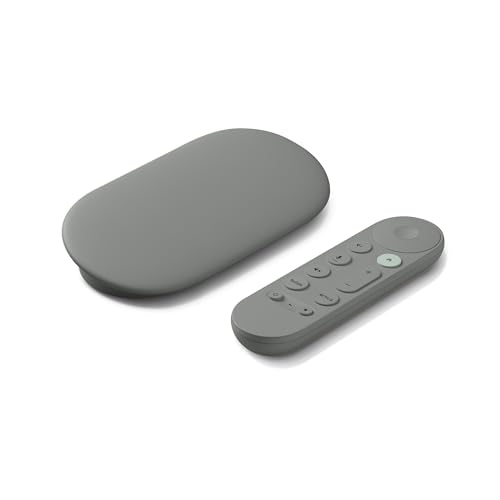
Google TV Streamer 4K
Google replaced the Chromecast line with a proper set top box that adds Ethernet, more memory and a built in Matter and Thread hub. A single watchlist row pulls shows from multiple subscriptions together, useful once a household juggles four or five apps. Camera feeds and thermostat controls also appear on screen, turning the box into a hallway hub.
Pros
- Cross service watchlist saves time hunting for shows
- Matter and Thread hub controls smart home gear directly
- Ethernet included despite the compact size
Cons
- Interface feels busy during initial setup
- Larger footprint than a stick style device
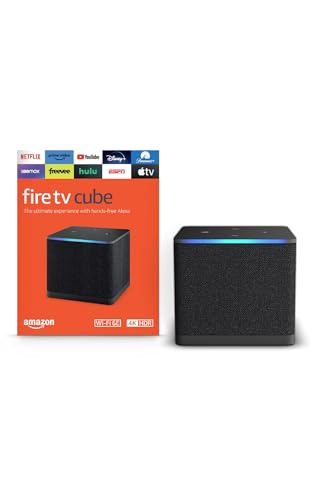
Amazon Fire TV Cube (3rd Gen)
Far field microphones let you change channels from the sofa without touching a remote, a feature none of the other six devices offer. An HDMI input passes through a cable box or console, while Ethernet and Wi-Fi 6E cover the network side. That combination suits anyone cutting the cord gradually while one legacy source stays connected.
Pros
- Hands free voice control reaches across the room
- HDMI input keeps a legacy cable box or console connected
- Fastest processor in the current Fire TV lineup
Cons
- Bulkier than a stick on the shelf
- Amazon storefront dominates the home screen layout

Roku Streaming Stick 4K
This stick delivers the same wide live TV app support as the Ultra without the extra ports. Its simple grid layout suits a bedroom or guest room, since visitors rarely need help finding a show. A long range Wi-Fi antenna built into the HDMI extender helps when the router sits at the far end of the house.
Pros
- Interface stays simple for casual or guest use
- Matches the Ultra’s app catalog at a smaller size
- Often powers from the TV’s own USB port
Cons
- No Ethernet port or remote finder feature
- Slower than the Ultra when running demanding apps
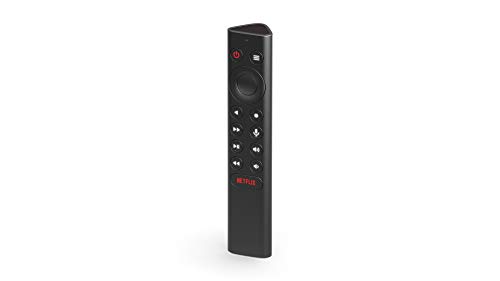
NVIDIA SHIELD TV Pro
This older design survives because nothing else here runs a full Plex server, decodes obscure file formats and upscales lower resolution content this well. Two USB 3.0 ports let you attach external storage directly, an option no other device in this group offers. The Android TV interface shows its age, so this pick suits owners with a local media library first.
Pros
- Runs a Plex Media Server directly on the device
- Two USB ports allow direct storage expansion
- Upscaling handles older, lower resolution content well
Cons
- Interface and hardware generation feel dated
- Overkill for anyone streaming apps only
What to look for
What should you check before buying a streaming box? Live TV app support matters more than any spec sheet before you buy. Confirm your intended live services run smoothly, since some smaller platforms delay features like multiview and cloud DVR. Roku and Fire TV carry the widest app lists among current devices. List two or three services you plan to subscribe to, then shortlist boxes that support all of them.
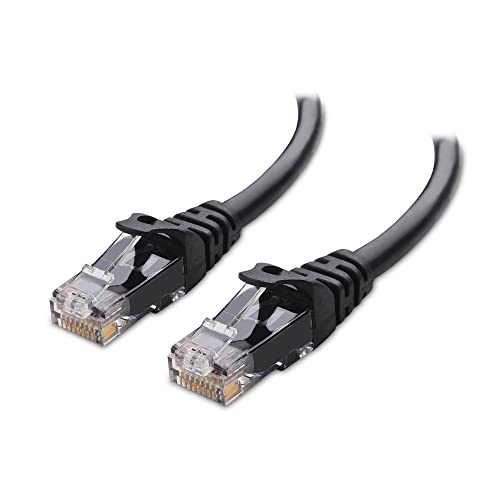
Does Ethernet matter more than fast Wi-Fi for live sports? On demand video buffers ahead, so a brief network hiccup rarely shows on screen. Live sports carry almost no buffer, so one dropped packet can freeze the picture at the worst moment. Roku Ultra, Google TV Streamer and Fire TV Cube solve this with a built in Ethernet port. A Wi-Fi 6 or 6E stick placed near the router is the next best option.
How do you match 4K, HDR and Dolby formats to your TV? Dolby Vision and HDR10+ compete for the same job, and most televisions handle one properly rather than both. Check your TV’s supported format before paying more for a device that outputs the wrong one. Dolby Atmos needs a soundbar or receiver in the signal chain to matter at all. Based on specifications, every device in this comparison outputs 4K, so resolution rarely decides the purchase now.
Which streaming device suits a household with kids or guests? A shared family TV benefits from Roku’s plain grid layout more than from an interface that reshuffles rows constantly. Voice remotes help everyone find a show faster, and a remote finder button saves real frustration. Owners report that headphone jack private listening on the Roku Ultra gets used more than expected. Older relatives and casual guests tend to prefer the simplest menu available.
The lineup, side by side
| # | Model | Max output | Best for | Score | Price |
|---|---|---|---|---|---|
| 1 | Roku Ultra (2024) | 4K HDR10+ and Dolby Vision | Best overall | 9.4 | Check price |
| 2 | Amazon Fire TV Stick 4K Max (2nd Gen) | 4K HDR10+ and Dolby Vision | Best value | 9.2 | Check price |
| 3 | Apple TV 4K (3rd generation) | 4K HDR10+ and Dolby Vision | Best premium | 9.0 | Check price |
| 4 | Google TV Streamer 4K | 4K HDR10+ and Dolby Vision | Best for smart home users | 8.8 | Check price |
| 5 | Amazon Fire TV Cube (3rd Gen) | 4K HDR10+ and Dolby Vision | Best for hands free control | 8.6 | Check price |
| 6 | Roku Streaming Stick 4K | 4K HDR10 and Dolby Vision | Best for a second TV | 8.3 | Check price |
| 7 | NVIDIA SHIELD TV Pro | 4K HDR10 and Dolby Vision | Best for home media servers | 8.0 | Check price |
Common questions
Do I still need an antenna after cutting cable?
Only if you want local channels without paying for a live TV subscription. Most streaming services carry local affiliates in major markets, though coverage depends on your zip code. An indoor antenna works as a low cost backup, and several boxes here can merge over the air channels into the main guide with an added tuner.
Is a streaming stick fast enough, or do I need a box?
Current sticks like the Fire TV Stick 4K Max handle everyday app use without lag. A box earns its size when you need Ethernet, an HDMI input, a media server or a household that switches apps constantly.
How much internet speed do I need for 4K streaming?
Most services recommend roughly 25 Mbps for one 4K stream. Running two 4K streams at once needs more headroom, so a multi screen household should prioritize connection stability over raw speed alone.
Can one streaming device replace every cable channel?
Not entirely. Live TV services carry different channel lineups, and some regional sports networks are missing from certain packages. Check the channel list for your zip code on each service, since the subscription limits you more than the hardware does.
Which streaming device works best for a second TV or bedroom?
Roku Streaming Stick 4K suits a secondary TV well, since its simple layout needs no explanation for guests. It skips the Ultra’s Ethernet port and remote finder but keeps the same wide app catalog.
Do these players work with older, non smart TVs?
Yes, as long as the TV has a spare HDMI port. Picture quality caps out at whatever the TV supports, so a 1080p set shows a 1080p image even from a 4K player. Some owners buy a 4K model anyway so it carries over to a future TV purchase.
Is Ethernet worth it over Wi-Fi for cord cutting?
For live sports and busy households, yes. A wired connection removes interference and network congestion from the equation. Modern Wi-Fi works fine when the router sits in the same room and few devices compete for bandwidth.
Which platform shows the fewest ads on the home screen?
Apple TV 4K carries no sponsored rows anywhere in its interface. Roku and Fire TV both place promoted tiles on the home screen, though most viewing time happens inside individual apps.
How long do streaming boxes stay supported with software updates?
Roku and Apple hold the strongest multi year update records, and owners report older units still receiving updates well past launch. Cheaper sticks tend to slow down first because of limited memory, not because support ends early.
Roku Ultra vs Fire TV Stick 4K Max: which should cord cutters buy?
Roku Ultra wins on app coverage, Ethernet and remote features, making it the safer all around choice. Fire TV Stick 4K Max costs less and matches its speed in a smaller package, which suits anyone upgrading a secondary room.
The bottom line
Roku Ultra remains the strongest cable replacement for most cord cutters, thanks to its wide live TV app support, Ethernet port and simple remote layout. Amazon Fire TV Stick 4K Max delivers nearly the same speed in a smaller, less expensive package. Choose Apple TV 4K instead when an ad free interface and the smoothest gaming performance outweigh the higher cost.
Marcus Chen
Marcus covered consumer electronics for enthusiast tech publications for six years before joining ChoiceCrest. He specializes in translating manufacturer spec sheets into plain-language buying advice, with a focus on audio, computing accessories and smart-home gear.