Top USB Flash Drives Gamers Actually Rely On
The SanDisk Extreme Pro is the top pick for gamers who need blazing fast transfer speeds and rugged durability. It is ideal for storing large game files, mods, and capture footage, but it costs more than standard drives.
Gamers know that storage speed can make or break the experience. Whether you are moving massive game installations, backing up save files, or transferring mods, a slow USB drive can waste precious time. The right flash drive should offer fast data transfer, rugged construction, and enough capacity to hold today’s huge game files.
We compared the most popular USB flash drives on the market, focusing on real-world performance and durability. Our selections include top-tier models for enthusiasts, as well as budget-friendly picks that still get the job done. Read on to find the perfect match for your gaming setup.
Our top picks
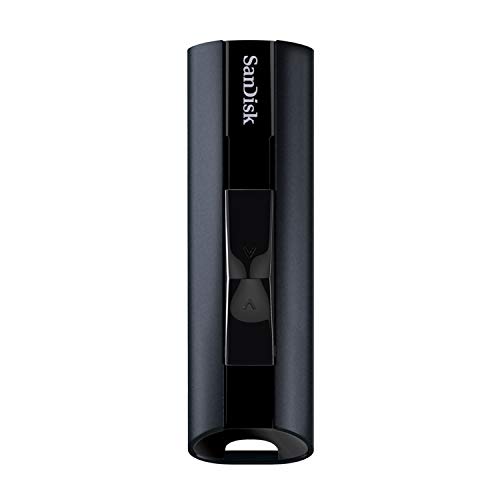
SanDisk Extreme Pro USB 3.2 Solid State Flash Drive
The SanDisk Extreme Pro is a powerhouse, delivering read speeds up to 420 MB/s and write speeds up to 380 MB/s. Its aluminum casing is both stylish and rugged, capable of withstanding drops and shocks. Gamers who need to move large game libraries or capture high-resolution gameplay will appreciate the speed and reliability.
Pros
- Blazing fast read and write speeds
- Rugged aluminum design
- Available in large capacities up to 1TB
Cons
- Premium price tag
- Can get warm during sustained transfers
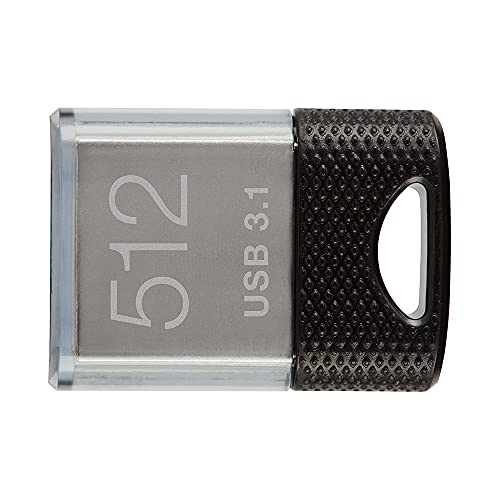
Corsair Flash Voyager GTX USB 3.1 Gen 1 Flash Drive
The Corsair Flash Voyager GTX is designed for performance, with read speeds up to 440 MB/s and write speeds up to 440 MB/s. Its zinc-alloy housing is both durable and stylish, and the integrated key ring loop makes it easy to carry. This drive is perfect for storing your entire game collection or running portable apps.
Pros
- Very fast sequential speeds
- Sturdy metal casing
- Key ring loop for portability
Cons
- No USB-C version
- Not as compact as some rivals

Samsung BAR Plus USB 3.1 Flash Drive
The Samsung BAR Plus is a solid choice for gamers on a budget. It offers read speeds up to 300 MB/s, which is sufficient for most gaming needs, and its metal body is waterproof, shock-proof, and temperature-proof. With capacities up to 256GB, it provides ample space for game saves and smaller game files.
Pros
- Affordable price point
- Rugged metal design
- Trusted brand
Cons
- Slower write speeds
- Limited to 256GB max

Kingston DataTraveler Max USB 3.2 Gen 2 Flash Drive
The Kingston DataTraveler Max is a high-performance USB-C drive with read speeds up to 1000 MB/s and write speeds up to 900 MB/s. It is perfect for gamers with modern laptops or consoles that support USB-C. The sliding collar design protects the connector when not in use.
Pros
- Super fast USB-C performance
- Large capacity options
- Sliding collar protects connector
Cons
- Requires USB-C port or adapter
- Can be pricey for higher capacities

PNY Elite-X Fit USB 3.1 Gen 2 Flash Drive
The PNY Elite-X Fit is one of the smallest USB flash drives available, barely protruding from the port. Despite its size, it delivers read speeds up to 400 MB/s, making it a great option for gamers who want to keep a drive plugged in without worrying about snapping it off. It is available in capacities up to 512GB.
Pros
- Very small and unobtrusive
- Good read speeds
- Large storage options
Cons
- No USB-C version
- Write speeds slower than read
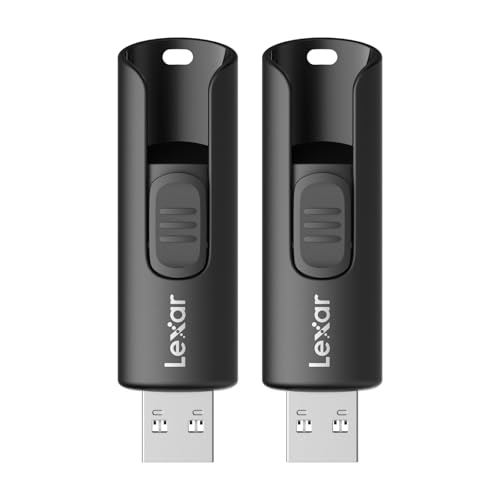
Lexar JumpDrive P30 USB 3.2 Gen 1 Flash Drive
The Lexar JumpDrive P30 offers read speeds up to 450 MB/s and write speeds up to 400 MB/s, providing solid performance for gaming. Its metal casing is both durable and attractive, and the retractable design protects the USB connector. It is available in capacities up to 256GB.
Pros
- Fast read and write speeds
- Retractable connector
- Sleek metal build
Cons
- Limited to 256GB
- No USB-C option

ADATA Elite SE880 USB 3.2 Gen 2×2 External SSD
The ADATA Elite SE880 is technically a portable SSD, but its compact size and USB-C connectivity make it a formidable option for gamers. With read speeds up to 2000 MB/s and write speeds up to 1800 MB/s, it is the fastest drive on our list. It is perfect for running games directly from the drive or transferring massive files in seconds.
Pros
- Blazing fast speeds
- Compact and durable design
- Large capacity available
Cons
- Requires USB 3.2 Gen 2×2 port for max speed
- More expensive than standard flash drives
How to choose
Side by side
| # | Model | Capacity | Best for | Score | Price |
|---|---|---|---|---|---|
| 1 | SanDisk Extreme Pro USB 3.2 Solid State Flash Drive | 128GB, 256GB, 512GB, 1TB | Maximum performance and durability | 9.4 | Check price |
| 2 | Corsair Flash Voyager GTX USB 3.1 Gen 1 Flash Drive | 128GB, 256GB, 512GB | High-speed transfers with a key ring loop | 9.0 | Check price |
| 3 | Samsung BAR Plus USB 3.1 Flash Drive | 64GB, 128GB, 256GB | Budget-friendly reliability | 8.7 | Check price |
| 4 | Kingston DataTraveler Max USB 3.2 Gen 2 Flash Drive | 256GB, 512GB, 1TB | USB-C users needing fast transfer | 8.9 | Check price |
| 5 | PNY Elite-X Fit USB 3.1 Gen 2 Flash Drive | 128GB, 256GB, 512GB | Ultra-compact design for portability | 8.5 | Check price |
| 6 | Lexar JumpDrive P30 USB 3.2 Gen 1 Flash Drive | 128GB, 256GB | Fast performance with a sleek metal design | 8.6 | Check price |
| 7 | ADATA Elite SE880 USB 3.2 Gen 2×2 External SSD | 500GB, 1TB | Portable SSD performance in a flash drive form | 9.2 | Check price |
Good to know
What is the fastest USB flash drive for gaming?
The ADATA Elite SE880 is the fastest, with read speeds up to 2000 MB/s, but it is technically a portable SSD. Among true flash drives, the SanDisk Extreme Pro and Corsair Flash Voyager GTX offer top speeds around 400-440 MB/s.
Can I run games directly from a USB flash drive?
Yes, but performance depends on the drive’s speed and the game’s requirements. Older or less demanding games may run fine, but modern AAA games often require faster storage to avoid long load times. For a smoother experience, consider a high-speed drive or a portable SSD.
How much storage do I need for gaming?
It depends on how many games you want to store. A single AAA game can take up over 100GB. For a small library, 128GB is a good start; for multiple large games, 256GB or 512GB is recommended.
Is USB-C better than USB-A for gaming flash drives?
USB-C is more convenient for modern devices and can support faster speeds, but USB-A is more universally compatible. Many drives offer both or come with adapters. Choose based on your devices and whether you need maximum speed.
What is the difference between USB 3.0, 3.1, and 3.2?
These are USB specifications that define transfer speeds. USB 3.0 supports up to 5 Gbps, USB 3.1 up to 10 Gbps, and USB 3.2 can go up to 20 Gbps with Gen 2×2. For gaming, USB 3.0 or higher is fine, but to take advantage of the fastest drives, you need a compatible port.
Are expensive flash drives worth it for gaming?
If you frequently transfer large files or need durable storage, investing in a faster, better-built drive is worthwhile. For occasional use, a budget drive may suffice. Consider how much time you spend waiting on transfers.
Can I use a USB flash drive to expand storage on a console?
Yes, many consoles like PlayStation and Xbox support external USB storage for playing games directly or storing them. Check your console’s specifications for supported USB versions and maximum capacity.
How do I know if a flash drive is compatible with my device?
Check the USB port type (USB-A or USB-C) and the USB version supported. Most modern devices support USB 3.0 or higher, but older devices may have slower ports. Consult your device’s manual or manufacturer’s website.
What is the best way to keep my game files safe on a flash drive?
Always safely eject the drive before removing it to prevent data corruption. Use a quality drive with error correction, and consider backing up important files to the cloud or another storage device. Some drives come with encryption software for added security.
The verdict
For most gamers, the SanDisk Extreme Pro is the best choice because it combines high speeds, durable construction, and a range of capacities that suit gaming needs. If you require USB-C and want portable SSD performance, the ADATA Elite SE880 is worth the extra cost. Budget-conscious gamers will find the Samsung BAR Plus a reliable and affordable alternative.
Marcus Chen
Marcus covered consumer electronics for enthusiast tech publications for six years before joining ChoiceCrest. He specializes in translating manufacturer spec sheets into plain-language buying advice, with a focus on audio, computing accessories and smart-home gear.


