Mini PCs Small Enough to Hide Behind a Monitor
The Apple Mac mini is the strongest all-around pick, pairing M4 chip efficiency with a footprint small enough to tuck behind a monitor. The Beelink SER8 suits buyers who want a Windows mini PC with strong integrated graphics, while the Lenovo ThinkCentre M75q fits anyone shopping for a simple business desktop replacement.
The Apple Mac mini stands out because its M4 chip delivers desktop-class performance in a chassis barely larger than a paperback book. Its main limitation is limited internal upgrade room once purchased, unlike some Windows mini PCs that allow later RAM or storage changes.
We compared processor performance, memory ceiling, graphics capability and port selection across each listing rather than running our own benchmark suite.
The shortlist, ranked

Apple Mac mini (M4)
The M4 chip handles everyday computing, creative software and light gaming efficiently inside a chassis measuring just a few inches across. Unified memory shares directly between CPU and GPU tasks, avoiding the separate memory pools found in traditional PC towers. Thunderbolt connectivity supports high-speed external storage and multiple high-resolution displays.
Pros
- M4 chip delivers strong performance in an extremely small chassis
- Unified memory benefits creative and multitasking workloads
- Thunderbolt ports support fast external storage and multiple displays
Cons
- Limited internal upgrade room after purchase
- Running Windows-only software requires workarounds or a separate machine

Beelink SER8
An AMD Ryzen AI 9 processor pairs with Radeon 780M integrated graphics strong enough for esports titles and older AAA games without a discrete GPU. Dual M.2 SSD slots allow more internal storage expansion than many mini PCs in this size class. A rear port selection includes USB4 for high-speed peripherals and external displays.
Pros
- Integrated graphics handle esports and older AAA titles without a discrete GPU
- Dual M.2 slots allow more storage expansion than most mini PCs
- USB4 ports support fast peripherals and external displays
Cons
- Integrated graphics still trail a dedicated discrete GPU in demanding new games
- Runs warmer under sustained load than larger desktop towers

Minisforum UM890 Pro
This mini PC supports a higher maximum RAM ceiling than many competitors in its size class, useful for running multiple virtual machines or memory-heavy software. An AMD Ryzen 9 processor handles demanding multitasking without a discrete GPU. Dual 2.5 Gigabit Ethernet ports support faster wired networking than the single port found on most mini PCs.
Pros
- Higher RAM ceiling suits virtual machines and memory-heavy software
- Dual 2.5 Gigabit Ethernet ports exceed typical mini PC networking
- Strong multitasking performance from the Ryzen 9 processor
Cons
- Integrated graphics are not built for demanding modern gaming
- Larger footprint than the smallest mini PCs in this category

ASUS NUC 14 Pro
Built on the NUC design ASUS acquired from Intel, this mini PC targets business deployment with vPro support for IT management features. Intel Core Ultra processors handle office software and light creative work efficiently. A compact mounting bracket allows it to attach directly behind a monitor, freeing desk space entirely.
Pros
- vPro support simplifies IT management for business deployment
- VESA mounting bracket frees desk space entirely
- Efficient performance for office and light creative work
Cons
- Integrated graphics limit gaming or heavy creative rendering
- Business-focused features add less value for home users
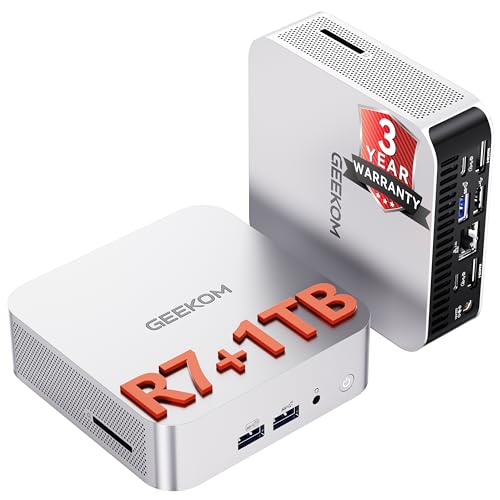
Geekom A8 Mini PC
An AMD Ryzen 9 8945HS processor delivers strong multitasking performance at a lower price than some competing mini PCs with similar specs. Dual M.2 slots and support for high-capacity RAM modules keep upgrade options open after purchase. A compact metal chassis dissipates heat passively better than some plastic-bodied mini PCs.
Pros
- Strong Ryzen 9 performance at a competitive price point
- Dual M.2 slots keep storage upgrade options open
- Metal chassis helps passive heat dissipation
Cons
- Integrated graphics still limit demanding gaming performance
- Fewer brand-specific software tools than ASUS or Lenovo offer

GMKtec EVO-X2
A Ryzen AI Max+ processor includes a dedicated neural processing unit built for AI-accelerated tasks beyond what standard CPUs handle efficiently. Integrated graphics performance pushes closer to entry-level discrete GPU territory than typical mini PC chips. Expandable storage through multiple M.2 slots supports larger local AI model files.
Pros
- Dedicated NPU accelerates AI-focused workloads beyond standard CPUs
- Integrated graphics perform closer to discrete GPU territory
- Multiple M.2 slots support larger local storage needs
Cons
- AI acceleration benefits depend on software specifically built to use it
- Higher price than mini PCs without dedicated NPU hardware

Lenovo ThinkCentre M75q
A simple, business-focused design keeps this mini PC’s price below gaming or AI-focused competitors, aimed at office deployment. AMD Ryzen processors handle everyday business software without the cost of discrete graphics or advanced NPU hardware. Lenovo’s own management software suits IT departments deploying many units at once.
Pros
- Lower price than gaming or AI-focused mini PCs
- Lenovo management software suits multi-unit IT deployment
- Compact size frees desk space in office environments
Cons
- Integrated graphics are not built for gaming or creative rendering
- Fewer advanced features than premium business mini PCs like the ASUS NUC 14 Pro
What matters most
What a mini PC trades off against a full tower A mini PC trades the internal space of a full tower for a footprint small enough to hide behind a monitor or tuck into a tight shelf. That smaller size limits cooling capacity, which generally caps most mini PCs at integrated graphics rather than a full discrete GPU. Processor choice still spans a wide range, from efficient chips built for everyday tasks to higher tier options handling heavier multitasking or AI-accelerated workloads. Port selection and expansion room vary more between mini PC models than their similar outward size might suggest.
Processor and graphics ceiling in a small chassis Integrated graphics, found on every mini PC in this category, have improved enough that chips like the Radeon 780M in the Beelink SER8 and Geekom A8 handle esports and older AAA games without a discrete GPU. The Apple Mac mini’s M4 chip takes a different approach with unified memory, benefiting creative software that can use CPU and GPU resources together more efficiently. Newer chips with dedicated AI acceleration hardware, like the Ryzen AI Max+ in the GMKtec EVO-X2, push further into workloads standard integrated graphics cannot handle as smoothly.
Matching a mini PC to home, business or creative use Home users wanting an efficient everyday computer get strong value from the Apple Mac mini or Geekom A8, both capable of handling browsing, media and light creative work smoothly. Business deployments benefit from management features built specifically for IT departments, which is why the ASUS NUC 14 Pro’s vPro support and Lenovo ThinkCentre M75q’s deployment software matter more in office settings than at home. Buyers running memory-intensive software or multiple virtual machines should prioritize the Minisforum UM890 Pro’s higher RAM ceiling over a mini PC optimized for a different use case.
Storage, memory and port expansion Storage expansion varies by model, with the Beelink SER8, Minisforum UM890 Pro and Geekom A8 all offering dual M.2 slots for adding a second internal drive later. Memory ceiling matters most for anyone running virtual machines or memory-heavy software, an area where the Minisforum UM890 Pro stands out among this group. Port selection, including USB4, Thunderbolt and multiple display outputs, affects how many monitors and peripherals a mini PC can drive at once, with the Apple Mac mini and Beelink SER8 both supporting multiple high-resolution displays simultaneously.
How they compare
| # | Model | Chip | Best for | Score | Price |
|---|---|---|---|---|---|
| 1 | Apple Mac mini (M4) | Apple M4 | Best Overall | 9.2 | Check price |
| 2 | Beelink SER8 | AMD Ryzen AI 9 | Best for Integrated Graphics Gaming | 8.7 | Check price |
| 3 | Minisforum UM890 Pro | AMD Ryzen 9 | Best for Memory Expansion | 8.5 | Check price |
| 4 | ASUS NUC 14 Pro | Intel Core Ultra (vPro option) | Best for Business Reliability | 8.6 | Check price |
| 5 | Geekom A8 Mini PC | AMD Ryzen 9 8945HS | Best Value for Ryzen Performance | 8.3 | Check price |
| 6 | GMKtec EVO-X2 | AMD Ryzen AI Max+ | Best for AI-Accelerated Workloads | 8.4 | Check price |
| 7 | Lenovo ThinkCentre M75q | AMD Ryzen 5 (business tier) | Best Budget Business Desktop | 8.0 | Check price |
Frequently asked questions
Can a mini PC play modern games?
Some handle esports and older titles well through strong integrated graphics, like the Beelink SER8 and Geekom A8, though none match a discrete GPU in the most demanding new releases.
Can I upgrade the RAM or storage in a mini PC later?
It depends on the model. The Minisforum UM890 Pro and Geekom A8 allow storage and memory upgrades, while the Apple Mac mini has limited internal upgrade room after purchase.
Is a Mac mini or Windows mini PC better for most people?
It depends on software needs. The Apple Mac mini suits macOS-based workflows, while a Windows mini PC like the Beelink SER8 covers a wider range of Windows-only software and games.
What is vPro support on a business mini PC?
It is an Intel feature enabling remote IT management, found on the ASUS NUC 14 Pro, useful for businesses deploying and maintaining many units at once.
Do mini PCs run hotter than full-size towers?
Generally yes, since their smaller chassis limits airflow, though well-designed models like the Geekom A8 use metal chassis construction to help dissipate heat passively.
What is a neural processing unit on a mini PC?
It is dedicated hardware for AI-accelerated tasks, included in the GMKtec EVO-X2’s Ryzen AI Max+ processor, that works alongside the main CPU and GPU.
Can a mini PC drive multiple monitors?
Yes, most current mini PCs, including the Apple Mac mini and Beelink SER8, support multiple display outputs through Thunderbolt or USB4 ports.
Are mini PCs good for a home office setup?
Yes, their small footprint and VESA mounting options, like on the ASUS NUC 14 Pro, free up desk space compared to a full tower.
What is the benefit of a mini PC over a laptop for desk use?
A mini PC typically offers stronger sustained performance than a laptop at a similar price, since it is not constrained by battery life or a thin chassis for cooling.
Our take
The Apple Mac mini earns the top recommendation for most buyers, since its M4 chip delivers strong everyday and creative performance in one of the smallest chassis in this category. Buyers who want a Windows mini PC with stronger gaming-capable integrated graphics should choose the Beelink SER8 instead. Businesses deploying many units with IT management needs should skip consumer-focused designs and pick the ASUS NUC 14 Pro for its vPro support.
Marcus Chen
Marcus covered consumer electronics for enthusiast tech publications for six years before joining ChoiceCrest. He specializes in translating manufacturer spec sheets into plain-language buying advice, with a focus on audio, computing accessories and smart-home gear.


