Do You Really Need a Dedicated Capture Card for Streaming?
No, not always. If you’re streaming gameplay from the same PC you’re playing on, software like OBS Studio can capture and encode the stream without any extra hardware, though it competes with your game for CPU and GPU resources. A capture card becomes genuinely necessary mainly when you’re streaming from a console, a second PC, or any external video source, since there’s no other way to get that video signal into your streaming software. The decision ultimately comes down to where your video signal is actually coming from, not how advanced or professional your streaming setup looks.
When you don’t actually need one
Streaming directly from the gaming PC itself, using built-in screen capture through software like OBS Studio, works without any additional hardware for the vast majority of PC streamers. The game, the capture software, and the encoder all run on the same machine, sharing its CPU and GPU. Modern CPUs and GPUs with dedicated hardware encoding, like NVIDIA’s NVENC, have made this single-PC approach far more viable than it was years ago, since the encoding workload no longer falls entirely on the main processor.
Why console streamers almost always need one
A game console like a PlayStation or Xbox doesn’t have a way to directly output its video feed into streaming software on a computer, there’s no shared operating system to screen capture from. A capture card physically intercepts the HDMI signal from the console and converts it into something your computer can read as a video source. A handful of capture cards also support passing audio through separately or mixing in a microphone directly at the hardware level, which simplifies the overall streaming software setup for console-based streamers.
The resource contention problem on single-PC setups
When one PC both runs the game and encodes the stream, the two tasks compete for the same CPU and GPU, which can cause frame drops in the game, a worse-looking stream, or both under heavy load. This is the main practical reason serious single-PC streamers eventually move to either a capture card feeding a second PC, or a hardware encoder, rather than needing the card to get video in the first place. This contention becomes most visible in demanding, graphically intensive games, where every bit of GPU headroom used for encoding is headroom not available for rendering the game itself at a stable frame rate.
How a two-PC streaming setup changes the need
In a dual-PC setup, the gaming PC sends its video output to a second PC dedicated to encoding and uploading the stream, and a capture card is what receives that video signal on the second machine. This setup removes almost all resource contention from the gaming PC, which is why many full-time or professional streamers use it despite the added cost and complexity.
What a capture card actually does technically
At its core, a capture card takes an incoming video signal, usually over HDMI, and converts it into a digital feed your computer’s streaming software can recognize as a webcam-like source, often while also passing the video through to a monitor with minimal added delay. Many capture cards also include basic hardware encoding of their own, which can further reduce the load on the connected computer’s CPU during a live stream.
Where people overbuy on capture cards
Streamers doing simple single-PC gameplay streams sometimes buy an external capture card unnecessarily, assuming it’s required for OBS to work at all, when in fact OBS’s built-in game and display capture sources handle that scenario natively without extra hardware.
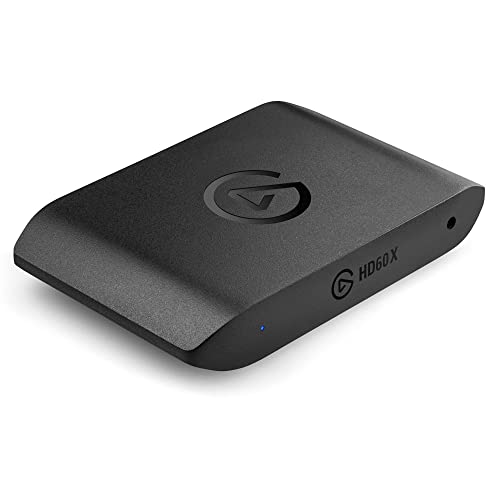
Elgato HD60 X
A widely used external capture card built for capturing HDMI video from a console or second PC into streaming software with low added latency.

Elgato Cam Link 4K
A compact HDMI capture device often used to bring an external camera’s video feed into streaming or video call software as a high-quality webcam alternative.
Common questions
Can you stream from a PlayStation or Xbox without a capture card?
Both current-generation consoles have built-in streaming to specific platforms, but for full control over your stream layout, overlays, and multi-platform streaming, a capture card feeding a PC is still the standard approach.
Does a capture card improve video quality compared to software capture?
Not inherently, quality mostly depends on the resolution and bitrate settings used, but a capture card does offload the capture and conversion work from your CPU, which indirectly helps maintain consistent quality under load.
Is an internal capture card better than an external one?
Internal cards generally offer lower latency and don’t take up a USB port, while external ones are easier to move between systems, and are the better fit for most home streaming setups that don’t need a rack-style install.
Does a capture card add noticeable delay to gameplay?
Modern capture cards add only a few milliseconds of pass-through latency when feeding a monitor, which most players won’t notice, though older or lower-end models can introduce more.
Can you use a capture card to record gameplay without live streaming?
Yes, capture cards work identically for local recording, many streamers use the same hardware for both live streams and separately saved gameplay footage.
Do you need a capture card to stream mobile games?
Only if you’re capturing the phone’s screen through an external device. Most mobile games are instead streamed using the phone’s or an emulator’s built-in screen recording combined with streaming software, without a capture card.
What resolution and frame rate should a capture card support for modern streaming?
At minimum 1080p60 is standard for most streamers today, with many choosing cards rated for 4K input even if they stream out at a lower resolution, mainly to future-proof the setup.
Can a weak capture card bottleneck a strong gaming PC or console?
Yes, a capture card rated below your source’s actual output resolution and frame rate will downscale or drop frames regardless of how powerful the gaming hardware behind it is.
Do you need a capture card if you only stream webcam facecam, not gameplay?
No, a regular USB webcam plugs directly into streaming software without any capture card, capture cards specifically solve the problem of getting an HDMI video source into a computer.
Is a dual-PC streaming setup worth it over a single capture card?
It depends on how serious the streaming is, a dual-PC setup with a capture card removes nearly all resource competition, which matters most for streamers pushing high settings on demanding games, but it’s unnecessary overhead for casual streaming.
Can you use a capture card with a laptop instead of a desktop?
Yes, as long as the laptop has an available Thunderbolt or USB port with enough bandwidth, external capture cards work the same way on laptops, though internal card options obviously don’t apply.
Does streaming software like OBS require any special setup to use a capture card?
Not much beyond selecting it as a video capture device source, most capture cards are recognized automatically by major streaming software once connected.
Why do some streamers use a capture card even when streaming from one PC?
Usually to also bring in an external camera, retro console, or secondary device as an additional video source alongside their main gameplay feed, not because the primary stream itself requires it.
Is a capture card a one-time purchase or does it need ongoing software updates?
It’s a one-time hardware purchase, though manufacturers do release periodic firmware and driver updates that can improve compatibility or fix bugs over time.
Does a capture card work differently for retro or older consoles than modern ones?
Older consoles sometimes output video through composite or component connections rather than HDMI, which require a capture card or adapter specifically rated for those older formats, not a standard HDMI-only capture card.
The bottom line
The honest answer depends entirely on your setup, not on how serious you are about streaming. A single-PC streamer playing on the same machine they stream from usually doesn’t need one at all, while anyone pulling video from a console or a second device has no real alternative to a capture card for getting that signal in.
Marcus Chen
Marcus covered consumer electronics for enthusiast tech publications for six years before joining ChoiceCrest. He specializes in translating manufacturer spec sheets into plain-language buying advice, with a focus on audio, computing accessories and smart-home gear.