Capture Cards That Record Without Adding Lag
The Elgato HD60 X is the best overall capture card, with 4K60 HDR10 passthrough and a simple external USB setup. The AVerMedia Live Gamer Ultra 2.1 suits streamers who want the lowest latency from an internal PCIe card, and the UGREEN card covers basic 1080p needs on a budget.
The Elgato HD60 X is the best overall capture card, because its 4K60 HDR10 passthrough keeps gameplay smooth to view while recording, and its external USB design skips opening a PC case. Its capture resolution caps lower than its passthrough number, so anyone who wants the absolute lowest latency for a dedicated streaming PC should consider an internal PCIe card instead.
We compared capture resolution, passthrough resolution, latency, connection type and standalone recording ability using manufacturer specifications and owner feedback from retail listings.
The shortlist, ranked

Elgato HD60 X
The HD60 X captures up to 4K at 30fps while passing through up to 4K60 HDR10 to a monitor, so console gameplay stays smooth to look at even while being recorded at a lower setting. It connects externally over USB, skipping the need to open a PC case.
Pros
- 4K60 HDR10 passthrough keeps gameplay smooth to view while recording
- External USB design needs no PC case access
- Works with consoles and PCs alike
Cons
- Capture resolution caps lower than passthrough resolution
- Requires a capable USB 3.0 port for full performance

AVerMedia Live Gamer Ultra 2.1
As an internal PCIe card, the Live Gamer Ultra 2.1 handles passthrough and capture processing on dedicated hardware inside the PC, reducing the latency overhead external USB capture cards can introduce. It suits a dedicated streaming PC build rather than quick setup between different computers.
Pros
- Internal PCIe design minimizes passthrough latency
- Dedicated hardware frees up CPU resources for streaming software
- Reliable performance for a permanent streaming PC setup
Cons
- Requires opening the PC case and an available PCIe slot
- Cannot be moved between a PC and a laptop like external options

Razer Ripsaw HD
The Ripsaw HD keeps setup simple with a single HDMI in, HDMI out and USB connection, avoiding the driver complexity some capture cards require. Passthrough latency stays low enough that most players do not notice a delay while gaming and streaming simultaneously.
Pros
- Simple plug and play setup with minimal driver fuss
- Low latency passthrough suits competitive gaming while streaming
- Compact external design travels easily between setups
Cons
- Capture resolution tops out at 1080p60, below 4K capture competitors
- Passthrough resolution caps at 4K30, not 4K60

AVerMedia Live Gamer Portable 2 Plus
The Live Gamer Portable 2 Plus records directly to an SD card using its own built in screen and controls, skipping the need for a connected computer entirely. That makes it a practical option for recording console gameplay at a friend’s house or a gaming event.
Pros
- Records standalone to an SD card without any computer
- Built in screen lets you monitor recording without a second display
- Doubles as a standard USB capture card when connected to a PC
Cons
- Standalone recording resolution trails what 4K-focused cards capture
- Built in screen is small for detailed in-the-field review

Elgato Cam Link 4K
The Cam Link 4K converts a DSLR or mirrorless camera’s clean HDMI output into a USB webcam feed recognized by streaming and video call software. It is built for using existing camera gear as a high quality webcam, not for capturing console or PC gameplay.
Pros
- Turns an existing DSLR or mirrorless camera into a high quality webcam
- Works directly with most streaming and video call software
- Simple single HDMI-in, USB-out design
Cons
- Not designed for recording or passing through console gameplay
- Requires a camera with clean HDMI output support
UGREEN HDMI Video Capture Card
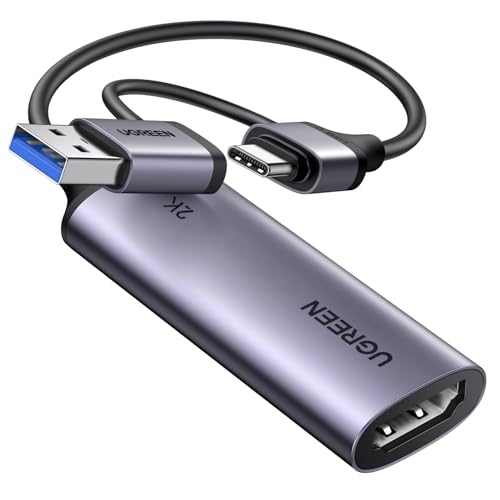
UGREEN’s capture card covers basic 1080p recording and streaming needs at a price well below premium capture card brands. It works as a simple external USB device for capturing a console, camera or another PC’s output.
Pros
- Lowest cost option in this comparison
- Simple plug and play setup for basic 1080p needs
- Works across consoles, cameras and PCs
Cons
- No 4K capture or passthrough support
- Latency and build quality trail premium capture cards
Mirabox 4K HDMI Capture Card
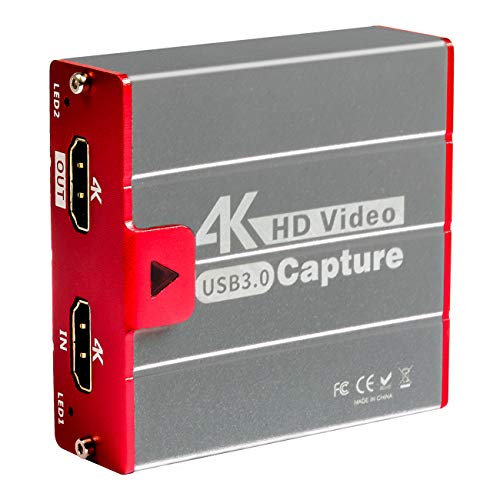
Mirabox adds 4K passthrough support at a price closer to basic 1080p capture cards, a middle ground for anyone who wants smooth 4K viewing while recording at 1080p. It uses a straightforward external USB design without extra software requirements.
Pros
- 4K passthrough at a price below most 4K-capable capture cards
- Simple external USB setup without heavy software
- Decent middle ground between basic and premium capture cards
Cons
- Capture resolution still limited to 1080p despite 4K passthrough
- Build quality trails established premium brands
Side by side
| # | Model | Max Capture | Best for | Score | Price |
|---|---|---|---|---|---|
| 1 | Elgato HD60 X | 4K30 or 1080p60 | Best Overall | 9.5 | Check price |
| 2 | AVerMedia Live Gamer Ultra 2.1 | 4K30 or 1080p60 | Best Internal PCIe Card for Low Latency | 9.2 | Check price |
| 3 | Razer Ripsaw HD | 1080p60 | Best for Simplicity With Low Latency | 8.9 | Check price |
| 4 | AVerMedia Live Gamer Portable 2 Plus | 4K30 passthrough, 1080p60 recording | Best for Portable Streaming On the Go | 8.7 | Check price |
| 5 | Elgato Cam Link 4K | 4K30 or 1080p60 passthrough as webcam | Best for Using a Camera as a Webcam | 8.4 | Check price |
| 6 | UGREEN HDMI Video Capture Card | 1080p60 | Best Budget Pick | 8.0 | Check price |
| 7 | Mirabox 4K HDMI Capture Card | 1080p60 | Best Budget 4K Passthrough | 7.9 | Check price |
How to pick the right one
Capture Resolution Versus Passthrough Resolution: Two Different Numbers A capture card’s capture resolution is what actually gets recorded or streamed, while passthrough resolution is what shows on a connected monitor while that recording happens. The Elgato HD60 X passes through up to 4K60 HDR10 for smooth viewing, even though it captures at a lower 4K30 or 1080p60. Confusing these two specs leads to disappointment when a card advertised with a big resolution number turns out to record at a much lower one.
Internal PCIe Cards Versus External USB Capture Devices Internal cards like the AVerMedia Live Gamer Ultra 2.1 install directly into a PC’s PCIe slot, generally offering the lowest latency since processing happens on dedicated hardware without passing through a USB connection. External devices like the Elgato HD60 X or Razer Ripsaw HD trade a small amount of potential latency for the convenience of moving between computers or using a laptop without an open PCIe slot.
Standalone Recording Without a Computer Most capture cards need a connected PC running capture software to actually save footage. The AVerMedia Live Gamer Portable 2 Plus breaks that pattern, recording directly to its own SD card with a built in screen for monitoring, useful for recording gameplay away from a usual streaming setup. That convenience comes with a lower standalone recording resolution than a PC-connected 4K capture workflow provides.
When a Capture Card Is the Wrong Tool Capture cards are built to record video and audio signals from HDMI sources like consoles, cameras or other computers, not to turn a webcam signal into something else. The Elgato Cam Link 4K specifically converts a camera’s clean HDMI output into a webcam feed for calls or streaming, a different job than recording console gameplay. Buyers should match the device to the actual signal source rather than assuming any capture card does the same job.
Good to know
What is the difference between capture resolution and passthrough resolution?
Capture resolution is what gets recorded or streamed, while passthrough resolution is what displays on a monitor connected to the capture card while you play, which can be higher than the capture resolution.
Do I need an internal PCIe capture card instead of an external USB one?
Only if you want the lowest possible latency for a dedicated streaming PC. External USB cards are more convenient for moving between computers and add only a small amount of latency for most users.
Can a capture card record gameplay without a computer connected?
Only standalone models like the AVerMedia Live Gamer Portable 2 Plus, which record directly to an SD card using their own built in screen and controls.
Will a capture card add noticeable input lag while gaming?
Passthrough designed capture cards, including every model in this comparison, are built to minimize added lag, though internal PCIe cards generally measure slightly lower latency than external USB devices.
Can I use a capture card to turn my DSLR into a webcam?
Yes, devices built for that purpose, like the Elgato Cam Link 4K, convert a camera’s clean HDMI signal into a standard USB webcam feed recognized by most software.
Do budget capture cards support 4K?
Some budget cards, like the Mirabox 4K HDMI Capture Card, support 4K passthrough for viewing while still capturing at 1080p, while others, like the UGREEN card, cap out at 1080p for both.
What connection type do most capture cards use?
External capture cards typically connect over USB 3.0 for sufficient bandwidth, while internal cards install directly into a PCIe slot inside a desktop PC.
Does a capture card need special software to work?
Most work with common streaming and recording software like OBS Studio, though several brands also offer their own companion software with additional features.
The bottom line
The Elgato HD60 X is the strongest overall pick, since its 4K60 HDR10 passthrough and external USB simplicity cover the widest range of console and PC streaming setups. Anyone building a dedicated streaming PC who wants the lowest possible latency should choose the AVerMedia Live Gamer Ultra 2.1 instead. Streamers who need to record gameplay away from their usual setup should look at the AVerMedia Live Gamer Portable 2 Plus over any PC-dependent capture card.
Marcus Chen
Marcus covered consumer electronics for enthusiast tech publications for six years before joining ChoiceCrest. He specializes in translating manufacturer spec sheets into plain-language buying advice, with a focus on audio, computing accessories and smart-home gear.