Which Streaming Device Actually Fits Your TV Setup
The Roku Streaming Stick 4K suits most households with its simple interface and wide app support. Apple device owners get tighter integration from the Apple TV 4K, while anyone chasing advanced features like Plex server hosting should pick the NVIDIA Shield TV Pro instead.
The Roku Streaming Stick 4K earns its spot as the default pick because it stays neutral between ecosystems, running nearly every major streaming app without favoring one media service. Its remote lacks a headphone jack found on pricier Roku models. Apple device owners get smoother AirPlay and HomeKit integration from the Apple TV 4K, which justifies its higher price for that specific group.
Streaming players look nearly identical in a store aisle, but the software ecosystem underneath changes daily use more than any spec sheet. A device tied to Amazon pushes Prime Video and Alexa features harder, while a Google-based player favors Google TV’s content recommendations and smart home controls. We compared published hardware specs, remote functionality and patterns in owner feedback to match each device to the ecosystem it serves best.
What we recommend

Roku Streaming Stick 4K
Roku keeps its own content recommendations out of the way more than competing platforms, which suits viewers who want a neutral home screen. The stick supports Dolby Vision and HDR10 for compatible content. A simple remote with voice search covers most daily navigation without extra buttons to learn.
Pros
- Neutral interface favors no single streaming service
- Wide app catalog including less common services
- Simple remote with voice search
Cons
- No Ethernet port on this model
- Remote lacks a headphone jack found on pricier Roku units

Apple TV 4K (3rd generation)
This Apple TV includes a built-in Ethernet port and Thread radio, letting it double as a smart home hub for HomeKit accessories. Dolby Vision plays at up to 60 frames per second, which matters for sports and fast motion content. AirPlay turns an iPhone or Mac screen into a wireless source with minimal setup.
Pros
- Built-in Ethernet port for stable streaming
- Doubles as a Thread border router for HomeKit
- Smooth AirPlay from iPhone and Mac
Cons
- Costs more than most competing streaming boxes
- Siri Remote takes adjustment for first-time Apple users

Amazon Fire TV Stick 4K Max
Amazon built this stick around faster Wi-Fi 6E support and a quicker processor than the base Fire TV Stick 4K, reducing load times for Prime Video and other apps. Alexa voice control reaches beyond the TV into compatible smart home devices. The home screen surfaces Prime Video content prominently, which some non-Prime users find pushy.
Pros
- Faster load times than the standard Fire TV Stick
- Strong Alexa smart home integration
- Affordable relative to Apple and NVIDIA options
Cons
- Home screen heavily promotes Amazon content
- Less neutral app presentation than Roku
Google TV Streamer
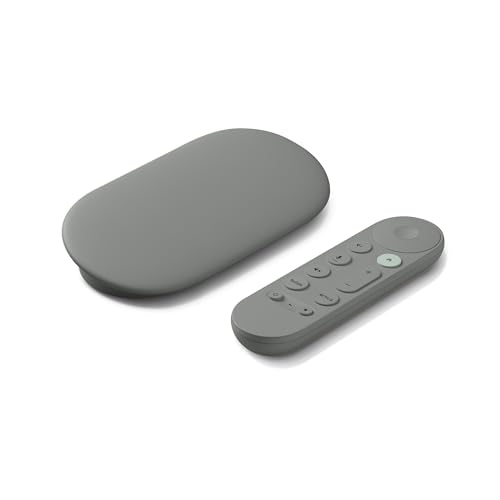
Google redesigned this as a set-top box rather than a stick, adding a built-in Ethernet port and Matter smart home hub support not found on the older Chromecast line. Google TV’s recommendation engine pulls from subscribed services into one browsing screen. A backlit remote with customizable buttons simplifies control in a dark room.
Pros
- Built-in Ethernet port, unlike most streaming sticks
- Doubles as a Matter smart home hub
- Backlit remote with customizable shortcut buttons
Cons
- Larger box shape needs more space near the TV
- Content recommendations mix ads with genuine suggestions
NVIDIA Shield TV Pro
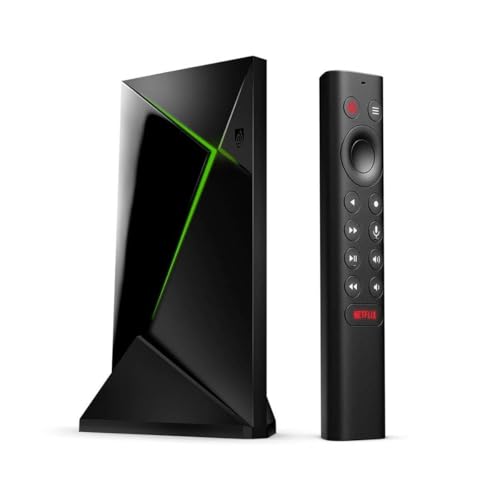
NVIDIA’s Tegra chip handles AI upscaling of lower-resolution content up to 4K, a feature most streaming boxes skip entirely. Built-in storage and processing power let it run a Plex Media Server directly, serving a home video library to other devices. GeForce Now cloud gaming runs natively without extra hardware.
Pros
- AI upscaling improves lower-resolution video
- Runs a Plex server without extra hardware
- Native GeForce Now cloud gaming support
Cons
- Higher price than most standard streaming sticks
- Overkill for viewers who only stream standard apps

Roku Ultra
Roku’s full-size Ultra adds a dedicated Ethernet port and a remote finder feature that plays a sound when the remote goes missing under a couch cushion. A headphone jack on the remote lets you listen privately without a soundbar. The box form factor sits flat near a TV instead of plugging directly into the HDMI port.
Pros
- Dedicated Ethernet port for stable connections
- Remote finder solves a common streaming annoyance
- Headphone jack enables private listening
Cons
- Takes up more shelf space than a stick
- Costs more than the Streaming Stick 4K for similar apps
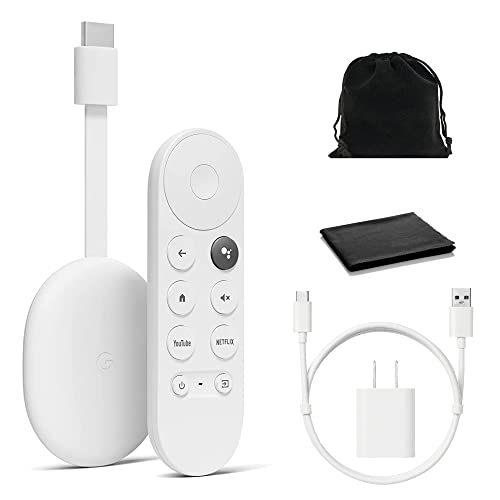
Chromecast with Google TV (HD)
Google kept this HD version on sale at a reduced price point after launching the Google TV Streamer, making it the cheapest way into the Google TV interface. It caps out at 1080p HD rather than 4K, which suits smaller or older televisions. The compact stick plugs directly into an HDMI port without a separate box.
Pros
- Lowest price among Google TV devices
- Compact stick form factor
- Same Google TV interface as pricier models
Cons
- Limited to 1080p, no 4K output
- No Ethernet port option
How to choose
What to look for in a streaming media player Resolution and HDR format decide how content looks on a modern TV, with Dolby Vision offering more dynamic range than basic HDR10. Connectivity matters just as much, since a device stuck on older Wi-Fi standards can buffer on a crowded home network. Remote features like voice search, a headphone jack or a lost-remote finder sound minor until you use one daily.
Matching a player to your existing ecosystem Apple device owners gain the most from the Apple TV 4K through AirPlay and HomeKit, benefits that disappear on an Android phone. Amazon Prime subscribers see faster, more integrated access to Prime Video on the Fire TV Stick 4K Max, while Google TV households get smart home hub features bundled into the Google TV Streamer. Choosing outside your existing ecosystem usually means losing one or two of these conveniences.
Neutral options for mixed households A household juggling Netflix, Hulu and several smaller services without loyalty to one tech brand does well with the Roku Streaming Stick 4K or Roku Ultra, since Roku’s interface does not push its own content over others. The Ultra adds Ethernet and a headphone jack for viewers who want those extras without switching ecosystems. Both skip the ecosystem lock-in that comes with Apple, Amazon or Google hardware.
When a power-user device is worth the extra cost Viewers who store a personal movie library benefit from the NVIDIA Shield TV Pro’s built-in Plex server support, which turns the box into a home media server. Its AI upscaling also sharpens older, lower-resolution video more effectively than standard streaming boxes. Skip this upgrade if you only stream standard app content, since the extra power goes unused.
How they compare
| # | Model | Resolution | Best for | Score | Price |
|---|---|---|---|---|---|
| 1 | Roku Streaming Stick 4K | 4K HDR, Dolby Vision | Best overall | 9.1 | Check price |
| 2 | Apple TV 4K (3rd generation) | 4K HDR, Dolby Vision at 60fps | Best for Apple device owners | 9.2 | Check price |
| 3 | Amazon Fire TV Stick 4K Max | 4K HDR, Dolby Vision | Best for Amazon Prime households | 8.8 | Check price |
| 4 | Google TV Streamer | 4K HDR, Dolby Vision | Best for Google ecosystem households | 8.9 | Check price |
| 5 | NVIDIA Shield TV Pro | 4K HDR with AI upscaling | Best for power users | 9.0 | Check price |
| 6 | Roku Ultra | 4K HDR, Dolby Vision | Best full-size player with a dedicated remote | 8.7 | Check price |
| 7 | Chromecast with Google TV (HD) | 1080p HD, HDR10 | Best budget pick | 8.2 | Check price |
Good to know
What is the difference between Roku and Google TV?
Roku keeps its home screen neutral between streaming services, while Google TV, used on the Chromecast and Google TV Streamer, builds content recommendations around your subscribed apps and ties into Google smart home features.
Do I need a 4K streaming player for a 1080p TV?
No, a 1080p-only device like the Chromecast with Google TV (HD) costs less and matches what an older television can actually display.
Can a streaming stick replace a smart TV’s built-in apps?
Yes, external players like the Roku Streaming Stick 4K often update faster and support more apps than a TV’s built-in smart platform, especially on older television models.
Does the Apple TV 4K work well for non-Apple households?
It still streams standard apps fine, but its biggest advantages, AirPlay and HomeKit integration, only matter if you also own an iPhone, iPad or Mac.
Is Ethernet better than Wi-Fi for a streaming device?
A wired connection through a device like the Roku Ultra or Google TV Streamer avoids Wi-Fi congestion, which helps in homes with many connected devices competing for bandwidth.
What makes the NVIDIA Shield TV Pro different from a basic streaming stick?
It adds AI video upscaling, built-in Plex Media Server hosting and native cloud gaming support, features aimed at viewers with large personal media libraries rather than casual streamers.
Can I use Alexa with a non-Amazon streaming player?
Most players, including the Roku Streaming Stick 4K, support Alexa voice control alongside their native voice assistant, though the Fire TV Stick 4K Max integrates it most deeply.
Why does the Roku Ultra cost more than the Streaming Stick 4K?
The Ultra adds a dedicated Ethernet port, a headphone jack on the remote and a remote finder feature, none of which the smaller stick includes.
Our pick
Most households get the best balance of price and app support from the Roku Streaming Stick 4K. Apple users should pay the premium for the Apple TV 4K given its AirPlay and HomeKit integration, and anyone hosting a personal media library should choose the NVIDIA Shield TV Pro over any basic streaming stick. Skip the Chromecast HD if your television already supports 4K, since the full Google TV Streamer makes better use of that screen.
Marcus Chen
Marcus covered consumer electronics for enthusiast tech publications for six years before joining ChoiceCrest. He specializes in translating manufacturer spec sheets into plain-language buying advice, with a focus on audio, computing accessories and smart-home gear.