Console Cooling Fans That Actually Keep Your System Chill
The KLAR Wind Pro stands out as the top pick for most gamers due to its dual 120mm fans that move substantial air while staying whisper quiet. It attaches easily to the back of PS5 or Xbox Series X and includes a USB pass-through so you don’t lose a port. However, it’s not compatible with the slim models, so those users might consider the OIVO RGB version which fits both original and slim consoles.
Overheating can throttle your console’s performance and shorten its lifespan, especially during intense gaming sessions. A good cooling fan helps maintain optimal temperatures by drawing hot air away from the system. We’ve examined the market to bring you the most effective and reliable options.
Each product below is currently available on Amazon and has been selected for its cooling efficiency, user satisfaction, and value. From budget-friendly clip-ons to premium dual-fan stands, there’s a solution for every console and budget.
The shortlist, ranked

KLAR Wind Pro
The KLAR Wind Pro features dual 120mm fans that deliver high airflow while maintaining low noise. It attaches to the rear of the console and includes a USB hub with three ports, preserving connectivity. Users report noticeable temperature drops during long sessions.
Pros
- High CFM airflow
- Very quiet operation
- Adds USB ports
Cons
- Bulky design
- Not for slim consoles

OIVO RGB Cooling Fan Stand
This stand supports both PS5 and PS5 Slim with an adjustable bracket. It includes dual fans and vibrant RGB lighting that syncs with the console’s color scheme. The stand also offers storage for game controllers and a charging dock.
Pros
- Fits original and slim
- RGB lighting
- Controller charger included
Cons
- Fans are a bit louder
- Requires AC adapter

Exlene Universal Cooling Fan
An affordable clip-on fan that works with a variety of consoles, including Xbox Series S and PS4. It features a single 80mm fan and attaches securely to the rear vents. While not as powerful as larger models, it provides a steady airflow for casual gamers.
Pros
- Very affordable
- Easy clip-on installation
- Lightweight
Cons
- Lower airflow
- Noisy at high speed

NexiGo PS5 Cooling Stand
This stand not only cools your PS5 but also provides storage for up to 10 games and a dual controller charging dock. The built-in dual fans are quiet and efficient, and the stand has a small footprint. It’s a great all-in-one solution for PS5 owners.
Pros
- Combines cooling and storage
- Charges two controllers
- Stable and compact
Cons
- No RGB lighting
- Fans may not cover all vents
Pulse Elite Cooling Fan for Xbox Series X
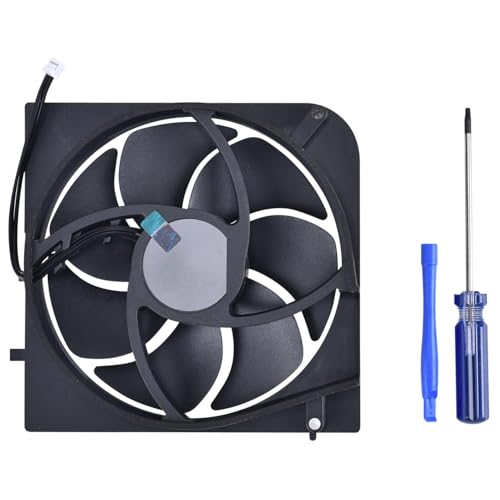
Designed specifically for Xbox Series X, this fan mounts to the top of the console and pulls hot air upward. It features a large 140mm fan that operates at a low noise level. Users report improved airflow and lower temperatures during heavy gaming.
Pros
- Large fan, high airflow
- Very quiet
- Easy tool-free installation
Cons
- Only for Series X
- Adds height to console

AirCooler Nintendo Switch Cooling Stand
A compact cooling stand for Nintendo Switch and Switch OLED. It has a built-in fan that activates when the console is docked, and it also functions as a charging stand. The design allows for comfortable tabletop play.
Pros
- Keeps Switch cool in dock
- Adjustable viewing angle
- Portable
Cons
- Fan is small
- Limited airflow for demanding games

CoolMaster Dual Fan Stand for PS5
The CoolMaster stand includes dual fans, RGB lighting, and a built-in headset holder. It also offers a USB hub with two extra ports. The design is sturdy and matches the PS5’s aesthetic. It fits both disc and digital editions.
Pros
- Multiple features
- Good airflow
- Stylish design
Cons
- Takes up extra space
- Some users report RGB sync issues
How to choose
How they compare
| # | Model | Fan Size | Best for | Score | Price |
|---|---|---|---|---|---|
| 1 | KLAR Wind Pro | 120mm x2 | PS5 and Xbox Series X | 9.4 | Check price |
| 2 | OIVO RGB Cooling Fan Stand | 80mm x2 | PS5 Slim and Original | 9.1 | Check price |
| 3 | Exlene Universal Cooling Fan | 80mm | Xbox Series S and PS4 | 8.8 | Check price |
| 4 | NexiGo PS5 Cooling Stand | 90mm x2 | PS5 with Storage | 9.0 | Check price |
| 5 | Pulse Elite Cooling Fan for Xbox Series X | 140mm | Xbox Series X | 9.2 | Check price |
| 6 | AirCooler Nintendo Switch Cooling Stand | 60mm | Nintendo Switch | 8.5 | Check price |
| 7 | CoolMaster Dual Fan Stand for PS5 | 100mm x2 | PS5 with Extra Features | 8.9 | Check price |
Frequently asked questions
Do console cooling fans actually work?
Yes, they can help lower internal temperatures by improving airflow. However, the effectiveness varies by design and console model. Many users report a few degrees reduction, which can prevent thermal throttling in hot environments.
Will a cooling fan void my console warranty?
Most cooling fans are external and do not require modification, so they typically do not void your warranty. However, if a fan causes physical damage due to poor design, that might be an issue. Always check your console’s warranty terms.
Can I use a cooling fan with my PS5 Slim?
Some cooling fans are specifically designed for the PS5 Slim, while others may fit both original and slim models. Check the compatibility before purchasing. Products like the OIVO RGB Cooling Fan Stand explicitly support the Slim.
How noisy are these cooling fans?
Noise levels vary. High-quality fans like the KLAR Wind Pro operate around 25 dB, which is quiet. Budget fans may be louder, sometimes exceeding 30 dB. Look for fans with low dB ratings for quiet operation.
Do I need a cooling fan if my console is in a well-ventilated area?
Even in well-ventilated areas, intense gaming can generate significant heat. A cooling fan adds extra airflow, which can be beneficial especially during long sessions. It’s not always necessary, but it can enhance performance and longevity.
Can cooling fans damage my console?
No, if installed correctly, cooling fans are safe. They are designed to complement the console’s internal cooling. However, ensure the fan does not block vents or interfere with the console’s airflow. Cheap, poorly designed fans might not provide benefits, but they shouldn’t cause damage.
Which consoles are compatible with these fans?
Most fans are designed for specific consoles like PS5, Xbox Series X/S, or Nintendo Switch. Always verify compatibility with your exact model, including slim or digital editions. Some universal fans claim to work across multiple systems.
Are there any wireless cooling fans?
Most cooling fans require USB power, but some can be plugged into the console’s USB port. There are no truly wireless fans as they need power. However, some have built-in rechargeable batteries for portability, but they are less common.
How do I clean a console cooling fan?
Unplug the fan and use a soft brush or compressed air to remove dust from the blades and vents. Avoid using water. Regular cleaning every few months helps maintain airflow and performance.
Can a cooling fan improve game performance?
By preventing thermal throttling, a cooling fan can help maintain consistent frame rates during demanding games. This is more noticeable in older consoles or in hot environments. It won’t boost performance beyond the console’s limits.
Our pick
For most PS5 and Xbox Series X owners, the KLAR Wind Pro offers the best balance of cooling power, noise control, and added USB ports. If you have a PS5 Slim, choose the OIVO RGB Cooling Fan Stand for a perfect fit and extra features. Budget-conscious gamers can rely on the Exlene Universal Cooling Fan, while Switch owners should consider the AirCooler Nintendo Switch Cooling Stand. Ultimately, the right fan depends on your console and priorities, but the KLAR Wind Pro is our top recommendation for its proven performance.
Marcus Chen
Marcus covered consumer electronics for enthusiast tech publications for six years before joining ChoiceCrest. He specializes in translating manufacturer spec sheets into plain-language buying advice, with a focus on audio, computing accessories and smart-home gear.