Which Network Switch Fits Your Home or Office Setup
The Netgear GS308 fits most home networks needing simple unmanaged ports. The Ubiquiti UniFi Switch Lite 8 PoE suits anyone running PoE cameras or access points. The Cisco CBS350 fits a small office that needs VLANs and real management features.
The Netgear GS308 is the best overall pick for a home network, giving eight gigabit ports in a fanless metal case for simple plug and play expansion. Its main limitation is the complete absence of management features, so anyone needing VLANs will outgrow it quickly.
Switches split clearly into unmanaged, smart managed, and fully managed tiers, and the right tier depends on whether a network needs VLANs, PoE budgeting, or just more ports. This comparison weighs port count, PoE wattage, and management depth against published specifications and owner reports from home and small office setups.
The best picks, ranked
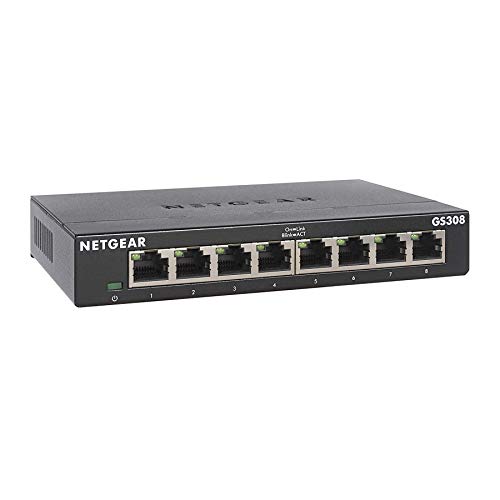
Netgear GS308 8-Port Gigabit Ethernet Switch
The GS308 adds eight gigabit ports with zero configuration required, which is why it shows up often in home networking setups needing a quick expansion. A fanless metal housing keeps operation silent next to a router or media console. Owners report it runs cool even under sustained file transfer loads.
Pros
- Silent fanless operation
- Metal housing resists heat buildup
- Zero setup, works immediately out of the box
Cons
- No PoE ports for cameras or access points
- No management interface or VLAN support

TP-Link TL-SG105 5-Port Gigabit Switch
At roughly the size of a paperback book, the SG105 fits behind a monitor or inside a cramped media cabinet. Five gigabit ports cover a small cluster of devices like a desktop, NAS, and streaming box. Owners cite it as a reliable pick for extending a single wall jack into several wired connections.
Pros
- Smallest footprint among the switches compared here
- Lifetime warranty backing from TP-Link
- Low cost per port for basic expansion
Cons
- Only five ports limits larger expansions
- Plastic housing feels less durable than metal rivals

Ubiquiti UniFi Switch Lite 8 PoE
This switch pairs eight gigabit ports with PoE output on four of them, enough to run a handful of UniFi access points or PoE security cameras without a separate injector. The UniFi app shows per port power draw and traffic in real time. Households expanding a camera system get the clearest view of device health here.
Pros
- PoE output removes the need for separate injectors
- UniFi app shows live per port power and traffic
- Fanless design stays quiet
Cons
- Requires a UniFi controller or app for full features
- PoE budget runs out quickly with power hungry devices

Cisco CBS350-8T-E-2G Business Switch
Cisco’s Business line brings real VLAN segmentation, link aggregation, and a web management console to a small office budget. Two SFP ports allow fiber uplinks to a core switch or ISP equipment. IT minded owners cite the familiar Cisco interface as the main reason to choose this over a consumer brand.
Pros
- Full VLAN and link aggregation support
- SFP uplinks allow fiber connections
- Familiar management interface for IT staff
Cons
- Steeper learning curve than smart managed switches
- Higher cost per port than unmanaged options

Netgear GS724Tv4 ProSafe Smart Switch
The GS724T sits between unmanaged and fully managed, offering VLANs and QoS through a browser interface without the full complexity of enterprise gear. Twenty four gigabit ports suit a growing home lab or a small office outgrowing an 8 port switch. Owners use the port mirroring feature for basic network troubleshooting.
Pros
- High port count suits a growing network
- Smart managed VLANs without full CLI complexity
- Port mirroring aids basic troubleshooting
Cons
- Larger rackmount size needs dedicated space
- Fan noise is noticeable in a quiet room

D-Link DGS-1016D 16-Port Gigabit Switch
D-Link packs sixteen gigabit ports into an unmanaged switch aimed at budget conscious expansions. There is no fan, so it stays quiet in a home office or closet install. Owners note the metal case holds up well over years of continuous operation.
Pros
- Low cost per port for sixteen gigabit connections
- Fanless metal case runs quietly
- Simple plug and play setup
Cons
- No PoE or management features at all
- Larger footprint than the compact 5 and 8 port options

TRENDnet TPE-TG350 24-Port Gigabit PoE+ Switch
TRENDnet puts PoE+ on sixteen of its twenty four ports with a generous shared power budget, suited to larger camera or access point rollouts. Web based management covers VLANs and basic QoS without a full CLI. Owners running multi camera security systems cite the power budget as the deciding factor over smaller PoE switches.
Pros
- Large PoE power budget fits bigger camera rollouts
- Web management covers VLANs without a steep learning curve
- Rackmount design suits a server closet
Cons
- Rackmount size overkill for a small home setup
- Fan noise picks up under full PoE load
How they compare
| # | Model | Ports | Best for | Score | Price |
|---|---|---|---|---|---|
| 1 | Netgear GS308 8-Port Gigabit Ethernet Switch | 8x gigabit RJ45 | Best overall | 9.1 | Check price |
| 2 | TP-Link TL-SG105 5-Port Gigabit Switch | 5x gigabit RJ45 | Best compact option | 8.8 | Check price |
| 3 | Ubiquiti UniFi Switch Lite 8 PoE | 8x gigabit RJ45, 4 PoE | Best for PoE cameras and access points | 9.0 | Check price |
| 4 | Cisco CBS350-8T-E-2G Business Switch | 8x gigabit RJ45, 2x SFP | Best for VLANs and small office management | 8.9 | Check price |
| 5 | Netgear GS724Tv4 ProSafe Smart Switch | 24x gigabit RJ45 | Best for growing a home lab | 8.6 | Check price |
| 6 | D-Link DGS-1016D 16-Port Gigabit Switch | 16x gigabit RJ45 | Best value for port count | 8.3 | Check price |
| 7 | TRENDnet TPE-TG350 24-Port Gigabit PoE+ Switch | 24x gigabit RJ45, 16 PoE+ | Best for large PoE deployments | 8.5 | Check price |
How to choose
Unmanaged, Smart Managed, or Fully Managed Unmanaged switches like the Netgear GS308 and TP-Link TL-SG105 need no setup and just extend ports. Smart managed switches like the Netgear GS724T add VLANs and QoS through a simple web page. Fully managed switches like the Cisco CBS350 add CLI access, link aggregation, and deeper VLAN tagging for a small office network. Most home users never need to go past unmanaged, while a household running multiple VLANs or guest networks benefits from stepping up a tier.
Best for Security Cameras and Access Points PoE support removes the need for a separate power adapter at every camera or access point, since power travels over the same ethernet cable as data. The Ubiquiti UniFi Switch Lite 8 PoE suits a handful of devices, while the TRENDnet TPE-TG350 carries enough wattage for a larger multi camera install. Anyone budgeting a PoE deployment should add up each device’s power draw and compare it against the switch’s total PoE budget before buying.
Best for a Small Office Network A small office typically needs VLANs to separate guest Wi-Fi, security cameras, and staff devices onto different broadcast domains. The Cisco CBS350 and Netgear GS724T both support VLAN tagging, with Cisco offering the deeper feature set for IT staff already familiar with its interface. SFP uplink ports, found on the Cisco model, matter once an office needs a fiber connection to a core switch or ISP demarcation point.
Best for Simple Home Expansion Most home networks just need more ports near a router, a gaming console, and a streaming device, without any VLAN complexity. The Netgear GS308 and D-Link DGS-1016D both cover this case well, differing mainly in port count and physical size. A fanless metal case, common across the unmanaged switches here, matters for quiet operation in a living room or home office.
Frequently asked questions
What is the difference between a managed and unmanaged switch?
An unmanaged switch has no configuration interface and just forwards traffic between ports. A managed switch adds a web page or CLI for VLANs, QoS, and traffic monitoring, which most home users never touch.
Do I need a PoE switch for security cameras?
Only if the cameras are PoE models. PoE switches like the Ubiquiti UniFi Switch Lite 8 PoE power the camera over the same cable carrying data, removing the need for a separate power adapter at each camera location.
How many ports do I need for a home network switch?
Count every wired device, including consoles, streaming boxes, and a NAS, then add a few spare ports for future expansion. An 8 port switch like the Netgear GS308 covers most homes comfortably.
Can I mix PoE and non-PoE devices on the same switch?
Yes. PoE switches like the TRENDnet TPE-TG350 only send power on ports a connected device actually requests, so a mix of PoE cameras and regular wired devices works on the same switch.
What is a VLAN and do I need one at home?
A VLAN separates network traffic into isolated groups on the same physical switch, such as a guest network and a main network. Most homes do not need one, but a small office benefits from the separation for security.
Is a gigabit switch fast enough for streaming and gaming?
Yes. Gigabit ports handle 1000 Mbps per connection, which comfortably exceeds the bandwidth needs of 4K streaming, online gaming, and most home internet plans.
What does switching capacity mean on a network switch?
Switching capacity is the total bandwidth a switch can move across all ports at once. A 16 Gbps rated switch can run all eight gigabit ports at full speed simultaneously without a bottleneck.
Do unmanaged switches need firmware updates?
No. Unmanaged switches like the Netgear GS308 and D-Link DGS-1016D have no firmware to update, since there is no software layer to patch.
Why does my PoE switch show less power than its PoE+ ports suggest?
PoE budgets are shared across all active ports, so a switch rated for 193 watts total may fall short if every connected device draws its maximum simultaneously.
The bottom line
The Netgear GS308 covers most home networks that just need reliable, zero configuration ports. Anyone adding PoE cameras or access points should pick the Ubiquiti UniFi Switch Lite 8 PoE instead, since its app gives visibility that a basic unmanaged switch cannot. A small office that needs VLANs and fiber uplinks gets the most capable setup from the Cisco CBS350.
Marcus Chen
Marcus covered consumer electronics for enthusiast tech publications for six years before joining ChoiceCrest. He specializes in translating manufacturer spec sheets into plain-language buying advice, with a focus on audio, computing accessories and smart-home gear.


