Picking a Security Camera for Your Home Setup
Google Nest Cam Indoor wins overall for accurate on-device alerts that separate people from pets. TP-Link Tapo C120 delivers 2K video with free local storage and no monthly fee. Ring Indoor Cam 2nd Gen suits Alexa households with its manual privacy shutter and Echo Show integration.
Nest Cam Indoor leads this lineup for alert precision, Tapo C120 pairs 2K clarity with free microSD storage, and Ring Indoor Cam 2nd Gen fits neatly into Alexa-connected homes.
Alert accuracy rarely shows up on a spec sheet, yet it decides whether anyone actually watches the footage. We compared resolution, on-device versus cloud detection, free storage limits, two-way audio and physical privacy controls across seven indoor-capable cameras, drawing on published specifications and owner feedback.
What we recommend

Google Nest Cam (Indoor, Wired, 2nd Gen)
On-device processing separates people, animals and vehicles before an alert reaches your phone. Recording continues locally through a short internet outage, then uploads once the connection returns. Three hours of free event history come standard, with no subscription required.
Pros
- Filters false alerts more accurately than rivals in this lineup
- Keeps recording through brief internet outages
- Includes free event history with no plan
Cons
- Caps out at 1080p instead of 2K or higher
- Extended history requires a Nest Aware subscription

TP-Link Tapo C120
Tapo C120 records at 2K QHD and adds color night vision through a built-in spotlight. Footage saves directly to a microSD card, so no plan is required. Weatherproofing lets it move between indoor rooms and covered outdoor spots without a second purchase.
Pros
- 2K resolution without a subscription fee
- Rated for both indoor and outdoor placement
- Local card storage keeps footage off third party servers
Cons
- Detection is less refined than Nest’s on device system
- MicroSD card sold separately
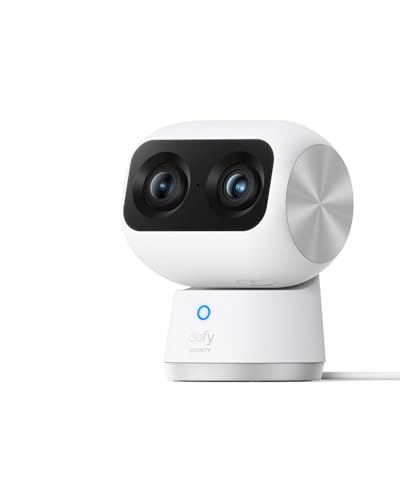
Eufy Indoor Cam S350
A motorized head pans a full 360 degrees and tilts 75 degrees, so one camera scans an entire living room. An 8x hybrid zoom brings distant detail into focus once something moves. Local storage handles recording, so no monthly fee applies.
Pros
- Covers wide or oddly shaped rooms from one mount
- 4K sensor supports meaningful digital zoom after the fact
- No subscription needed for local recording
Cons
- Motor makes audible noise while panning
- Larger housing than fixed dome cameras

Ring Indoor Cam (2nd Gen)
A manual privacy shutter slides over the lens by hand, addressing the biggest objection to indoor cameras. Power comes from any standard outlet, with no battery to charge. Echo Show integration lets Alexa households pull up the live feed by voice.
Pros
- Physical shutter blocks the lens completely, not just software
- Small footprint fits on a shelf or bookcase
- Deep integration with Alexa and Echo Show displays
Cons
- Stored recording history requires a Ring subscription plan
- Resolution tops out at 1080p

Arlo Essential Indoor Camera 2K
A motorized shield closes over the lens automatically whenever the system disarms. Two-way audio includes noise reduction for clearer conversations through the speaker. Compatibility spans Alexa, Google Assistant and SmartThings, unlike most single ecosystem cameras.
Pros
- Privacy shield closes on its own, no manual step needed
- 2K resolution captures more detail than 1080p rivals
- Works across three major smart home ecosystems
Cons
- Advanced detection features require an Arlo subscription
- Shutter motor is audible when it moves

Blink Mini 2
A compact plug in body hides a built-in spotlight for color night vision. An optional weather resistant adapter lets it move outdoors when needed. Setup finishes in minutes through the Blink app, faster than any other camera in this lineup.
Pros
- Lowest cost way to cover a spare room or entryway
- Spotlight enables color footage after dark
- Fastest setup process of the seven cameras compared
Cons
- Person detection requires a Blink subscription plan
- Weather resistant adapter for outdoor use sold separately

Wyze Cam v4
A microSD card records continuously, not just in short event clips, once inserted. Color night vision comes from a built-in spotlight, matching pricier rivals. An IP65 rating allows mounting indoors or under an outdoor eave.
Pros
- Continuous card recording captures more than clip based rivals
- 2K video and color night vision at a low cost
- Rated for outdoor mounting, not just indoor use
Cons
- App and cloud service have had reliability issues over time
- Build quality feels lighter than Nest or Arlo hardware
How they stack up
| # | Model | Resolution | Best for | Score | Price |
|---|---|---|---|---|---|
| 1 | Google Nest Cam (Indoor, Wired, 2nd Gen) | 1080p HDR | Best overall | 9.4 | Check price |
| 2 | TP-Link Tapo C120 | 2K QHD | Best value | 9.2 | Check price |
| 3 | Eufy Indoor Cam S350 | 4K with 8x zoom | Best for large rooms | 9.0 | Check price |
| 4 | Ring Indoor Cam (2nd Gen) | 1080p HDR | Best for Alexa homes | 8.7 | Check price |
| 5 | Arlo Essential Indoor Camera 2K | 2K | Best privacy controls | 8.5 | Check price |
| 6 | Blink Mini 2 | 1080p HDR | Best budget | 8.2 | Check price |
| 7 | Wyze Cam v4 | 2K HD | Best for local storage | 8.0 | Check price |
What matters most
What matters more, alert accuracy or resolution? A high resolution sensor means little if false alerts train you to ignore notifications. On device detection, the approach Nest Cam uses, filters people from pets and passing shadows before sending anything. Cloud based detection adds delay and often sits behind a subscription. Swiping away alerts without reading them signals the camera has already failed at its job.
Local storage or cloud subscription, how to decide Two storage philosophies split this category. Ring, Arlo and Nest lean on cloud subscriptions, which survive a stolen camera but cost money every month. Tapo, Eufy and Wyze save footage to a microSD card at no ongoing cost, though the recording lives inside the camera itself. Pick the failure mode you can accept, since switching later usually means buying new hardware.
Why indoor cameras need a physical privacy control Software toggles require trusting a manufacturer’s app and servers. A physical shutter removes that dependency entirely. Ring’s cover works by hand, while Arlo’s shield closes automatically the moment the system disarms, which matters more for anyone who forgets manual steps. Bedrooms, living rooms and home offices call for this feature rather than treating it as optional.
Where to mount a camera for the best coverage Entry points and pinch points, such as hallways and staircases, matter more than open floor space. Mount at a height that captures faces straight on instead of the top of a head. Keep the lens away from direct window backlight, since even an HDR sensor struggles against a bright window behind a silhouette.
Frequently asked questions
Do security cameras require a monthly subscription?
Not every model needs one. Tapo C120, Eufy Indoor Cam S350 and Wyze Cam v4 record locally with no ongoing fee. Nest Cam includes three hours of free event history. Ring, Arlo and Blink depend on a plan for stored history and some detection features.
Can an indoor security camera be used outside?
Some models allow it. Tapo C120 and Wyze Cam v4 carry outdoor ratings, and Blink Mini 2 works outside with an optional weather resistant adapter. Cameras without any weather rating should stay inside, since moisture reaches the electronics quickly even under a covered porch.
How much internet bandwidth does a security camera use?
A 2K camera uses a noticeable amount of upload bandwidth during events, though most only upload when triggered rather than streaming constantly. Cameras that record to a local card use far less internet. Running several cloud connected cameras on a slow upload connection is the most common cause of a laggy live view.
What resolution do I actually need for an indoor camera?
1080p usually suffices indoors, since rooms are small and the camera sits close to its subject. 2K helps when you want to zoom into a specific detail after an event. Detection accuracy and lighting affect usefulness more than raw pixel count.
Are Wi-Fi security cameras safe from hacking?
A unique account password, two factor authentication and current firmware address most real world incidents, which typically involve reused passwords rather than sophisticated attacks. Local storage also reduces how much footage sits on a remote server, which limits exposure if an account is compromised.
Can I view camera footage remotely while away from home?
Yes, all seven cameras support live viewing through their apps from anywhere with internet access. Cameras that record locally still stream remotely, they just keep the saved footage on the card instead of the cloud. Reasonable upload bandwidth at the camera’s location keeps the stream smooth.
Do security cameras work at night?
Every camera in this comparison includes night vision. Infrared produces a black and white image that stays invisible to the eye. Tapo C120, Wyze Cam v4 and Blink Mini 2 add a spotlight for color night footage, which makes identifying clothing or a vehicle color much easier.
How many cameras does a typical house need?
Three to four cameras usually cover a home well, placed at the front entrance, back entrance, main hallway and any detached structure like a garage. Adding cameras to areas already covered mostly produces duplicate alerts. Cover entry points first, then reassess based on what alerts you actually receive.
Local storage vs cloud storage, which should I choose for a security camera?
Local storage on a microSD card costs nothing ongoing and keeps footage off outside servers, but a stolen or damaged camera takes the recording with it. Cloud storage survives a stolen camera and often adds smarter search features, at the cost of a recurring plan. Renters and budget focused buyers tend to prefer local storage.
Which security camera works best for renters?
Plug in models like Ring Indoor Cam, Blink Mini 2 and Arlo Essential avoid drilling, since none require a hardwired connection. Tapo C120 and Wyze Cam v4 add local recording, so footage stays with the camera when a lease ends. Avoid mounting hardware that leaves permanent holes in a rental wall.
Our take
Google Nest Cam Indoor takes the top spot because on device detection makes its alerts worth reading, the difference between a camera you trust and one you mute. Tapo C120 delivers sharper 2K video and free local recording, making it the strongest value here. Alexa households get a clean fit from Ring Indoor Cam 2nd Gen, thanks to its manual shutter and Echo Show integration.
Marcus Chen
Marcus covered consumer electronics for enthusiast tech publications for six years before joining ChoiceCrest. He specializes in translating manufacturer spec sheets into plain-language buying advice, with a focus on audio, computing accessories and smart-home gear.


