Motion-Activated Security Light Cameras Worth Installing
Ring Floodlight Cam Wired Plus tops this list for consistent motion detection and adjustable dual floodlights. eufy Security Floodlight Camera E340 stores footage locally with no monthly fee, and its second lens catches facial detail from a distance. Wyze Cam Floodlight Pro delivers color night vision and a bright light for far less money.
Ring Floodlight Cam Wired Plus leads this comparison. Its motion zones hold their boundaries better than rivals, and the twin floodlight heads aim independently at a path and a driveway. eufy’s E340 skips the subscription entirely by saving to local storage, while Wyze Cam Floodlight Pro adds color night vision at a much lower price.
Two numbers dominate the marketing here, resolution and lumens, yet neither predicts whether a camera earns its keep. A bright floodlight aimed badly leaves a path dark while glaring into the lens. Some models are barely usable without an ongoing subscription, so we compared measured brightness and beam spread, motion zone and person detection accuracy, storage costs, and what owners report about wiring, mounting and app reliability.
What we recommend

Ring Floodlight Cam Wired Plus
Motion zones on this camera hold their shape instead of drifting, cutting false alerts that plague cheaper rivals. Two floodlight heads swivel independently, so one can cover a path while the other lights a driveway. Saved footage still requires a subscription, and that remains the main complaint from owners.
Pros
- Motion zones stay accurate and cut false alerts
- Two floodlight heads aim independently
- Siren and two way talk work as advertised
Cons
- Subscription needed to save recorded clips
- 1080p resolution trails newer competitors

eufy Security Floodlight Camera E340
A second telephoto lens lets this camera hold a wide scene and zoom on a subject at once, which is rare below the professional tier. Footage saves to built in storage at no ongoing cost. Setup takes longer than Ring’s, and the companion app feels less polished.
Pros
- No subscription required for saved footage
- Telephoto lens captures usable facial detail
- Pan and tilt tracking follows a moving subject
Cons
- App lags behind Ring and Arlo in polish
- Costs more upfront than single lens cameras

Wyze Cam Floodlight Pro
Wyze undercuts established brands by a wide margin and still ships color night vision plus a genuinely bright floodlight. Footage records locally to a memory card, with cloud backup optional. Notifications can lag a few seconds behind Ring, which matters less on a side gate than a front door.
Pros
- Color night vision at a fraction of rival prices
- Local recording with no required fees
- Bright enough to light a full driveway
Cons
- Notifications sometimes arrive a few seconds late
- App occasionally lags when loading clips
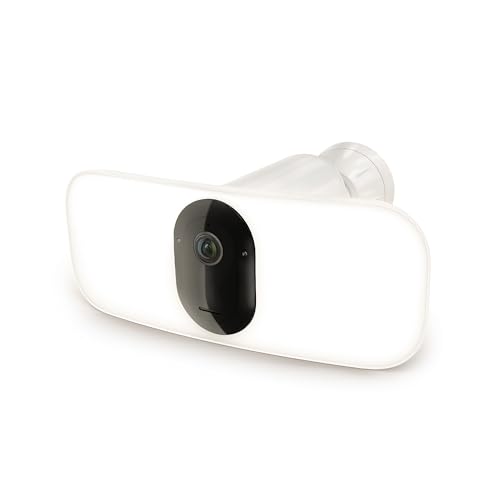
Arlo Pro 3 Floodlight Camera
No fixture box on site is not a dealbreaker here, since a rechargeable battery lets this camera mount almost anywhere. Video holds up well with HDR detail even in mixed light. Battery life swings hard with traffic, and a camera facing a busy street needs charging far more often than one watching a quiet yard.
Pros
- Mounts anywhere without running new wiring
- 2K HDR video holds detail in mixed light
- Brightness adjusts to help preserve battery
Cons
- Battery drains quickly in high traffic spots
- Most useful features sit behind a subscription

Blink Outdoor 4 Floodlight Camera
Alexa routines and Echo Show displays tie into this camera more tightly than most, which suits a household already built around Amazon’s ecosystem. Battery life stretches for months because the camera stays conservative about what it records. Video tops out at 1080p, and the floodlight throws less light than the wired options above.
Pros
- Battery lasts months between charges
- Built for households already using Alexa
- Sync module adds a local storage option
Cons
- Floodlight output is modest next to wired rivals
- 1080p limits detail at longer distances

Ring Spotlight Cam Plus Battery
A spotlight throws a narrower beam than a floodlight, but this camera goes almost anywhere a floodlight cannot, fences and walls included. Ring’s motion detection carries over from the wired model, which is the real selling point. Anyone lighting a whole area rather than a single approach should look at a true floodlight instead.
Pros
- Same motion detection accuracy as the wired Ring
- Battery swaps without removing the camera
- Mounts on fences and walls with no fixture box
Cons
- Spotlight covers less ground than a floodlight
- Subscription still required to save clips
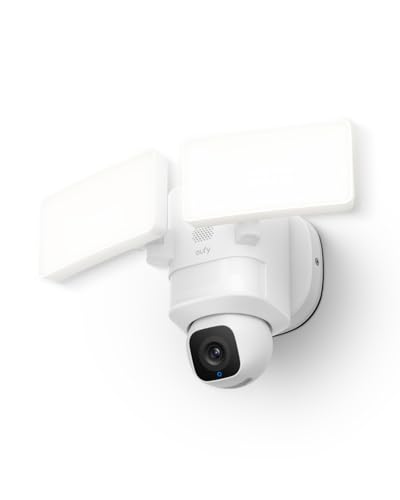
Amcrest SmartHome Floodlight Security Camera
Memory cards and network drives handle storage here, and the camera runs fine with no cloud account at all. That setup appeals to anyone wary of routing home footage through a third party server. The app looks dated next to Ring or eufy, and initial setup assumes some networking patience.
Pros
- Works fully without any cloud account
- Network drive support suits long term retention
- No subscription tied to core recording
Cons
- App interface feels dated next to rivals
- Setup takes longer and assumes networking knowledge
The lineup, side by side
| # | Model | Video | Best for | Score | Price |
|---|---|---|---|---|---|
| 1 | Ring Floodlight Cam Wired Plus | 1080p with two way talk | Best overall | 9.4 | Check price |
| 2 | eufy Security Floodlight Camera E340 | Dual lens, wide plus telephoto | Best without subscription | 9.2 | Check price |
| 3 | Wyze Cam Floodlight Pro | 2K with color night vision | Best value | 9.0 | Check price |
| 4 | Arlo Pro 3 Floodlight Camera | 2K HDR | Best wire free | 8.8 | Check price |
| 5 | Blink Outdoor 4 Floodlight Camera | 1080p | Best for Alexa homes | 8.6 | Check price |
| 6 | Ring Spotlight Cam Plus Battery | 1080p with two way talk | Best for flexible placement | 8.3 | Check price |
| 7 | Amcrest SmartHome Floodlight Security Camera | 1080p or higher depending on model | Best for local recording | 8.0 | Check price |
How to pick the right one
What lumens and beam pattern actually tell you Brightness ratings dominate the spec sheet, yet two fixtures rated for the same lumens can light a yard completely differently. Beam spread decides where the light actually lands. Independently adjustable heads let one point down a path and the other across a driveway, which beats a single fixed panel every time. Two to three thousand lumens covers a typical yard well. Pushing past that mostly adds glare, since the sensor exposes for the brightest patch and drops everything else into shadow.
How the storage model changes the real cost Some cameras show a live view for free but will not save a single clip without a paid plan. Others record locally to a card or built in storage at no ongoing cost. Neither approach is wrong, but the gap over five years is real money that rarely shows up when comparing sticker prices. Anyone wanting an off site backup too should look for optional cloud storage rather than a mandatory one, and check whether a subscription covers one camera or the whole household.
Picking motion detection that will not annoy you A muted camera provides no security at all, and that is where too many alerts leads. Adjustable motion zones let you exclude a sidewalk or a tree that sways in the wind. Person detection filters out cars, cats and passing shadows. Passive infrared sensors respond to heat and tend to shrug off headlights and rain, while pure video analysis reacts to more but triggers more false alarms in bad weather. Camera angle matters too, since motion crossing the frame registers far more reliably than motion walking straight at the lens.
Wiring, mounting height and signal strength Wired floodlight cameras swap into an existing exterior fixture, an easy job if the wiring is already there and an electrician’s job if it is not. Battery models skip that requirement entirely but trade away continuous recording and need charging every few months. Mount around eight to ten feet up, high enough to deter tampering and low enough to still recognize faces. Test the wireless signal at the mounting spot before committing, since an exterior wall between camera and router is the most common cause of dropped clips.
Good to know
Do floodlight security cameras need a monthly subscription?
It depends on the brand. Ring and Arlo require a plan to save and review clips, while eufy, Wyze and Amcrest record locally at no extra cost. Every model shows a live view for free. Add up several years of fees before comparing hardware prices alone.
How many lumens does a security floodlight need?
Two to three thousand lumens covers a typical driveway or yard. Going brighter often creates glare that hurts the camera image, since the sensor exposes for the brightest spot. Beam spread and aim matter as much as the raw lumen number.
Can I install a floodlight camera myself?
Yes, if it is replacing an existing fixture and you are comfortable killing the circuit at the breaker and wiring three connections. Running new cable where no fixture exists is electrician work in most areas. Battery powered models need no wiring at all.
What is the difference between a floodlight camera and a spotlight camera?
A floodlight spreads wide light across an area, good for lighting a whole driveway or yard. A spotlight aims narrower light at one approach or subject. Choose a floodlight for general visibility and a spotlight for a spot a large fixture will not fit.
Do these cameras record in color at night?
Some do, using a larger sensor and ambient light instead of relying only on infrared. Standard night vision produces a black and white image without triggering the floodlight. The floodlight typically fires when motion is detected, which both deters and enables color footage.
How do I stop constant false motion alerts?
Set zones that exclude sidewalks, roads and moving branches, turn on person detection where it is offered, and dial down sensitivity gradually. Angle the camera so movement crosses the frame instead of approaching head on. Passive infrared sensors generally cause fewer weather related false alarms.
How long does a battery powered floodlight camera last between charges?
Makers commonly quote three to six months, though real life depends heavily on how often the camera records and how long its light stays on. A quiet backyard easily beats that estimate. A camera facing a busy street may need monthly charging.
Is a wired or battery floodlight camera better?
Wired models record continuously and never run out of charge, provided an existing fixture is nearby. Battery models mount anywhere but need regular charging and often limit recording to save power. Pick wired for a permanent spot with power access, battery for flexibility.
Are floodlight security cameras weatherproof?
Every model in this comparison carries an outdoor rating. Check that the specific rating matches your climate, since a soffit mounted camera faces very different conditions than one exposed to driving rain. Mounting under an eave extends the life of any outdoor camera.
Which floodlight camera works best without a subscription?
eufy Security Floodlight Camera E340 and Wyze Cam Floodlight Pro both save footage locally at no ongoing cost. Amcrest SmartHome Floodlight Security Camera goes further and skips cloud accounts entirely if you prefer. Ring and Arlo, by contrast, need a plan to save clips.
The bottom line
Ring Floodlight Cam Wired Plus remains the easiest recommendation for most homes, since dependable motion detection and a polished app matter more day to day than a resolution number on a spec sheet. Skip the subscription entirely with the eufy Security Floodlight Camera E340, whose second lens also catches detail the single lens cameras miss. Wyze Cam Floodlight Pro covers the essentials on a tight budget, and Arlo Pro 3 Floodlight Camera answers for any spot with no wiring at all.
Marcus Chen
Marcus covered consumer electronics for enthusiast tech publications for six years before joining ChoiceCrest. He specializes in translating manufacturer spec sheets into plain-language buying advice, with a focus on audio, computing accessories and smart-home gear.


