Managed vs Unmanaged: Choosing the Right Network Switch
For most homes, the NETGEAR GS308 wins as the simplest way to add gigabit ports with zero setup. Want VLANs or powered cameras? The TP-Link TL-SG108PE adds both for a small step up. Building a managed network instead? The Ubiquiti UniFi USW-Lite-8-PoE fits that job.
Adding wired ports behind a desk or television points to one switch: the NETGEAR GS308. Step up to the TP-Link TL-SG108PE for VLANs and powered devices, or the Ubiquiti UniFi USW-Lite-8-PoE for a properly managed setup. The real decision is whether you will ever configure the switch at all.
Switches look interchangeable in a product photo while differing sharply in PoE budget, fan noise, backplane capacity and whether they support VLANs at all, which makes shopping tricky. We compared published port configurations, power budgets, switching capacity and cooling designs, weighing what owners report about heat, coil whine and long-term stability at home.
The top picks, ranked

NETGEAR GS308 8-Port Gigabit Ethernet Unmanaged Switch
One job defines the GS308: turning a single Ethernet drop into eight, with zero configuration required. A metal case spreads heat without a fan, keeping it silent in a living room. Nobody needs to log into anything for this switch to work.
Pros
- Plug and play with no setup required
- Silent fanless metal housing
- Compact enough to hide behind a television
Cons
- No VLANs, monitoring or link aggregation
- External power brick needs space to sit

TP-Link TL-SG108PE 8-Port Easy Smart PoE Switch
A lightweight web interface adds VLANs, port mirroring and QoS on top of a small desktop switch. Four ports supply Power over Ethernet, enough for a couple of cameras or access points. This model makes sense once an unmanaged switch stops covering your needs.
Pros
- VLAN support without enterprise complexity
- Powers cameras and access points directly
- Runs silently in a living space
Cons
- PoE budget caps how many devices you power
- Web interface stays basic next to full managed switches

Ubiquiti UniFi Switch Lite 8 PoE USW-Lite-8-PoE
Full Layer 2 management and detailed per-port statistics run through the UniFi app, which is why this switch anchors so many home labs. Four PoE plus ports handle access points comfortably. A UniFi controller is expected, so it makes less sense as a standalone box.
Pros
- Delivers genuine managed features and statistics
- Fits neatly into a UniFi ecosystem
- Runs fanless and silent for its class
Cons
- Best features require a UniFi controller
- PoE budget is modest for eight ports

NETGEAR GS308T 8-Port Gigabit Smart Managed Pro Switch
VLANs, link aggregation, IGMP snooping and access control all run through a clear web interface with no controller needed. Separating guest devices, cameras and work equipment on one network becomes straightforward. No PoE is built in, so plan power separately for access points.
Pros
- Delivers managed features without a controller
- Offers a clear interface for VLAN setup
- Runs silent with a fanless design
Cons
- Lacks Power over Ethernet entirely
- Interface feels dated next to newer rivals
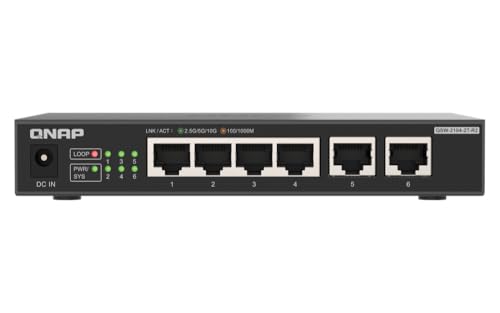
QNAP QSW-1105-5T 5-Port 2.5GbE Switch
Every port on this switch runs at 2.5 gigabits, unlocking faster NAS transfers and matching modern multi-gig internet plans. It stays unmanaged and fanless, needing no setup at all. Five ports limit expansion, but multi-gig speed here costs little.
Pros
- Delivers multi gigabit speed on every port
- Runs silent with no configuration needed
- Falls back cleanly to gigabit devices
Cons
- Offers only five ports total
- Includes no management features

TP-Link TL-SG108 8-Port Gigabit Desktop Switch
A plain unmanaged gigabit switch in a metal case, the TL-SG108 handles the common job of splitting one wall port into eight. No fan runs inside it. Owners report years of uneventful service, which is the highest compliment a switch earns.
Pros
- Costs less than most metal cased switches
- Stays silent and cool running
- Delivers reliable service over long periods
Cons
- Offers no management or monitoring
- Lacks PoE support entirely

TRENDnet TEG-S50g 5-Port Gigabit GREENnet Switch
Small enough to sit behind a router or tuck into a media cabinet, this switch keeps power draw low when ports sit idle. Five gigabit ports cover a television, a console and a streaming box. Adding a few ports, not rewiring a house, is the job here.
Pros
- Fits a very small footprint
- Draws low idle power
- Requires no setup at all
Cons
- Five ports fill up quickly
- Some revisions use a plastic body
Before you buy
Unmanaged, smart managed or fully managed: which do you need? An unmanaged switch forwards traffic with no configuration, which suits most homes. Smart managed switches add VLANs, quality of service and port statistics through a simple web page, useful once cameras or guest devices need isolation. Fully managed switches add spanning tree and access control, earning their place mainly in larger installs or home labs.
How much Power over Ethernet budget do you actually need? PoE sends power and data down one cable, letting ceiling access points and cameras go where no outlet exists. Total power budget matters more than PoE port count, since a switch listing four PoE ports and sixty watts cannot run four devices that each want thirty. Check the standard too, because PoE plus supplies more per port than the original spec.
Is a multi gigabit switch worth the upgrade? A 2.5 gigabit switch does nothing unless devices plugged into it also support 2.5 gigabit, which today mostly means newer NAS units, some motherboards and modern access points. A multi-gig switch between modem and router removes a bottleneck when an internet plan exceeds a gigabit. Otherwise, that money buys more gigabit ports or managed features you will actually use.
Where should a noisy or hot switch live? Fanless metal cased switches run silent and shed heat through the chassis, making them the right pick for living rooms and offices. Larger PoE switches often include fans audible in a quiet room, so those belong in a cupboard or rack. Give any switch a few inches of clearance, since running warm shortens power supply life well before the switching hardware fails.
Side by side
| # | Model | Ports | Best for | Score | Price |
|---|---|---|---|---|---|
| 1 | NETGEAR GS308 8-Port Gigabit Ethernet Unmanaged Switch | 8 x Gigabit Ethernet | Best overall | 9.4 | Check price |
| 2 | TP-Link TL-SG108PE 8-Port Easy Smart PoE Switch | 8 x Gigabit, 4 with PoE | Best value | 9.2 | Check price |
| 3 | Ubiquiti UniFi Switch Lite 8 PoE USW-Lite-8-PoE | 8 x Gigabit, 4 with PoE plus | Best for managed home networks | 9.0 | Check price |
| 4 | NETGEAR GS308T 8-Port Gigabit Smart Managed Pro Switch | 8 x Gigabit Ethernet | Best for VLAN segmentation | 8.8 | Check price |
| 5 | QNAP QSW-1105-5T 5-Port 2.5GbE Switch | 5 x 2.5 Gigabit Ethernet | Best for multi gigabit | 8.6 | Check price |
| 6 | TP-Link TL-SG108 8-Port Gigabit Desktop Switch | 8 x Gigabit Ethernet | Best budget | 8.3 | Check price |
| 7 | TRENDnet TEG-S50g 5-Port Gigabit GREENnet Switch | 5 x Gigabit Ethernet | Best for small spaces | 8.0 | Check price |
Good to know
Do I need a managed switch at home?
Most households do not. A managed switch earns its keep when you want to isolate smart home devices on their own VLAN, monitor per-port traffic, or aggregate links to a NAS. Otherwise an unmanaged switch stays simpler and cheaper.
Will adding a switch slow down my network?
No. A gigabit switch forwards traffic at full speed with negligible added latency. What can slow things down is a switch running at a lower speed than the devices attached, such as an old fast Ethernet unit in the chain.
Can you connect one network switch to another?
Yes, this is normal practice. Run a cable from any port on one switch to any port on the other, since modern switches auto-detect the connection type. Avoid connecting two cables between the same pair of unmanaged switches, which creates a loop.
What is Power over Ethernet used for?
It powers devices such as wireless access points, security cameras and IP phones through the network cable, removing the need for a nearby outlet. Check both the switch total power budget and the standard each device requires.
How many switch ports should you buy?
Count the devices you want wired now, add the uplink port, then add room for two or three more. Ports fill up faster than expected, and an eight-port switch rarely costs much more than a five-port model.
Does a network switch replace a router?
No. A switch only extends the wired ports of an existing network and does not assign addresses or connect to the internet. The router still handles routing, addressing and the internet connection.
Are metal cased switches better than plastic ones?
Generally yes, since the metal chassis acts as a heat sink and allows fanless operation with better long-term reliability. Plastic cased units run warmer and are more prone to power supply failure over years.
Is 2.5 gigabit Ethernet worth upgrading to?
Only if devices at both ends support it, typically a NAS, a modern desktop or a multi-gig internet connection. For general browsing and streaming, gigabit remains far more than enough.
What is the difference between a switch and a hub?
A switch sends data only to the port a device needs, while an old-style hub broadcasts to every port. Hubs are essentially obsolete today, and any switch you buy now performs far better on a busy network.
How do you know if a switch has enough PoE budget?
Add up the wattage each connected device draws and compare it to the switch total PoE budget, not the number of PoE ports listed. A switch can advertise four PoE ports yet fall short of powering four hungry cameras at once.
The verdict
The NETGEAR GS308 covers what most homes need, staying silent, reliable and free of any configuration. Step up to the TP-Link TL-SG108PE for VLANs or to power a camera and access point, and choose the Ubiquiti UniFi Lite 8 when building a properly managed network. Multi gig only pays off when both ends of the link support it.
Marcus Chen
Marcus covered consumer electronics for enthusiast tech publications for six years before joining ChoiceCrest. He specializes in translating manufacturer spec sheets into plain-language buying advice, with a focus on audio, computing accessories and smart-home gear.


