How to Pick an HDMI Switch Without Lag or Dropouts
Kinivo’s 501BN suits most setups with five inputs and a dependable remote. Techole’s HS305 3-Port stands out on value for smaller living rooms. amtake’s 2-Port switch is the simplest budget pick for two devices with no remote needed.
Running out of ports on a TV usually means several devices fighting over one HDMI input, and a switch solves that by letting them share it. Kinivo’s 501BN leads for its dependable remote and five inputs, while Techole’s HS305 delivers the best value at three ports.
Cheap switches often stumble on 4K HDR handshakes or auto switch to the wrong source at the worst moment. We ranked these by comparing published specs and port counts, and by looking for patterns in what owners report after months of daily use.
Our top picks

Kinivo 501BN 5-Port HDMI Switch
Five inputs pair with an included IR remote, making this a natural fit for a busy media console with multiple devices. Owners report solid 4K at 30Hz performance alongside reliable manual switching that skips the guesswork of auto detect. A metal housing adds durability over years of daily switching.
Pros
- Five inputs cover most living room setups
- Included remote works reliably at a distance
- Metal housing holds up over years of use
Cons
- Capped at 4K 30Hz, no HDR passthrough
- Auto switch mode can be inconsistent

Techole HS305 3-Port HDMI Switch
Three inputs cover the most common living room needs, and both auto switching and a small remote come included. An aluminum shell helps dissipate heat during long sessions. Owners note dependable handshakes at 4K across a range of source devices.
Pros
- Both auto and manual switching modes work
- Strong value for the price per port
- Aluminum body runs cool during long sessions
Cons
- Only three inputs limit larger setups
- No HDR passthrough on some source devices

amtake 2-Port HDMI Switch 4K
A no frills toggle button swaps between two devices, and no external power is needed to run it. This suits alternating a console and a streaming stick without wanting a remote at all. Its pocket sized body tucks behind a TV without adding clutter.
Pros
- Very affordable for a two device setup
- Runs without a power adapter
- Pocket sized and easy to hide
Cons
- No remote control included
- Limited to only two inputs

UGREEN 4K HDMI Switch 3-Port
This switch works in both directions, routing several sources to one display or splitting one source across two displays manually. A compact braided cable design suits a tidy media setup. No power adapter is needed for most common configurations.
Pros
- Bidirectional design adds real flexibility
- Compact build keeps cable clutter down
- No power required for most use cases
Cons
- No auto switching mode available
- Manual switching only, no remote
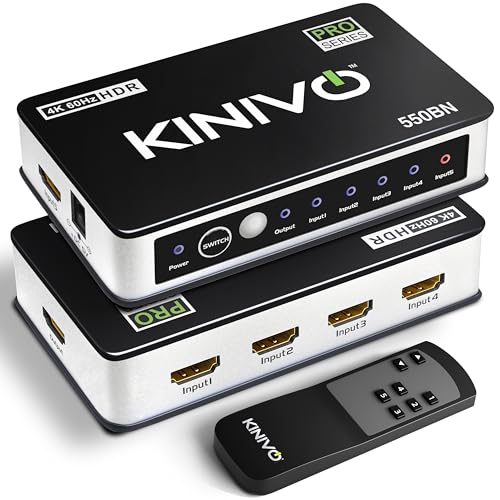
Kinivo 550BN 5-Port 4K HDMI Switch
Broader bandwidth and HDR passthrough separate this from the standard 501BN, while keeping five inputs and a remote. Owners who run newer 4K sources gain real headroom here that the base model lacks. The larger chassis reflects the added internal hardware.
Pros
- Supports full 4K at 60Hz
- HDR passthrough for newer sources
- Five inputs plus a working remote
Cons
- Costs more than the standard 501BN
- Larger footprint takes up more shelf space

GANA 3-Port HDMI Switch
Simple auto detection prioritizes the newest active source, skipping any need to reach for a remote. People who dislike juggling controls tend to prefer this hands off approach. Optional USB power adds stability for longer sessions.
Pros
- Auto detect requires no manual input
- Optional USB power for stability
- Low profile fits behind most TVs
Cons
- Auto priority order is not adjustable
- No manual remote for direct control

ROOFULL 4×1 HDMI Switch
Four inputs fill the gap between compact three port units and larger media center boxes, backed by an included remote. Owners appreciate clear input labeling that avoids guessing which port feeds which device. A metal chassis adds durability beyond typical plastic switches.
Pros
- Four inputs plus a working remote
- Clear input labels reduce guesswork
- Metal build adds durability over plastic
Cons
- Limited to 4K at 30Hz
- Remote range runs shorter than rivals
Side by side
| # | Model | Inputs | Best for | Score | Price |
|---|---|---|---|---|---|
| 1 | Kinivo 501BN 5-Port HDMI Switch | 5 | Best overall | 9.4 | Check price |
| 2 | Techole HS305 3-Port HDMI Switch | 3 | Best value | 9.1 | Check price |
| 3 | amtake 2-Port HDMI Switch 4K | 2 | Best budget | 8.8 | Check price |
| 4 | UGREEN 4K HDMI Switch 3-Port | 3 | Best for streaming boxes | 8.6 | Check price |
| 5 | Kinivo 550BN 5-Port 4K HDMI Switch | 5 | Best for HDR fans | 8.4 | Check price |
| 6 | GANA 3-Port HDMI Switch | 3 | Best plug-and-play | 8.2 | Check price |
| 7 | ROOFULL 4×1 HDMI Switch | 4 | Best for four devices | 8.0 | Check price |
How to choose
How many HDMI ports do you actually need? Count active HDMI devices and add one for future use. Two port switches suit a console plus a streaming stick, three port units cover most living rooms, and five port models handle serious media centers. Buying more ports than needed adds cost and clutter without real benefit.
Does the switch support 4K, HDR and higher refresh rates? Not every switch claiming 4K support actually handles 4K at 60Hz or HDR passthrough. Recent consoles and high end streaming boxes need 60Hz and HDR listed explicitly in the specs. Older 1080p and 4K 30Hz gear works fine with a basic, cheaper switch.
Auto switching versus manual and remote control, which is better? Auto switching picks the last active source, convenient but prone to grabbing the wrong device when several stay powered on. A manual button or remote hands back full control. Many owners prefer a remote for a media console where devices sit out of reach.
Does build quality and heat management matter for a switch? Metal or aluminum housings shed heat better and tend to outlast plastic equivalents. Cheaper switches can overheat during long 4K sessions, showing up as dropouts or flicker on screen. A cool running unit with a solid shell earns its small price premium for daily use.
Good to know
Does an HDMI switch reduce picture quality?
A quality switch passes signal through without downscaling, so picture quality matches a direct connection. Problems usually trace back to underpowered cheap units or cables unable to carry the full 4K bandwidth.
What is the difference between an HDMI switch and a splitter?
A switch takes several inputs and sends one to a single display. A splitter takes one input and sends it to several displays at once. Buying the wrong direction for your setup wastes the purchase entirely.
Do I need external power for an HDMI switch?
Many two and three port switches draw enough power from the HDMI signal itself to run. Larger units and those with remotes often include a USB power lead for more stable performance.
Will an HDMI switch work with 4K HDR content?
Some switches do and some do not. Check that the listing states 4K at 60Hz and HDR passthrough explicitly if your devices output those formats, since basic switches often cap out at 4K 30Hz.
Can one remote control both the switch and the TV?
The switch remote only controls the switch itself. Some universal remotes can learn its IR codes, but no guaranteed single remote solution works across every brand.
Why does my HDMI switch flicker or drop the signal?
Flicker often points to an overheating unit, a weak cable, or an HDCP handshake issue between devices. Try a shorter certified cable, add USB power if the switch supports it, and confirm the switch handles your resolution.
Does auto switching always pick the right device?
Not always. When several sources stay powered on at once, auto detect can grab the wrong one. A model with a manual button or remote avoids that frustration entirely.
Is it worth paying more for an HDMI switch?
For 1080p or 4K at 30Hz, spending little is usually fine. Paying more makes sense when you need 4K at 60Hz, HDR passthrough, many inputs, or a metal build for long daily sessions.
Which HDMI switch works best for a gaming console and streaming box together?
A switch supporting 4K at 60Hz with HDR passthrough, like the Kinivo 550BN, avoids bottlenecking either device. Basic 4K 30Hz switches work fine if neither source outputs HDR or a high refresh rate.
Final word
Kinivo’s 501BN is the switch most people should buy, balancing five inputs, a reliable remote, and a sturdy build. Techole’s HS305 makes sense for strong value at three ports, and amtake’s 2-Port switch suits anyone who just needs to toggle between two devices without fuss.
Marcus Chen
Marcus covered consumer electronics for enthusiast tech publications for six years before joining ChoiceCrest. He specializes in translating manufacturer spec sheets into plain-language buying advice, with a focus on audio, computing accessories and smart-home gear.