How to Pick a Camera for Your YouTube Channel
Sony ZV-E10 is the best all round YouTube camera thanks to its flip screen, mic input and creator tools. Fujifilm X-S20 records longest before overheating, and Panasonic Lumix G7 is the budget workhorse. Canon EOS R50 is the value pick for beginners.
Sony ZV-E10 covers what a talking head channel needs with a flip screen, a mic input and reliable face autofocus in one body. Fujifilm X-S20 records the longest before heat becomes a problem, and Panasonic Lumix G7 is the unlimited record budget workhorse.
A long take needs a body that will not overheat, a screen visible while talking to the lens, and a mic input for clean audio, yet plenty of cameras drop one of the three. We compared recording limits and heat behavior, flip screen designs, mic connections, autofocus for a single subject and battery life.
What we recommend
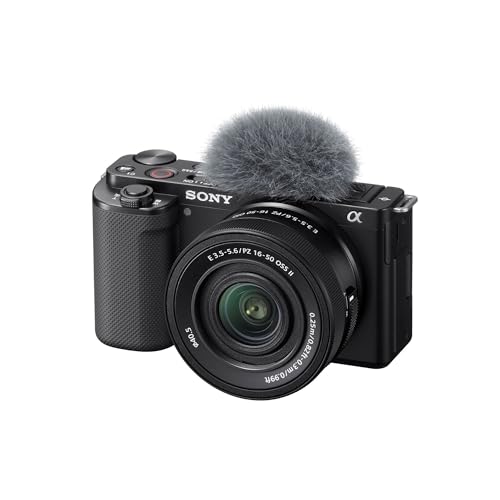
Sony ZV-E10
The core YouTube checklist arrives in one affordable body: a fully articulating screen that faces forward for talking to camera, a mic input plus a capable built in directional mic, and dependable face autofocus. Light weight makes it easy to set up on a desk or tripod. Heat is the one caution, since long continuous 4K takes can trigger a warning, so shorter segments suit it best.
Pros
- Flip screen and mic input for the price
- Good built in mic plus external option
- Reliable face autofocus for talking heads
Cons
- Overheats in long continuous 4K
- Rolling shutter on quick movement

Fujifilm X-S20
A large battery pairs with heat management built to keep this camera rolling through long takes where lesser bodies stop. A fully articulating screen faces forward for framing, and a mic input plus headphone monitoring through a USB-C adapter cover audio. In body stabilization smooths handheld pieces, appealing to creators recording long, uninterrupted segments.
Pros
- Long record times before heat
- Big battery for full sessions
- In body stabilization for handheld
Cons
- Headphone monitoring needs an adapter
- Menus have a learning curve

Canon EOS R50
Clean 4K, a fully articulating screen, a mic input and Canon’s sticky subject autofocus make this the easiest route onto YouTube without fuss. A guided interface helps newcomers, and the color needs little correction out of camera. A small body means a small battery, and long 4K takes can warm up, so extended shoots need planned power and breaks.
Pros
- Very easy to set up and shoot
- Reliable autofocus for presenters
- Flip screen and mic input included
Cons
- Small battery for long sessions
- Can overheat in extended 4K

Panasonic Lumix G7
No internal recording limit and cooling that shrugs off long takes let this budget pick quietly outlast pricier rivals, alongside a fully articulating screen and a mic input. Low light image quality trails newer bodies, yet a well lit desk setup filming long talking segments still looks solid. Buy it when uninterrupted record time matters more than the newest sensor.
Pros
- No recording time limit
- Handles heat on long takes
- Low cost with flip screen and mic input
Cons
- Weaker in low light
- Older autofocus than rivals
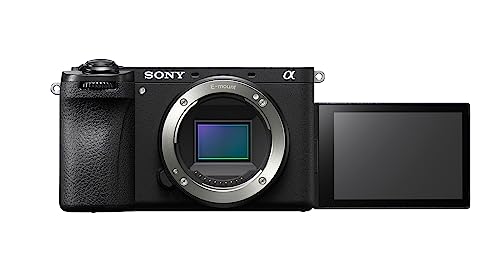
Sony a6700
Sony’s latest subject tracking autofocus and oversampled 4K land in an APS-C body with both a mic input and a headphone jack, allowing live audio monitoring while recording. A fully articulating screen faces forward, and in body stabilization steadies handheld work. Creators who have outgrown an entry body and want sharper autofocus and cleaner low light pay more for this one.
Pros
- Best autofocus in this list
- Headphone jack for monitoring
- In body stabilization
Cons
- Higher price than entry bodies
- Can warm up in the longest 4K modes

Nikon Z30
No viewfinder strips this body down to content focused essentials: a front facing articulating screen, a deep comfortable grip and a mic input in a light frame easy to set up alone. Clean 4K and simple controls make it a tidy talking head camera. Stabilization is lens based rather than in body, and long 4K sessions can warm up, so a stabilized lens and shorter takes help.
Pros
- Comfortable grip and front screen
- Clean 4K and simple controls
- Mic input for better audio
Cons
- No in body stabilization
- Can overheat in long 4K takes
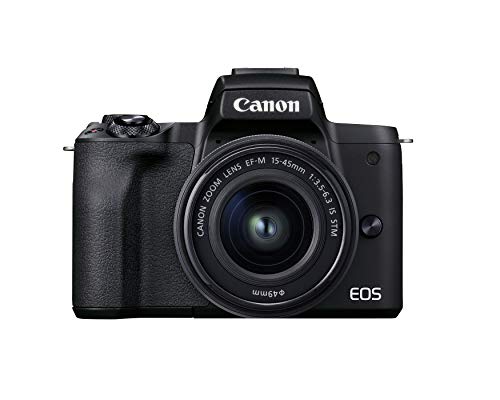
Canon EOS M50 Mark II
A longtime beginner favorite for YouTube, this body pairs a flip out screen, a mic input, easy menus and flattering Canon color that helps first videos look good with little effort. Light weight and low cost come with a small but capable range of lenses. Its 4K is cropped and the battery is small, so shorter, well lit segments work better than marathon sessions.
Pros
- Very easy for beginners
- Flip screen and mic input included
- Flattering colour out of camera
Cons
- 4K is heavily cropped
- Small battery and heat on long takes
Before you buy
Why overheating catches so many creators off guard A camera stopping mid record with a heat warning is the most common YouTube frustration, and it varies enormously by body. The Panasonic G7 and Fujifilm X-S20 are built to keep rolling, while entry mirrorless bodies like the ZV-E10, R50 and M50 Mark II can cut out during long continuous 4K. Long single takes call for a body known to endure, or a plan to split recordings into segments.
Why a mic input is non negotiable for YouTube Viewers judge audio first, and a built in mic in any room with echo sounds amateur fast. Every camera on this list has a mic input, the single most important audio feature, letting a shotgun or lavalier mic get added. A headphone jack, found on the a6700 and via adapter on the X-S20, catches audio problems before they ruin a take.
What makes a flip screen actually usable while filming Filming yourself means the lens faces you, so the screen needs to as well. A fully articulating screen that swings out to the side and forward, offered by every pick here, stays visible even with a mic mounted on top. Checking that a cage or microphone does not block the screen matters, since a screen that cannot be seen defeats the purpose.
Which cameras track a face best in a solo, dim setup Recording alone means autofocus must hold a face through movement and talking without hunting. The Sony a6700, ZV-E10 and the Canon bodies track a single presenter reliably. Larger APS-C sensors beat the Micro Four Thirds G7 in a dim room, and a bright lens with decent lighting reduces the demand on either.
Compared at a glance
| # | Model | Video | Best for | Score | Price |
|---|---|---|---|---|---|
| 1 | Sony ZV-E10 | 4K up to 30p | Best overall | 9.4 | Check price |
| 2 | Fujifilm X-S20 | 4K up to 60p | Best for long recording | 9.2 | Check price |
| 3 | Canon EOS R50 | 4K up to 30p | Best value | 9.0 | Check price |
| 4 | Panasonic Lumix G7 | 4K up to 30p | Best budget workhorse | 8.7 | Check price |
| 5 | Sony a6700 | 4K up to 60p oversampled | Best for advanced creators | 8.5 | Check price |
| 6 | Nikon Z30 | 4K up to 30p | Best for talking heads | 8.2 | Check price |
| 7 | Canon EOS M50 Mark II | 4K cropped, 1080p uncropped | Best for beginners | 8.0 | Check price |
Good to know
What is the most important feature for a YouTube camera?
A mic input and a flip screen, backed by a body that will not overheat on a typical take length. Clean audio and reliable framing matter more than resolution for most channels, and stopping mid video is the worst outcome.
Which camera overheats the least for long YouTube videos?
The Panasonic Lumix G7 and Fujifilm X-S20, both built for long record times. The G7 has no internal recording limit, while entry bodies like the ZV-E10 and M50 Mark II can warn and stop during long continuous 4K.
Do all these cameras have a microphone input?
Yes, every camera here has a mic input, which is why it made the list. Only the Sony a6700 adds a full headphone jack for monitoring, with the Fujifilm X-S20 offering it through a USB-C adapter.
Is 4K necessary for YouTube videos?
Not required, but it gives cropping room and future proofing, and most viewers watch in high definition regardless. The Canon M50 Mark II crops its 4K heavily, so its 1080p mode is often the more practical choice on that body.
What is the best camera for a beginner starting a YouTube channel?
The Canon EOS R50 or M50 Mark II, both with guided menus, flip screens, mic inputs and flattering color. The R50 is the newer and more capable body, while the M50 Mark II costs less and stays easy to use.
Can these cameras record long talking head videos without stopping?
The Panasonic G7 and Fujifilm X-S20 handle long takes best. Others can stop on a heat warning in extended 4K, so very long single takes call for one of those two or a recording split into shorter segments.
Do I need in body stabilization for YouTube?
Not for tripod or desk filming, which covers most talking head content. It helps for handheld or moving shots, where the Fujifilm X-S20 and Sony a6700 have it. A tripod does the job for far less on a static setup.
Sony ZV-E10 vs Canon EOS R50, which suits a new channel better?
The Sony ZV-E10 leans creator first, with a built in directional mic and background defocus tools tailored to solo filming. The Canon EOS R50 leans easier autofocus and guided menus, appealing to someone new to manual camera settings.
What is the best value option for YouTube on a budget?
The Canon EOS R50 offers an easy modern body with strong autofocus, or the Panasonic Lumix G7 if unlimited record time on a budget matters most. The R50 suits beginners better, while the G7 wins on endurance.
How much battery life does a YouTube camera actually need?
Enough for a full recording session without a mid video swap. The Fujifilm X-S20 stands out with its large battery, while smaller bodies like the Canon EOS R50 need a spare cell for longer sessions.
The bottom line
Sony ZV-E10 is the YouTube camera worth recommending to most creators, since a flip screen, a mic input and reliable face autofocus cover a talking head channel in one affordable body, as long as takes stay reasonable to manage heat. Anyone recording long, uninterrupted segments should choose the Fujifilm X-S20 or, on a budget, the Panasonic Lumix G7 for its record stamina. The Canon EOS R50 remains the easiest value pick for a first channel.
Marcus Chen
Marcus covered consumer electronics for enthusiast tech publications for six years before joining ChoiceCrest. He specializes in translating manufacturer spec sheets into plain-language buying advice, with a focus on audio, computing accessories and smart-home gear.



