Gaming TVs With Low Input Lag and Fast Refresh Rates
LG C4 OLED is the best all-round gaming TV, with four full-bandwidth HDMI 2.1 ports and near-instant pixel response. Samsung QN90D Neo QLED suits bright rooms where glare matters more than contrast. Hisense U6N covers low-lag single-player gaming for anyone skipping 120Hz and flagship pricing.
Buying a gaming TV means matching panel technology, port bandwidth and refresh rate to the hardware you actually own. LG C4 OLED, Samsung QN90D Neo QLED and Hisense U6N mark the realistic span from flagship to budget-conscious. Same spec sheet claims translate into different real-world lag and brightness depending on room and use.
Marketing terms like game mode and gaming hub show up on sets that cannot accept a full 120Hz signal, which makes this category confusing. What actually matters: panel refresh rate, whether HDMI ports run full-bandwidth 2.1, which VRR standards are supported, and how low input lag drops in game mode. We compared published specifications, port counts and what owners report about brightness and reflections in real rooms.
The top picks, ranked

LG C4 OLED
Four HDMI ports run full 2.1 bandwidth, so two consoles and a PC can all stay connected at high refresh without cable swapping. OLED pixels switch almost instantly, which removes motion blur in fast-paced titles. Per-pixel contrast keeps dark scenes readable, and owners report game-mode lag low enough that competitive players stop noticing it.
Pros
- All four HDMI ports run full 2.1 bandwidth
- Near-instant pixel response cuts motion blur
- Deep per-pixel contrast for dark scenes
Cons
- Peak brightness trails Mini LED in daylight rooms
- Static HUDs need periodic pixel-shift care to avoid burn-in

Samsung S90D OLED
QD-OLED technology pairs OLED-level black levels with noticeably higher color brightness than standard white-OLED panels. Four full-bandwidth HDMI 2.1 ports and a fast game mode make it a capable console partner. According to the listing, dark-scene detail stays visible even with some daytime light in the room, better than most OLED competitors.
Pros
- Higher color brightness than standard white-OLED panels
- Four full-bandwidth HDMI 2.1 ports
- Built-in Game Bar shows VRR and refresh status on screen
Cons
- No Dolby Vision support
- Black levels rise slightly in very bright rooms

LG G4 OLED
A micro lens array pushes highlight brightness higher than the C-series OLED panel, without changing any gaming spec. Gaming features match the C4 exactly, so the real difference is picture headroom in daylight. Based on specifications, this model suits a wall-mounted install more than a shelf, since it ships with a flush mount bracket instead of a stand.
Pros
- Brighter highlights than the C4 thanks to the micro lens array
- Identical full gaming feature set to the C4
- Ships with a flush wall mount bracket
Cons
- Costs meaningfully more than the C4 for the brightness gain
- Some sizes skip a tabletop stand entirely

Samsung QN90D Neo QLED
Mini LED backlighting reaches far higher peak brightness than any OLED in this lineup, which matters when windows or lamps hit the screen directly. An anti-reflective coating cuts glare further than a standard glossy panel. Four full-bandwidth HDMI 2.1 ports and 144Hz support cover current consoles and PC gaming without compromise.
Pros
- High peak brightness for sunlit rooms
- Anti-reflective coating cuts glare from windows and lamps
- No OLED-style burn-in risk from static HUD elements
Cons
- Blooming appears around bright objects in dark scenes
- Contrast narrows when viewed from off-center seats
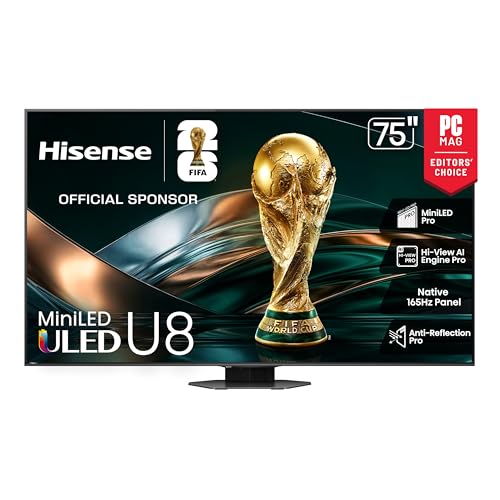
Hisense U8N
Mini LED brightness and 144Hz support land close to flagship territory while the port count and finish trim cost. Two full-bandwidth HDMI 2.1 ports handle one console and a PC, or two consoles if a soundbar uses eARC on a separate port. Owners report aggressive local dimming that suits high-contrast game scenes more than film.
Pros
- Flagship-level brightness at a lower spec tier
- 144Hz with broad VRR standard support
- Strong HDR highlight punch in games
Cons
- Only two ports run full HDMI 2.1 bandwidth
- Local dimming can look heavy-handed in mixed scenes

TCL QM8 QM851G
TCL’s Mini LED flagship scales up to very large screen sizes without losing peak brightness, which matters more as screen area grows. Game Accelerator mode trades resolution for higher refresh in competitive titles. Based on specifications, it offers more screen area than any other set in this lineup at the same feature tier. Only two ports run full 2.1 bandwidth, though, so cable planning matters more here.
Pros
- Largest screen sizes available in this lineup
- High peak brightness for the feature tier
- Game Accelerator mode boosts refresh for competitive titles
Cons
- Only two ports run full HDMI 2.1 bandwidth
- Viewing angles narrow when seated off-center

Hisense U6N
This Mini LED set keeps brightness respectable while skipping 120Hz support on most screen sizes. Auto Low Latency Mode switches to game mode automatically, and input lag stays low for single-player titles. Owners report it as a clear step up from basic LED sets, best suited to 60 frames-per-second console gaming rather than high-refresh PC play.
Pros
- Solid brightness for an entry-level Mini LED panel
- ALLM switches to low-latency game mode automatically
- Supports Dolby Vision and HDR10+ formats
Cons
- No 120Hz support on most screen sizes
- Limited benefit for high-frame-rate PC gaming
How to pick the right one
How many HDMI 2.1 ports does a gaming setup need? Manufacturers often label a port HDMI 2.1 when only one or two on the panel actually carry full bandwidth. One of those full-bandwidth ports is frequently the eARC connector your soundbar needs, which eats into the count. Two consoles plus a PC call for four full-bandwidth ports so nothing gets unplugged to make room for something else. Check the spec sheet line by line. A 2.1-labeled port limited to lower bandwidth cannot carry 4K at 120Hz with full color.
Does a 144Hz panel matter for console gaming? A 144Hz panel goes unused on a console capped at 120 frames per second. Games that target 60 frames per second use even less of that headroom. Current consoles hit 120Hz only in specific performance-mode titles. PC gaming is where the higher numbers actually pay off, especially in competitive shooters. Match the panel to your hardware first, then decide whether the extra headroom is worth paying for.
What does VRR fix, and which standard do you need? Variable refresh rate matches the display to the frame rate a game is producing. This removes tearing and the stutter caused by uneven frame pacing. Standards differ by hardware: PC graphics cards often use G-SYNC or FreeSync, while consoles rely on the HDMI Forum VRR spec. Confirm your console or GPU supports the same standard as the panel before assuming compatibility. Some sets also show faint brightness flicker in dark scenes with VRR active, which is a known quirk rather than a fault.
OLED or Mini LED: which panel suits your room? OLED delivers per-pixel contrast and near-instant response, best experienced in a dim room after dark. Mini LED panels reach far higher peak brightness and resist glare better. That comes with a tradeoff: some blooming shows around bright objects in dark scenes. Evening gaming with the lights down favors OLED for its contrast. A sunlit living room favors Mini LED, where raw brightness matters more than contrast ratio.
Compared at a glance
| # | Model | Panel | Best for | Score | Price |
|---|---|---|---|---|---|
| 1 | LG C4 OLED | OLED evo | Best overall | 9.4 | Check price |
| 2 | Samsung S90D OLED | QD-OLED | Best OLED for daytime brightness | 9.2 | Check price |
| 3 | LG G4 OLED | OLED evo with micro lens array | Best for a flush wall-mounted setup | 9.0 | Check price |
| 4 | Samsung QN90D Neo QLED | Neo QLED, Mini LED with quantum dots | Best for bright, glare-heavy rooms | 8.8 | Check price |
| 5 | Hisense U8N | Mini LED with quantum dots | Best value flagship | 8.6 | Check price |
| 6 | TCL QM8 QM851G | Mini LED with quantum dots | Best for large screen sizes | 8.3 | Check price |
| 7 | Hisense U6N | Mini LED | Best budget pick | 8.0 | Check price |
Frequently asked questions
Do I need 120Hz for console gaming?
Only for the subset of titles with a 120Hz performance mode. Many console games still target 60 frames per second, where a good 60Hz panel with low lag works fine. Competitive shooters with a performance mode are where 120Hz support pays off.
What input lag counts as fast enough for gaming?
Anything under about 15 milliseconds in game mode feels immediate to most players. Competitive players tend to look for single-digit figures, which current OLED and Mini LED sets reach at high refresh rates.
Is OLED burn-in still a risk for gaming in 2026?
Modern OLED panels run pixel-shifting and refresh routines that keep normal, varied use low risk. Risk rises with many hours of the same static HUD element at high brightness. Varying content and dimming static interfaces reduces it further.
What is ALLM and does a gaming TV need it?
Auto Low Latency Mode lets a console switch the TV into game mode automatically. It removes the step of switching manually and prevents gaming in a picture mode with heavy processing and high lag. Most current consoles and TVs support it.
Is a gaming monitor better than a gaming TV?
For a close desk setup and the very highest refresh rates, monitors still lead. For couch gaming at a distance, large high-refresh TVs now match monitor lag while offering far more screen area.
Which HDMI cable supports 4K 120Hz?
Only an Ultra High Speed certified cable rated for 48Gbps carries a full 4K 120Hz signal. Older cables often work at 4K 60Hz, then fail intermittently at 120Hz, showing up as a black screen or dropped signal.
Why does VRR cause flickering on some TVs?
Dark scenes with rapidly changing frame rates can trigger brief brightness flicker while VRR is active on some panels. It is a known display behavior rather than a fault. Turning VRR off in the specific title that shows it resolves the issue.
What size TV works best for couch gaming?
For couch distances around eight to ten feet, screen sizes from 55 to 65 inches suit most rooms. Sitting closer than that with a very large screen forces your head to track the edges of the image.
OLED vs Mini LED: which is better for gaming?
OLED wins on contrast and response time, especially in a dim room after dark. Mini LED wins on peak brightness and glare resistance in a sunlit room. Neither is universally better; room lighting decides which trait matters more.
The verdict
LG C4 OLED remains the strongest all-round pick, combining near-instant response, deep blacks and four full-bandwidth ports so nothing needs unplugging. Samsung QN90D Neo QLED is the better call in a bright living room, where glare rejection and peak brightness outweigh absolute contrast. Hisense U6N covers low-lag, single-player console gaming for anyone skipping 120Hz and flagship spending.
Marcus Chen
Marcus covered consumer electronics for enthusiast tech publications for six years before joining ChoiceCrest. He specializes in translating manufacturer spec sheets into plain-language buying advice, with a focus on audio, computing accessories and smart-home gear.
You might also need

Office Calculators Built for Fast, Accurate Number Crunching
Fixing the Most Common Gaming Headset Issues

Which Standing Gaming Desk Frame Actually Stays Steady
