Which Standing Gaming Desk Frame Actually Stays Steady
Flexispot’s E7 Pro wins on frame rigidity and lift capacity, Eureka Ergonomic’s 63 inch model adds a gaming top with cable routing built in, and VIVO’s Electric Standing Desk delivers a dual motor base without the premium price. All three beat single motor desks at full standing height.
Flexispot’s E7 Pro suits most setups, with a three stage frame that stays rigid under a loaded monitor arm. Eureka Ergonomic’s 63 inch desk fits players who want a finished gaming top without buying extras. VIVO’s Electric Standing Desk covers the value slot with a dual motor lift at a lower cost.
Rigidity at standing height rarely appears on a spec sheet, yet it decides whether typing feels stable. Frame stage count, leg cross section and top thickness affect wobble more than price does. We compared published lift capacity, motor count, height range and what owners report about stability and noise.
What matters most
What makes a standing desk stable at full height Wobble comes from frame design, not price alone. A two stage leg has one telescoping section; a three stage leg has two, adding overlap that resists sway. Motor count matters too, since dual motor frames push both legs evenly while single motor frames lean on a crossbar to keep pace. Taller users and heavier loads benefit most from three stage, dual motor construction.
How to size height range and load capacity to your body and gear Standing height should put your elbows near ninety degrees, wrists flat, monitor top at eye level. Many desks max out too low for taller users once a thick top and a keyboard tray are added. Check the stated maximum height, add top thickness, then compare against your measured elbow height. Do the same for load, since monitors, an arm, a tower and peripherals add weight fast, and a motor near its rated limit slows and wears sooner.
Gaming top features versus a plain office surface Cable trays, headset hooks and cup holders come standard on gaming desks but cost extra on office models. Across a top over 60 inches, a full surface mat helps mouse tracking more than a small mat ever could. Curved fronts shorten reach to the far corners of the widest desks. Does any of this change the frame underneath? No, stability still depends on stage count and motor setup.
Which desk fits a tight budget, a small room or a fast setup Single motor frames cost less but lift slower and sway more under a loaded top. A 55 inch footprint or a manual gaming desk suits a room too small for a full electric frame. Preassembled options skip the build entirely, trading a higher price for an hour saved. Weigh room size, budget and patience for assembly before ranking rigidity above everything else.
The shortlist, ranked

Flexispot E7 Pro Standing Desk
Flexispot built the E7 Pro around a three stage dual motor frame, which raises higher than two stage designs and overlaps more at full extension. Load capacity clears two monitors, an arm and a tower with room to spare. Owners note it stays steadier at standing height than most competitors, which is the main reason to pay for three stages.
Pros
- Three stage legs add height and stability
- Handles multiple monitors and a monitor arm
- C shaped legs improve knee and wall clearance
Cons
- Heavy frame makes solo assembly harder
- Priced above two stage alternatives

Eureka Ergonomic Standing Gaming Desk 63 Inch
Eureka designs this desk specifically for gaming rooms, pairing a 63 inch mat style top with a built in cable tray. Headset hooks and a cup holder ship in the box, cutting the extra shopping list to zero. A dual motor frame lifts a typical two monitor gaming load and stores four height presets.
Pros
- Cable tray and headset hook included from the start
- Wide top fits a dual monitor gaming layout
- Full desk mat suits mouse tracking
Cons
- Two stage frame flexes more than three stage designs at max height
- Gaming look may clash with a home office
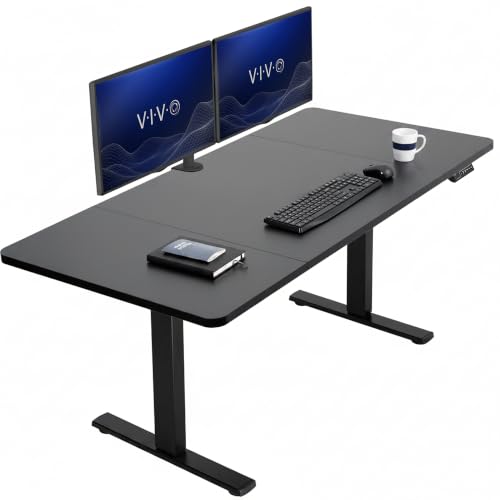
VIVO Electric Standing Desk 60 Inch
VIVO keeps this desk simple: a dual motor frame, four memory presets and a 60 inch laminate top. Two stage legs mean it will not rise quite as high or stay quite as steady as three stage rivals. Most owners report that trade off barely matters for everyday sitting and standing.
Pros
- Dual motor lift at a lower entry cost
- Memory presets included, not an upsell
- Parts and instructions are easy to find
Cons
- Two stage frame caps maximum height
- Laminate top is thinner than premium picks
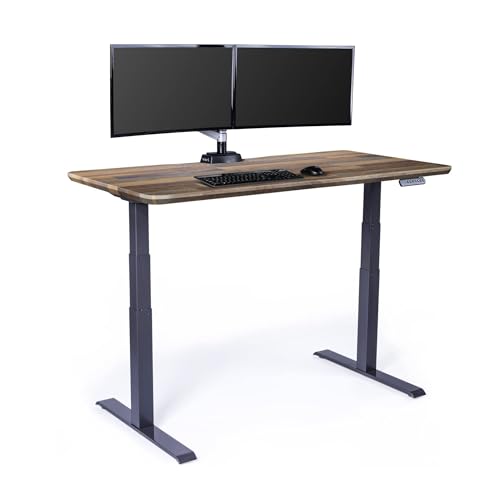
Vari Electric Standing Desk
Vari ships this desk mostly preassembled, skipping the multi hour build other frames require. A dual motor lift and a simple up and down controller with a height display keep daily use straightforward. Laminate finishes look closer to office furniture than a typical gaming rig.
Pros
- Fastest setup of the desks compared here
- Office grade finish suits shared rooms
- Solid frame feels sturdy in daily use
Cons
- Fewer gaming specific features than rivals
- Costs more than comparable self assembly desks

ApexDesk Elite Series 71 Inch Standing Desk
ApexDesk fits a 71 inch curved top onto a dual motor frame with a crossbar for lateral stability. Triple monitor setups, or a monitor plus a full sim rig, get enough surface to spread out. Measure the room first, since a top this wide needs a dedicated wall.
Pros
- Wide curved top suits triple monitor setups
- Crossbar adds lateral stability at height
- Curve keeps outer edges within reach
Cons
- Large footprint rules out small rooms
- Heavy top makes solo assembly awkward

SHW 55 Inch Electric Height Adjustable Desk
SHW offers the cheapest route into powered height adjustment here, using a single motor and a basic controller. It lifts a single monitor setup without strain but slows and sways under a heavier triple screen load. A compact 55 inch top suits a first standing desk or a secondary station.
Pros
- Lowest cost entry into electric adjustment
- Compact width fits smaller rooms
- Few parts make assembly quick
Cons
- Single motor lifts slower under load
- Noticeable sway at full height when loaded

RESPAWN 3010 Gaming Computer Desk
RESPAWN shapes this desk for gaming rather than standing, adding a raised monitor shelf, cup holder and headphone hook. Height adjustment is manual, not motorized, so treat it as a gaming desk rather than a true sit to stand frame. Its compact footprint fits rooms where a full electric frame will not.
Pros
- Accessories included in a compact footprint
- Costs less than any powered frame here
- Monitor shelf lifts screens toward eye level
Cons
- No motorized sit to stand adjustment
- Limited surface area for extra peripherals
The lineup, side by side
| # | Model | Frame | Best for | Score | Price |
|---|---|---|---|---|---|
| 1 | Flexispot E7 Pro Standing Desk | Three stage, dual motor | Best overall | 9.4 | Check price |
| 2 | Eureka Ergonomic Standing Gaming Desk 63 Inch | 63 inch surface with full desk mat | Best for a gaming specific setup | 9.2 | Check price |
| 3 | VIVO Electric Standing Desk 60 Inch | Two stage, dual motor | Best value | 9.0 | Check price |
| 4 | Vari Electric Standing Desk | Dual motor electric | Best for fast setup | 8.7 | Check price |
| 5 | ApexDesk Elite Series 71 Inch Standing Desk | 71 inch curved work surface | Best for multiple monitors | 8.5 | Check price |
| 6 | SHW 55 Inch Electric Height Adjustable Desk | Single motor electric | Best budget electric | 8.2 | Check price |
| 7 | RESPAWN 3010 Gaming Computer Desk | Gaming desk, manual height adjustment | Best for small rooms | 8.0 | Check price |
Common questions
Is a three stage frame worth it for a standing gaming desk?
Three stage frames rise higher and hold steadier at full extension than two stage designs. That extra stability matters most for taller users and desks loaded with a monitor arm. Two stage frames still suit lighter, average height setups at a lower cost.
How much weight can a standing gaming desk hold?
Lift capacity ranges from modest on single motor desks to well above typical gaming loads on dual motor frames. Add up monitors, a monitor arm, a tower and peripherals before choosing. A motor running near its limit lifts slower and wears out sooner.
Why does my standing desk wobble at full height?
Wobble usually traces back to a two stage frame, a loose top attachment or a missing crossbar. Retightening every bolt after the first week of use fixes much of it. Wider leg profiles and more section overlap reduce sway the most.
Can I attach my own top to an electric standing desk frame?
Most frames sell separately and accept a range of top sizes within stated limits. Drilling your own pilot holes and checking top thickness against the span prevents sagging. A factory matched top skips that step entirely.
Are dual motor standing desks quieter than single motor desks?
Dual motor frames tend to run quieter and smoother since both legs share the lifting work evenly. Single motor budget desks are usually louder and slower during travel. Either way, noise only happens for the few seconds a desk is moving.
How long does assembly take on a standing gaming desk?
Self assembly frames typically take one to two hours, and a second person helps when flipping a finished desk. Preassembled models cut that time down to minutes. Heavy tops are the main reason to avoid building alone.
What is the difference between a gaming desk and a standing desk?
Frame technology is often identical between the two categories. Gaming desks add extras like cable trays, headset hooks and a full surface mat. A plain office frame paired with a wide top does the same job functionally.
What is the best standing gaming desk for small rooms?
Compact desks around 55 inches wide, or manual gaming desks without a powered frame, fit tighter spaces best. Look for a narrow footprint and a top under 60 inches before adding accessories. A full 71 inch curved top needs a dedicated wall instead.
How often should you switch between sitting and standing?
Common guidance favors alternating rather than standing for long unbroken stretches, since static standing brings its own strain. Memory height presets make switching fast enough that people actually use them. An anti fatigue mat makes longer standing sessions more comfortable.
Standing desk vs gaming desk: which one do I actually need?
Choose a standing desk if a powered sit to stand frame and stability matter most. Choose a gaming desk if built in accessories and a finished look matter more than motorized height adjustment. Some models, like Eureka’s 63 inch desk, blend both.
The verdict
Flexispot’s E7 Pro remains the strongest overall pick, since a three stage dual motor frame solves the wobble that undermines cheaper desks. Eureka Ergonomic’s 63 inch desk suits players who want a gaming top and cable tray included, while VIVO’s Electric Standing Desk delivers a dual motor base for less. Measure elbow height and total load before ordering, and budget space for a proper cable tray.
Marcus Chen
Marcus covered consumer electronics for enthusiast tech publications for six years before joining ChoiceCrest. He specializes in translating manufacturer spec sheets into plain-language buying advice, with a focus on audio, computing accessories and smart-home gear.