Office Calculators Built for Fast, Accurate Number Crunching
Casio FR-2650RC leads daily bookkeeping with two colour printing and a check and correct function. Sharp EL-1801V offers similar tax and margin keys at a quieter, better value print speed, and Casio MS-80B suits desks that only need fast, silent non printing math.
Casio FR-2650RC is the sensible default for most offices, backed by two colour printing and a review function. Sharp EL-1801V trails closely for lighter ledger work at a quieter print speed. Casio MS-80B covers desks that never need a paper tape at all.
Office calculators look interchangeable on a listing page, which is exactly why so many end up wrong for the job. Print speed, mains only power and a check and correct function matter more than digit count on the box. We compared published specifications, manuals and long term owner reports across seven current models.
The top picks, ranked

Casio FR-2650RC Printing Calculator
Roughly two lines print per second in black and red, making negative totals obvious while reconciling. A check and correct function reviews up to 150 entered steps before committing a total. Owners report the keyboard holds up under heavy daily entry better than most desktop printers in its class.
Pros
- Check and correct catches entry errors before printing
- Two colour printing makes negatives easy to spot
- Large, well spaced keys suit long entry sessions
Cons
- Needs mains power, so it stays deskbound
- Ribbon and paper remain ongoing consumables

Sharp EL-1801V Printing Calculator
A two colour ink roller pairs with a notably quiet print action, which matters in a shared room. Tax, percentage change and cost sell margin work without digging through menus. Owners report the ink roller swaps easily and the angled display stays readable under overhead lighting.
Pros
- Runs quieter than most tape calculators
- Ink roller swaps in quickly
- Angled display stays clear under lighting
Cons
- Print speed trails the Casio FR-2650RC
- Skips a check and correct review function
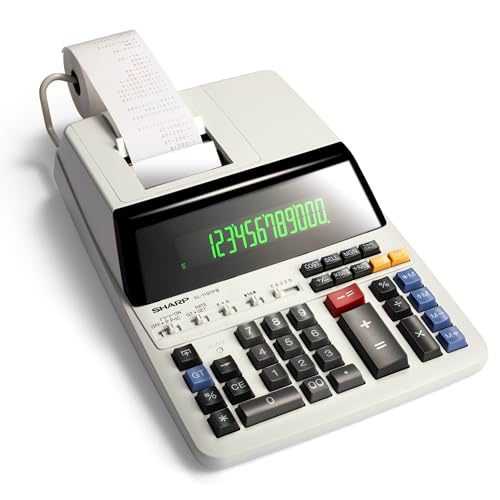
Sharp EL-1197PIII Heavy Duty Printing Calculator
This is the calculator for a tape that runs all day. About four and a half lines print per second using a two colour ribbon rather than an ink roller. A heavier chassis than most keeps it planted during fast, one handed entry.
Pros
- Ranks among the fastest tapes in this group
- Heavy base resists sliding during entry
- Ribbon lasts longer than a typical ink roller
Cons
- Runs noticeably louder than the EL-1801V
- Takes up more desk depth than compact models

Canon P170-DH-3 Printing Calculator
Currency conversion joins the usual tax and business keys, useful for anyone invoicing across borders. Mains power runs the unit, with a battery backup option that preserves settings after an unplug. Owners report crisp printing and keys quieter than their travel suggests.
Pros
- Built in currency conversion function
- Battery backup preserves stored rates
- Compact footprint for a printing model
Cons
- Keys run smaller than the Casio and Sharp printers
- Display sits on the small side
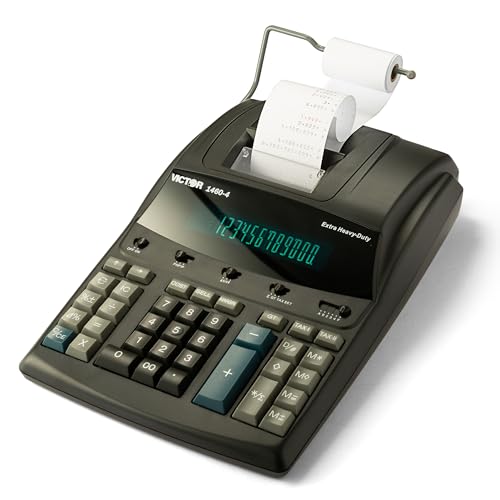
Victor 1210-4 Printing Calculator
A tilted display and a large, contoured keypad suit anyone who enters figures by touch. Tax, delta percent and cost sell margin functions cover common bookkeeping tasks. Based on specifications, it sits between budget and heavy duty printers, a reasonable pick for a shared desk.
Pros
- Contoured keypad feels comfortable over long sessions
- Tilted display reads well from standing height
- Function layout stays straightforward
Cons
- Print speed trails the Sharp EL-1197PIII
- Plastic housing feels lighter than rivals
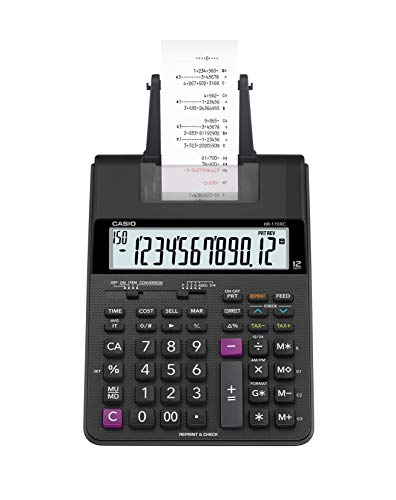
Casio HR-170RC Plus Printing Calculator
This is the smallest true printing calculator here, running on batteries as well as the mains adapter. A hot desk or site office benefits most from that portability. Check and correct plus tax keys survive the size cut, though tape speed and keyboard width both shrink.
Pros
- Battery option makes it genuinely portable
- Check and correct function carries over
- Small footprint suits tight desks
Cons
- Keyboard feels cramped next to full size printers
- Battery life drops fast during heavy printing
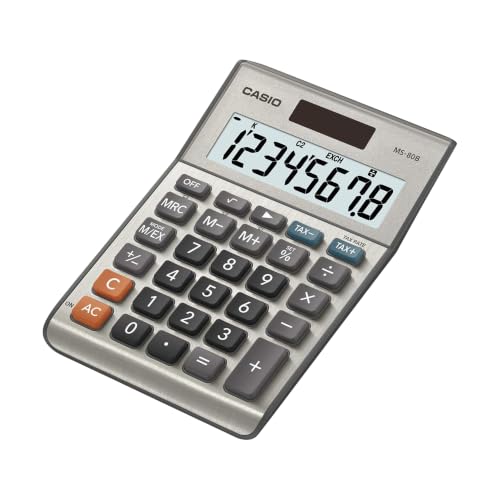
Casio MS-80B Standard Function Desktop Calculator
No paper tape means no consumables for teams that never need a printed record. Solar power with battery backup keeps it running without a cord. Tax keys and independent memory cover basic bookkeeping, but this stays a supporting calculator rather than a primary tool.
Pros
- Runs without paper or ink to replace
- Operates silently in shared spaces
- Very small desk footprint
Cons
- Limited to eight digit totals
- Leaves no printed audit trail
How to choose
Do you actually need a printing calculator? A printing calculator earns its place when someone checks your work later, typically bookkeeping, stocktakes or invoice reconciliation. One and done calculations suit a quieter, cheaper, smaller non printing model instead. Buying a printer you never load with paper remains the most common mistake in this category.
Why does print speed matter more than digit count? Nearly every office calculator here handles twelve digits, so that spec rarely decides anything. Lines per second does the deciding instead. Around two lines per second suits occasional totals, while long batch entry benefits from something closer to four and a half, though faster printers also run louder.
What does check and correct actually do? This review function lets you step back through entered figures and fix one before the total prints. Casio brands it check and correct, and it remains the single most useful feature for bookkeeping accuracy. Without it, one mistyped figure means restarting an entire run from scratch.
How much do power source and key feel matter? Most printing calculators run on mains power only, so check the adapter arrangement before committing to a desk position. Ribbons generally outlast ink rollers but cost more per unit, and both remain ongoing supplies. Key feel stays subjective but decisive for anyone entering figures by touch all day.
Side by side
| # | Model | Type | Best for | Score | Price |
|---|---|---|---|---|---|
| 1 | Casio FR-2650RC Printing Calculator | Printing, mains powered | Best overall | 9.4 | Check price |
| 2 | Sharp EL-1801V Printing Calculator | Printing, mains powered | Best value | 9.2 | Check price |
| 3 | Sharp EL-1197PIII Heavy Duty Printing Calculator | Printing, mains powered | Best for high volume printing | 9.0 | Check price |
| 4 | Canon P170-DH-3 Printing Calculator | Printing, mains with battery option | Best for tax and currency work | 8.8 | Check price |
| 5 | Victor 1210-4 Printing Calculator | Printing, mains powered | Best for shared desks | 8.6 | Check price |
| 6 | Casio HR-170RC Plus Printing Calculator | Printing, mains or battery | Best compact printer | 8.3 | Check price |
| 7 | Casio MS-80B Standard Function Desktop Calculator | Non printing desktop | Best budget | 8.0 | Check price |
Frequently asked questions
Do you need a printing calculator for bookkeeping?
Not strictly, but the paper tape gives an audit trail you can hand to someone else or check against a ledger. Anyone reconciling invoices or counting a till usually finds the tape saves more time than it costs.
What does the check and correct function do?
It stores entered figures so you can step back, fix a single wrong entry and print a corrected total. On the Casio FR-2650RC that buffer covers around 150 steps.
Are two colour tapes worth it for accounting?
Yes for most bookkeeping work. Negatives print in red, so a subtotal that has gone the wrong way jumps out instead of hiding in a column of black figures.
Ink roller or ribbon, which should you choose?
Ink rollers cost less and swap in easily, which suits light use. Ribbons generally last longer between changes, so high volume offices tend to prefer models like the Sharp EL-1197PIII.
Can office calculators run without mains power?
Some can. Casio HR-170RC Plus takes batteries as well as an adapter, and the non printing Casio MS-80B runs on solar with battery backup. Most full size printers stay mains only.
How many digits do you actually need?
Twelve digits covers almost every business use, including totals into the hundreds of billions. Eight digit models like the MS-80B handle everyday sums but overflow on large ledger totals.
What are tax keys for on an office calculator?
You store a local tax rate once, then add or remove tax from any figure with a single key. That stays faster and less error prone than multiplying by hand, and every printing model here supports it.
Will a printing calculator be too loud for an open office?
It depends on the model. Sharp EL-1801V ranks among the quieter printers here, while the high speed EL-1197PIII runs noticeably louder. Favor slower, two colour ink roller models where noise is a concern.
Casio FR-2650RC vs Sharp EL-1801V, which prints better for daily use?
Casio FR-2650RC prints faster and adds a check and correct review function for catching mistakes. Sharp EL-1801V runs quieter and costs less, which suits lighter ledger work just as well.
Final word
Casio FR-2650RC remains the calculator worth putting on most bookkeeping desks, since check and correct plus two colour printing solve the two problems that actually waste time. Sharp EL-1801V covers lighter ledger work more quietly and affordably. Casio MS-80B answers for any desk that only needs quick, silent math.
Marcus Chen
Marcus covered consumer electronics for enthusiast tech publications for six years before joining ChoiceCrest. He specializes in translating manufacturer spec sheets into plain-language buying advice, with a focus on audio, computing accessories and smart-home gear.