How to Pick a Gaming Router That Keeps Lag Low
ASUS ROG Rapture GT-AX6000 tops this list for its dual 2.5 Gbps ports and deep gaming QoS. TP-Link Archer AX55 suits smaller homes on a budget. TP-Link Archer GE800 brings Wi-Fi 7 bandwidth for crowded apartment buildings running many connected devices at once.
Match quality depends on jitter control, not headline speed. ASUS ROG Rapture GT-AX6000 wins this comparison for its dual multi-gig ports and granular traffic prioritization, with TP-Link Archer AX55 as the value pick.
Marketing highlights top throughput, yet stable pings come from buffer management and how many devices a router juggles at once. We compared published specifications, QoS feature depth, port layouts, and recurring patterns in owner feedback to rank these seven.
What we recommend
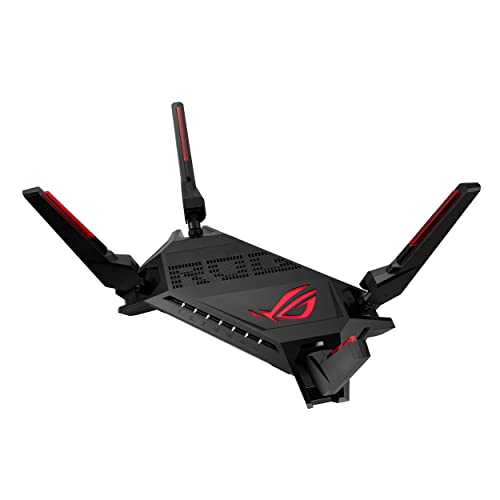
ASUS ROG Rapture GT-AX6000 Gaming Router
Two 2.5 Gbps ports handle a multi-gig internet plan without giving up wired priority for a console. ASUS gaming QoS assigns bandwidth per device, and mobile game mode extends that control to phones. Eight antennas push coverage across a large home, though the router itself takes real shelf space.
Pros
- Two multi-gig ports cover WAN and LAN needs
- Granular QoS actually changes measured latency
- Strong signal range for a dual band router
Cons
- Large footprint with eight external antennas
- Setup menus overwhelm first time users

TP-Link Archer AX55 Wi-Fi 6 Router
AX3000 speeds and OFDMA cover the basics without flagship pricing or complexity. Setup runs through the Tether app in under ten minutes. Apartments and small homes with one or two gamers get reliable coverage without extra tuning.
Pros
- Strong value for a genuine Wi-Fi 6 router
- App based setup takes minutes, not hours
- Handles small to mid size homes reliably
Cons
- No multi-gig ports for faster internet plans
- QoS controls are basic next to gaming branded models

TP-Link Archer GE800 Wi-Fi 7 Gaming Router
Tri-band Wi-Fi 7 opens a wide 6 GHz channel that stays clear in crowded apartment blocks. Dual 10 Gbps ports future-proof a wired connection well past current internet plans. Owners report steadier pings once several devices compete for airtime.
Pros
- Wide 6 GHz channel suits dense buildings
- Two 10 Gbps ports outlast most internet plans
- Dedicated game acceleration mode included
Cons
- Full benefit needs Wi-Fi 7 client devices
- Bulky chassis draws more power than dual band units

NETGEAR Nighthawk Pro Gaming XR1000 Router
DumaOS lets a player geo-filter matchmaking servers to cut distance based lag. Per device bandwidth caps stop one console or PC from starving the rest of the house. Dashboards show ping and traffic in real time instead of a generic signal bar.
Pros
- Geo-filter blocks distant game servers directly
- Per device bandwidth caps offer real control
- Clear ping and traffic dashboards
Cons
- No multi-gig ports on this model
- DumaOS interface has a learning curve

ASUS RT-AX86U Pro Gaming Router
A dedicated gaming LAN port auto prioritizes whatever device plugs into it, ahead of a separate 2.5 Gbps port for the WAN. AiMesh support means coverage can expand later with another ASUS unit instead of a full replacement. A built in security suite runs at no extra cost.
Pros
- Dedicated gaming LAN port skips manual QoS setup
- AiMesh compatibility allows future expansion
- Included security suite adds real value
Cons
- Only one multi-gig port on the whole unit
- Runs warm inside an enclosed cabinet

TP-Link Archer AXE75 Wi-Fi 6E Router
A 6 GHz band that is still nearly empty in most buildings gives a same room gaming PC a clean, low interference link. Older devices stay on 2.4 and 5 GHz so they never crowd that primary connection. Tri-band layout keeps the setup simple for mixed households.
Pros
- Clean 6 GHz band cuts interference sharply
- Strong value among current Wi-Fi 6E routers
- TP-Link app keeps setup straightforward
Cons
- 6 GHz signal loses range through walls quickly
- No multi-gig wired ports included

ASUS TUF Gaming AX3000 V2 Router
ASUS gaming QoS and mobile game mode carry over from pricier models into a smaller, plainer case. A single gamer in a compact home gets prioritization features without multi-gig hardware costs. AiMesh support leaves room to expand coverage later.
Pros
- Gaming QoS available at an entry level price
- Compact, quiet chassis fits tight spaces
- AiMesh ready for later coverage expansion
Cons
- Coverage falls short in larger homes
- No multi-gig or 6 GHz support
What to look for
Why latency beats headline speed Game traffic is tiny next to a 4K stream, so raw throughput rarely bottlenecks a match. Jitter, the variation in packet timing, causes the lag spikes players actually feel. A router that queues game data behind a large download creates that jitter regardless of its advertised AX or BE number. Smart queue management or gaming specific QoS solves this more reliably than a bigger spec sheet.
Choosing between Wi-Fi 6, 6E, and 7 Wi-Fi 6 remains the safe baseline and works with nearly every device sold in the last five years. Wi-Fi 6E adds a 6 GHz band that stays uncongested in most buildings, which helps apartments most, though its range through walls is short. Wi-Fi 7 widens channels further and adds multi-link operation, but only pays off once phones, laptops, and consoles support it too.
Why wired ports still matter Ethernet remains the most consistent link for competitive play, since it skips interference and airtime contention entirely. Check Gigabit port count first, then look for a 2.5 Gbps or faster port if the internet plan exceeds one gigabit. Some routers label a single gaming port that auto prioritizes whatever plugs into it, a simple way to guarantee a console gets first access.
Solving coverage in larger or awkward homes Long or multi story homes strain a single router no matter its rating. Central, elevated placement away from metal and thick masonry does more for signal than a bigger antenna array. An awkward layout calls for a router that supports the maker’s mesh system, so a node can be added later instead of buying a second router from scratch.
How they stack up
| # | Model | Standard | Best for | Score | Price |
|---|---|---|---|---|---|
| 1 | ASUS ROG Rapture GT-AX6000 Gaming Router | Wi-Fi 6 AX6000 | Best overall | 9.4 | Check price |
| 2 | TP-Link Archer AX55 Wi-Fi 6 Router | Wi-Fi 6 AX3000 | Best value | 9.1 | Check price |
| 3 | TP-Link Archer GE800 Wi-Fi 7 Gaming Router | Wi-Fi 7 BE19000 | Best Wi-Fi 7 upgrade | 8.8 | Check price |
| 4 | NETGEAR Nighthawk Pro Gaming XR1000 Router | Wi-Fi 6 AX5400 | Best for latency control | 8.6 | Check price |
| 5 | ASUS RT-AX86U Pro Gaming Router | Wi-Fi 6 AX5700 | Best for wired setups | 8.4 | Check price |
| 6 | TP-Link Archer AXE75 Wi-Fi 6E Router | Wi-Fi 6E AXE5400 | Best for congested apartments | 8.2 | Check price |
| 7 | ASUS TUF Gaming AX3000 V2 Router | Wi-Fi 6 AX3000 | Best budget gaming router | 8.0 | Check price |
Frequently asked questions
Does a gaming router actually lower ping?
It cannot shorten the distance to a game server, but it stops your own network from adding delay. Good QoS keeps a large download from queuing ahead of game packets, removing the spikes most players notice.
Is Wi-Fi 7 worth buying right now?
Only with Wi-Fi 7 client devices and a fast internet plan already in place. On Wi-Fi 6 hardware, a Wi-Fi 7 router performs much like a strong Wi-Fi 6E model, so the purchase is really about future proofing.
Should I use Ethernet or Wi-Fi for gaming?
Ethernet stays more consistent because it skips interference and shared airtime completely. Wi-Fi works when cable runs are impractical, and the 5 GHz or 6 GHz band beats 2.4 GHz for that use.
Do I need a multi-gig port on my router?
Only if the internet plan exceeds one gigabit, or large files move between wired machines regularly. A standard Gigabit port is not the limiting factor on typical plans.
Will a gaming router improve console performance?
It improves network consistency, cutting rubber banding and disconnects. Frame rate and load times depend on the console hardware, not the router.
What does QoS do and should I enable it?
QoS decides which traffic moves first when the connection gets busy. Assigning a gaming device top priority is usually the single most effective setting to change.
Is a mesh system better than a gaming router?
Mesh systems fix coverage gaps, while gaming routers fix prioritization problems. Dead zones call for mesh, and several gaming routers double as mesh nodes to cover both needs.
How often should a router get replaced?
Most routers last four to six years before the wireless standard and security updates fall behind. Replace sooner if the device count has grown a lot or firmware support has ended.
Which gaming router suits a small apartment?
TP-Link Archer AX55 covers small to mid size homes well without extra cost, while TP-Link Archer AXE75 adds a clean 6 GHz band for buildings with heavy Wi-Fi congestion.
Gaming router vs regular router: what is different?
A gaming router adds traffic prioritization, low latency queue management, and often a dedicated gaming port or multi-gig WAN. A regular router treats all traffic equally, which lets one large download slow down a match.
The bottom line
ASUS ROG Rapture GT-AX6000 wins this comparison for dual multi-gig ports and the deepest latency tuning tools here. TP-Link Archer AX55 suits anyone who wants solid Wi-Fi 6 without extras. TP-Link Archer GE800 fits households that already own Wi-Fi 7 devices and deal with heavy wireless congestion.
Marcus Chen
Marcus covered consumer electronics for enthusiast tech publications for six years before joining ChoiceCrest. He specializes in translating manufacturer spec sheets into plain-language buying advice, with a focus on audio, computing accessories and smart-home gear.



