Can a WiFi Extender Actually Fix Your Dead Zone?
TP-Link’s RE605X leads as the best overall pick, pairing WiFi 6 speeds with OneMesh roaming and a gigabit port. Netgear’s Nighthawk EAX15 suits whole-home mesh coverage better. TP-Link’s RE315 is the strongest budget option for a single dead room.
TP-Link’s RE605X fits most homes best, since WiFi 6 support, OneMesh roaming and a gigabit ethernet port cover both wireless and wired dead spots. Netgear’s Nighthawk EAX15 answers better when a whole upstairs runs weak rather than one room, and TP-Link’s RE315 handles a single problem room cheaply. Linksys owners should look at the RE7350 for the smoothest integration.
Extenders earned a reputation for halving speed, largely from older single band units that received and rebroadcast on the same channel. Modern dual and tri band extenders with dedicated backhaul avoid most of that penalty, though placement still decides everything: a unit sitting in the dead zone itself has nothing good to repeat. We compared wireless standard, band configuration, ethernet ports, mesh roaming support and the placement tools each app provides.
The best picks, ranked

TP-Link RE605X AX1800 WiFi Extender
This WiFi 6 extender supports TP-Link OneMesh, so compatible routers present one network name and devices roam without dropping. A gigabit ethernet port turns it into a wired access point for a console or smart TV. Setup through the Tether app includes a signal strength indicator that confirms whether the chosen outlet is good enough.
Pros
- OneMesh keeps one network name for seamless roaming
- Gigabit port supports a wired device at the far end
- App based placement guidance takes the guesswork out
Cons
- Mesh roaming only works with compatible TP-Link routers
- Bulky plug can block an adjacent socket

Netgear Nighthawk EAX15 AX1800 Mesh Extender
This desktop style WiFi 6 extender creates a mesh with the existing network and keeps the same network name across the house. Four ethernet ports make it useful behind a media unit where several devices need wired connections. It needs a socket and shelf space rather than plugging directly into the wall.
Pros
- Four ethernet ports serve a whole media setup
- Keeps one network name across the home
- Works with most routers, not just Netgear
Cons
- Needs shelf space rather than plugging into a socket
- Larger and more visible than plug in extenders

TP-Link RE315 AC1200 WiFi Extender
This compact dual band WiFi 5 extender solves the classic single dead room at a low price. OneMesh support comes included, unusual at this level, alongside an ethernet port for a wired device. Peak speeds stay capped below WiFi 6, but most devices in a weak signal room aren’t WiFi 6 anyway.
Pros
- Very inexpensive for dual band and mesh support
- Compact plug design doesn’t dominate the socket
- Simple app setup with placement feedback
Cons
- WiFi 5 caps peak throughput
- Ethernet port is fast ethernet, not gigabit

Linksys RE7350 AX1800 WiFi 6 Extender
This WiFi 6 plug in extender integrates neatly with Linksys mesh systems while still working with other routers. Setup moves quickly through the app, and its spot finder confirms whether the chosen outlet carries enough signal to work with. Build stays tidy and the unit runs cool.
Pros
- Slots cleanly into an existing Linksys network
- Spot finder simplifies placement decisions
- Runs cool and quiet in a wall socket
Cons
- Best features assume a Linksys router
- Fewer configuration options than TP-Link’s app

ASUS RP-AX58 AX3000 WiFi 6 Range Extender
This AX3000 class extender carries stronger radios than the AX1800 units here, aimed at homes where the extended area still needs real bandwidth for streaming or working. AiMesh support lets it join compatible ASUS routers as a proper mesh node. Its physically large body takes up a double socket’s worth of space.
Pros
- Highest throughput class in this roundup
- AiMesh integration with ASUS routers
- Holds speed better at longer distances
Cons
- Large body blocks adjacent sockets
- Overkill if the dead zone only needs basic browsing

D-Link DAP-X1870 AX1800 WiFi 6 Range Extender
D-Link keeps this one straightforward with WPS pairing, a signal indicator on the body and a compact plug form. It’s a sensible choice for anyone who wants a WiFi 6 extender without installing another app ecosystem. A gigabit port handles a wired device at the extended end.
Pros
- WPS pairing avoids app installation entirely
- Signal indicator helps with placement
- Compact enough for tight socket positions
Cons
- No mesh roaming with most routers
- App features are thinner than the bigger brands
Netgear EX3700 AC750 WiFi Range Extender
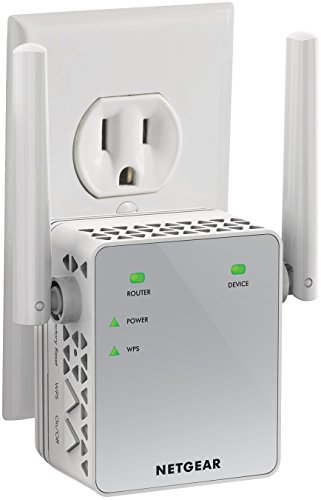
This older WiFi 5 plug in extender still does the basic job of pushing a signal into a spare room or garage. External antennas help it reach further than its price suggests. Throughput stays modest, so treat it as a fix for browsing and smart home devices rather than high resolution streaming.
Pros
- External antennas improve reach for the price
- Simple WPS setup with no app needed
- Cheap enough to try in an outbuilding
Cons
- Low throughput ceiling by modern standards
- Creates a separate network name on most routers
Side by side
| # | Model | Standard | Best for | Score | Price |
|---|---|---|---|---|---|
| 1 | TP-Link RE605X AX1800 WiFi Extender | WiFi 6, AX1800 class | Best overall | 9.4 | Check price |
| 2 | Netgear Nighthawk EAX15 AX1800 Mesh Extender | WiFi 6, AX1800 class | Best for whole home coverage | 9.2 | Check price |
| 3 | TP-Link RE315 AC1200 WiFi Extender | WiFi 5, AC1200 class | Best budget | 9.0 | Check price |
| 4 | Linksys RE7350 AX1800 WiFi 6 Extender | WiFi 6, AX1800 class | Best for Linksys networks | 8.8 | Check price |
| 5 | ASUS RP-AX58 AX3000 WiFi 6 Range Extender | WiFi 6, AX3000 class | Best throughput | 8.6 | Check price |
| 6 | D-Link DAP-X1870 AX1800 WiFi 6 Range Extender | WiFi 6, AX1800 class | Best simple setup | 8.3 | Check price |
| 7 | Netgear EX3700 AC750 WiFi Range Extender | WiFi 5, AC750 class | Best basic option | 8.0 | Check price |
What to look for
Placement matters more than the model you buy The single biggest mistake is plugging the extender into the dead zone itself. An extender can only rebroadcast what it receives, so it needs to sit roughly halfway between the router and the weak area, where signal is still solid. Most modern extenders include an indicator light or an app based spot finder for exactly this reason. Elevate it where possible, keep it clear of metal appliances and microwaves, and avoid tucking it behind furniture.
Extender, mesh node or powerline: which fits your problem A single extender is the right fix for one weak room. If several rooms and floors run weak, a mesh system replacing the router usually performs better than chaining extenders, since mesh nodes coordinate rather than compete. Powerline adapters are worth considering when the dead zone sits far away or behind very thick walls, since they use electrical wiring instead of fighting through masonry, though performance depends heavily on circuit age.
Bands, backhaul and the speed penalty Older single band extenders halve throughput because they receive and retransmit on the same radio. Dual band units avoid most of that by using one band to talk to the router and another to talk to devices. WiFi 6 models add efficiency in homes with many connected devices, which matters more than headline speed for most households. Upgrading an aging router may deliver more benefit than adding an extender to it.
Roaming, network names and ethernet ports Basic extenders create a second network name, so devices cling to the weak original signal instead of switching over. Mesh capable extenders such as TP-Link OneMesh or ASUS AiMesh models keep one name and hand devices over automatically, a noticeable quality of life improvement. Don’t overlook the ethernet port either: plugging a TV, console or desktop directly into the extender is usually the fastest connection in the room.
Common questions
Where should I put a WiFi extender?
About halfway between the router and the dead zone, where the existing signal still runs strong. Plugging it into the dead zone itself leaves it nothing good to rebroadcast. Use the app or the indicator light to confirm the position before settling on it.
Do WiFi extenders halve your internet speed?
Old single band extenders did, since they used one radio for both jobs. Modern dual band and WiFi 6 extenders dedicate a band to the router link, which greatly reduces the penalty. Expect lower speeds than standing next to the router, but far less than half on a well placed unit.
Extender or mesh system, which should I buy?
One weak room calls for an extender. A whole floor or several weak areas calls for a mesh system that replaces or supplements the router, since mesh nodes coordinate with each other. Mesh costs more but performs better across a large or awkward home.
Will an extender give me one network name or two?
Basic extenders create a second network name, which stops devices switching automatically. Mesh capable extenders such as OneMesh or AiMesh models keep a single name and hand devices between nodes. Check for that feature specifically if seamless roaming matters.
Do I need a WiFi 6 extender?
Only if the router and devices support WiFi 6 and the extra throughput matters. WiFi 6 helps most in homes with many connected devices. A WiFi 6 extender still works on a WiFi 5 router, just without the full benefit.
Can an extender reach an outbuilding or garage?
Sometimes, but thick masonry and distance work against wireless. A powerline adapter or an outdoor rated access point usually proves more reliable for a detached garage or garden office than pushing a signal through several walls.
Does an extender improve my internet plan speed?
No. It redistributes the connection already in the house into areas with poor coverage. An extender won’t fix a plan speed bottleneck, so confirm the speed near the router first.
How do I set up an extender without an app?
Most models support WPS: press the button on the router, then on the extender, to pair them. Alternatively, connect to the extender’s own setup network from a laptop and use the built in web page. Both routes skip manufacturer apps entirely.
Final word
TP-Link’s RE605X is the WiFi extender most households should buy, since OneMesh roaming and a gigabit port solve both the wireless and wired sides of a dead zone. Choose the Netgear Nighthawk EAX15 instead if the problem spans a whole floor and multiple ethernet ports matter. For one weak bedroom on a tight budget, the TP-Link RE315 gets the job done for very little.
Marcus Chen
Marcus covered consumer electronics for enthusiast tech publications for six years before joining ChoiceCrest. He specializes in translating manufacturer spec sheets into plain-language buying advice, with a focus on audio, computing accessories and smart-home gear.