6 Desk Phone Holders That Keep Screens at Eye Level
Lamicall’s Cell Phone Stand tops this list for stability and an adjustable angle at low cost. UGREEN’s Adjustable Phone Stand offers a wider tilt range for similar money. OMOTON’s Desktop Cell Phone Stand is the budget option and grips a phone securely in portrait or landscape.
Lamicall’s Cell Phone Stand holds a phone steadily at a genuinely useful angle. UGREEN’s Adjustable Phone Stand offers a wider tilt range for similar money, and OMOTON’s Desktop Cell Phone Stand covers the basics for very little.
Desk phone holders look like a solved problem, yet most cheap stands tip when tapped, block the charging port, or refuse to grip a phone with a thick case. We compared base weight and footprint, tilt and height range, whether a cable can pass through while docked, and how each stand behaves in landscape for video calls.
Our top picks
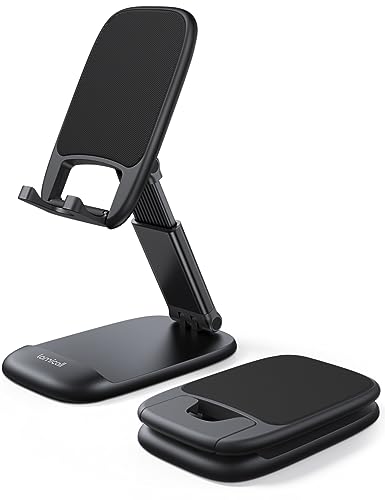
Lamicall Cell Phone Stand
A weighted aluminium base is what makes this work, since tapping the screen firmly does not rock the stand. Its cradle sits deep enough for a thick case and cuts out at the bottom so a cable passes straight through. A single hinge handles adjustment and holds its position over time.
Pros
- Weighted base resists tipping when tapping the screen
- Cable passes through while the phone is seated
- Works with thick cases fitted
Cons
- Tilt only, no height adjustment
- Fixed cradle depth limits very large tablets
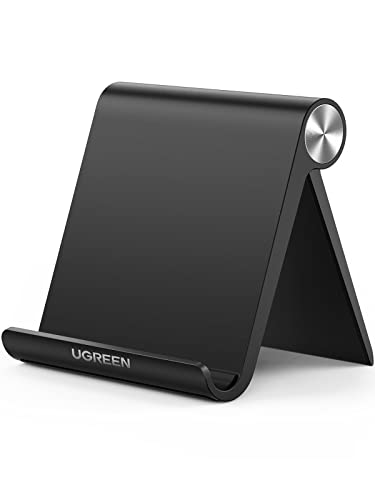
UGREEN Adjustable Phone Stand
A wider adjustment range than most stands here works for glancing at notifications and for propping a phone nearly upright on a call. Owners report the hinge stays tight rather than slowly drooping over months, the usual failure point. Folding flat enough for a bag suits anyone working from more than one desk.
Pros
- Broader tilt range than most stands here
- Hinge tension holds up over time
- Folds flat for travel between desks
Cons
- Lighter base than the Lamicall
- Folding design has more parts to loosen eventually
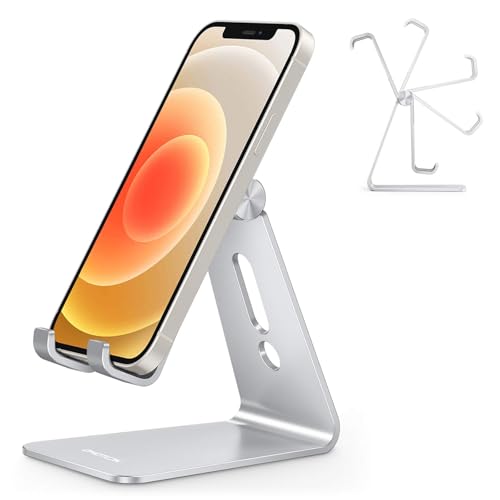
OMOTON Desktop Cell Phone Stand
A fixed angle aluminium wedge has no moving parts, so nothing loosens and nothing needs adjusting. Its angle suits desk viewing well, though it sits too low for a flattering video call. Silicone pads protect the phone and stop the stand sliding on a smooth desk.
Pros
- No moving parts to wear out or loosen
- Very low outlay for solid aluminium
- Silicone pads protect the phone and grip the desk
Cons
- Fixed angle cannot be adjusted at all
- Angle sits too low for flattering video calls

Nulaxy Cell Phone Stand
Height and angle both adjust here, the combination that actually gets a screen to eye level instead of just tilted. A wider base handles the extra leverage from the raised position. More desk space goes to this stand than the simple wedges, and it reads more like equipment than an accessory.
Pros
- Height adjustment gets the screen to eye level
- Wide base stays stable when raised
- Handles both phones and small tablets
Cons
- Takes noticeably more desk space
- More visually prominent than minimal stands
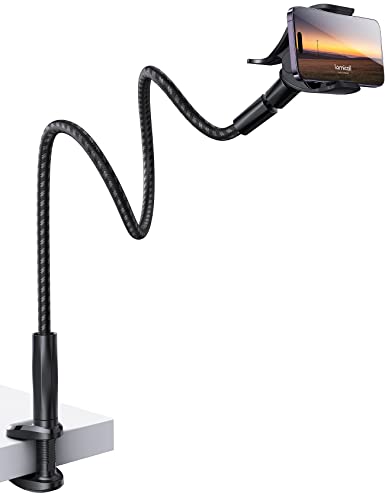
Lamicall Gooseneck Phone Holder
A clamp mounts to the desk edge, and a flexible arm puts the phone anywhere, including out over the desk or beside a monitor. That freedom is the appeal, though the arm sags slightly with a heavy phone at full extension. Freeing the desk surface entirely counts for a lot on a small desk.
Pros
- Positions the phone anywhere around the desk
- Uses no desk surface at all
- Clamp fits most desk thicknesses
Cons
- Arm sags slightly at full extension with a heavy phone
- Needs a suitable desk edge to clamp onto

Twelve South HiRise 3 for iPhone
A raised MagSafe charger lets the phone charge magnetically while sitting at viewing height, with no cable to plug in each time. Build quality sits a step above the generic stands. Owning or buying a MagSafe charger separately is required, since the stand does not include one.
Pros
- Charges magnetically with no cable to plug in
- Raised angle suits desk viewing and calls
- Noticeably better finish than generic stands
Cons
- MagSafe charger is a separate purchase
- Only useful with magnetically compatible phones

Elago P2 Aluminum Phone Stand
A single piece of shaped aluminium nearly disappears on a desk while still holding a phone at a readable angle. Nothing here adjusts, and nothing breaks. A tidy desk where appearance matters as much as function suits it best, less so heavy screen interaction.
Pros
- Visually unobtrusive on a tidy desk
- Solid single piece with nothing to fail
- Small footprint suits cramped desks
Cons
- Light enough to shift under firm screen taps
- No adjustment of any kind
What matters most
What makes a desk phone stand stable Rocking or tipping under a screen tap is the most common complaint about desk phone stands. Base weight and footprint relative to phone height decide that outcome. A heavy aluminium base with a wide contact area stays put, while a light folding stand at full height will not. Prioritise base weight over adjustability for anyone tapping the phone often.
What angle works best for calls versus glancing A shallow angle around fifteen to twenty degrees suits reading notifications or following a recipe. Video calls want the phone much closer to vertical and raised, since a low camera angle looks unflattering and forces a downward gaze. Fixed angle wedges suit the first case, so a height and tilt adjustable stand earns its extra desk space when calls happen regularly.
Will a stand fit my phone with a case on Two things matter before buying: whether the charging port stays reachable with the phone seated, and whether the cradle fits your case depth. Many stands are designed around a bare phone and grip poorly once a rugged case goes on. A cutout at the base of the cradle signals a design built with cables in mind.
Do wireless charging stands need anything extra A magnetic or wireless charging stand removes daily plugging in, which is genuinely convenient, but comes with conditions. The phone needs to support the standard, thick or metal cases can interfere with charging, and many stands hold a charger sold separately. Confirm what ships in the box, since MagSafe branded stands often exclude the charging puck itself.
How they compare
| # | Model | Material | Best for | Score | Price |
|---|---|---|---|---|---|
| 1 | Lamicall Cell Phone Stand | Aluminium with silicone pads | Best overall | 9.4 | Check price |
| 2 | UGREEN Adjustable Phone Stand | Aluminium alloy | Best value | 9.2 | Check price |
| 3 | OMOTON Desktop Cell Phone Stand | Aluminium | Best budget | 9.0 | Check price |
| 4 | Nulaxy Cell Phone Stand | Aluminium alloy | Best adjustable | 8.8 | Check price |
| 5 | Lamicall Gooseneck Phone Holder | Desk edge clamp | Best for hands-free viewing | 8.6 | Check price |
| 6 | Twelve South HiRise 3 for iPhone | MagSafe compatible iPhones | Best for MagSafe charging | 8.3 | Check price |
| 7 | Elago P2 Aluminum Phone Stand | Single piece aluminium | Best minimalist | 8.0 | Check price |
Common questions
Will a desk phone stand work with a case on?
Most do, though cradle depth varies. Stands with an open cradle and flexible grip handle thick cases well, while tight fixed slots built for a bare phone often will not. Check the stated maximum thickness for a rugged case.
Can I charge my phone while it sits in the stand?
Yes with most stands, provided the cradle has a cutout at the base for the cable. Product photos usually show that detail, since stands without it force a lift out to plug in.
What angle is best for a desk phone holder?
Around fifteen to twenty degrees works for glancing at a phone on a desk. Video calls need a steeper angle with the phone raised closer to eye level, which calls for a height adjustable stand.
Do phone stands work with tablets too?
Some do. Check the stated maximum device width and the base weight, since a tablet carries far more leverage than a phone and will tip a stand built only for phones.
Are gooseneck holders stable enough for a heavy phone?
They hold fine at moderate extension but sag slightly once a large phone sits out at the arm’s full reach. Keeping the phone closer to the clamp gives noticeably better stability.
Does a MagSafe stand charge as fast as a cable?
No, magnetic wireless charging runs slower than a wired connection and generates more heat. Treat it as a convenience for topping up through the day rather than the fastest way to refill a battery.
Will a metal stand scratch my phone?
Only if the contact points are bare metal. Every stand here uses silicone or rubber padding where the phone rests, and worn padding is an easy fix with adhesive felt pads.
Fixed angle or adjustable stand, which should I choose?
Fixed angle stands stay more stable and have nothing to loosen, suiting a phone mostly glanced at. Adjustable stands earn their extra parts for anyone taking video calls or sharing a desk with different devices.
Best phone stand for a standing desk?
A height adjustable model such as the Nulaxy Cell Phone Stand tracks a standing desk’s changing eye level better than a fixed wedge. Weighted base models still matter most if the desk vibrates when raised.
How much desk space does a phone stand need?
Minimal stands like the Elago P2 take a footprint smaller than a coaster. Height and tilt adjustable designs, including the Nulaxy, need roughly a coffee mug’s worth of extra clearance around the base.
The bottom line
Lamicall’s Cell Phone Stand suits most desks because its weighted base does not shift during actual use, and the cable cutout lets it charge while docked. UGREEN’s Adjustable Phone Stand is the better call for a wider angle range or something that folds into a bag. On a small desk where the phone stays a device mostly glanced at, OMOTON’s Desktop Cell Phone Stand costs very little and does not wobble.
Marcus Chen
Marcus covered consumer electronics for enthusiast tech publications for six years before joining ChoiceCrest. He specializes in translating manufacturer spec sheets into plain-language buying advice, with a focus on audio, computing accessories and smart-home gear.
You might also need
File Organisers That Keep Busy Desks Clutter Free
Keyboard Tray or Desk Level Setup: Which Fits You?
