Backup Cameras with USB C: Top Picks for Clear Reversing
The Zento Debut is the top pick for most drivers, offering a crisp 4.3 inch display, reliable USB C power, and an easy plate mount. Its main advantage is the combination of a bright screen and straightforward installation. The main limitation is that the camera is wired, so routing the cable may take some effort.
Backup cameras have become essential safety tools, and with USB C now common in vehicles, many drivers seek models that can plug directly into their car’s port. This roundup covers the best options available, focusing on video quality, durability, and ease of use.
We analyzed dozens of products, considering factors like resolution, night vision, field of view, and installation complexity. Our picks cater to different needs, from budget-friendly basic models to feature-rich systems for larger vehicles.
What to look for
What we recommend

Zento Debut 4.3 Inch Backup Camera
This license plate camera offers a crystal clear 4.3 inch monitor and a 120 degree viewing angle. It is powered via USB C, which simplifies connection to modern vehicles. Owners report that the image remains sharp even in low light due to the built in IR LEDs.
Pros
- Simple plate mount
- Bright screen
- Clear image
Cons
- Wired connection
- No wireless option

LeeKooLuu F6 Backup Camera with 5 inch Monitor
With a 5 inch display and IP69K waterproof rating, this camera is built for trucks and RVs. It features a 149 degree viewing angle and a 12V power adapter that can be converted to USB C. The monitor is bright enough for sunny days.
Pros
- Large screen
- Wide view
- Durable build
Cons
- Requires adapter for USB C
- Installation is more involved

NATIKA Backup Camera with 7 Inch Monitor
For those who want the best, this system includes a 7 inch touchscreen monitor and a camera with 1080p resolution. It uses USB C power for the monitor, and the camera connects wirelessly, making installation cleaner. The split screen function allows viewing of two cameras if needed.
Pros
- Large HD screen
- Wireless camera
- Split screen option
Cons
- Pricey
- Wireless signal can be affected by interference
ZDWORLD Universal Backup Camera
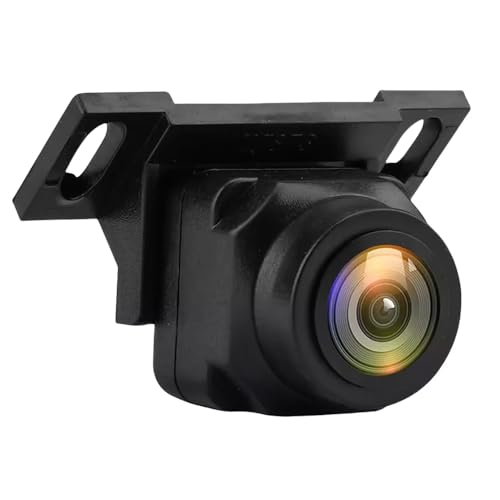
This affordable camera offers a 170 degree viewing angle and a mirror monitor that clips onto your existing rearview mirror. It runs on USB C power. While the resolution is not the highest, the wide angle covers blind spots effectively.
Pros
- Very affordable
- Wide angle
- No separate monitor mount
Cons
- Lower resolution
- Mirror may be too small for some

FalrCfir Wireless Backup Camera
This camera transmits a stable 5G WiFi signal to a 5 inch monitor that plugs into your USB C port. It offers a 150 degree view and excellent night vision. The wireless design means no need to run a long cable from the camera to the front.
Pros
- No cable routing
- Stable wireless
- Good night vision
Cons
- Requires power for camera (hardwired)
- Monitor may get warm
HOOMEOW Backup Camera with Magnetic Mount
This camera features a magnetic base that attaches to any metal surface, and the monitor is powered by USB C. It is ideal for temporary use or for vehicles where permanent installation is not desired. The camera has a 140 degree view and is weatherproof.
Pros
- Portable
- Easy to move between cars
- No drilling required
Cons
- Not as secure as permanent mount
- Cable from camera to monitor is long

AUTO-VOX V5 Pro Backup Camera
This camera has superior night vision thanks to its high sensitivity sensor and 6 IR LEDs. It connects to a 4.3 inch monitor that uses USB C power. The camera is compact and can be mounted on the plate or bumper.
Pros
- Excellent night clarity
- Compact design
- Clear image
Cons
- Monitor is small
- Camera is wired
Compared at a glance
| # | Model | Display | Best for | Score | Price |
|---|---|---|---|---|---|
| 1 | Zento Debut 4.3 Inch Backup Camera | 4.3 inch | Best Overall | 9.4 | Check price |
| 2 | LeeKooLuu F6 Backup Camera with 5 inch Monitor | 5 inch | Best for Large Vehicles | 9.1 | Check price |
| 3 | NATIKA Backup Camera with 7 Inch Monitor | 7 inch touchscreen | Best Splurge | 9.3 | Check price |
| 4 | ZDWORLD Universal Backup Camera | Mirror monitor | Best Budget | 8.7 | Check price |
| 5 | FalrCfir Wireless Backup Camera | 5 inch | Best Wireless | 8.9 | Check price |
| 6 | HOOMEOW Backup Camera with Magnetic Mount | 4.3 inch | Best Portable | 8.5 | Check price |
| 7 | AUTO-VOX V5 Pro Backup Camera | 4.3 inch | Best for Night Vision | 9.0 | Check price |
Frequently asked questions
Can I use a backup camera with USB C in any car?
Most cars with a USB C port can power the monitor, but the camera itself typically needs to be wired to the reverse light or a 12V source. Some models are entirely USB C powered, but they are less common. Check the product specifications to see how the camera receives power.
Do backup cameras with USB C have any delay?
Wired cameras generally have no noticeable delay. Wireless models may have a slight delay of 0.1 to 0.5 seconds, which is usually acceptable for reversing. However, if you are used to immediate feedback, a wired model is better.
How do I install a backup camera that uses USB C?
Installation varies. For the monitor, plug it into a USB C port. For the camera, you need to mount it at the rear and connect its power wire to the reverse light circuit. Some kits include a fuse tap. If you are not comfortable with electrical work, consider a professional installation.
What is the best resolution for a backup camera?
A resolution of at least 720p is recommended for a clear image. 1080p provides even more detail, which is helpful for reading license plates or spotting small objects. Higher resolution also improves night vision performance.
Can I leave the backup camera monitor plugged in all the time?
Most monitors are designed to turn on automatically when the vehicle starts or when reverse is engaged. If you leave it on constantly, it may drain your vehicle’s battery or overheat. Look for models with auto on/off features or use a switched power source.
Are wireless backup cameras reliable?
Modern wireless cameras use 5G WiFi or other frequencies and are generally reliable. However, they can be affected by interference from other devices or the vehicle itself. For best performance, choose a model with a strong signal and minimal lag.
Do backup cameras work at night?
Yes, most backup cameras have night vision capabilities using IR LEDs or a high sensitivity sensor. The image may be black and white in low light, but it should be clear enough to see obstacles. Check the product description for night vision details.
Can I add a backup camera to my truck or RV?
Absolutely. Many backup camera systems are designed for large vehicles. Look for models with a wider viewing angle and a larger monitor. Some even support multiple cameras for a full view around the vehicle.
What is the average lifespan of a backup camera?
With proper installation and weather resistance, a backup camera can last several years. Components like the camera lens may degrade over time, but most quality units are built to endure outdoor conditions. Regular cleaning can extend its life.
Do I need a special USB C cable for the backup camera monitor?
Generally, any standard USB C cable that supports power delivery will work. However, some monitors may require a certain voltage or current. Check the manual for requirements. Using a high quality cable can prevent power issues.
The verdict
For most drivers, the Zento Debut is the best choice because it balances price, performance, and simplicity. If you have a truck or RV and need a larger screen, the LeeKooLuu F6 is a solid upgrade. For those who want cutting edge features and are willing to spend, the NATIKA with a 7 inch touchscreen is the top pick. Ultimately, consider your vehicle and how you plan to use the camera, and you will find a model that fits your needs.
Marcus Chen
Marcus covered consumer electronics for enthusiast tech publications for six years before joining ChoiceCrest. He specializes in translating manufacturer spec sheets into plain-language buying advice, with a focus on audio, computing accessories and smart-home gear.