How Seven Streaming Sticks Compare on Speed and Apps
Roku Streaming Stick 4K ranks first for its simple interface and long range wireless receiver. Amazon Fire TV Stick 4K Max follows for raw speed and Wi-Fi 6E support. Amazon Fire TV Stick 4K takes third, matching the Max’s picture formats at a lower spec tier.
Roku Streaming Stick 4K suits most households, pairing a simple interface with strong wireless range. Amazon Fire TV Stick 4K Max wins on raw speed and Wi-Fi 6E. Amazon Fire TV Stick HD makes sense for older 1080p sets that skip 4K entirely.
Judging a stick by its spec sheet misses the real differences, which show up in memory, heat and wireless performance over time. Two devices with identical resolution support can feel completely different after a year of app updates. We compared processor and memory allowances, wireless standards, supported HDR and audio formats, remote features and what owners report about slowdown or Wi-Fi dropouts.
The best picks, ranked

Roku Streaming Stick 4K
Roku’s app grid stays simple even after years of updates. A long range wireless receiver sits inside the HDMI extender, holding a signal in rooms where other sticks lose bars. Dolby Vision and HDR10 cover nearly every current TV panel, and the voice remote controls TV power and volume directly.
Pros
- Interface stays easy for casual viewers
- Wireless signal holds up in distant rooms
- App and live TV catalogue covers nearly every service
Cons
- Sponsored tiles appear on the home screen
- Menu design looks plainer than Fire TV or Google TV

Amazon Fire TV Stick 4K Max (2nd Gen)
This stick opens heavy apps faster than any other model here. Wi-Fi 6E cuts through congestion in apartment buildings where standard bands get crowded. Amazon’s catalogue dominates the home screen, pushing promoted rows above your own apps.
Pros
- Fastest app launches in this lineup
- Wi-Fi 6E helps in crowded buildings
- Ambient art mode activates when idle
Cons
- Home screen promotes Amazon content heavily
- Ships with a power adapter instead of using TV USB
Amazon Fire TV Stick 4K (2nd Gen)
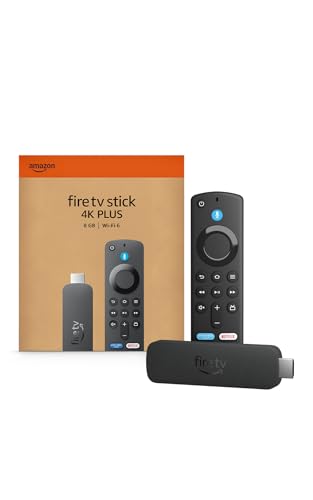
Picture output matches the Max model, including Dolby Vision and HDR10+. Wi-Fi 6 replaces Wi-Fi 6E, a difference most viewers never notice. Storage drops to 8 GB, and app switching runs slightly slower than the Max.
Pros
- Matches the Max’s picture formats
- Wi-Fi 6 handles most home networks well
- Full Fire TV app catalogue included
Cons
- Half the storage of the Max model
- App switching takes a beat longer
Google Chromecast with Google TV (4K)
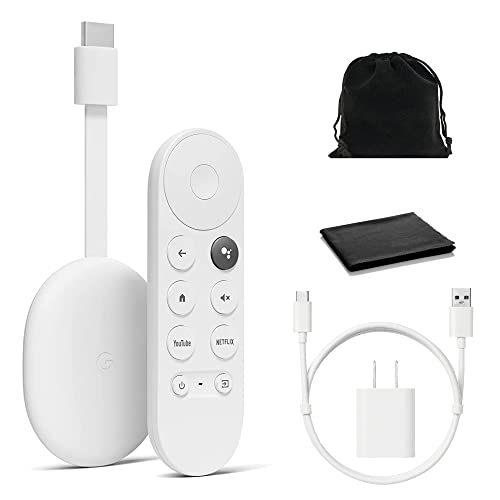
Google TV merges titles from every subscribed service into one continue watching row. Casting from a phone works the same way it always has, useful when guests want to share a video. Storage sits at 8 GB, tight enough that heavy app users end up uninstalling things.
Pros
- Cross service watchlist cuts down searching
- Phone casting works reliably
- Voice search returns strong results
Cons
- Limited storage fills quickly
- Interface feels cluttered until you learn it

Roku Express 4K Plus
A palm sized box replaces the stick shape for TVs with an awkward or blocked HDMI port. Roku software and the same app catalogue carry over from the Streaming Stick 4K. Wireless range falls short of the stick’s long range receiver, so keep it closer to the router.
Pros
- Fits ports a stick cannot reach
- Runs the same Roku software and apps
- Adhesive strip mounts it to the TV back
Cons
- No Dolby Vision support
- Wireless range trails the stick model

Amazon Fire TV Stick HD
A 1080p television gains nothing from 4K output, which makes this the sensible pick for a bedroom set, camper or garage screen. Interface matches the pricier Fire sticks, though a slower processor sits behind it. Owners report smooth single app viewing, with slowdown showing up when switching apps quickly.
Pros
- Modernises an older TV without overpaying for 4K
- Full Fire TV app catalogue
- Compact enough to pack for travel
Cons
- No 4K output available
- Switching between apps feels slower
Google Chromecast with Google TV (HD)
This version keeps Google TV’s unified watchlist and phone casting while dropping to 1080p output. A second television that never needed 4K fits this stick well. Storage matches the 4K model’s 8 GB allowance, so app management stays part of ownership.
Pros
- Unified watchlist stays intact at a lower tier
- Casting from phones and laptops works reliably
- Compact design hides behind the TV easily
Cons
- 1080p ceiling limits future use
- Storage fills after a few large apps
How to pick the right one
What matters most when choosing a streaming stick Four factors decide long term satisfaction: output resolution, HDR format support, available storage and wireless range. Matching these to your TV and home network matters more than brand loyalty. A 4K stick on a 1080p panel adds no visible benefit today, though it does future proof a later TV swap. Storage and heat management affect how smoothly a stick runs after two years of app updates, often more than the chip inside it.
Which HDR format does your TV support Dolby Vision and HDR10+ compete for the same job, and most televisions handle only one properly. Check your TV’s supported format before picking a stick, since output in an unsupported format just falls back to standard HDR. Roku’s Streaming Stick 4K covers Dolby Vision, Amazon’s Fire TV sticks cover both formats, and the Roku Express 4K Plus supports neither. That distinction changes which stick suits a specific television, not just which brand you prefer.
How storage and heat affect a stick after a year Sticks sit in an unventilated space directly behind a warm panel, and both heat and limited storage take a toll over time. App file sizes grow with every update, so an 8 GB device eventually forces you to uninstall something. Extra memory reduces stutter when resuming a paused show. Resolution grabs attention at purchase, but storage and heat management decide how a stick performs three years later.
Which stick works best for small apartments, older TVs or travel Wi-Fi 6E on the Fire TV Stick 4K Max cuts through interference in apartment buildings packed with competing networks. Older 1080p televisions gain nothing from 4K output, making the Fire TV Stick HD or a similar 1080p model the practical choice. Travelers benefit from a stick’s small size, though hotel Wi-Fi with a browser login page can complicate setup. Renters and small space owners should also weigh the Roku Express 4K Plus when an HDMI port sits in an awkward spot.
How they compare
| # | Model | Max output | Best for | Score | Price |
|---|---|---|---|---|---|
| 1 | Roku Streaming Stick 4K | 4K with Dolby Vision and HDR10 | Best overall | 9.4 | Check price |
| 2 | Amazon Fire TV Stick 4K Max (2nd Gen) | 4K with Dolby Vision and HDR10+ | Best for speed | 9.2 | Check price |
| 3 | Amazon Fire TV Stick 4K (2nd Gen) | 4K with Dolby Vision and HDR10+ | Best value | 9.0 | Check price |
| 4 | Google Chromecast with Google TV (4K) | 4K with Dolby Vision and HDR10+ | Best for cross app recommendations | 8.8 | Check price |
| 5 | Roku Express 4K Plus | 4K with HDR10 and HDR10+ | Best small box alternative | 8.6 | Check price |
| 6 | Amazon Fire TV Stick HD | 1080p HDR | Best budget | 8.3 | Check price |
| 7 | Google Chromecast with Google TV (HD) | 1080p HDR | Best for casting on a budget | 8.0 | Check price |
Good to know
Can a streaming stick run on a TV’s USB port?
Sometimes, though many manufacturers advise against it. TV USB ports often supply less current than a stick needs, causing random restarts. Plugging into the supplied power adapter is the reliable route, especially for 4K models.
How much internet speed does a streaming stick need?
A single 4K stream runs comfortably on about 25 Mbps, and HD needs only 5 to 10 Mbps. Connection stability matters as much as raw speed, particularly during live broadcasts.
Why do streaming sticks get so hot?
Design places them in an unventilated space directly behind the TV. An HDMI extender moves the stick away from the chassis, improving both heat and wireless reception.
Do streaming sticks work with any television?
Any TV with a free HDMI port supports one. Older sets with only composite or component inputs need an adapter, and picture quality through those converters rarely justifies the effort.
Which streaming stick has the most apps?
Roku and Fire TV both carry broad catalogues, including nearly every live TV service. Google TV trails only slightly. Differences now come down to interface preference rather than missing apps.
Do streaming sticks slow down over time?
Owners report that limited storage and memory cause slowdown well before software support ends, since app sizes grow with each update. Picking a model with more storage limits the effect.
Is a streaming stick good for travel?
Yes, small size makes them popular for hotel rooms. Captive portal Wi-Fi that requires a browser login can complicate setup, so a phone hotspot or travel router often works better.
Streaming stick vs set top box: which is the better buy?
A stick suits normal app viewing and hides completely behind the TV. A box makes more sense when you need Ethernet for live sport, extra storage, an HDMI input or a remote finder.
Which streaming stick is best for an older 1080p TV?
Amazon Fire TV Stick HD and the Chromecast with Google TV HD both skip 4K output, matching the panel’s real resolution. Paying extra for 4K support on a 1080p set adds no visible benefit.
The bottom line
Roku Streaming Stick 4K remains the pick for most televisions, combining a simple interface with strong wireless range and a complete app catalogue. Choose the Amazon Fire TV Stick 4K Max when speed and Wi-Fi 6E congestion handling matter more than a clean home screen. Pick the Fire TV Stick HD for a 1080p television that has no plans to change.
Marcus Chen
Marcus covered consumer electronics for enthusiast tech publications for six years before joining ChoiceCrest. He specializes in translating manufacturer spec sheets into plain-language buying advice, with a focus on audio, computing accessories and smart-home gear.
You might also need

Gaming Keyboards Compared by Switch Type and Response Speed

Compact Flight Sticks That Save Desk Space Without Sacrificing Control
Keyboard Stands Compared: X-Style, Z-Style, and Table