Which Bluetooth Keyboard Fits Your Multi-Device Desk?
Logitech MX Keys leads this comparison for office workers who juggle a laptop and desktop, thanks to backlit keys and steady three-device Bluetooth. Budget-conscious multitaskers should look at the Logitech K380 instead. Mac and iPad owners get the smoothest setup from the Apple Magic Keyboard, which pairs automatically through a shared Apple ID.
Logitech MX Keys suits office workers splitting time between a laptop and a desktop. Backlit keys and Logi Bolt or Bluetooth pairing switch across three devices with one button. It costs more than every Bluetooth-only board in this lineup.
Battery chemistry, switch type, and OS support vary enough to make comparison shopping confusing. We compared listed connectivity specs, owner feedback on pairing stability, and battery claims across office, Mac, and multi-device use cases.
The shortlist, ranked

Logitech MX Keys Wireless Illuminated Keyboard
Bluetooth Low Energy or a Logi Bolt USB receiver connects this board to three devices at once. One button press, called Easy-Switch, moves between them instantly. Auto-adjusting backlighting responds to ambient light, and the full-size layout keeps arrow keys and page controls within reach.
Pros
- Backlit keys adjust brightness automatically in low light
- Easy-Switch button moves across three paired devices instantly
- Rechargeable battery skips constant AAA replacement
Cons
- Costs more than most Bluetooth-only keyboards
- Full-size layout takes up extra desk space

Logitech K380 Multi-Device Bluetooth Keyboard
Three devices pair over Bluetooth with the K380, switching through a dedicated button. Two AAA batteries power it for up to 24 months, according to the listing. A compact 78-key layout skips the number pad to save desk space.
Pros
- Switches across three Bluetooth devices with one button
- AAA battery life rated near two years
- Compact frame fits small desks and laptop stands
Cons
- No backlighting for typing in dim rooms
- Missing number pad slows spreadsheet entry

Apple Magic Keyboard
Apple ID linked devices pair automatically with this board, skipping manual Bluetooth setup on a Mac or iPad. A built-in rechargeable battery lasts about a month per charge, based on Apple’s specifications. Scissor-switch keys keep a low profile without sacrificing key travel.
Pros
- Automatic pairing across Apple ID linked devices
- Low profile scissor switches feel stable under fast typing
- Built in battery removes AAA replacement costs
Cons
- Limited multi-device switching outside the Apple ecosystem
- Windows support lacks native media key mapping

Keychron K3 Max
Hot-swappable low-profile mechanical switches let owners change typing feel without soldering. Bluetooth 5.1 connects to three devices, plus a 2.4GHz dongle or wired USB-C. A 4000mAh battery keeps it running for weeks with the backlight off, per the listing.
Pros
- Hot swappable mechanical switches suit different typing feels
- Three connection modes cover desktop, laptop, and tablet setups
- Large battery reduces charging frequency
Cons
- Mechanical switches run louder than membrane keyboards
- Low profile keycaps limit aftermarket customization options

Arteck HB030B Universal Bluetooth Keyboard
A slim aluminum alloy body under a third of an inch thick keeps this board light for travel. Bluetooth 3.0 pairs with one device at a time, which simplifies setup but limits multitasking across gadgets. Two AAA batteries run for roughly six months per the manufacturer’s rating.
Pros
- Slim aluminum build resists flex during travel
- Simple single device pairing avoids switching confusion
- Budget price undercuts most backlit competitors
Cons
- No multi-device switching without re-pairing manually
- Lacks backlighting found on pricier models

iClever BK10 Compact Bluetooth Keyboard
An 81-key compact layout drops the number pad but keeps arrow keys intact. Bluetooth 5.1 links up to three devices, and a rechargeable battery lasts roughly 85 hours with the backlight on. Seven adjustable backlight colors help match a desk setup.
Pros
- Rechargeable battery avoids ongoing AAA costs
- Backlight offers seven color options for low light use
- Compact size fits tight desks and travel bags
Cons
- Smaller key spacing takes adjustment for larger hands
- Backlight drains battery faster than unlit use
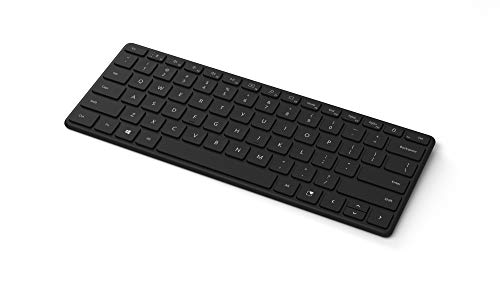
Microsoft Designer Compact Keyboard
Two AAA batteries power this board for up to 36 months, according to Microsoft’s specifications. Bluetooth Low Energy 5.0 connects up to three devices, with a dedicated Microsoft 365 key for quick app switching. The compact frame skips the number pad entirely.
Pros
- Battery rating near three years cuts replacement frequency
- Dedicated Microsoft 365 key speeds access to Office apps
- Compact frame leaves room for a mouse close by
Cons
- Optimized for Windows, with limited macOS key mapping
- No backlighting for typing in dark rooms
What to look for
What to check before buying a Bluetooth keyboard Battery type decides long-term cost. Rechargeable boards like the MX Keys and Keychron K3 Max need periodic USB-C charging. AAA-powered boards, including the K380 and Arteck HB030B, run for months between swaps. Bluetooth Low Energy versions such as 5.0 and 5.1 generally hold a steadier link than older Bluetooth 3.0 hardware. Compatibility varies by OS, so confirm macOS, Windows, iOS, or Android support before ordering.
Best Bluetooth keyboards for switching between multiple devices Anyone working across a laptop, tablet, and phone benefits from an Easy-Switch style button. Both the Logitech K380 and iClever BK10 pair with three devices and swap between them instantly. Arteck’s HB030B, by contrast, holds one Bluetooth connection at a time. That design suits a single-device desk better than a multitasking setup.
Which Bluetooth keyboard fits Mac and iPad users Apple Magic Keyboard pairs automatically once devices share an Apple ID. Its scissor-switch keys mirror the feel of a MacBook keyboard, which shortens the adjustment period. Windows-focused boards like the Microsoft Designer Compact Keyboard still work with a Mac, but they lose native media key functions.
Mechanical vs membrane keys for heavy typists Writers and coders who type for hours often prefer tactile feedback over flat membrane keys. Keychron K3 Max uses hot-swappable mechanical switches, so the feel can change without new hardware. Membrane and scissor-switch boards, including the MX Keys and K380, stay quieter for shared offices or video calls.
The lineup, side by side
| # | Model | Connectivity | Best for | Score | Price |
|---|---|---|---|---|---|
| 1 | Logitech MX Keys Wireless Illuminated Keyboard | Bluetooth Low Energy plus Logi Bolt USB receiver | Best overall | 9.4 | Check price |
| 2 | Logitech K380 Multi-Device Bluetooth Keyboard | Bluetooth with Easy-Switch across 3 devices | Best for switching between multiple devices | 9.1 | Check price |
| 3 | Apple Magic Keyboard | Bluetooth, auto-pairs with linked Apple ID devices | Best for Mac and iPad | 8.9 | Check price |
| 4 | Keychron K3 Max | Hot swappable low profile mechanical switches | Best for typing feel | 8.7 | Check price |
| 5 | Arteck HB030B Universal Bluetooth Keyboard | Bluetooth 3.0, single-device pairing | Best budget | 8.4 | Check price |
| 6 | iClever BK10 Compact Bluetooth Keyboard | Bluetooth 5.1, switches across 3 devices | Best compact | 8.2 | Check price |
| 7 | Microsoft Designer Compact Keyboard | Bluetooth Low Energy 5.0, up to 3 devices | Best for long battery life | 8.0 | Check price |
Common questions
What is the difference between Bluetooth and 2.4GHz dongle keyboards?
Bluetooth pairs directly with a device’s built-in radio, so no USB port gets used. A 2.4GHz dongle, like the Keychron K3 Max offers in its wired mode, plugs into a USB-A port and often reconnects faster after sleep. Bluetooth suits tablets and phones that lack a spare USB port.
Can one Bluetooth keyboard connect to multiple devices?
Several models here, including the MX Keys, K380, and iClever BK10, pair with up to three devices and switch with a button press. Others, such as the Arteck HB030B, hold only one Bluetooth connection and need manual re-pairing to change devices.
How long do Bluetooth keyboard batteries actually last?
Rated battery life ranges widely by design. AAA-powered boards like the K380 and Microsoft Designer Compact Keyboard claim 24 to 36 months per set, according to their listings. Rechargeable models like the MX Keys need a USB-C charge roughly every 5 months without backlighting.
Is a mechanical Bluetooth keyboard worth it for typing?
Mechanical switches, as used on the Keychron K3 Max, give more tactile feedback than membrane or scissor-switch boards. Typists who write for hours often notice less finger fatigue. The tradeoff is more noise, which matters in shared offices.
Which Bluetooth keyboard works best with a Mac?
Apple Magic Keyboard integrates most closely with macOS, pairing automatically through an Apple ID and matching the native keyboard layout. Multi-device boards like the MX Keys also support macOS, but they require manual Bluetooth pairing the first time.
Do Bluetooth keyboards work with Android tablets?
Most boards in this comparison list Android compatibility, including the K380, iClever BK10, and Arteck HB030B. Pairing follows the same Bluetooth settings menu used for phones, though some function keys may not map to Android shortcuts.
Bluetooth keyboard or USB dongle keyboard, which fits a laptop better?
A dongle keeps a dedicated USB-A port occupied but often reconnects instantly after a laptop wakes. Bluetooth frees that port for other accessories, which matters on laptops with limited ports. Keychron K3 Max offers both options on one keyboard.
Why does a Bluetooth keyboard keep disconnecting?
Interference from other 2.4GHz devices, low battery charge, or an outdated Bluetooth driver commonly causes drops. Owners report that updating firmware and staying within about 30 feet of the paired device reduces disconnects.
Are backlit Bluetooth keyboards worth the extra cost?
Backlighting helps in dim rooms or late-night typing sessions, and models like the MX Keys and iClever BK10 include it. Boards without backlighting, such as the Arteck HB030B, cost less but require good ambient light. The choice comes down to where and when typing happens most.
What is the best Bluetooth keyboard for a small desk?
Compact layouts without a number pad, like the K380, iClever BK10, and Microsoft Designer Compact Keyboard, free up several inches of desk space. Dropping the number pad slows spreadsheet-heavy work, so frequent number entry favors a full-size board like the MX Keys instead.
The verdict
Logitech MX Keys earns the top spot for anyone moving between a desktop and laptop daily. Its backlit keys and Logi Bolt pairing prove more reliable than plain Bluetooth on budget boards. Heavy multi-device users on a budget should pick the Logitech K380 instead, given its near two-year AAA battery life and instant three-device switching. Mac and iPad only households get closer native integration from the Apple Magic Keyboard, though it loses ground for anyone bouncing between Windows machines too.
Marcus Chen
Marcus covered consumer electronics for enthusiast tech publications for six years before joining ChoiceCrest. He specializes in translating manufacturer spec sheets into plain-language buying advice, with a focus on audio, computing accessories and smart-home gear.