7 Multi Port Chargers That Power Every Device at Once
Anker Prime 250W GaN Charging Station leads for sheer capacity and a desk friendly port layout. UGREEN Nexode 100W 4-Port GaN Charger balances laptop class output with a compact body. Baseus 65W GaN5 Pro 4-Port Charger covers phones, tablets and a thin laptop on a tight budget.
One brick handling a laptop, a phone and a pair of earbuds needs the headroom of the Anker Prime 250W GaN Charging Station. The UGREEN Nexode 100W 4-Port GaN Charger covers the same jobs in a much smaller package. Tight budgets do well with the Baseus 65W GaN5 Pro instead.
Multi port chargers get tricky because the headline wattage on the box rarely matches what each port delivers once every socket fills up. We compared published power sharing tables, port counts, USB-C versus USB-A mixes, plug design and reported heat behavior. The seven chargers below are ranked on how predictably they split power under real multi device loads.
Our top picks

Anker Prime 250W GaN Charging Station
Six ports and 250W combined let this charger run two laptops with room left for a phone and tablet. A display shows live per port draw, removing most guesswork about power sharing. Desk duty suits it better than travel, though it replaces an entire strip of separate adapters.
Pros
- Enough total power for two laptops plus accessories
- Live wattage display shows real per port output
- Six ports covers a whole desk from one outlet
Cons
- Too large and heavy for a travel bag
- Attached power cable takes up desk space

UGREEN Nexode 100W 4-Port GaN Charger
One hundred watts across four ports lands in the sweet spot for most people, and the body stays small enough to travel. Owners report a 13 inch laptop charges near full speed even with a phone attached. Foldable prongs matter more than they sound once this lives in a bag.
Pros
- Laptop class output in a genuinely portable body
- Sensible port mix for mixed device households
- Foldable prongs survive daily bag life
Cons
- Power drops noticeably once all four ports load
- Runs warm under sustained full load

Baseus 65W GaN5 Pro 4-Port Charger
Sixty five watts covers a phone, a tablet and a thin and light laptop, and this ranks among the smallest four port bricks offering it. Based on specifications the first USB-C port gets priority, so plug the laptop there. A bedside or bag charger fits this role well.
Pros
- Very small for a four port charger
- Handles a thin laptop plus two phones
- Foldable plug and light weight suit travel
Cons
- Not enough total power for a large laptop under load
- Per port output falls sharply with four devices attached

Belkin BoostCharge Pro 4-Port GaN Charger 108W
Belkin built this around a strong primary USB-C port, useful when a laptop is the main job and phones stay secondary. Safety certification and warranty coverage run more thorough than most rivals, which matters for a charger left unattended. Bulk runs higher than the UGREEN at similar output.
Pros
- Strong single port output for demanding laptops
- Thorough safety certification and warranty backing
- Stable performance when ports are mixed
Cons
- Larger than rivals at the same wattage
- Only one USB-A port for older accessories
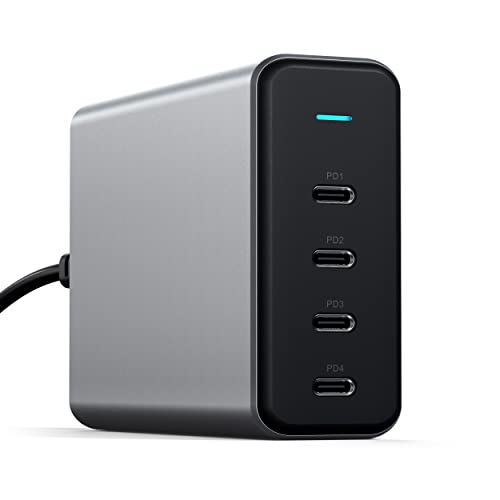
Satechi 165W USB-C 4-Port GaN Charger
All four ports run USB-C here, and the total sits high enough to run two laptops without either dropping to trickle speed. That all C layout suits modern gear but frustrates anyone still holding USB-A cables. Aluminum housing sheds heat well and sits neatly next to a monitor.
Pros
- Runs two laptops at usable speeds
- All USB-C layout suits current devices
- Metal body helps manage heat
Cons
- No USB-A port for older cables
- Detachable cable adds another thing to lose

Anker 737 Charger GaNPrime 120W
120W fits inside something you can close your hand around, which is the whole argument for this charger. Dynamic power allocation shifts wattage between ports as devices fill up, suiting a hotel room where everything charges overnight. Three ports mark the ceiling, so it will not replace a desk hub.
Pros
- High wattage in a very compact brick
- Reallocates power automatically as devices finish
- Foldable prongs and light weight for travel
Cons
- Only three ports total
- Gets warm when pushed near its ceiling
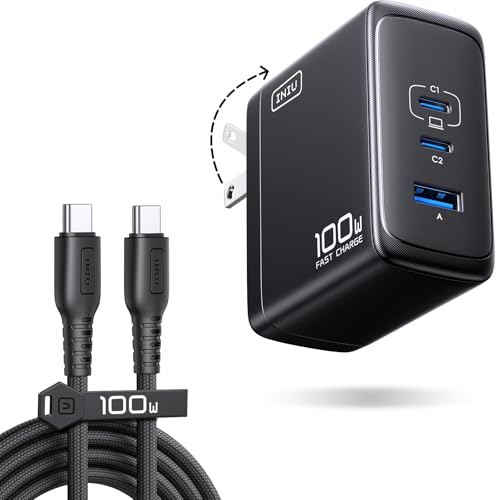
INIU 100W 4-Port GaN Fast Charger
Port mix here leans toward phones and tablets rather than one power hungry laptop, fitting a household where four people need a top up at once. Owners report steady output across all four ports rather than one dominant socket. Build quality stays plainer than premium options, but the fundamentals hold up.
Pros
- Even power split suits several phones at once
- Includes a usable cable in the box
- Good port count for the price
Cons
- Primary port is weaker than laptop focused rivals
- Plainer build and finish than premium brands
What matters most
Is total wattage the same as per port wattage? The number printed on the box is the sum available across every port, and almost every charger reallocates it the moment a second device plugs in. A 100W charger might give a laptop the full amount alone, then drop it to 65W once a phone joins. Check the power distribution table in the listing or manual, since that table shows what happens in the situation you will actually be in.
Why does GaN matter for size and heat? Gallium nitride switches more efficiently than older silicon designs, meaning less waste heat and a smaller body for the same output. In practice that is the difference between a brick blocking two outlets and one sitting neatly in a power strip. Every charger ranked here uses GaN, and it remains the single most useful spec to filter on when comparing similar wattages.
How do I match port mix to the devices I own? Count your cables before counting the ports. An all USB-C charger looks forward thinking but strands anything with a USB-A cable, and plenty of accessories, older headphones and battery packs still ship that way. Three USB-C plus one USB-A covers most households today, while a two and two split works better if half your gear is a few years old.
What should travelers check beyond wattage? Foldable prongs decide whether a charger survives a bag or tears the lining. Weight and shape matter too, since a wide brick can block the second socket on a hotel nightstand. Crossing borders only needs a plug adapter if the charger accepts 100 to 240 volt input, which every model here does.
The lineup, side by side
| # | Model | Total output | Best for | Score | Price |
|---|---|---|---|---|---|
| 1 | Anker Prime 250W GaN Charging Station | 250W | Best overall | 9.4 | Check price |
| 2 | UGREEN Nexode 100W 4-Port GaN Charger | 100W | Best value | 9.2 | Check price |
| 3 | Baseus 65W GaN5 Pro 4-Port Charger | 65W | Best budget | 9.0 | Check price |
| 4 | Belkin BoostCharge Pro 4-Port GaN Charger 108W | 108W | Best for laptops | 8.8 | Check price |
| 5 | Satechi 165W USB-C 4-Port GaN Charger | 165W | Best for desk setups | 8.6 | Check price |
| 6 | Anker 737 Charger GaNPrime 120W | 120W | Best for travel | 8.3 | Check price |
| 7 | INIU 100W 4-Port GaN Fast Charger | 100W | Best for families | 8.0 | Check price |
Questions worth asking
Can one charger safely power a laptop and a phone at once?
Yes. Multi port chargers negotiate power with each device using USB Power Delivery, and the charger will not push more than a device requests. The main consequence is the laptop may charge more slowly while the phone stays attached.
How many watts do I actually need?
A phone is happy with 20 to 30W, a tablet around 30 to 45W, a thin laptop 45 to 65W and a larger laptop 90 to 100W. Add up the devices charged simultaneously and pick a charger with a comfortable margin above that total.
Does a higher wattage charger damage a phone?
No. The device requests the power level it wants, so a 100W charger delivers the same safe amount to a phone as a small 20W adapter. Higher wattage only matters once the device is capable of accepting it.
Is GaN worth paying more for?
For a multi port charger, generally yes. GaN designs run cooler and pack the same output into a noticeably smaller body, exactly what a brick handling several devices at once needs.
Why does my laptop charge slower when other ports are in use?
Chargers share a fixed total power budget. Once a second or third device connects, the controller reallocates wattage, usually reducing the primary port. Check the manufacturer power distribution table to see the exact split.
Do I need special cables to hit the advertised charging speed?
Often yes. Anything above 60W needs a USB-C cable rated for 100W or 240W with an E-marker chip. A cheap charging cable quietly caps speed no matter how capable the charger is.
Are USB-A ports still worth having on a new charger?
If older headphones, battery packs or other accessories are still in use, yes. USB-A ports run slower, but they save buying replacement cables for gear that otherwise works fine.
Can multi port chargers be used overseas?
All seven chargers here accept 100 to 240 volt input, so a simple plug shape adapter is enough. A bulky, failure prone voltage converter is not needed.
Final word
A desk that has to feed everything at once needs the headroom of the Anker Prime 250W GaN Charging Station, and its live wattage display removes the mystery from power sharing. Most people get better everyday value from the UGREEN Nexode 100W 4-Port GaN Charger, which covers a laptop and two phones in something that still travels. Anyone skipping a large laptop should treat the Baseus 65W GaN5 Pro 4-Port Charger as the sensible second charger.
Marcus Chen
Marcus covered consumer electronics for enthusiast tech publications for six years before joining ChoiceCrest. He specializes in translating manufacturer spec sheets into plain-language buying advice, with a focus on audio, computing accessories and smart-home gear.