The Best Computer Speaker Sets for Every Desk Setup
The Audioengine A2+ Wireless stands out as the top pick for most users. It delivers rich, detailed sound in a compact size, ideal for desktop listening. Its main advantage is the combination of high-fidelity audio and wireless connectivity. A limitation is the higher price compared to budget options.
Upgrading your computer speakers can transform your daily experience. Whether you are gaming, streaming, or working, clear audio matters. But the market is flooded with options. We compared top sets to help you choose.
Our picks range from budget-friendly to premium. Each set has its strengths. We focused on real-world usage and what owners report. This guide simplifies your decision.
What we recommend

Audioengine A2+ Wireless
The Audioengine A2+ Wireless delivers exceptional sound in a compact design. It features a built-in DAC and Bluetooth. Owners praise its clarity and depth. Ideal for music lovers who want premium desktop audio.
Pros
- Superb sound quality
- Compact footprint
- Versatile connections
Cons
- Pricey
- No subwoofer output
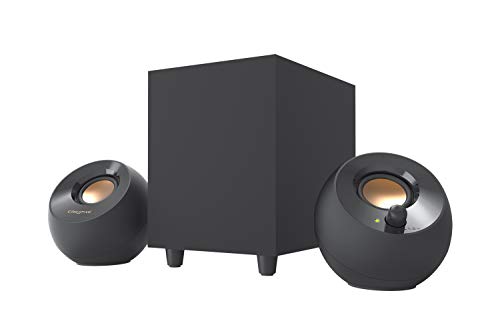
Creative Pebble Plus 2.1
The Creative Pebble Plus offers a 2.1 system with a subwoofer at an unbeatable price. It provides surprising bass and clear mids. Perfect for users on a tight budget who still want decent sound.
Pros
- Great value
- Included subwoofer
- Compact design
Cons
- Limited volume
- No Bluetooth

Logitech Z407
The Logitech Z407 delivers immersive sound with a wireless control pod. It offers Bluetooth, micro-USB, and 3.5mm inputs. Gamers appreciate the deep bass and adjustable sound. Its sleek design fits any desk.
Pros
- Powerful bass
- Wireless controls
- Multiple inputs
Cons
- Satellite quality average
- Control pod battery
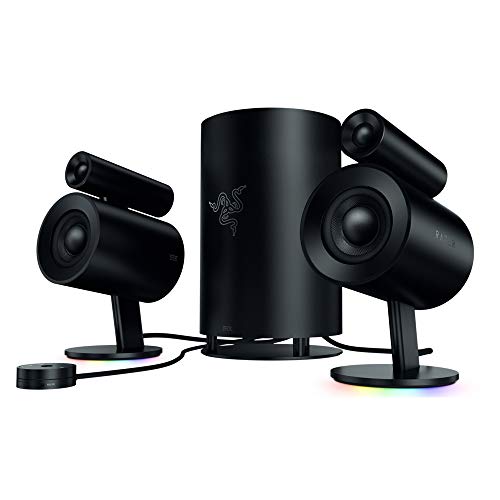
Razer Nommo Pro
The Razer Nommo Pro is a premium 2.1 system with THX-certified audio. It features Dolby virtual surround and a wireless subwoofer. Audiophiles will appreciate the crisp highs and deep lows. It is built for serious immersion.
Pros
- Exceptional soundstage
- THX certification
- Wireless subwoofer
Cons
- Very expensive
- Large footprint
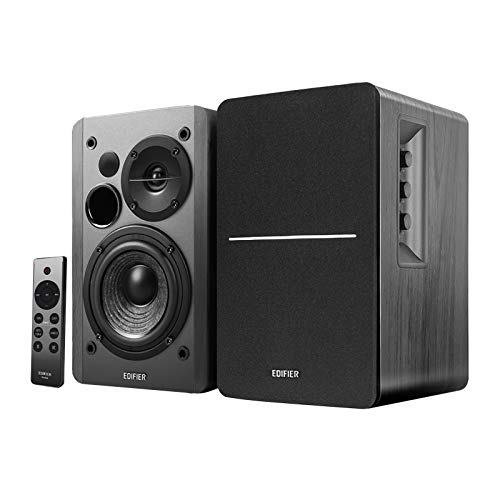
Edifier R1280DB
The Edifier R1280DB bookshelf speakers offer a warm, natural sound. They support Bluetooth and optical inputs. Wood finish adds classic style. Ideal for music enthusiasts on a mid-range budget.
Pros
- Rich sound
- Multiple inputs
- Elegant design
Cons
- Large for small desks
- No subwoofer output
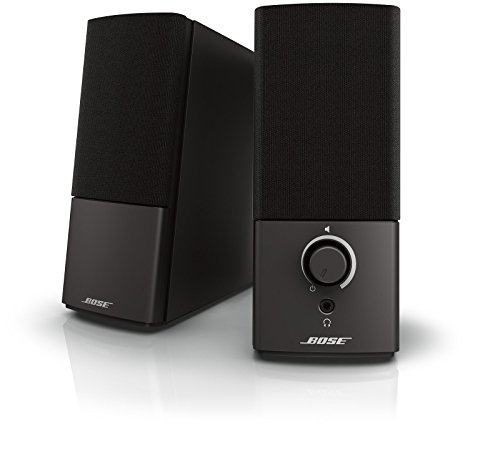
Bose Companion 2 Series III
The Bose Companion 2 Series III provides clear, balanced audio. It is known for excellent vocal reproduction. Simple setup with aux and headphone jack. Great for podcasts and conference calls.
Pros
- Crisp vocals
- Simple design
- Trusted brand
Cons
- No Bluetooth
- Limited bass

Klipsch ProMedia 2.1
The Klipsch ProMedia 2.1 is famous for its powerful output and dynamic sound. It includes a 6.5 inch subwoofer and satellite speakers. Handles high volumes without distortion. Excellent for movies and games.
Pros
- Loud and clear
- Strong bass
- Works well at high volume
Cons
- Wired only
- Bulky subwoofer
How they compare
| # | Model | Type | Best for | Score | Price |
|---|---|---|---|---|---|
| 1 | Audioengine A2+ Wireless | Powered bookshelf | Best Overall | 9.4 | Check price |
| 2 | Creative Pebble Plus 2.1 | 2.1 system | Best Budget | 8.6 | Check price |
| 3 | Logitech Z407 | 2.1 system | Best for Gaming | 8.9 | Check price |
| 4 | Razer Nommo Pro | 2.1 system | Best for Audiophiles | 9.1 | Check price |
| 5 | Edifier R1280DB | Powered bookshelf | Best for Music | 8.8 | Check price |
| 6 | Bose Companion 2 Series III | 2.0 system | Best for Clear Vocals | 8.4 | Check price |
| 7 | Klipsch ProMedia 2.1 | 2.1 system | Best for High Volume | 8.7 | Check price |
How to pick the right one
Questions worth asking
Do I need a subwoofer for computer speakers?
Not always. If you enjoy bass-heavy music or movies, a subwoofer adds depth. For general use, 2.0 speakers are fine. Many 2.1 systems include a sub for better low-end.
Can I use computer speakers with a TV?
Yes, if they have the right inputs. Optical or RCA connections work. Some speakers have Bluetooth for wireless TV connection. Check your TV’s outputs.
What is the difference between powered and passive speakers?
Powered speakers have built-in amplifiers. They are plug-and-play. Passive speakers need an external amp. Most computer speakers are powered for simplicity.
How important is wattage in speakers?
Wattage indicates power handling and potential loudness. Higher wattage can play louder without distortion. But efficiency and driver quality also matter. For desktop use, 20-30W is usually sufficient.
Are Bluetooth speakers good for gaming?
Bluetooth can add latency, which is bad for gaming. Wired connections are better. However, some modern speakers have low-latency Bluetooth. Still, for serious gaming, a wired set is preferable.
Can I connect multiple speakers to one computer?
Usually, you can use a splitter or a sound card with multiple outputs. But most computers support one audio output at a time. Some speakers can be daisy-chained if they have an output port.
Do I need a sound card for better audio?
Modern motherboards have decent onboard audio. If you are using USB speakers, the DAC is inside the speaker. For analog, an external DAC can improve quality, but it is not essential for most.
How do I reduce speaker static or interference?
Keep speakers away from wireless routers and phones. Use shielded cables. Ensure your audio source is grounded. If static persists, try a different input or a ground loop isolator.
What should I look for in speaker materials?
Wood cabinets reduce resonance better than plastic. Cloth grilles are less prone to vibration. The build quality affects sound. Higher-end speakers use MDF or real wood.
Are gaming speakers different from regular ones?
Gaming speakers often emphasize surround sound and bass. They may have RGB lighting. But audio quality is similar. Many regular speakers work well for gaming.
Our take
For most users, the Audioengine A2+ Wireless is the best computer speaker set. It offers superb sound and versatile connectivity. If you are on a budget, the Creative Pebble Plus is a solid choice. Gamers should consider the Logitech Z407. Ultimately, pick based on your priorities.
Marcus Chen
Marcus covered consumer electronics for enthusiast tech publications for six years before joining ChoiceCrest. He specializes in translating manufacturer spec sheets into plain-language buying advice, with a focus on audio, computing accessories and smart-home gear.