What Makes a 75-Inch TV Worth the Living Room Space
Samsung QN90C ranks first, pairing a Mini-LED backlight with anti-glare coating and four HDMI 2.1 ports. Hisense U8K matches much of that brightness for far less outlay. Sony Bravia XR X90L is the accuracy pick, with upscaling that rescues cable and older streaming feeds.
Samsung QN90C is the safest all-round 75 inch buy, strong on glare rejection and gaming ports alike. Hisense U8K takes the value slot with Mini-LED brightness at a lower tier. Sony Bravia XR X90L suits households still watching plenty of broadcast and cable.
Showroom lighting hides the differences that matter at home: how a panel handles a sunlit wall, a dark movie scene, and fast motion. Selections here rest on published panel technology, refresh rates, port counts, and consistent owner feedback about dimming behavior and interface speed.
What we recommend

Samsung QN90C 75-Inch Neo QLED
Mini-LED backlighting and an anti-glare layer keep the QN90C readable opposite a window, which few panels manage at this size. Four HDMI 2.1 inputs handle 4K at 120Hz, so consoles and a soundbar coexist without swapping cables. Motion stays clean on fast pans, which suits football and hockey.
Pros
- Anti-glare layer beats window reflections
- Four inputs run 4K at 120Hz
- Judder-free panning on sport
Cons
- Priciest of these seven at 75 inches
- Color shifts from far side seats
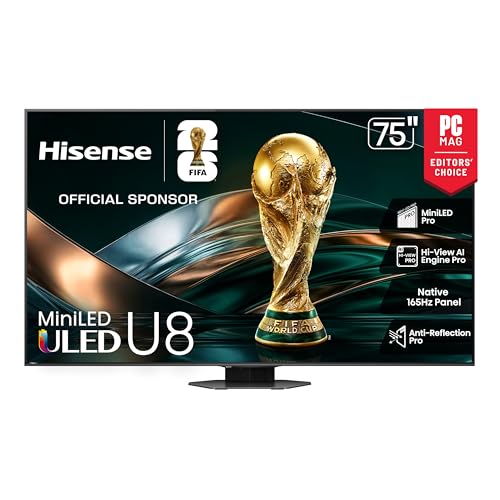
Hisense U8K 75-Inch Mini-LED
Mini-LED zones and quantum dots give the U8K HDR punch that competes several tiers above its position. Local dimming holds highlights bright without lifting black bars much. Google TV covers apps and voice search, though the menu structure buries picture settings deeper than most.
Pros
- Flagship brightness at a lower tier
- Local dimming keeps highlights bright
- Google TV app catalog is complete
Cons
- Only two 4K 120Hz inputs
- Picture settings buried in menus

Sony Bravia XR X90L 75-Inch
Cognitive XR processing does its best work on imperfect sources, cleaning up cable feeds and low-bitrate streams without smearing detail. Full array local dimming supports a natural, restrained image rather than a punchy one. Skin tones land close to reference straight out of the box in Cinema mode.
Pros
- Best upscaling of cable and DVD
- Accurate color without calibration
- Restrained motion handling for film
Cons
- Dimmer than the Mini-LED sets here
- Two qualifying gaming inputs only

TCL QM8 75-Inch Mini-LED
A dense Mini-LED array behind a quantum dot panel makes the QM8 the brightest option in this group. Game mode drops input lag low enough for competitive play, with VRR smoothing frame rate dips. Its wide, splayed stand needs a deeper table than the alternatives here.
Pros
- Highest peak output of this group
- Input lag suits competitive play
- Dense dimming array aids HDR
Cons
- Motion processing trails Sony
- Wide stand needs a deep surface

LG QNED80 75-Inch
Quantum dot and NanoCell layers widen the color gamut, producing saturated daytime images without Mini-LED cost. Backlighting is conventional, so dark scenes lose some depth compared with dimmed arrays. webOS launches apps quickly and the Magic Remote pointer speeds up text entry.
Pros
- Saturated color in daylight
- webOS responds quickly to input
- Pointer remote speeds up searching
Cons
- Dark scenes look gray by comparison
- Refresh rate varies between variants

Samsung CU8000 75-Inch Crystal UHD
Crystal UHD processing keeps everyday broadcast and streaming clean on a straightforward LED panel. Refresh rate stops at 60Hz, capping console frame rates and softening fast sport. Tizen supplies the same app lineup as pricier Samsung sets, with a slim profile that suits wall mounting.
Pros
- Large screen at entry-level outlay
- Same Tizen apps as flagship models
- Slim chassis suits flush mounting
Cons
- 60Hz limits gaming and fast sport
- Dark scene detail disappears

Vizio V-Series 75-Inch (V755M)
SmartCast builds in free ad-supported channels, so the V755M works as a complete TV without a subscription. Its LED panel skips local dimming entirely, which keeps cost down and contrast modest. Setup takes minutes, and the interface avoids the promoted tiles that clutter rival platforms.
Pros
- Free built-in channels need no subscription
- Quick setup with minimal prompts
- Lowest outlay of these seven
Cons
- No local dimming, so blacks look gray
- Motion blurs during fast action
What to look for
What to check before buying a 75 inch TV Backlight design, peak brightness, refresh rate, and port count cover most of the decision. Mini-LED arrays control contrast far better than plain LED panels. Anti-glare coatings matter as much as raw output in a bright room. Count how many devices need 4K at 120Hz, since sets often carry fewer qualifying ports than total HDMI sockets.
How much brightness does your room actually need? Walk into the room mid-afternoon and look at the wall. Facing windows or under downlights, Mini-LED panels like the QN90C, U8K, and QM8 hold saturation where cheaper sets go flat. A room with blinds and evening viewing needs far less output, which frees budget for a soundbar. Screen finish counts too, because a glossy panel mirrors whatever is behind you.
Best 75 inch TV for consoles and PC gaming Look for HDMI 2.1, VRR, ALLM, and a low-lag game mode together. Samsung QN90C carries four qualifying inputs, which matters once a soundbar claims one. TCL QM8 pairs quick response with high output for daytime play. Streaming-only households lose nothing with a 60Hz set such as the CU8000 or V-Series.
Fitting a 75 inch TV: delivery, stands and mounts Measure doorways and stairwells before ordering, since the box is considerably wider than the panel. Check stand foot spacing against your table, because splayed feet like the QM8’s need a deeper surface. Wall mounting needs studs, a bracket rated above panel weight, and two people. Leave air gaps around the chassis for heat and cable routing.
How they stack up
| # | Model | Panel | Best for | Score | Price |
|---|---|---|---|---|---|
| 1 | Samsung QN90C 75-Inch Neo QLED | Neo QLED Mini-LED | Best overall | 9.4 | Check price |
| 2 | Hisense U8K 75-Inch Mini-LED | ULED Mini-LED | Best value | 9.2 | Check price |
| 3 | Sony Bravia XR X90L 75-Inch | Full array LED | Best for movies and cable | 9.0 | Check price |
| 4 | TCL QM8 75-Inch Mini-LED | QLED Mini-LED | Best for gaming | 8.8 | Check price |
| 5 | LG QNED80 75-Inch | QNED, Quantum NanoCell | Best for daytime viewing | 8.6 | Check price |
| 6 | Samsung CU8000 75-Inch Crystal UHD | Crystal UHD LED | Best budget | 8.3 | Check price |
| 7 | Vizio V-Series 75-Inch (V755M) | LED, no local dimming | Best for casual viewing | 8.0 | Check price |
Good to know
Is a 75 inch TV too big for a normal living room?
Eight feet or more of seating distance makes 75 inches feel immersive rather than overwhelming. Below that, text on menus and streaming compression become noticeable. Measure from the sofa to the wall before deciding between 65 and 75 inches.
Do I need HDMI 2.1 on a 75 inch TV?
Only for gaming at 4K and 120Hz on a current console or PC. Streaming, cable, and disc playback run fine over HDMI 2.0. Buying HDMI 2.1 anyway gives headroom for devices you add over the next several years.
Is Mini-LED worth the extra cost?
In bright rooms and for HDR movies, yes. Dimming zones raise highlight brightness and deepen black levels at the same time, which plain LED panels cannot do. In a dark room on a tight budget, a standard LED set still delivers a watchable picture.
Which 75 inch TV is best for watching sport?
Samsung QN90C and TCL QM8 handle fast motion and daytime glare best, which covers most weekend viewing. Sony X90L is smoother still on panning shots and gives broadcast feeds more natural color, at the cost of peak brightness.
How far away should I sit from a 75 inch screen?
Eight to ten feet suits 4K material at this size. Sitting nearer reveals more fine detail but makes rapid on-screen movement harder to track comfortably during long viewing sessions.
Can all these TVs be wall mounted?
Yes, all seven use standard VESA patterns. Confirm the exact hole spacing and panel weight in the manual, then choose a bracket rated above that figure. Fixing into studs rather than drywall anchors is essential at this size.
Do I still need a soundbar with a 75 inch TV?
Picture scale outgrows built-in audio quickly at this size. Thin chassis speakers fire downward and lack bass extension. A soundbar with a separate subwoofer fixes dialogue clarity and low end, connected through the eARC-labelled HDMI port.
Which 75 inch TV offers the best value?
Hisense U8K delivers the most performance for the outlay, since Mini-LED brightness and local dimming rarely appear below flagship pricing. Anyone watching only streaming and broadcast saves further with the Samsung CU8000.
What is the difference between QLED and QNED?
Both add quantum dots for wider color. QLED is Samsung and TCL branding, often paired with Mini-LED backlights on higher models. QNED is LG branding that combines quantum dots with NanoCell filtering, and the QNED80 here uses conventional backlighting rather than Mini-LED.
Our pick
Samsung QN90C is the safest 75 inch upgrade, combining glare rejection, clean motion, and four gaming-ready inputs. Buyers watching the outlay should compare it directly against the Hisense U8K, which gives up port count rather than brightness. Sony Bravia XR X90L remains the pick for households still watching plenty of cable and older streaming.
Marcus Chen
Marcus covered consumer electronics for enthusiast tech publications for six years before joining ChoiceCrest. He specializes in translating manufacturer spec sheets into plain-language buying advice, with a focus on audio, computing accessories and smart-home gear.


