7 75-Inch TVs Worth Anchoring Your Home Theater Setup
Hisense U8N leads for theater builds, combining a 144Hz Mini-LED panel with hundreds of dimming zones for dark-room contrast. Sony Bravia 7 renders film cadence and shadow detail most accurately. TCL QM8 answers rooms with lamps and windows by pushing far more light at the screen.
Hisense U8N heads this list on contrast and brightness together, which is rare at 75 inches. Sony Bravia 7 suits film-first rooms where accuracy beats punch. TCL QM8 wins any space that cannot be fully darkened.
Scale changes the priorities. At 75 inches, letterbox bars, blooming, and reflections all become obvious in ways a 55 inch set hides. Rankings here rest on published dimming architecture, HDR format support, screen coatings, and owner reports about halos, motion, and off-axis seating.
Our top picks
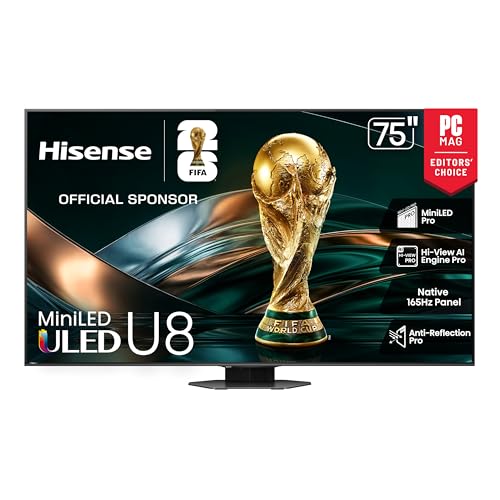
Hisense 75-Inch U8N Mini-LED
Hundreds of dimming zones sit behind the U8N panel, keeping black bars dark while specular highlights stay bright. A 144Hz native refresh rate covers movies, sport, and console play without compromise. Dolby Vision and HDR10+ both decode, so streaming apps and 4K discs use their preferred format.
Pros
- High output holds HDR highlights
- Dense zone count keeps bars dark
- Both dynamic HDR formats supported
Cons
- Halos appear around subtitles
- Contrast drops from side seats

Sony Bravia 7 75-Inch
XR processing gives the Bravia 7 restraint, which matters more than raw numbers in a dark room. Motion stays film-like at 24 frames per second instead of drifting into video smoothness. Shadow detail and skin tones track close to reference, and older cable sources upscale without artificial edge sharpening.
Pros
- Film cadence preserved at 24fps
- Shadow detail survives dark scenes
- Upscaling avoids halo sharpening
Cons
- Fewer dimming zones than the U8N
- Costs more than brighter rivals

TCL 75-Inch QM8 QLED
Raw output defines the QM8, which stays watchable with overhead lights on and curtains open. Quantum dots widen the color gamut, so saturated HDR reds and greens hold up rather than washing pale. A 144Hz panel and low-latency game mode make it a fit for theaters that double as game rooms.
Pros
- Cuts through daylight and lamps
- Wide quantum dot color volume
- Handles console play at 144Hz
Cons
- Interface takes time to navigate
- Color shifts across a wide couch

Samsung 75-Inch Q80D QLED
Direct full array backlighting pairs with a 120Hz panel and Samsung’s gaming hub for low-lag console play. Viewing angles hold better than most QLED sets, which helps when three people share a sofa. Dolby Vision is absent, so Dolby-encoded discs fall back to HDR10.
Pros
- Low input lag across game modes
- Wider viewing angle than typical QLED
- Tizen gaming hub built in
Cons
- No Dolby Vision decoding
- Contrast trails dense Mini-LED arrays

Vizio 75-Inch Quantum Pro
Quantum dots and full array local dimming land the Quantum Pro well above basic LED panels for HDR punch. Both Dolby Vision and HDR10+ decode, which is unusual at this level. SmartCast keeps the interface plain, with free channels built in and fewer promoted tiles than rival platforms.
Pros
- Dual dynamic HDR at a lower tier
- 120Hz panel included
- Uncluttered smart interface
Cons
- Zone count trails flagship arrays
- Smaller app catalog than Google TV

Samsung 75-Inch The Frame
A matte anti-reflective panel replaces the usual glossy layer, scattering lamp and window glare instead of mirroring it. Art Mode displays paintings when idle, and swappable magnetic bezels let the set pass as framed artwork. Flush wall mounting comes standard via the slim One Connect cable.
Pros
- Matte finish scatters reflections
- Sits flush against the wall
- Bezels change to match decor
Cons
- Peak brightness lags Mini-LED sets
- Matte layer softens black depth

LG 75-Inch UT7570 4K
Direct LED backlighting without local dimming keeps the UT7570 affordable at a size where affordability is rare. webOS runs quickly and covers all major streaming apps. Best results come from a controlled-light room, since contrast is modest and the 60Hz panel limits fast motion clarity.
Pros
- Lowest outlay for a 75 inch panel
- webOS interface stays responsive
- Clean upscaling of streaming content
Cons
- Blacks look gray in dark scenes
- 60Hz blurs fast sport and gaming
Side by side
| # | Model | Panel | Best for | Score | Price |
|---|---|---|---|---|---|
| 1 | Hisense 75-Inch U8N Mini-LED | Mini-LED, local dimming | Best overall | 9.4 | Check price |
| 2 | Sony Bravia 7 75-Inch | Mini-LED, local dimming | Best for movies | 9.2 | Check price |
| 3 | TCL 75-Inch QM8 QLED | QLED Mini-LED | Best for bright rooms | 9.0 | Check price |
| 4 | Samsung 75-Inch Q80D QLED | QLED, Direct Full Array | Best for gaming | 8.8 | Check price |
| 5 | Vizio 75-Inch Quantum Pro | Quantum Dot, local dimming | Best value | 8.6 | Check price |
| 6 | Samsung 75-Inch The Frame | QLED with matte finish | Best for living room theaters | 8.3 | Check price |
| 7 | LG 75-Inch UT7570 4K | LED LCD, no local dimming | Best budget | 8.0 | Check price |
How to choose
What a home theater needs from a 75 inch TV Contrast control ranks first in a room you can darken. Dimming zone count, screen finish, and HDR format support follow. Refresh rate matters only for gaming and sport. Audio outputs matter for everyone, since no panel this thin produces usable bass and every serious theater build routes sound elsewhere.
How far should you sit from a 75 inch screen? Nine to twelve feet suits most 4K material at this size. Closer seating fills more of your field of view but exposes streaming compression and panel structure. Farther back wastes the scale you paid for. Measure from the sofa cushion to the wall before choosing between 65 and 75 inches, because distance changes the experience more than any single specification.
Dark theater room or bright media room? Fully darkened rooms reward black-level control, which is where the Bravia 7 and its restrained processing shine. Rooms with lamps or windows need output instead, and the QM8 supplies it. Mixed-use spaces benefit from a matte screen like The Frame, which scatters reflections rather than trying to out-muscle them. Assess the room honestly before spending on brightness you cannot use.
Planning mounting, audio and HDMI for the build Confirm the VESA pattern and total weight, then buy a mount rated above it and recruit a second person. Route an eARC-capable HDMI to your soundbar or receiver so Dolby Atmos passes through uncompressed. Count devices that need 4K at 120Hz before assuming ports suffice. Leave cable slack behind the panel, since flush mounts strain connectors otherwise.
Good to know
How far should I sit from a 75 inch TV?
Nine to twelve feet is the usual comfortable range for 4K content. If nearly everything you watch is native 4K rather than upscaled cable, the closer end of that range feels immersive without exposing compression artifacts.
Do I need Mini-LED for a home theater?
Not strictly, but dimming zone density is what makes letterbox bars disappear in a dark room. Mini-LED arrays like the U8N pack far more zones than standard backlights. A basic LED panel such as the UT7570 shows gray bars during dark scenes.
Is brightness or contrast more important for movies?
Contrast wins in a darkened room, since black level and shadow detail define the filmlike look. Brightness takes over once ambient light enters, because a dim panel washes out under lamps regardless of how good its blacks are on paper.
Which 75 inch TV is best for a room with windows?
TCL QM8 pushes the most light of this group, so it resists washout best. Samsung The Frame takes the other approach, using a matte coating that scatters reflections instead of mirroring the window back at you.
What HDR format should a home theater TV support?
Dolby Vision and HDR10+ both adjust tone mapping scene by scene, which matters most on a big panel. The Hisense U8N, TCL QM8, and Vizio Quantum Pro decode both. Samsung sets skip Dolby Vision, so Dolby discs fall back to standard HDR10.
Are the built-in speakers good enough for a theater?
No. Downward-firing drivers in a thin chassis cannot deliver dialogue weight or low frequency effects at cinema scale. Budget for at least a soundbar with a separate subwoofer, connected through the eARC port so Atmos passes intact.
How hard is it to wall mount a 75 inch TV?
Plan for two people and a stud finder. Check the VESA hole pattern in the manual, then buy a bracket rated comfortably above the panel weight. Bolt into studs rather than drywall anchors, and dry fit the plate before lifting the set.
Is a 75 inch TV too big for a living room?
Seating distance decides, not floor area. Sitting nine feet or more away makes 75 inches feel immersive rather than overwhelming. Closer than that, a 65 inch panel usually feels more comfortable for long viewing sessions.
Can a home theater TV double as a gaming screen?
Yes. Samsung Q80D and TCL QM8 both run low-lag game modes with VRR, and the QM8 reaches 144Hz for PC play. Check that gaming devices connect to the ports rated for 4K at 120Hz, since not every input on a set qualifies.
The verdict
Hisense U8N is the strongest theater choice overall, since it holds deep contrast in the dark and still handles a lit room. Film-first builds in a controlled space should take the Sony Bravia 7 for its motion and shadow handling. Rooms that stay bright are better served by the TCL QM8 and its raw output.
Marcus Chen
Marcus covered consumer electronics for enthusiast tech publications for six years before joining ChoiceCrest. He specializes in translating manufacturer spec sheets into plain-language buying advice, with a focus on audio, computing accessories and smart-home gear.