Why Does a Smart Plug Sometimes Lose Its WiFi Connection After a Power Outage?
A smart plug losing its connection after a power outage is almost always a timing and network problem, not a hardware failure. The plug, your router, and your modem all restart from power loss at the same time, and if the plug tries to reconnect before the router and internet are fully back up, it can get stuck rather than automatically retrying successfully.
The restart sequence that causes the problem
When power returns after an outage, every device on your network reboots simultaneously rather than in the order they need to. A modem typically takes the longest to re-establish a connection with your internet provider, your router needs the modem’s connection before it can route traffic, and the smart plug needs the router’s WiFi network to exist before it can join it. If the plug finishes booting and attempts to connect before the router’s WiFi is actually broadcasting again, that connection attempt fails.
Why some plugs recover automatically and others do not
Better smart plug firmware includes a retry loop that keeps attempting to reconnect every so often until it succeeds, which is why many smart plugs do eventually come back online on their own within a few minutes. Cheaper or older firmware sometimes gives up after a limited number of attempts and sits in a disconnected state until someone manually power-cycles it or reconnects it through the app.
How your router’s DHCP settings play a role
Your router assigns each device an IP address through DHCP, and in some setups a device that was offline during a lease renewal can come back expecting an address that is no longer reserved for it, causing a connection mismatch. Routers with a long DHCP lease time and devices that remember their assigned address generally handle this more smoothly than setups with short lease windows.
Why the plug’s own battery backup, or lack of one, matters less than expected
Most smart plugs have no internal battery and lose all memory of their connection state the instant power cuts, which means every single outage is effectively a fresh boot for the plug’s WiFi radio. This is different from a router, which sometimes has a brief battery-backed memory of its settings, so the plug is not doing anything wrong by restarting from scratch, it is simply more exposed to bad timing.
Whether 2.4GHz vs 5GHz WiFi affects this specifically
Smart plugs almost universally use 2.4GHz WiFi rather than 5GHz because it has better range and lower power requirements, which is unrelated to the outage problem itself but worth knowing if you are troubleshooting. If your router is slower to bring the 2.4GHz radio fully online compared to 5GHz after a restart, that can add an extra few seconds of delay specifically for plug-type devices.
What actually fixes recurring post-outage dropouts
Giving the router and modem a head start, by plugging them into a basic surge protector rather than the same smart outlet strip as everything else, lets them finish booting before downstream smart devices try to reconnect. Keeping router firmware updated and avoiding overly short DHCP lease times also reduces how often this specific failure mode happens.
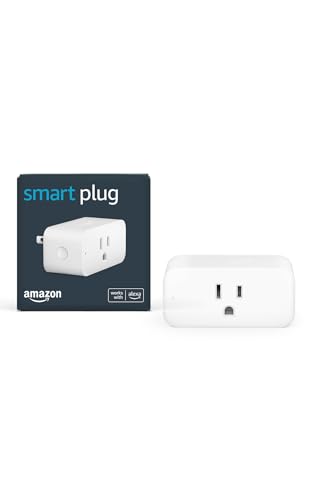
Amazon Smart Plug
A simple WiFi smart plug built to work with Alexa, commonly used for lamps and small appliances, and a frequent example in outage-reconnect discussions because of how widely it is deployed.

TP-Link Kasa Smart Plug KP125
A WiFi smart plug with energy monitoring that also supports a scheduling feature some users rely on to automatically power-cycle devices that get stuck after connectivity issues.
Questions worth asking
Does every smart plug lose connection after a power outage?
No, many reconnect automatically within a few minutes once the router’s network is stable again. The ones that stay offline are usually dealing with a timing mismatch or a firmware retry limit rather than a universal flaw in smart plugs.
Will unplugging and replugging the smart plug fix it?
Often yes, because that forces the plug through a fresh boot and reconnect attempt at a moment when the router’s network is already stable, which removes the bad timing that caused the original failure.
Does resetting the router help a stuck smart plug reconnect?
Sometimes, especially if the router’s DHCP table or WiFi radio did not fully recover from the outage either. A router restart can clear up inconsistencies on both sides at once.
Why does my smart plug show as offline in the app but still have power?
The plug has electrical power and its own basic functions working, but its WiFi connection to your network specifically failed to re-establish, which is a separate issue from whether the outlet itself is energized.
Does a UPS or battery backup prevent this problem?
Yes, if the router, modem, and smart plug all stay powered through a brief outage via a UPS, none of them reboot and the connection issue never occurs in the first place.
Is this more common with mesh WiFi systems than a single router?
It can be, since mesh systems have multiple nodes that each need to resync with each other and the internet after an outage, adding more steps where timing can go wrong compared to a single router.
Does the brand of smart plug matter for how well it recovers from outages?
To some degree, since firmware quality varies by brand and model. Plugs with more persistent automatic reconnect logic tend to recover more reliably than cheaper models with limited retry attempts.
Can too many smart devices reconnecting at once cause this?
Yes, if dozens of devices on your network all try to rejoin WiFi within the same few seconds after an outage, some routers can become briefly overloaded handling that many simultaneous connection requests.
Does changing the smart plug’s WiFi channel help prevent future dropouts?
It can help overall WiFi reliability if there was channel congestion, but it does not directly address the outage-timing issue, which is more about sequencing than about which channel is in use.
Will static IP addresses instead of DHCP prevent this issue?
They can reduce one potential failure point, since the plug does not need to request and receive a new address after reconnecting, though it does not eliminate timing issues with the WiFi radio itself coming back online.
Does firmware update frequency affect how reliably a plug reconnects?
Yes, manufacturers do periodically improve reconnect logic in firmware updates, so a plug running outdated firmware may behave worse after outages than the same model with current firmware installed.
Is there a way to automatically reboot a smart plug that gets stuck?
Some smart home hubs and routers support scheduled reboots or connectivity checks that can power-cycle a smart device automatically if it stays offline past a set time, though this depends on your specific ecosystem.
Does distance from the router make reconnection after an outage less reliable?
Yes, a plug at the edge of WiFi range has a weaker signal to begin with, and reconnecting successfully after a reboot is less forgiving of marginal signal strength than staying connected to an already-established link.
Do smart plugs remember their WiFi network after losing power?
Yes, the network name and password are normally stored in the plug’s memory and survive a power loss, so in most cases a stuck plug does not need to be fully reconfigured, just reconnected.
Does an outage that lasts only a second or two still cause this problem?
A very brief flicker usually will not trigger a full reboot if devices have any internal capacitor holding power through the gap, but a true outage lasting even a few seconds is generally enough to force a full restart cycle on most smart plugs.
Our take
A smart plug that drops offline after an outage is rarely broken. It is more often a small window of bad timing between the plug, the router, and the modem all restarting from zero at once. Giving your core network gear a head start, or a cheap UPS, solves the root cause far more reliably than troubleshooting the plug itself.
Marcus Chen
Marcus covered consumer electronics for enthusiast tech publications for six years before joining ChoiceCrest. He specializes in translating manufacturer spec sheets into plain-language buying advice, with a focus on audio, computing accessories and smart-home gear.