How Often Should Thermal Paste Be Reapplied on a Desktop CPU?
For a desktop CPU running under normal conditions, most quality thermal pastes last three to five years before they need reapplying, and some non-drying formulas can go even longer. The better signal than a calendar date is rising idle and load temperatures over time, since that is the actual evidence the paste has degraded.
Why thermal paste wears out at all
Thermal paste fills microscopic gaps between the CPU’s surface and the cooler’s contact plate so heat transfers efficiently instead of being trapped by air pockets. Over time, repeated heating and cooling cycles cause the paste to slowly dry out, lose its suspended particles’ contact, or in some formulas separate slightly, which reduces how well it conducts heat even though it still looks intact.
How much temperature rise actually matters
A few degrees of increase over a year or two is normal and not worth chasing. What matters is a clear upward trend, typically five to ten degrees Celsius higher at the same workload compared to when the system was freshly built, especially if fan curves and dust levels have not changed. That gap is the real indicator paste performance has dropped, not just age on its own.
Why paste quality changes the timeline significantly
Not all thermal paste behaves the same way over time. Budget silicone-based pastes tend to dry out faster, sometimes within one to two years under sustained heat. Higher quality non-conductive compounds and some liquid metal products are formulated to resist drying for much longer, which is why a generic reapplication schedule does not fit every paste equally well.
Does a laptop or small form factor PC need it sooner
Yes, generally. Smaller cases and laptops run hotter and have less airflow margin, which accelerates the same drying process. A laptop CPU under sustained heavy use might benefit from fresh paste every one to two years, while a well-ventilated desktop tower under light use can comfortably stretch past the typical three to five year range.
What actually happens if you wait too long
Degraded paste does not usually cause sudden failure. Instead, the CPU runs hotter than it should, which can trigger more aggressive fan noise, earlier thermal throttling under load, and slightly reduced sustained performance in demanding tasks like gaming or rendering. None of this damages the chip immediately, but it chips away at performance headroom you paid for.
Signs it is actually time to repaste, beyond just age
The clearest signals are a sustained temperature increase at the same ambient room temperature and workload, louder fans kicking in earlier than they used to, or visible pump-out where paste has migrated to the edges of the contact area on an older build. Any one of these is a better reason to repaste than simply counting years since the last build.

Arctic MX-4 Thermal Compound
A non-conductive, long-lasting paste commonly used for both initial builds and reapplication, formulated to resist drying out for several years under normal desktop use.
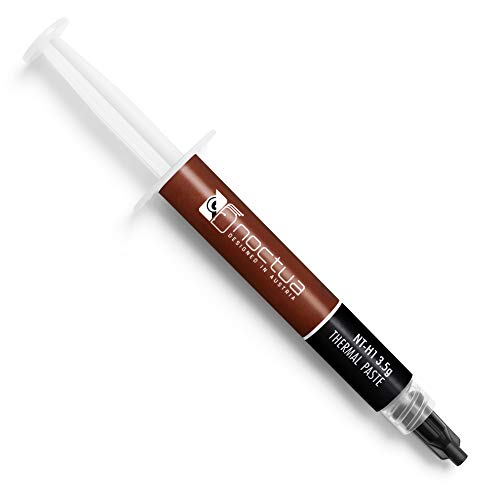
Noctua NT-H1 Thermal Compound
A pre-mixed paste bundled with many Noctua coolers, known for stable long-term performance without needing frequent reapplication on typical desktop builds.
Common questions
Is there a hard rule for how many years thermal paste lasts?
No single number applies to every paste and system. Three to five years is a reasonable average for quality paste in a well-cooled desktop, but formula, heat exposure, and airflow all shift that window in either direction.
Can thermal paste dry out even if the computer is barely used?
Yes, though more slowly. Heat cycling accelerates drying, but some paste formulas will still gradually lose performance over many years even with light use, just on a longer timeline than a daily gaming rig.
Does reapplying thermal paste actually lower CPU temperatures noticeably?
If the old paste had genuinely degraded, reapplication can drop temperatures by several degrees. If the paste was still performing well, a repaste often produces little to no measurable difference.
Will using more thermal paste than needed improve cooling?
No, and it can actually hurt cooling. A thin, even layer transfers heat best; excess paste can create its own insulating gap or squeeze out unevenly, which is worse than a correctly sized amount.
How do I know if my cooler mounting pressure, not the paste, is the real problem?
Uneven or unusually high temperatures right after a fresh repaste, especially on one side of the chip, usually points to mounting pressure or cooler contact rather than the paste itself.
Does liquid metal thermal compound need to be reapplied as often as regular paste?
Liquid metal generally resists drying out far longer than standard paste because it does not rely on the same oil-based suspension that eventually separates, though it carries its own handling risks around conductivity and compatibility with bare aluminum.
Is it normal to see thermal paste pushed out to the edges of the CPU after a few years?
Some migration, often called pump-out, can happen over time with certain pastes and is a legitimate sign to consider repasting, though a small amount around the edges on removal is also just a sign the paste spread correctly during installation.
Does overclocking shorten how long thermal paste lasts?
Yes, sustained higher temperatures from overclocking put more heat cycling stress on the paste, which can shorten the realistic reapplication window compared to running the same CPU at stock settings.
Can I tell paste has degraded just by looking at it?
Not reliably. Dried-out paste can still look intact visually while performing worse thermally, which is why temperature trends over time are a better indicator than a visual check alone.
Does the type of CPU cooler change how often paste needs replacing?
The paste degrades at a similar rate regardless of cooler type, but a less efficient cooler will expose degraded paste’s effects sooner since it has less thermal headroom to begin with.
Is it worth repasting a computer that is already running fine?
Not usually. If temperatures are stable and within normal range for your hardware, repasting a system that shows no signs of thermal creep is unnecessary maintenance rather than a real improvement.
Does ambient room temperature affect how often paste needs changing?
Indirectly. A consistently hot room pushes the CPU to run hotter overall, which accelerates the same heat-cycling process that degrades paste over time, even though the room temperature is not degrading the paste directly.
Do pre-applied thermal pads on some coolers wear out the same way as paste?
Thermal pads behave somewhat differently since they are solid rather than a spreadable compound, but they can still lose effectiveness over years of heat cycling and generally get replaced rather than reapplied.
Should I repaste every time I remove the cooler for cleaning?
Not strictly necessary for a quick cleaning if the existing paste layer is undisturbed and still in good shape, but once the cooler has been fully removed from the CPU, it is good practice to apply fresh paste before reseating it.
Does the amount of thermal paste applied change how long it lasts?
A correctly sized thin layer tends to age more evenly than an overly thick application, since excess paste in the middle of the contact area can take longer to fully cure and may be more prone to uneven degradation over time.
Can reapplying thermal paste fix a CPU that is already thermal throttling badly?
If degraded paste is the actual cause, yes, a fresh application can noticeably lower temperatures and reduce or eliminate throttling. If the real cause is inadequate cooler sizing, dust buildup elsewhere, or poor case airflow, repasting alone will not fully resolve it.
Our take
Thermal paste reapplication is one of those maintenance questions where chasing a strict schedule misses the point. A quality paste in a well-ventilated desktop can comfortably go years longer than people assume, and rising temperatures under the same workload tell you far more than a calendar ever will.
Marcus Chen
Marcus covered consumer electronics for enthusiast tech publications for six years before joining ChoiceCrest. He specializes in translating manufacturer spec sheets into plain-language buying advice, with a focus on audio, computing accessories and smart-home gear.