How Often Should a Smart Lock’s Batteries Be Checked?
Most smart locks run on standard AA or similar batteries that last roughly six to twelve months under normal use, but it is worth manually checking battery status through the lock’s app or keypad display every month or two rather than relying solely on a low-battery alert. Wireless connectivity issues or notification settings can occasionally prevent that alert from reaching your phone when it matters most, which is the actual risk with smart locks compared to a traditional deadbolt that never needs power at all. Checking more frequently is reasonable in a high-traffic household where the lock is engaged many times a day, since that usage pattern drains batteries faster than average.
What actually drains a smart lock’s batteries
The motor that physically turns the deadbolt mechanism draws a meaningful burst of power with every lock and unlock cycle, so a household locking and unlocking the door many times a day uses more battery life than one with infrequent access. The lock’s wireless radio, whether Bluetooth, Wi-Fi or a smart home protocol like Z-Wave, also draws power continuously to stay connected and respond to app commands, and Wi-Fi-enabled locks in particular tend to use noticeably more power than Bluetooth-only models.
Typical battery life ranges across different smart lock types
Many battery-powered smart locks using four AA batteries last somewhere around six months to a year under typical household use, though this varies by brand, usage frequency and whether the lock maintains an always-on Wi-Fi connection. Locks that rely on a connected hub or bridge for Wi-Fi access, rather than putting that radio directly in the lock itself, often get longer battery life since the lock’s own power draw stays lower.
How a smart lock usually warns you before batteries die completely
Most models send a low battery notification through their companion app once remaining charge drops below a set threshold, and many also provide a physical indicator, such as a flashing light or an audible beep when the keypad is used, as a backup warning that does not depend on an app connection working correctly.
Why relying only on the app notification carries some risk
App notifications depend on the lock successfully connecting to Wi-Fi or Bluetooth and the phone actually receiving and displaying that alert, and any break in that chain, from a Wi-Fi outage to notification settings quietly turned off, can mean the warning never actually reaches you before the batteries run out. This is the main practical reason a periodic manual check is worth the small effort even when the app has not flagged anything.
A reasonable manual check schedule to follow
Opening the lock’s app to glance at the battery percentage roughly once a month, or testing the physical keypad’s battery indicator every couple of months, catches a declining battery well before it becomes an emergency. Most smart locks also include a backup method, like a physical key or a 9-volt battery terminal for an emergency jump-start, which is worth confirming works before it is actually needed.
Does battery type and quality actually affect reliability?
Lithium batteries generally perform more consistently than standard alkaline batteries, particularly in cold weather where alkaline batteries lose capacity faster, and many smart lock manufacturers specifically recommend lithium batteries for this reason. Using a reputable battery brand rather than the cheapest available option tends to produce more predictable battery life and fewer unexpected early failures.
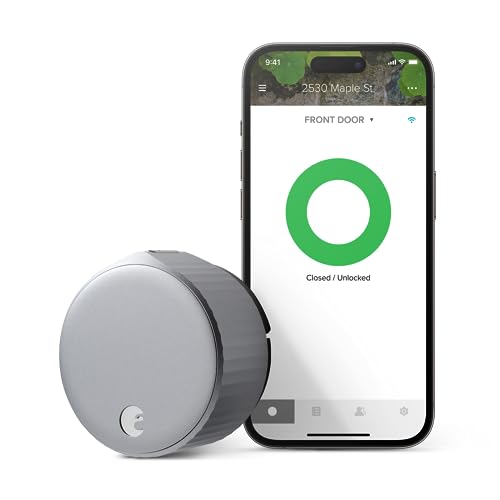
August Wi-Fi Smart Lock
A retrofit smart lock that mounts over an existing deadbolt, using Bluetooth with an optional Wi-Fi connection for remote access.

Schlage Encode Plus Smart Deadbolt
A standalone Wi-Fi smart deadbolt with a built-in keypad and its own low battery alerting through the companion app.
Frequently asked questions
How do I check my smart lock’s battery level without waiting for an app alert?
Most companion apps display a battery percentage or status directly on the lock’s main screen, and many physical keypads also show a low battery warning light or sound when the code is entered.
Why did my smart lock’s batteries die faster than expected?
Frequent locking and unlocking, an always-on Wi-Fi connection, cold weather, or lower-quality batteries can all shorten battery life compared to the manufacturer’s typical estimate, which assumes average conditions.
What happens if a smart lock’s batteries die while the door is locked?
Most models include a backup access method, such as a physical key override or an external terminal for applying a temporary 9-volt battery to power the lock briefly, so being locked out entirely from dead batteries is uncommon if those backups are in place.
Should I replace all the batteries at once or just the weakest ones?
Replacing the full set at once is generally recommended, since mixing old and new batteries in the same device can lead to uneven power delivery and less predictable battery life readings.
Does cold weather really affect smart lock battery life that much?
Yes, especially with standard alkaline batteries, which lose a meaningful amount of effective capacity in cold temperatures. Lithium batteries hold up better in cold conditions and are often recommended for exterior doors in colder climates.
Can I set up more frequent low battery alerts than the default?
Some smart lock apps allow adjusting notification sensitivity or sending reminders at a higher battery percentage threshold, though not all brands offer this level of customization.
Is it normal for battery percentage to drop suddenly rather than gradually?
A sudden drop can happen as batteries near the end of their usable charge, since voltage output in many battery types declines more sharply toward the end of their life rather than at a steady linear rate throughout.
Do smart locks with a keypad use batteries faster than ones without a keypad?
Keypad use itself draws relatively little extra power, but a keypad lock is often used more frequently throughout the day by multiple household members, and that increased usage frequency is what tends to use more battery over time.
Should I test the backup key or 9-volt terminal before the batteries actually run low?
Yes, confirming a backup access method works while the lock is still functioning normally avoids discovering a problem with it at the exact moment the batteries fail.
Does a smart lock lose its settings or codes if the batteries die?
Generally no. Programmed codes and settings are typically stored in non-volatile memory that persists even when power is lost, so replacing batteries usually restores normal function without needing to reprogram the lock.
Why do some smart locks last closer to a year on batteries while others need changes every few months?
Differences in motor efficiency, radio type, how often the household uses the lock, and whether the lock relies on a constant Wi-Fi connection versus occasional Bluetooth communication all contribute to this range.
Is it worth buying rechargeable batteries for a smart lock instead of disposables?
Some households prefer rechargeables for convenience and cost over time, though it is worth checking the manufacturer’s recommendation, since some locks specifically suggest lithium disposables for more consistent voltage output.
Does leaving a smart lock connected to a smart home hub drain batteries faster than standalone use?
It depends on how often the hub polls or communicates with the lock; frequent status checks or automation routines that interact with the lock often can use slightly more battery than occasional manual use alone.
How many times can a smart lock typically lock and unlock on one set of batteries?
This varies significantly by model and battery quality, but many manufacturers estimate several hundred to a few thousand cycles per battery set under typical household conditions.
Where this leaves you
A smart lock’s battery life is generally predictable enough that app alerts alone usually work, but a quick manual check every month or so is cheap insurance against the one time connectivity or notifications fail you. Confirming the backup access method works before it is ever needed is the detail most people skip until it actually matters.
Marcus Chen
Marcus covered consumer electronics for enthusiast tech publications for six years before joining ChoiceCrest. He specializes in translating manufacturer spec sheets into plain-language buying advice, with a focus on audio, computing accessories and smart-home gear.