How Does an Action Camera’s Image Stabilization Actually Work Without a Gimbal?
An action camera without a gimbal stabilizes footage using electronic image stabilization, which relies on built-in motion sensors, a gyroscope and accelerometer, to detect exactly how the camera is shaking or moving many times per second. Software then shifts and crops each recorded frame to cancel out that detected motion, using extra sensor area recorded beyond the final output frame as room to shift the image around without showing empty edges. This is fundamentally different from a mechanical gimbal, which physically counteracts movement using motors, but well-tuned electronic stabilization can produce remarkably smooth footage for typical action camera use like running, biking or mounting on gear that bounces around.
What the camera is actually measuring to detect shake
Action cameras include a built-in inertial measurement unit combining a gyroscope, which detects rotational movement, and an accelerometer, which detects linear movement and vibration. These sensors sample motion data many times per second, giving the stabilization software a detailed, continuously updated picture of exactly how the camera is moving and shaking during recording.
How the correction actually gets applied to each frame
Once the software knows how the camera moved during a given frame, it digitally shifts the image content in the opposite direction to cancel out that detected motion, then crops the frame to the final output size. This only works because the camera records a wider field of view than it ultimately outputs, leaving a margin of extra pixels around the edges that the stabilization process can shift into without ever showing a blank or warped edge.
Why this approach requires giving up some field of view
The extra sensor area used as shifting room for stabilization is not available in the final video frame, meaning a camera using strong electronic stabilization typically produces slightly less wide footage than the same camera with stabilization turned off. More aggressive stabilization settings generally need more of that cropped margin to work with, which is why high-stabilization modes often visibly narrow the field of view compared to a standard setting.
How rolling shutter correction fits into the same process
Many action cameras use a sensor readout method that captures different parts of a frame at very slightly different moments, which can cause a wobbling or jello-like distortion during fast motion, separate from general shake. Software often corrects this rolling shutter effect alongside general stabilization, since both problems stem from the same underlying sensor data but require slightly different mathematical correction.
Why stabilization software treats different kinds of motion differently
A steady, intentional panning motion while filming needs to be preserved rather than canceled out, while rapid, repetitive high-frequency shake from running or a bumpy mount needs to be smoothed away. Stabilization algorithms distinguish between these by analyzing the pattern and frequency of detected motion, generally preserving slower, sustained movement while aggressively correcting fast, jittery motion.
Where electronic stabilization reaches its real limits
Electronic stabilization works within the bounds of the extra cropped sensor margin available, so an extremely violent or sudden motion, like a hard fall or an abrupt impact, can exceed what the available crop room can correct for, resulting in visible shake or even a brief frame skip. A mechanical gimbal has a theoretically wider range of physical correction for this kind of extreme motion, which is why serious filmmaking work sometimes still pairs a gimbal with a camera even when that camera already has strong built-in electronic stabilization.

GoPro HERO12 Black
An action camera using HyperSmooth electronic stabilization that relies on onboard motion sensors and frame cropping rather than a mechanical gimbal.
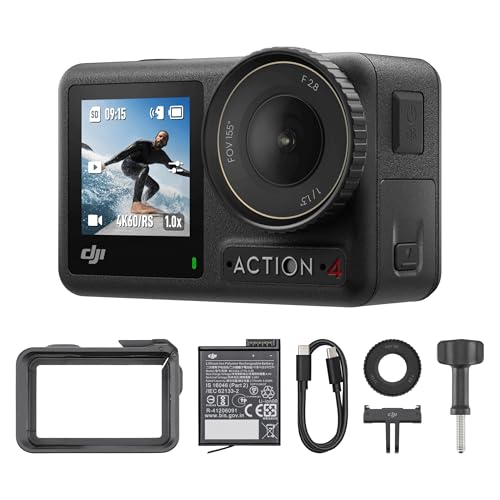
DJI Osmo Action 4
An action camera with RockSteady electronic stabilization built around similar gyroscope and accelerometer sensor data processing.
Questions worth asking
Does electronic stabilization reduce video quality compared to no stabilization at all?
It typically crops the field of view somewhat to make room for the correction, which can reduce how wide the shot appears, though resolution and sharpness within that cropped frame generally remain unaffected.
Is electronic stabilization the same thing as optical image stabilization found on some phone cameras?
No, optical stabilization physically moves a lens element or sensor using small motors to counteract shake, while electronic stabilization corrects the image digitally after capture using sensor data and cropping, which is a different mechanism entirely.
Why does my action camera’s field of view look narrower with stabilization turned on?
Stronger stabilization settings use more of the extra recorded sensor margin as shifting room to correct for motion, which directly reduces how much of that wider captured area makes it into the final cropped output frame.
Can electronic stabilization fully replace a gimbal for professional video work?
For most everyday action camera use it comes very close, but extremely demanding or very large motion situations can still exceed what digital cropping and shifting alone can correct, which is why some professional setups still use a gimbal.
Does stabilization work the same way in low light as it does in bright daylight?
Stabilization itself relies on motion sensor data rather than image brightness, so it functions similarly in both conditions, though lower light often requires a slower shutter speed that can introduce its own motion blur stabilization cannot fully correct.
Why does some stabilized footage still look slightly jittery during very fast motion?
If the detected motion exceeds the available cropped margin the software has to work with, the correction cannot fully cancel it out, leaving some residual jitter in footage from very abrupt or extreme movement.
Does higher resolution recording affect how well stabilization performs?
Recording at a higher resolution than the final output resolution gives the stabilization software more extra pixel area to use as shifting room, which can improve stabilization effectiveness compared to recording at the exact output resolution with no margin.
Is horizon leveling part of stabilization or a separate feature?
Horizon leveling is a related but distinct correction that keeps the horizon line level even as the camera rotates, often working alongside general shake stabilization using the same underlying gyroscope data.
Does stabilization use more battery power on an action camera?
Yes, processing motion sensor data and performing real-time frame correction requires additional processing power compared to recording without stabilization, which can measurably reduce battery life during extended recording.
Why do some action cameras offer multiple stabilization strength settings?
Different strength settings trade off field of view against how aggressively motion is corrected, letting users choose between a wider shot with lighter stabilization or a narrower, smoother shot with stronger correction depending on the activity.
Can stabilization be added to footage after recording if it wasn’t enabled during filming?
Some video editing software can apply after-the-fact digital stabilization using image analysis rather than sensor data, but this generally produces a less precise correction than stabilization applied in-camera using actual motion sensor readings during recording.
Does mounting an action camera more securely reduce the need for strong stabilization?
Yes, a securely mounted camera with less physical vibration to begin with needs less aggressive digital correction, which can let you use a lighter stabilization setting and keep more of the original field of view.
Why does stabilized footage sometimes have a subtle warping or wobble at the edges?
This can happen when rolling shutter distortion and stabilization correction interact, particularly during fast panning or vibration, since the software is correcting two related but separate motion artifacts simultaneously.
Is gimbal-based stabilization always smoother than a camera’s built-in electronic stabilization?
For large, sweeping or very abrupt movements, a mechanical gimbal generally has more physical range to correct for motion than digital cropping alone, though for everyday action footage a good electronic system can look comparably smooth.
Final word
The absence of visible moving parts makes electronic stabilization feel almost like magic, but it is really just fast sensor data paired with a deliberate cropping tradeoff happening many times per second. It works remarkably well for the bumps and jostles typical of action camera use, even if it cannot fully replace a mechanical gimbal for the most extreme motion situations.
Marcus Chen
Marcus covered consumer electronics for enthusiast tech publications for six years before joining ChoiceCrest. He specializes in translating manufacturer spec sheets into plain-language buying advice, with a focus on audio, computing accessories and smart-home gear.