7 Media Players That Actually Handle 4K Smoothly
Nvidia Shield TV Pro leads on power and app support for most living rooms. Amazon Fire TV Stick 4K Max is the smart value pick. Roku Streaming Stick 4K stays the easiest budget option that still plays crisp 4K HDR content on an older television.
Nvidia Shield TV Pro tops this list for raw power and app depth. Amazon Fire TV Stick 4K Max and Roku Streaming Stick 4K cover the value and budget tiers without dropping 4K support. Each pick suits a different living room budget and ecosystem.
Media players look alike on a shelf, yet processor speed, remote design and app catalogs vary a lot between them. Owner feedback and published specifications shaped this ranking rather than marketing claims. We focused on which platform fits which household, not just raw benchmarks.
How to choose
Streaming stick or set-top box? Sticks tuck behind the TV and cost less than boxes. Set-top boxes add Ethernet ports, faster chips and extras like game streaming. Weak Wi-Fi or a desire for the snappiest interface makes the extra box space worth it.
Which platform fits your habits? Roku, Fire TV, Google TV and tvOS organize apps differently from each other. Neutral platforms like Roku push no single store, while Fire TV and Google TV surface their own content first. Pick the interface you expect to open every single day.
Do the video and audio formats match your TV? Confirm the player outputs formats your TV and soundbar actually support, such as Dolby Vision and Dolby Atmos. A capable player cannot add HDR that your screen lacks. Match the device to your display instead of chasing the highest spec sheet.
Does your smart-home ecosystem matter here? Phones, speakers and smart-home gear from one brand often work more smoothly with a matching player. Casting, voice commands and account sign-ins stay simpler within a single ecosystem. Owners frequently report fewer setup headaches this way.
The shortlist, ranked
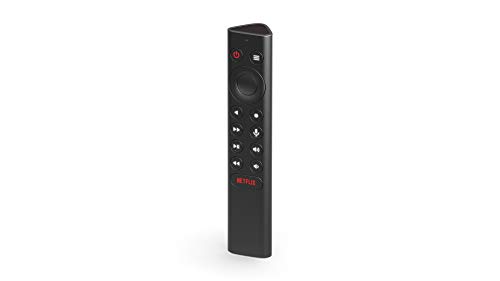
Nvidia Shield TV Pro
A Tegra processor keeps this box fast years after release, according to owner reports. AI upscaling sharpens older content on 4K screens, and the same hardware doubles as a Plex server or light game streamer. Expandable storage handles a growing app and game library.
Pros
- Fast, future-proof processor
- AI upscaling sharpens lower-res video
- Doubles as a Plex server
Cons
- Costs more than a stick
- Interface can feel busy

Roku Ultra
Roku’s simple menu carries over here, with Ethernet and Wi-Fi 6 added for a steadier connection. A lost-remote finder locates a dropped remote by sound. This platform stays neutral, surfacing every major streaming app rather than pushing one store.
Pros
- Neutral, app-agnostic platform
- Ethernet and Wi-Fi 6
- Handy remote finder
Cons
- No free-game library
- Remote uses batteries

Apple TV 4K
An A-series chip keeps the tvOS interface fluid and quick to respond. AirPlay and HomeKit support turn this box into a hub for a household already running iPhones and HomePods. Owners note the rechargeable Siri Remote as a welcome change from disposable batteries.
Pros
- Very smooth interface
- Deep Apple ecosystem tie-in
- Rechargeable remote
Cons
- Priced above rivals
- Less useful outside Apple

Amazon Fire TV Stick 4K Max
Wi-Fi 6E and a fast processor pack into a stick small enough to hide behind the TV. Owners like the Alexa remote and Ambient Experience screensaver mode. Amazon content gets top billing on the home screen, more than on neutral platforms.
Pros
- Fast for a stick
- Wi-Fi 6E support
- Hides behind the TV
Cons
- Amazon-heavy interface
- Ad-forward home screen

Google TV Streamer 4K
This set-top box replaces the old Chromecast dongle and adds Ethernet plus a smart-home control panel. Recommendations from across your apps land in one row on the home screen. Matter and Thread support suit a house already running Nest devices.
Pros
- Unified cross-app suggestions
- Built-in smart-home hub
- Ethernet included
Cons
- Recommendations can crowd home
- Storage fills over time

Roku Streaming Stick 4K
Roku’s familiar menu fits into an inexpensive stick with long-range Wi-Fi. Older TVs gain reliable 4K HDR playback without a new interface to learn. Few extras come bundled, which keeps the price down compared with the Ultra.
Pros
- Very affordable
- Simple, neutral menu
- Long-range Wi-Fi
Cons
- No Ethernet port
- Fewer extras than Ultra

Amazon Fire TV Cube
Far-field microphones let Alexa control playback without touching a remote. This is the fastest Fire TV device Amazon sells, and an HDMI input passthrough lets it sit between a cable box and the TV. A busy entertainment center benefits most from voice control.
Pros
- Hands-free Alexa control
- Fastest Fire device
- Ethernet and HDMI input
Cons
- Bulkier than a stick
- Amazon-forward interface
The lineup, side by side
| # | Model | Resolution | Best for | Score | Price |
|---|---|---|---|---|---|
| 1 | Nvidia Shield TV Pro | 4K HDR Dolby Vision | Best overall | 9.4 | Check price |
| 2 | Roku Ultra | 4K HDR Dolby Vision | Best for features | 9.1 | Check price |
| 3 | Apple TV 4K | 4K HDR Dolby Vision | Best for Apple users | 9.0 | Check price |
| 4 | Amazon Fire TV Stick 4K Max | 4K HDR Dolby Vision | Best value | 8.8 | Check price |
| 5 | Google TV Streamer 4K | 4K HDR Dolby Vision | Best for Google users | 8.6 | Check price |
| 6 | Roku Streaming Stick 4K | 4K HDR Dolby Vision | Best budget | 8.4 | Check price |
| 7 | Amazon Fire TV Cube | 4K HDR Dolby Vision | Best for hands-free control | 8.2 | Check price |
Common questions
Do I need a media player if my TV is already smart?
Not strictly, though a dedicated player is usually faster and gets longer software updates. Apps missing from an aging smart TV often show up on a dedicated player instead. Many owners buy one specifically to revive a slow older TV.
What is the difference between a streaming stick and a box?
A stick is a compact HDMI dongle hidden behind the TV. A box sits on a shelf and typically adds Ethernet, a faster processor and extra features. Boxes cost more but feel snappier day to day.
Which media player has the most apps?
Roku, Fire TV and Google TV all carry nearly every major streaming service. Differences show up in niche apps and how each home screen prioritizes content. Raw app counts rarely separate these platforms much.
Do I need a 4K player for a 1080p TV?
No, though many 4K players cost little more and future-proof you for a later upgrade. On a 1080p set the player simply outputs 1080p. There is no real downside beyond the small price difference.
Can a media player replace a cable box?
Yes, most people pair one with streaming subscriptions or a live-TV app to drop cable entirely. A fast enough internet connection matters more than the player itself. Buffering during 4K playback usually points to the connection, not the box.
Do media players support Dolby Atmos?
Several higher-end boxes do, but your soundbar or receiver must also support Atmos. Check both the player and the audio gear before expecting the format to work. Missing support on either end silently falls back to standard audio.
Is Ethernet better than Wi-Fi for streaming?
A wired connection stays more stable and avoids buffering on a congested network. That is why boxes tend to include an Ethernet port and sticks usually do not. A router far from the TV benefits most from going wired.
How long do media players stay updated?
Support windows vary by brand. Premium boxes such as the Shield have historically received updates for years after release. Budget sticks tend to see shorter windows, so factor longevity into the price you pay.
Which media player is best for gaming?
Nvidia Shield TV Pro handles light game streaming through GeForce Now, and its faster processor keeps menus responsive during play. Fire TV Cube and Apple TV 4K support casual games from their app stores too. None of these match a dedicated console for demanding titles.
Roku vs Fire TV vs Google TV: which should I buy?
Roku stays the most neutral, without pushing one store’s content first. Fire TV suits households already using Alexa and Amazon services. Google TV fits homes built around Google Assistant and Nest devices.
Final word
Nvidia Shield TV Pro remains the strongest all-round media player and the safest long-term buy. Amazon Fire TV Stick 4K Max and Roku Streaming Stick 4K both deliver smooth 4K for less money. Match the platform to the ecosystem already running in your home.
Marcus Chen
Marcus covered consumer electronics for enthusiast tech publications for six years before joining ChoiceCrest. He specializes in translating manufacturer spec sheets into plain-language buying advice, with a focus on audio, computing accessories and smart-home gear.



