Squares, Rules and Calipers for Precise Wood Layout
The Woodpeckers 12 inch Woodworking Rule leads for everyday layout precision. Owners on a budget do well with the Swanson Speed Square S0101. Fine joinery work favors the iGaging 8 inch Digital Caliper, which reads to a fraction of a millimeter and switches units on demand.
A crooked cut usually starts at the marking stage, not the saw. Our top pick, the Woodpeckers 12 inch Woodworking Rule, keeps lines crisp for years thanks to laser etching. Tight budgets are covered by the Swanson Speed Square S0101, and joinery that has to fit within a fraction of a millimeter calls for the iGaging 8 inch Digital Caliper.
Printed scales blur, plastic squares warp, and a tool that reads even slightly out of true multiplies error across a whole project. We ranked these seven by comparing graduation quality, how each scale reads under shop light, repeatability across repeated marks, and owner reports on durability.
Our top picks
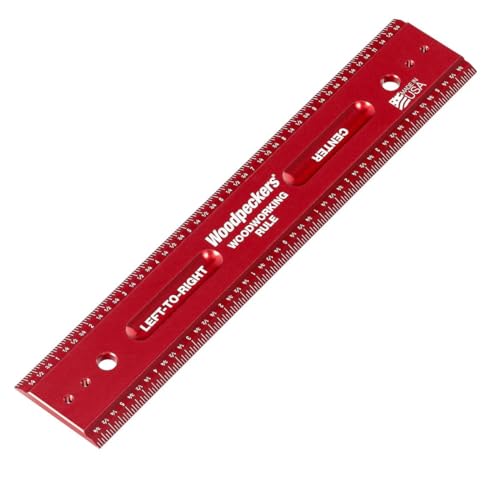
Woodpeckers 12 inch Woodworking Rule
Laser-etched graduations stay legible against an anodized aluminum body, even under sawdust and dim light. Precision-milled edges give a straight reference for marking and checking flatness. Unlike printed rules, the etched scale cannot wear off with handling.
Pros
- Etched markings resist wear indefinitely
- Anodized body shrugs off shop knocks
- Milled edges double as a straightedge
Cons
- Costs more than a printed rule
- One fixed length limits longer layouts

Starrett C33H-12-4R Combination Square
A hardened, satin-finished blade slides through a machined cast head without slop. Woodworkers use it to set 90 and 45 degree references, check depth, and locate center on round stock. Owners report the accuracy holding up after years of daily shop use.
Pros
- Sliding head stays accurate long term
- Handles depth and center-finding tasks
- Satin blade resists glare under lights
Cons
- Priced above hobbyist combination squares
- Heavier to carry than a speed square

Swanson Speed Square S0101
One cast aluminum body works as a try square, miter square, and saw guide. Framers and furniture makers alike use it for fast 45 and 90 degree marks. The rigid edge also clamps against a circular saw as a straight fence.
Pros
- Marks square corners in one motion
- Doubles as a circular saw fence
- One-piece casting resists bending
Cons
- Stamped scale reads coarser than etched
- Not built for fine joinery tolerances

iGaging 8 inch Digital Caliper
Fitting a tenon into its mortise means measuring both to a fraction of a millimeter, and this caliper delivers that resolution. A zero-anywhere function and a large LCD make repeat measurements fast. It switches between inch, metric, and fractional readouts on demand.
Pros
- Reads tolerances a rule cannot catch
- Zero function speeds repeat checks
- Large display stays readable in low light
Cons
- Battery-powered display can fail unnoticed
- Fine jaws need protection from dust
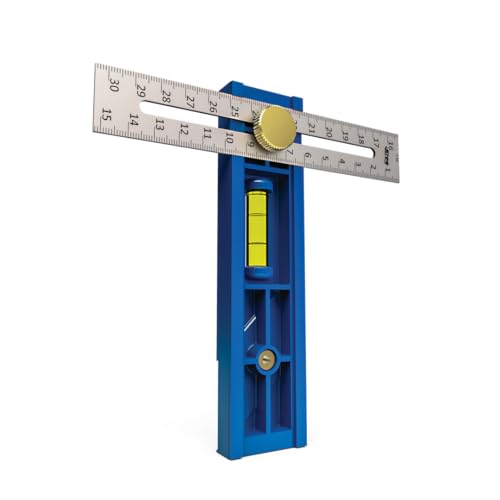
Kreg KMA2900 Multi-Mark
A sliding body converts between depth gauge, marking gauge, ruler, and square without swapping tools. Set the adjustable arm once, and it holds that setting through repeated marks. Many woodworkers keep it in an apron pocket for quick setup checks.
Pros
- Four layout functions in one body
- Sliding depth stop locks in place
- Compact enough for an apron pocket
Cons
- Less precise than a dedicated tool
- Locking screw loosens with heavy use
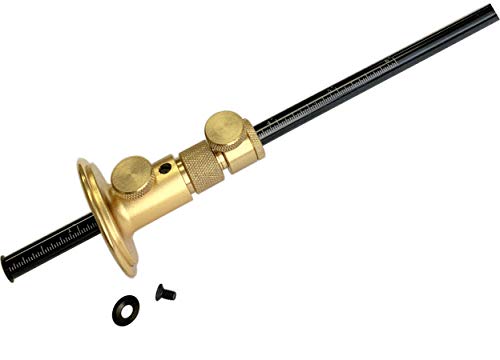
iGaging Wheel Marking Gauge
A cutting wheel scores a clean line across the grain, which a chisel or saw can register against directly. Dovetails and mortises benefit from that crisp knife line over a pencil mark that wanders. Micro-adjustment on the knob dials in exact settings before the first cut.
Pros
- Scored line stays put across the grain
- Micro-adjust knob sets fine offsets
- Brass and steel body resists wear
Cons
- Handles scribing only, not general layout
- Cutter wheel needs periodic replacement

Empire True Blue Torpedo Level
Bright vials read level, plumb, and 45 degree angles clearly, even in a dim garage. A ruled edge along the body marks short spans without reaching for a separate rule. Magnetic sides free up a hand while checking shelves or jigs.
Pros
- Vials stay legible in poor lighting
- Magnetic edge holds hands-free on steel
- Ruled edge covers quick short marks
Cons
- Too short for long stock or panels
- Not a substitute for a precision rule
How to pick the right one
What actually decides accuracy in a layout tool Three things matter most: graduation type, material, and how the tool holds its calibration over time. Etched or engraved scales stay crisp for years, while printed ones fade and blur with handling. Aluminum and hardened steel resist the dents that throw a tool out of true. Get those three right, and readability under shop light follows naturally.
Which square type fits your bench A speed square like the Swanson S0101 marks fast 45 and 90 degree lines and doubles as a saw fence, which suits framing and rough cuts. Finer bench work favors a combination square such as the Starrett C33H, which adds a sliding head for adjustable depth checks and center finding. Many shops keep both rather than choosing one. Test any square before trusting it: mark a line against a straight edge, flip the square, and mark again from the same point. Diverging lines mean the square is not true.
When to reach for a caliper or a marking gauge Cabinet and furniture joinery often needs tolerances a rule cannot see, which is where a digital caliper earns its place. The iGaging 8 inch caliper measures a tenon or dowel to a fraction of a millimeter so mating parts fit without gaps. For scribing the actual cut line, a wheel marking gauge scores the wood instead of just marking it, giving a chisel or saw a crisp wall to register against. Pencil marks have width and can wander with the grain, which scored lines avoid entirely.
Matching tools to the job: framing versus fine joinery Rough carpentry and deck framing rarely need more than a tape, a speed square, and a torpedo level for quick checks. Furniture and cabinet work reward finer tools: an etched rule for layout, a combination square for repeatable references, and a caliper for tight-fitting joints. A multi-function tool like the Kreg Multi-Mark suits shops that need several functions without carrying separate tools for each. Choosing tool precision to match the actual job avoids both wasted money and avoidable error.
Side by side
| # | Model | Length | Best for | Score | Price |
|---|---|---|---|---|---|
| 1 | Woodpeckers 12 inch Woodworking Rule | 12 inch | Best overall | 9.4 | Check price |
| 2 | Starrett C33H-12-4R Combination Square | 12 inch | Best for lasting accuracy | 9.2 | Check price |
| 3 | Swanson Speed Square S0101 | 7 inch | Best value | 9.0 | Check price |
| 4 | iGaging 8 inch Digital Caliper | 0 to 8 inch | Best for fine tolerances | 8.8 | Check price |
| 5 | Kreg KMA2900 Multi-Mark | Depth, marking, square, ruler | Best multi-purpose tool | 8.6 | Check price |
| 6 | iGaging Wheel Marking Gauge | Wheel cutter gauge | Best for scribing joinery | 8.3 | Check price |
| 7 | Empire True Blue Torpedo Level | 9 inch | Best for leveling and short spans | 8.0 | Check price |
Good to know
What measuring tools does a beginner woodworker need?
Start with a tape measure, a speed or combination square, and a marking gauge or knife. That trio covers length, square layout, and precise scribing, handling most projects before a caliper or specialty rule becomes necessary.
Is a digital caliper worth it for woodworking?
For fine joinery, yes. A caliper measures a tenon, dowel, or dado to a fraction of a millimeter so mating parts fit exactly. Rough carpentry rarely needs that resolution, but furniture and cabinet work benefit from it.
Speed square vs combination square: what’s the difference?
A speed square is a rigid triangle built for fast 45 and 90 degree marks and as a saw guide. Combination squares add a sliding head for adjustable depth, center finding, and finer reference work. Many shops use both.
How do you check if a square is actually true?
Mark a line against a straight board edge, flip the square over, and mark again from that same point. If the two lines diverge, the square reads out of true and should be replaced or returned.
Marking knife vs pencil: which gives a cleaner line?
A marking knife or wheel gauge scores a thin line that will not shift with the grain, unlike a pencil line that has width and can wander. Visible joinery, like dovetails, benefits most from the scored line.
How do you keep layout tools accurate over time?
Store squares and calipers away from dust and moisture, and avoid dropping them. Etched scales resist wear better than printed ones, and keeping tools clear of sawdust helps digital displays and sliding heads last longer.
Do woodworking layout tools need both metric and imperial scales?
It depends on the plans and hardware you follow. Many woodworkers stick to one system to avoid conversion mistakes, but a tool that switches between inch, fraction, and metric adds flexibility across different plan sources.
What size square or rule is most useful in a small shop?
A 12 inch rule paired with a 7 to 12 inch square covers most bench work while staying easy to store. Longer straightedges help with sheet goods, so some shops add a longer tool alongside the compact daily pair.
Can a torpedo level replace a straightedge?
Only for short spans. Its ruled edge handles quick marks and its magnetic sides free a hand for leveling shelves or jigs. Longer stock and full panels still need a dedicated rule or straightedge.
Why do etched scales cost more than printed ones?
Laser etching cuts the graduation into the metal itself, so it cannot rub off with years of handling. Printed scales are cheaper to produce but fade and blur, which is why serious layout tools favor etched markings.
Our pick
Everyday layout accuracy points to the Woodpeckers 12 inch Woodworking Rule, thanks to its crisp etched scale and rugged body. Budget-conscious shops get dependable square marks from the Swanson Speed Square S0101. Reach for the iGaging 8 inch Digital Caliper whenever joinery has to fit within a fraction of a millimeter.
Jake Monroe
Jake worked as a residential contractor for over a decade before shifting to full-time writing. He evaluates power tools, hand tools and workshop gear through the lens of someone who has actually used them on job sites, not just read the box.


