Which USB Switch Actually Keeps Your Devices Connected?
UGREEN’s USB 3.0 Switch Selector leads this lineup, running four devices at full 5Gbps between two computers with reliable button switching. Sabrent’s USB-SW20 matches that speed for less and ships with cables included. ABLEWE’s selector strips things down to one press, ideal for a shared printer or scanner.
Two computers sharing one keyboard, printer or drive need a switch, not a hub. UGREEN’s Switch Selector handles that job at full USB 3.0 speed, Sabrent’s USB-SW20 covers the same use case for less, and ABLEWE’s selector strips the feature list down for simple printer sharing.
Listings for USB switches often look identical, but bandwidth, port count and power support vary underneath. We compared published USB generation, host and device counts, external power support and switching method across seven current Amazon listings. Reconnection reliability, drawn from owner feedback, decided the final ranking, since a switch that drops a keyboard mid-task creates more friction than it removes.
What to look for
USB switch vs KVM switch: which one do you need? A USB switch moves peripherals between computers while each machine keeps its own monitor. A KVM switch moves keyboard, video and mouse together, so a single monitor serves both towers. Two monitors, or two laptops with built-in screens, call for the cheaper USB switch. One shared monitor calls for a KVM instead.
Does a USB switch need to be 3.0, or is 2.0 enough? USB 2.0 covers keyboards, mice, printers, scanners and audio interfaces without issue. USB 3.0 at 5Gbps matters once an external drive or a high-resolution webcam joins the shared side, since a 2.0 switch throttles that traffic hard. Match the switch to what you actually plan to connect. Paying for 3.0 to move a printer buys nothing extra.
Why does a USB switch need external power? Bus-powered switches pull all their current from the connected computer, fine for low-draw peripherals but marginal once a portable hard drive or powered hub joins in. Devices that connect on and off, drop mid-task or fail to spin up usually point to a power shortfall, not a data problem. Sharing drives calls for a switch with an external power input, used consistently.
Button, remote or keyboard shortcut: which switching method works best? A physical button works well when the switch sits in plain reach on the desk. Many people hide switches behind a monitor, then cannot reach the button, which is where a wired remote helps. Some models respond to a keyboard shortcut, though that only works if the keyboard itself stays connected through the switch. Physical buttons remain the most dependable control method.
What we recommend
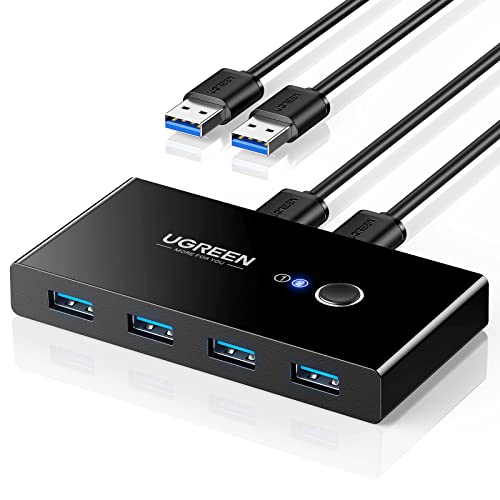
UGREEN USB 3.0 Switch Selector
Two computers can share four USB devices at full 5Gbps through this switch, which matters when an external drive sits on the shared side. A single button press moves the connection, backed by a clear indicator light. Owners report clean reconnection with keyboards and mice, the point where cheaper switches usually fail.
Pros
- Full USB 3.0 speed on every port
- Clean reconnection reported for keyboards and mice
- Solid housing with a clear switch indicator
Cons
- Host cables come in fixed lengths only
- Power-hungry drives need an external adapter
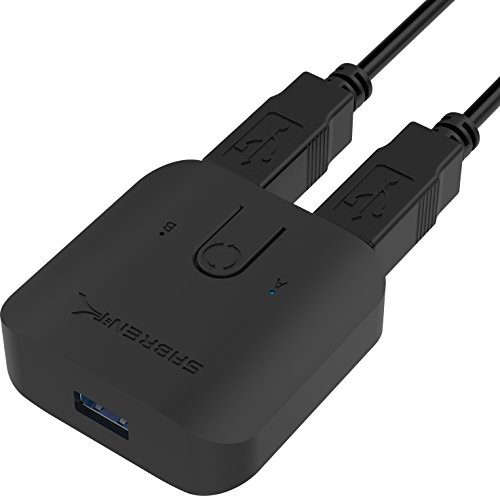
Sabrent USB-SW20 USB 3.0 Sharing Switch
Sabrent targets the common two-computer setup without dropping to USB 2.0 speeds. Its compact case fits neatly between two machines, and the switching button is easy to find without looking. Host cables ship in the box, which skips a separate order.
Pros
- Host cables included in the box
- USB 3.0 speed at a lower price point
- Compact footprint for tight desks
Cons
- Plastic case feels light for daily use
- No remote or keyboard-shortcut switching

ABLEWE USB 3.0 Switch Selector
ABLEWE answers one question well: moving a printer or scanner between two computers with a single press. It skips docking features to keep cost and complexity down. Bus power covers printers and flash drives, but larger external hard drives need more current than it supplies.
Pros
- Low entry price for basic sharing
- One-press switching with no learning curve
- Well suited to shared printers and scanners
Cons
- Bus power cannot run larger hard drives
- Indicator lights are hard to see in bright rooms

Cable Matters USB 3.0 Sharing Switch
Cable Matters documents compatibility more clearly than most switches in this category, which helps when hardware has to work alongside managed office equipment. Switching behavior stays consistent across Windows and macOS. Build quality is plain but sturdy enough for daily desk use.
Pros
- Consistent switching across Windows and macOS
- Clear compatibility documentation before purchase
- Sturdy housing for daily office use
Cons
- Design is plain compared to rivals
- No long host cables included

IOGEAR GUS404 4×4 USB 3.0 Sharing Switch
Most switches top out at two computers, but the GUS404 connects four hosts to four shared devices. An included external power adapter keeps bus-powered drives running without dropouts. That extra capacity comes with a larger footprint and a higher price than two-host switches.
Pros
- Supports four separate computers at once
- External power adapter included for demanding devices
- Metal-reinforced housing feels built for daily use
Cons
- Takes up more desk space than two-host units
- Costs noticeably more than simpler switches

Rybozen USB 3.0 Switch Selector
A wired remote button sets this switch apart, letting the unit itself sit hidden behind a monitor while the control stays within reach. That solves the common problem of tucking a switch away and then not being able to press it. Speeds match standard USB 3.0, and device count matches its two-host rivals.
Pros
- Wired remote allows hidden placement
- Standard USB 3.0 speed across ports
- Indicator clearly shows the active computer
Cons
- Remote adds one more cable to route
- Plain plastic casing

ATEN US224 2-Port USB Peripheral Sharing Device
ATEN builds for commercial installations, and this unit’s conservative design and long production run reflect that focus. It runs USB 2.0 rather than 3.0, so external drives are not the target use. For keyboards, printers and scanners, it behaves close to set and forget.
Pros
- Long track record of stable operation
- Widely used in professional and office environments
- Predictable, simple switching behavior
Cons
- USB 2.0 speeds limit drive use
- Fewer shared ports than four-device switches
Side by side
| # | Model | Standard | Best for | Score | Price |
|---|---|---|---|---|---|
| 1 | UGREEN USB 3.0 Switch Selector | USB 3.0 at up to 5Gbps | Best overall | 9.4 | Check price |
| 2 | Sabrent USB-SW20 USB 3.0 Sharing Switch | USB 3.0 at up to 5Gbps | Best value | 9.2 | Check price |
| 3 | ABLEWE USB 3.0 Switch Selector | USB 3.0 | Best budget | 9.0 | Check price |
| 4 | Cable Matters USB 3.0 Sharing Switch | USB 3.0 at up to 5Gbps | Best for office setups | 8.8 | Check price |
| 5 | IOGEAR GUS404 4×4 USB 3.0 Sharing Switch | USB 3.0 | Best for four computers | 8.6 | Check price |
| 6 | Rybozen USB 3.0 Switch Selector | USB 3.0 | Best for desk cable tidiness | 8.3 | Check price |
| 7 | ATEN US224 2-Port USB Peripheral Sharing Device | USB 2.0 | Best for reliability | 8.0 | Check price |
Good to know
What is the difference between a USB switch and a USB hub?
A hub expands one computer’s ports into several. A switch lets separate computers take turns using the same set of devices. Some products combine both functions, but the core job differs.
Will a USB switch work with my keyboard and mouse?
Wired keyboards and mice reconnect reliably through almost any switch. Wireless receivers and gaming peripherals with high polling rates sometimes take a moment longer to reconnect after switching.
Is USB 3.0 worth it over USB 2.0 for a switch?
USB 2.0 handles keyboards, mice, printers and scanners with room to spare. Choose 3.0 for an external drive, a fast card reader or a high-resolution webcam, since 2.0 bottlenecks that traffic.
Can two computers share one printer through a USB switch?
Yes, and printer sharing is one of the most common uses for these switches. Both computers need the printer driver installed ahead of time. Only the selected computer can print, so switch before sending a job.
Why do devices take a few seconds to reconnect after switching?
Switching re-enumerates the USB devices on the newly selected computer, similar to unplugging and replugging a cable. Longer delays usually point to a power shortfall or a slow-loading driver.
Do USB switches work with Mac and Linux, not just Windows?
Yes. Most switches are passive hardware that need no drivers, so operating system support rarely causes problems. Quirks tend to come from the connected peripheral, not the switch itself.
Can I connect an external hard drive to a USB switch?
Choose a switch with external power and a USB 3.0 rating for that. Eject the drive properly before switching, since cutting the connection mid-write risks data corruption.
How many computers can one USB switch handle?
Most consumer switches cover two computers. Four-host models, like the IOGEAR GUS404 here, exist for test benches and multi-machine desks willing to pay more.
Best USB switch for a home office with two computers?
UGREEN’s Switch Selector and Sabrent’s USB-SW20 both target two-computer setups at full USB 3.0 speed. Choose UGREEN for the strongest reconnection reliability, or Sabrent when included cables and a lower price matter more.
The verdict
UGREEN’s Switch Selector suits most desks that need dependable sharing, since full 5Gbps speed and clean reconnection cover both peripherals and drives. Sabrent’s USB-SW20 delivers nearly the same result for less when needs stay modest. Choose the ATEN US224 instead when long-term stability matters more than raw speed, and confirm first whether a KVM switch fits the setup better, since a shared monitor changes the answer.
Marcus Chen
Marcus covered consumer electronics for enthusiast tech publications for six years before joining ChoiceCrest. He specializes in translating manufacturer spec sheets into plain-language buying advice, with a focus on audio, computing accessories and smart-home gear.


