OLED, Mini-LED or QLED: How to Pick the Right TV
Hisense U8 series suits most living rooms, combining bright Mini-LED contrast with strong gaming specs at a moderate price. LG C4 OLED delivers the deepest blacks and best contrast for darker rooms. TCL Q6 QLED covers the budget tier while still holding up under daytime light.
Hisense U8 series works best for most living rooms. LG C4 OLED wins on picture quality for darker spaces. TCL Q6 QLED holds the budget end without a cheap look.
Spec sheets rarely predict how a TV behaves in a real room, since brightness, panel type and gaming support pull in different directions. We compared current listings on measured brightness, panel technology, HDMI bandwidth and the features owners mention most, then grouped each set by the room and budget it fits.
The best picks, ranked

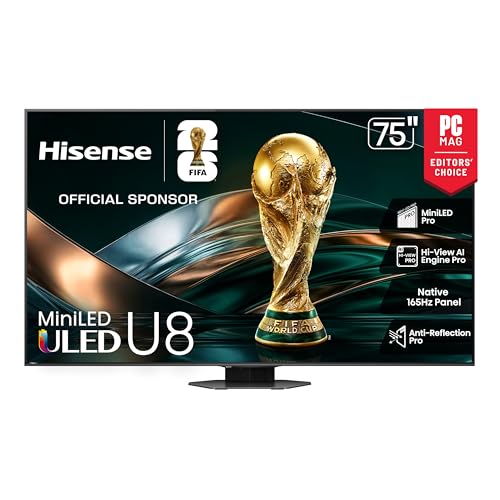
Hisense U8 Series Mini-LED QLED
Mini-LED backlighting gives the U8 series local-dimming contrast usually reserved for pricier sets. Owners report strong performance in sunlit rooms, and its 144Hz gaming spec sheet rivals TVs that cost more.
Pros
- Very high peak brightness for HDR
- Full 144Hz gaming support
- Strong contrast from Mini-LED dimming
Cons
- Off-angle viewing softens contrast
- Google TV interface can feel busy

LG C4 OLED
Self-lit OLED pixels switch off individually, producing true black and near-infinite contrast. Reviewers favor the C4 for dedicated movie or gaming rooms with controlled lighting. Four full-bandwidth HDMI 2.1 ports support 4K at 120Hz from current consoles.
Pros
- Per-pixel contrast and true black levels
- Fast pixel response for motion clarity
- Four full-bandwidth HDMI 2.1 ports
Cons
- Lower peak brightness than Mini-LED rivals
- Costs more per inch than LED alternatives

TCL Q6 QLED
Quantum-dot color and a direct-lit backlight let the Q6 punch above its price bracket. Large screen sizes stay affordable, making it a practical main set for a shared living room.
Pros
- Bright, saturated color for the price
- Affordable at larger screen sizes
- Straightforward Google TV setup
Cons
- 60Hz panel limits fast-paced gaming
- Contrast falls short of Mini-LED sets

Samsung Q60D QLED
Edge-lit QLED keeps the Q60D thin while quantum dots add vivid color. Tizen’s menus respond quickly, and owners describe it as a dependable everyday set for casual viewing rather than a home-theater centerpiece.
Pros
- Vivid quantum-dot color
- Slim, space-saving design
- Fast, responsive Tizen interface
Cons
- No Dolby Vision support
- Edge lighting limits deep contrast

Sony Bravia 3 LED
Sony’s video processing carries into the Bravia 3, producing natural color and clean upscaling of lower-resolution sources. Viewers who watch a lot of streaming and physical media get accurate skin tones without extra calibration.
Pros
- Accurate color straight out of the box
- Reliable upscaling of older content
- Clean, ad-light Google TV layout
Cons
- Peak brightness stays only moderate
- Fewer advanced gaming features than rivals

Amazon Fire TV Omni QLED Series
Hands-free Alexa sits built into the Omni QLED, useful for households already running Echo devices. Voice commands can search, launch apps or control smart-home gear without a remote.
Pros
- Hands-free Alexa built in
- Solid color from the QLED panel
- Deep catalog of streaming apps
Cons
- Interface pushes Amazon content first
- Not built for competitive gaming

Roku Plus Series QLED
Roku’s interface wraps around a full-array QLED panel here, favoring simplicity over extras. Anyone who wants a set that works right after setup, without menu-diving, fits this model well.
Pros
- Simple, uncluttered Roku interface
- Full-array local dimming at this price
- Voice remote finder included
Cons
- Refresh rate tops out at 60Hz
- Built-in speakers sound only adequate
The lineup, side by side
| # | Model | Panel | Best for | Score | Price |
|---|---|---|---|---|---|
| 1 | Hisense U8 Series Mini-LED QLED | Mini-LED QLED | Best overall | 9.4 | Check price |
| 2 | LG C4 OLED | OLED evo | Best picture quality | 9.3 | Check price |
| 3 | TCL Q6 QLED | QLED (direct-lit) | Best value | 8.8 | Check price |
| 4 | Samsung Q60D QLED | QLED (edge-lit) | Best for bright rooms | 8.5 | Check price |
| 5 | Sony Bravia 3 LED | Full-array LED | Best for movie fans | 8.4 | Check price |
| 6 | Amazon Fire TV Omni QLED Series | QLED | Best for streamers | 8.2 | Check price |
| 7 | Roku Plus Series QLED | QLED (full-array) | Best for simplicity | 8.0 | Check price |
Before you buy
OLED vs QLED vs Mini-LED: Which Panel Type Fits Your Room? Nearly every current TV ships in 4K, so resolution rarely separates good sets from bad ones. Panel technology decides picture quality instead. OLED pixels switch off individually, giving true black in dark rooms. Mini-LED and QLED panels push higher brightness, useful in rooms with lots of windows. Match panel type to your room’s lighting before comparing anything else.
How Much Brightness Do You Need for a Bright Living Room? A TV that measures bright on paper punches harder with HDR content and fights through daylight better. Local dimming, especially the fine zones on Mini-LED panels, keeps highlights sharp next to shadows without a gray wash. Daytime viewers should prioritize a bright panel with strong dimming over a slightly more accurate but dimmer screen.
Do You Need 120Hz or 144Hz for Gaming? Console and PC gamers should look for a 120Hz or 144Hz panel, HDMI 2.1 ports, variable refresh rate and auto low-latency mode. These features cut input lag and screen tearing. Casual play and movie nights work fine on a 60Hz set. Fast shooters and racing games feel noticeably smoother at higher refresh rates, so weigh that against the price gap.
Which Smart Platform Should You Pick: Google TV, Roku, Fire TV or Tizen? Every model here runs a different built-in system, and you touch it daily. Roku keeps menus simple and ad-light. Fire TV favors Alexa households and Amazon’s own catalog. Google TV blends broad app support with a busier layout, while Tizen on Samsung sets feels fast but skips Dolby Vision. Pick the platform that matches how you already stream, since it becomes a real tiebreaker between similarly priced sets.
Frequently asked questions
Is OLED Better Than QLED for a Dark Room?
Yes, for black levels and contrast. OLED pixels dim individually, so dark scenes stay free of the gray haze that backlit panels can show. QLED and Mini-LED still win on peak brightness, so daylight rooms often look better with those instead.
What Size TV Fits a Typical Living Room?
Seating distance matters more than most buyers expect. Measure how far your couch sits from the wall, and for common living-room distances a 55 to 75 inch screen usually feels immersive without dominating the space.
Do I Need a 144Hz TV for Gaming?
Only if your console or PC can output high frame rates. A 120Hz or 144Hz panel smooths fast games, but 60Hz handles movies, streaming and casual play without issue.
What Is Mini-LED and Why Does It Cost More Than Standard LED?
Mini-LED packs thousands of small backlight zones behind the screen, letting dark areas dim and highlights brighten independently. That narrows the gap with OLED contrast while keeping high brightness, which pushes the price above standard LED.
Are Built-In TV Speakers Good Enough, or Do I Need a Soundbar?
Built-in speakers handle news and casual streaming fine, but thin TV cabinets limit bass and volume. Frequent movie watchers usually notice more improvement from a modest soundbar than from any picture upgrade.
Does Dolby Vision Matter for Streaming?
Dolby Vision adjusts brightness scene by scene, and most major streaming services support it. Sets that handle it often look slightly better on premium content, though strong HDR10 performance still holds up well.
Can You Use a TV as a Computer Monitor?
Yes, and larger models make roomy displays for productivity or gaming. Confirm the set supports your computer’s output refresh rate and connector, since very large screens sit uncomfortably close on a desk.
How Long Does a Modern TV Last?
Most panels run for years under normal use. OLED sets include burn-in protection features, and following those settings alongside varied content keeps picture quality steady over time.
Which TV Is Best for a Bright Living Room With Lots of Windows?
Mini-LED and QLED panels handle glare and ambient light better than OLED, since they push higher peak brightness. Hisense U8 series and TCL Q6 QLED both suit sunlit rooms for this reason.
OLED vs Mini-LED: Which Should You Buy?
Choose OLED for a darker room where contrast and black levels matter most. Pick Mini-LED for a brighter room or mixed-use space, since it holds up better against daylight and windows.
Final word
Hisense U8 series remains the smart default for most rooms, combining brightness, contrast and a complete gaming spec sheet at a reasonable price. Darker rooms benefit most from stepping up to LG C4 OLED for its deeper black levels. Budget-focused shoppers still get a genuinely good picture from TCL Q6 QLED.
Marcus Chen
Marcus covered consumer electronics for enthusiast tech publications for six years before joining ChoiceCrest. He specializes in translating manufacturer spec sheets into plain-language buying advice, with a focus on audio, computing accessories and smart-home gear.
You might also need

How to Pick a WiFi Router That Actually Covers Your Home
Mini LED TVs Pack Local Dimming Zones Into Budget Sets

How to Pick a Cross Cut Shredder for Home or Office
