Choosing a Streaming Microphone That Matches Your Room
Shure MV7+ leads for hybrid USB and XLR output plus strong rejection of room noise. Elgato Wave:3 delivers the best value with built in mixing software for multi channel audio. Logitech Blue Yeti remains the simplest plug and play start for a first streaming setup.
Shure MV7+ combines USB and XLR outputs with a dynamic capsule that ignores most room noise. Elgato Wave:3 pairs a condenser capsule with Wave Link software for multi channel mixing. Logitech Blue Yeti stays the fastest way to start streaming without extra gear.
Streaming microphones are hard to judge from a spec sheet alone, since room acoustics change how each capsule behaves. A carpeted apartment performs differently than a bedroom with hardwood floors and a loud PC fan running nearby. We compared capsule type, connection options, onboard controls and owner feedback on background noise rejection to rank these seven models.
What we recommend

Shure MV7+ Hybrid USB/XLR Dynamic Microphone
Dynamic capsule and tight cardioid pickup keep this mic quiet in untreated rooms. Touch controls on top handle gain, mute and monitor mix during a live scene. Switching between USB C and XLR means the same body works with a laptop now and a mixer later.
Pros
- Handles background noise better than condenser rivals
- USB C and XLR outputs cover a full gear upgrade path
- Built in denoiser cleans audio before it reaches streaming software
Cons
- Requires close mic technique for a full sound
- Metal body adds weight that a flimsy arm cannot support

Elgato Wave:3 USB Condenser Microphone
Wave Link software routes game, chat and mic audio into separate channels without a hardware mixer. Clipguard lowers gain automatically when volume spikes, according to the listing. Capacitive mute button on top switches silently, unlike a mechanical toggle.
Pros
- Wave Link replaces a standalone hardware mixer
- Clipguard prevents distortion during loud reactions
- Compact stand clears most monitor arms on a desk
Cons
- Condenser capsule captures more keyboard and room noise
- USB only connection with no XLR upgrade path

Logitech for Creators Blue Yeti USB Microphone
Plugging in the USB cable is the entire setup process, with no drivers to install. Four selectable patterns cover solo commentary, two person interviews and round table recording. Owners report the weighted base stand resists tipping, though desk thumps still transmit through it.
Pros
- Four patterns fit almost any recording layout
- Works immediately without extra software
- Built in headphone jack gives zero latency monitoring
Cons
- Desk vibration reaches the capsule without a shock mount
- Large footprint crowds a small desk

RODE NT-USB+ Condenser Microphone
Internal 32 bit float conversion makes clipped audio recoverable during editing. Aphex processing applies compression and noise gating before the signal reaches OBS. Included pop filter mounts directly to the body instead of clamping to a separate arm.
Pros
- 32 bit float recording rescues audio that would otherwise clip
- Onboard DSP reduces noise before capture
- Pop filter and tripod ship in the box
Cons
- Changing processing settings requires a companion app
- Sensitive capsule picks up a noisy room quickly

HyperX QuadCast S USB Condenser Microphone
Built in shock mount absorbs desk bumps that shake other condenser mics. Tap to mute on the top plate switches silently, and the RGB ring shows mute status at a glance. Four polar patterns switch through a dial on the rear housing.
Pros
- Shock mount is included, so no separate purchase is needed
- RGB ring makes mute status visible in peripheral vision
- Rear dial makes pattern switching quick during a session
Cons
- RGB lighting adds cost that non gamers may not want
- Cardioid pickup is wider than a dynamic mic
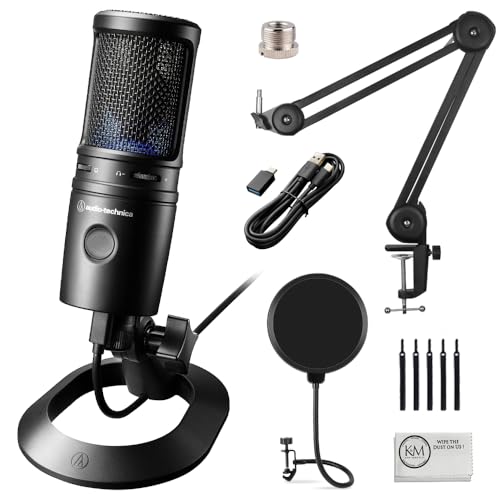
Audio-Technica AT2020USB-X Cardioid Condenser Microphone
AT2020 capsule has anchored Audio-Technica’s podcast lineup for years, and this USB-X version adds a headphone jack and touch mute. No companion software runs in the background, which some streamers prefer for reliability. Based on specifications, it handles high sound pressure levels well for a condenser.
Pros
- Neutral capsule tone with minimal coloring
- Runs without installing any companion app
- Metal housing resists knocks on a busy desk
Cons
- Bundled tripod sits low for a seated streamer
- No onboard noise processing

Razer Seiren V3 Mini USB Microphone
Standing barely taller than a coffee mug, this mic suits cramped desks and travel setups. Built in limiter catches sudden peaks before they clip. Tap to mute top plate includes an LED ring that shows status without checking software.
Pros
- Small footprint frees up desk space
- Built in limiter guards against harsh clipping
- Tap to mute with a visible LED indicator
Cons
- No headphone jack for direct monitoring
- Thinner low end than full size microphones
Compared at a glance
| # | Model | Capsule type | Best for | Score | Price |
|---|---|---|---|---|---|
| 1 | Shure MV7+ Hybrid USB/XLR Dynamic Microphone | Dynamic | Best overall | 9.4 | Check price |
| 2 | Elgato Wave:3 USB Condenser Microphone | Condenser | Best value | 9.2 | Check price |
| 3 | Logitech for Creators Blue Yeti USB Microphone | Condenser, three capsule | Best for beginners | 9.0 | Check price |
| 4 | RODE NT-USB+ Condenser Microphone | Condenser | Best for voice clarity | 8.8 | Check price |
| 5 | HyperX QuadCast S USB Condenser Microphone | Condenser, three capsule | Best for gaming setups | 8.6 | Check price |
| 6 | Audio-Technica AT2020USB-X Cardioid Condenser Microphone | Condenser | Best budget condenser | 8.3 | Check price |
| 7 | Razer Seiren V3 Mini USB Microphone | Condenser | Best compact pick | 8.0 | Check price |
What to look for
Dynamic vs condenser: which fits your room? Condenser capsules capture more detail, along with air conditioners, keyboards and street noise. Dynamic capsules like the Shure MV7+ reject far more of that background sound. Streaming from an untreated bedroom favors a dynamic mic, since acoustic panels become optional. Choose a condenser only when the room is quiet and softly furnished, such as a carpeted space with curtains.
USB or XLR: what connection do you need? USB microphones plug straight into a computer with no extra hardware, which explains why most streamers start there. XLR mics need an audio interface or mixer, but they open the door to better preamps and outboard processing later. Hybrid designs, such as the MV7+, carry both outputs and cost more upfront. Sticking with one computer and one mic long term makes USB alone a reasonable choice.
Best microphone mounting for reducing desk noise Desk stands transmit keystrokes and mouse clicks straight into the capsule. Boom arms with a shock mount lift the mic off the desk and move it closer to your mouth. That combination improves voice to room ratio from two directions at once. Check thread size before buying an arm, since some mics need an adapter, and confirm the arm can support heavier metal bodies like the QuadCast S or MV7+.
Which onboard controls matter most for live streaming? Reaching for a software slider mid broadcast breaks the flow of a stream. Physical or touch controls for gain, mute and headphone mix solve that problem directly. Silent mute matters too, since a mechanical switch click ends up on the recording. Zero latency headphone monitoring lets you hear your own voice without the delay that makes speaking feel off.
Questions worth asking
Do I need an audio interface for a USB streaming microphone?
No, every USB mic in this list has a built in converter and headphone amp. Plugging into a laptop is enough to start recording. An interface only becomes necessary with an XLR mic or when running multiple microphones together.
Why does my microphone pick up keyboard noise so easily?
Most often the culprit is a condenser sitting directly on a desk stand. Moving to a boom arm with a shock mount stops vibration from traveling through the desk. Sitting closer to the mic and lowering gain also helps, and a dynamic capsule reduces the problem further.
Is a cardioid pattern enough for solo streaming?
Yes, cardioid pickup suits one person speaking into the front of the mic. Omnidirectional and stereo patterns exist for room recording or interviews. Using those patterns for solo streaming just adds unwanted room noise.
What is the difference between USB and XLR microphones for streaming?
USB mics connect directly to a computer with no extra hardware. XLR mics require an interface or mixer but allow better preamps and future upgrades. Hybrid models like the Shure MV7+ carry both outputs on one body.
How close should you sit to a streaming microphone?
Dynamic mics work best about a hand width from the grille for a fuller tone. Condensers can sit slightly farther back because they are more sensitive. Owners report that thin sounding audio often comes from sitting too far away and raising gain to compensate.
Do these microphones work with OBS and Streamlabs?
Yes, each one shows up as a standard audio input device. Streaming and recording software detects them without special drivers. Companion apps from Elgato and RODE add mixing features but are not required for basic capture.
Should you buy a pop filter for a streaming microphone?
If the mic does not include one, yes. Plosive bursts from P and B sounds create thumps that software cannot fully remove afterward. The RODE NT-USB+ ships with an integrated filter, and a foam windscreen works as a substitute on other mics.
Is a more expensive microphone always better for streaming?
Only up to a point. Upgrading from a cheap mic to a solid one brings a clear improvement. Past that, room treatment, mic placement and gain staging affect sound quality more than the gear itself. A mid range dynamic mic in a treated corner can beat a costlier condenser in a bare room.
What is the best streaming microphone for a small desk?
Razer Seiren V3 Mini fits cramped desks and travel bags, standing about the height of a coffee mug. Its built in limiter catches sudden peaks, and a tap to mute plate keeps controls simple. Sound quality trails larger mics, but the size tradeoff suits tight setups.
Our take
Shure MV7+ suits most streamers who want a mic that stays clean in an untreated room and scales from USB to XLR later. Elgato Wave:3 makes more sense when built in mixing software matters more than hybrid outputs. Logitech Blue Yeti remains the fastest way to start streaming without researching any of this first.
Marcus Chen
Marcus covered consumer electronics for enthusiast tech publications for six years before joining ChoiceCrest. He specializes in translating manufacturer spec sheets into plain-language buying advice, with a focus on audio, computing accessories and smart-home gear.


