Streaming Boxes That Won’t Slow Down Like Your Smart TV
Roku Ultra pairs the widest app catalogue with a fast, uncluttered interface, making it the strongest all-around pick. Amazon Fire TV Stick 4K Max delivers nearly the same picture quality in a smaller, cheaper package. Apple TV 4K suits households already inside Apple’s ecosystem, with AirPlay and HomeKit built in.
Smart TVs run their own apps, but the processor inside ages faster than the screen, and menu lag creeps in within two or three years. A dedicated streaming box sidesteps that problem, since swapping in a new one costs far less than a new television. The lineup here spans a plain HDMI dongle to a gaming capable box with its own storage and Ethernet port.
Comparing them gets messy once app selection, remote design and processing speed all vary by platform. We compared chipset performance, internal storage, voice remote functionality and what owners report about menu lag, narrowing the field to seven currently sold boxes.
Our top picks

Roku Ultra (2024)
Roku runs its own lightweight operating system instead of Android or Google TV, so menus stay quick even on older televisions. An Ethernet port lets it skip Wi-Fi entirely in a crowded household. Its remote hides a headphone jack for private listening without pairing a companion app.
Pros
- Ethernet port sidesteps Wi-Fi congestion
- Lightweight OS keeps menus fast
- Headphone jack in the remote enables private listening
Cons
- No local storage for offline downloads
- Fewer gaming features than Android based boxes

Amazon Fire TV Stick 4K Max
Wi-Fi 6E inside the 4K Max cuts buffering on networks packed with other devices. Alexa sits built into the remote, so launching an app or dimming smart lights needs no separate hub. The whole unit is a compact dongle that hides behind the television.
Pros
- Wi-Fi 6E reduces buffering on busy networks
- Compact dongle needs no nearby power brick
- Alexa remote doubles as smart home control
Cons
- Home screen pushes Amazon content and ads
- Limited storage for sideloaded apps

Apple TV 4K (2022, 3rd generation)
An A15 Bionic chip handles gaming and app switching faster than most rivals at this price. AirPlay mirrors an iPhone screen instantly, and Wi-Fi passwords transfer automatically between Apple devices. HomeKit support turns the box into a hub for compatible smart home accessories.
Pros
- A15 Bionic chip handles apps and games quickly
- AirPlay mirroring works seamlessly with iPhone and iPad
- Doubles as a HomeKit smart home hub
Cons
- Fewer third-party apps than Android based boxes
- Only one remote ships in the box
NVIDIA Shield TV Pro
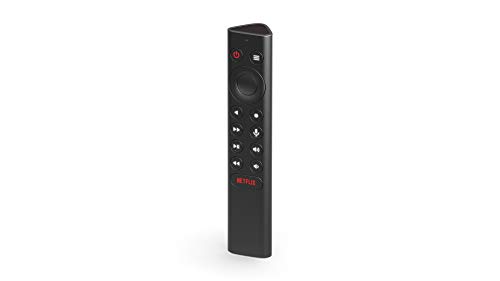
A Tegra X1+ processor runs GeForce Now cloud gaming and transcodes Plex libraries locally. Three gigabytes of RAM plus two USB ports for external storage go beyond what most streaming boxes offer. Its larger shell also houses better cooling than any dongle style competitor.
Pros
- Handles cloud gaming and Plex transcoding smoothly
- USB ports allow external storage expansion
- Cools better than compact dongle designs
Cons
- Bulkier than stick style streaming devices
- Costs more than most other Android TV boxes
Google Chromecast with Google TV (4K)
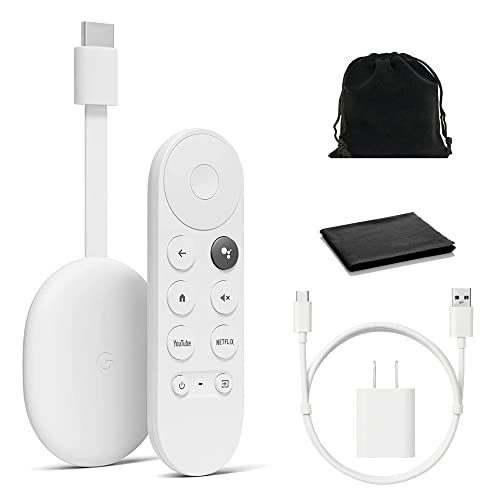
Google TV recommends shows across every installed app instead of walling each one off, unlike older Chromecast models that needed a phone to drive them. It still doubles as a caster for phone screens when you want that. Dolby Vision and Dolby Atmos play on any app that supports them.
Pros
- Cross-app recommendations simplify finding something to watch
- Works as both a standalone box and a caster
- Supports Dolby Atmos on compatible apps
Cons
- Processor lags on content-heavy home screens
- Storage is tight for sideloading extra apps

Xiaomi Mi Box S
Stock Android TV with Chromecast built in gives access to the full Google Play catalogue rather than a curated storefront. It plays 4K HDR content and pairs with a basic voice remote for Google Assistant search. Low cost makes it an easy first step into Android TV.
Pros
- Full Google Play access beyond curated app lists
- Built-in Chromecast adds casting from any phone
- Low cost entry point into Android TV
Cons
- Processor feels slower than newer Android TV boxes
- Remote lacks dedicated streaming service shortcut buttons

Amazon Fire TV Cube
A built-in Alexa speaker launches apps and controls compatible smart home gear without touching the remote. An infrared blaster also handles TV power and volume, replacing a second remote for basic functions. Its processor loads apps faster than the standard Fire TV Stick line.
Pros
- Hands-free Alexa control skips reaching for a remote
- Infrared blaster consolidates TV and streaming control
- Faster processor than standard Fire TV Stick models
Cons
- Larger footprint needs open space near the TV
- Costs more than simpler Fire TV Stick options
How they stack up
| # | Model | Resolution Support | Best for | Score | Price |
|---|---|---|---|---|---|
| 1 | Roku Ultra (2024) | 4K, HDR10+, Dolby Vision | Best overall streaming box | 9.3 | Check price |
| 2 | Amazon Fire TV Stick 4K Max | 4K, HDR10+, Dolby Vision | Best value streaming device | 9.0 | Check price |
| 3 | Apple TV 4K (2022, 3rd generation) | Apple A15 Bionic | Best for Apple ecosystem users | 9.1 | Check price |
| 4 | NVIDIA Shield TV Pro | NVIDIA Tegra X1+ | Best for gaming and power users | 9.0 | Check price |
| 5 | Google Chromecast with Google TV (4K) | 4K, HDR10+, Dolby Vision | Best budget streaming box | 8.6 | Check price |
| 6 | Xiaomi Mi Box S | 4K, HDR | Best for a simple Android TV interface | 8.3 | Check price |
| 7 | Amazon Fire TV Cube | 4K, HDR10+, Dolby Vision | Best for hands-free voice control | 8.8 | Check price |
How to pick the right one
What to know before buying a streaming box Boxes run on Roku OS, Google TV, Fire OS or Apple’s tvOS, and each has its own app store and interface style. Major services like Netflix, Disney Plus and YouTube support nearly all of them, so the platform matters more for interface speed than for app availability. Chipset quality decides how fast menus load, which is why older or budget boxes can feel sluggish scrolling through rows.
Do you need 4K, HDR and Dolby Atmos support? Most current boxes support 4K, though Dolby Vision and HDR10+ vary by device and by which apps actually use them. Dolby Atmos passthrough matters for anyone running a soundbar or receiver capable of object based sound. An older television without 4K or HDR gains little from paying extra for a higher end box.
Which streaming box is best for gaming or a smart home? Gamers get real use from the NVIDIA Shield TV Pro, which supports cloud gaming and local streaming from a PC. Smart home households often prefer a built-in voice assistant, like the Fire TV Cube’s hands-free Alexa, over remote-based voice search. Apple device owners gain extra value from HomeKit support if their accessories already use that standard.
Best streaming box for a simple, budget setup Dongle style boxes like the Chromecast with Google TV or Fire TV Stick 4K Max cost less and suit a single television without gaming or heavy multitasking needs. Households that want a plain home screen without recommendation algorithms often prefer Roku’s simpler layout. Anyone replacing an aging smart TV’s built-in apps can start with a budget box before moving up to a gaming capable model.
Frequently asked questions
What is the difference between a streaming stick and a streaming box?
A stick is a compact dongle that plugs directly into an HDMI port, while a box is larger, often with better cooling, more storage and sometimes gaming capability.
Which streaming device has the most app selection?
Roku and Android TV based devices, including the NVIDIA Shield and Xiaomi Mi Box S, generally offer the widest app selection through their respective stores.
Do streaming boxes work without a smart TV?
Yes. A streaming box only needs an HDMI port and power, so it adds smart features to any television regardless of built-in apps.
Can a streaming box replace a cable box entirely?
It replaces cable for on-demand and app based content, though live local channels may still need a separate antenna or a live TV streaming app.
Is Apple TV worth it for non-Apple households?
It works fine without other Apple devices, but AirPlay mirroring and HomeKit integration matter less without an iPhone or HomeKit accessories.
How much storage do streaming boxes actually need?
Most cloud based apps need little storage, though boxes with 16GB or more, like the Fire TV Cube, handle sideloaded apps and games more comfortably.
Are streaming boxes good for gaming?
The NVIDIA Shield TV Pro supports cloud gaming services and local streaming from a gaming PC, though none of these boxes replace a dedicated console.
Which streaming box has the least lag navigating menus?
Roku’s lightweight OS and Apple TV’s A15 Bionic chip both navigate with less lag than budget Android TV boxes running older processors.
Fire TV Stick vs Fire TV Cube: what’s the real difference?
The Cube adds a built-in Alexa speaker and an infrared blaster for TV control, plus a faster processor, at a larger size and higher cost than the Stick.
Do I need Ethernet on a streaming box?
Wired boxes like the Roku Ultra avoid Wi-Fi congestion in crowded households, which matters most for 4K streaming or homes with many connected devices.
Our take
Roku Ultra offers the broadest app support with a fast, uncluttered interface for most households. Budget shoppers get comparable streaming quality from the Amazon Fire TV Stick 4K Max, while the NVIDIA Shield TV Pro remains the top pick for gaming and cloud transcoding needs.
Marcus Chen
Marcus covered consumer electronics for enthusiast tech publications for six years before joining ChoiceCrest. He specializes in translating manufacturer spec sheets into plain-language buying advice, with a focus on audio, computing accessories and smart-home gear.