How To Pick The Stream Deck That Fits Your Setup
Elgato’s Stream Deck MK.2 suits most streamers, pairing 15 LCD keys with the widest plugin library available. Multi camera productions favor the 32 key Stream Deck XL. New creators start easiest with the eight key Stream Deck Neo, while editors get more value from the Loupedeck Live S.
Elgato Stream Deck MK.2 handles scene switching, mic muting and clip playback without paging through folders. Bigger productions need the 32 key Stream Deck XL for the same reason. New streamers often start with the Stream Deck Neo instead, since eight keys are easier to learn.
Picking one is tricky because most controllers share a similar button grid, and the real gap sits in software depth and plugin support. We compared key counts, screen resolution, dial and pedal options, connection type and mounting flexibility, then weighed the results against what owners report after regular use.
The best picks, ranked

Elgato Stream Deck MK.2
Fifteen customizable LCD keys balance capability against desk space, which keeps this model the default pick for most streamers. A detachable USB-C cable and adjustable stand simplify cable routing on a crowded desk. Software support covers OBS, Streamlabs, Twitch, Discord, Spotify and hundreds of community plugins.
Pros
- Largest plugin and profile library in the category
- Detachable cable simplifies cable routing
- Compact footprint fits crowded desks
Cons
- Fifteen keys fill up fast on complex shows
- No dials or touch strip included

Elgato Stream Deck XL
Thirty two keys hold scenes, sources, audio, lighting and chat commands on one page instead of several folders. Owners running multi camera shows report less mental overhead during a live broadcast. Extra keys mean extra desk space, so measure your setup before ordering.
Pros
- No paging needed for large action sets
- Runs the same mature software as the MK.2
- Stays put on the desk while typing
Cons
- Takes up significant desk space
- More capability than a single scene stream needs

Elgato Stream Deck +
Four analog dials and a touch strip sit below eight LCD keys, turning volume, gain and filter changes into a twist instead of a mouse drag. Streamers who mix several audio sources live get the most from this layout. Fewer keys than the MK.2 is the main trade off.
Pros
- Dials speed up live audio mixing
- Touch strip adds swipe based control
- Works well as a secondary editing controller
Cons
- Only eight programmable keys
- Dial mapping takes setup time

Elgato Stream Deck Neo
Eight LCD keys, two touch points and a small info bar covering the clock and notifications keep the layout simple for new creators. A fixed, low profile stand needs no assembly. It runs the same software as the rest of the Elgato lineup, so upgrading later means no relearning.
Pros
- Simple layout that is hard to outgrow quickly
- Fixed stand needs no assembly
- Full access to the Elgato plugin library
Cons
- Cable is not detachable
- Info bar adds little practical function

Elgato Stream Deck Mini
Six keys cover scene switching, mic mute and a couple of alerts, enough for many solo streamers. This is the smallest, most affordable entry into the Stream Deck ecosystem, and it travels well in a laptop bag. Folders add extra actions once six keys run out.
Pros
- Smallest desk footprint in the lineup
- Most affordable route into the software
- Packs easily for events or travel
Cons
- Six keys require heavy folder use
- Light body can slide on smooth desks

Razer Stream Controller X
Twelve LCD keys run through Razer Synapse and the Streamer Companion App, keeping setup close to Razer’s existing peripheral software. Integration with Razer Chroma lighting and audio gear matters most if those products already sit on your desk. Third party plugin choice is narrower than Elgato’s lineup.
Pros
- Ties directly into existing Razer hardware
- Bright, clear key display
- Guided setup wizard for new users
Cons
- Smaller third party plugin library
- Requires Razer Synapse running in the background
Loupedeck Live S
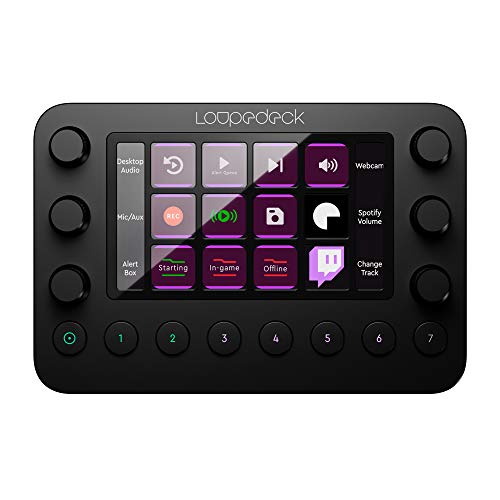
A touchscreen grid paired with physical dials targets people who split time between streaming and editing in Premiere Pro, Lightroom or Photoshop. Touch pages scroll instead of folding into folders, which suits owners managing large action sets. Streaming plugin coverage trails Elgato’s, though core apps like OBS are supported.
Pros
- Strong shortcut support for Adobe apps
- Touch pages scroll instead of paging
- Dials handle fine adjustments smoothly
Cons
- Smaller streaming plugin catalog
- Touchscreen keys give no tactile click
Before you buy
How many keys do you actually need Count the actions you reach for during a normal stream, then add a few for growth. Solo streamers typically land between six and fifteen keys, which points toward the Mini, Neo or MK.2. Running several cameras, guest audio and a lighting rig pushes the count higher, where the 32 key XL removes constant folder switching.
Software and plugin depth matter more than the buttons Every controller here is essentially a grid of programmable buttons. What separates them is what those buttons can trigger. Elgato’s plugin catalog is the widest, covering broadcast software, chat bots, smart lighting and home automation. Check that a plugin exists for any niche app before committing to a platform.
Dials and touch strips for live audio and OBS scenes Physical dials suit continuous adjustments such as mic gain, music volume or a video scrub during an OBS switch. Both the Stream Deck Plus and Loupedeck Live S include them. A foot pedal, sold separately by Elgato, can carry mute or push to talk duties when your hands stay on mouse and keyboard.
Budget picks and small desk setups A tight desk or a limited budget narrows the field fast. Six keys fit in a pocket sized body on the Mini, while the Neo adds two touch points without growing much larger. Both run full Stream Deck software, so a smaller unit today does not block bigger profiles later.
The lineup, side by side
| # | Model | Keys | Best for | Score | Price |
|---|---|---|---|---|---|
| 1 | Elgato Stream Deck MK.2 | 15 LCD | Best overall | 9.4 | Check price |
| 2 | Elgato Stream Deck XL | 32 LCD | Best for multi camera productions | 9.2 | Check price |
| 3 | Elgato Stream Deck + | 8 LCD plus 4 dials | Best for live audio control | 9.0 | Check price |
| 4 | Elgato Stream Deck Neo | 8 LCD plus 2 touch points | Best for beginners | 8.8 | Check price |
| 5 | Elgato Stream Deck Mini | 6 LCD | Best for small desks and budget setups | 8.6 | Check price |
| 6 | Razer Stream Controller X | 12 LCD | Best for Razer gaming setups | 8.3 | Check price |
| 7 | Loupedeck Live S | Touchscreen grid plus dials | Best for streamers who also edit | 8.0 | Check price |
Questions worth asking
Do I need a stream deck if I only stream casually?
Not strictly, but even casual streamers benefit from one button scene switching, mic mute and clip capture. A six key Mini or eight key Neo covers casual use without eating up desk space.
Does a stream deck work with OBS Studio?
Yes. Official OBS Studio and Streamlabs plugins exist for the full Elgato range, and both Razer and Loupedeck support OBS through their own software.
Can a stream deck replace shortcuts for work outside streaming?
Yes. Owners report using them for meeting mute, camera toggles, app launching, text snippets and macros inside editing software. The action library is not limited to broadcasting tasks.
Does a stream deck work on a Mac?
Elgato, Razer and Loupedeck software all run on Windows and macOS. Confirm current system requirements for your macOS version before buying.
What is the difference between the Stream Deck MK.2 and XL?
Key count and size mainly separate them. The MK.2 carries 15 keys, the XL carries 32 across a much larger footprint, while software and features stay the same.
Is the Stream Deck Mini worth it on a small desk?
For solo streamers with limited space, yes. Six keys cover the basics, and folders add extra actions once that grid fills up.
How do the dials on the Stream Deck Plus work?
Each dial presses and turns, so you can click to select then rotate to adjust volume, gain or a filter setting. A touch strip below adds swipe based control.
Is a Razer Stream Controller better than an Elgato Stream Deck for gamers?
It depends on your existing gear. Razer Synapse integration helps if you already own Razer lighting and audio devices, though Elgato still offers a wider plugin library.
Can a stream deck control smart lights and other gear?
Yes. Plugins exist for Elgato Key Light, Philips Hue, Nanoleaf and several smart home systems, letting one key change lighting alongside your camera scene.
Our take
Elgato Stream Deck MK.2 remains the strongest balance of key count, software depth and desk space for most streamers. Move up to the Stream Deck XL once a show has too many moving parts for folders to handle, or start with the Neo while a workflow is still taking shape. Choose the Stream Deck Plus when live audio control matters more than raw key count, and the Loupedeck Live S when editing time rivals streaming time.
Marcus Chen
Marcus covered consumer electronics for enthusiast tech publications for six years before joining ChoiceCrest. He specializes in translating manufacturer spec sheets into plain-language buying advice, with a focus on audio, computing accessories and smart-home gear.