Sticker Printers Compared by Ink, Width and Media Cost
Brother’s VC-500W wins overall because it prints full colour stickers with zero ink cartridges. MUNBYN’s ITPP941 handles shipping and product labels at volume on standard thermal stock. Phomemo’s M110 delivers the best value for phone first craft labelling on a budget.
Brother’s VC-500W leads this group for full colour stickers with no ink involved. MUNBYN’s ITPP941 takes shipping and product labels at volume, while Phomemo’s M110 covers cheap craft labels from a phone. Technology splits into thermal, thermal transfer and ZINK, and print width decides what size sticker each one can actually produce.
Running cost matters more than sticker price tags suggest, since proprietary rolls on a cheap printer can outspend a pricier machine within a year. We compared print technology, maximum width, colour capability and media availability across all seven models. Owner feedback on fading, adhesive strength and app reliability shaped the final ranking, not marketing claims alone.
Our top picks

Brother VC-500W Versatile Compact Color Label Printer
Colour comes straight from ZINK paper, so no cartridge ever needs replacing. Prints top out near two inches wide, enough for jar labels, name tags and small product stickers. Wireless setup pairs with Brother’s app on phone or desktop, and saturation runs a touch softer than inkjet output.
Pros
- Full colour output with zero ink cartridges
- Pairs wirelessly with phone and desktop apps
- Compact footprint suits a craft desk or counter
Cons
- Locked to proprietary ZINK label rolls
- Colour saturation trails a true inkjet

MUNBYN ITPP941 Thermal Label Printer
Direct thermal printing means zero ink for shipping labels, barcodes and product stickers. Four inch width handles most carrier label formats without cropping. Standard rolls and fanfold stock from any supplier keep per label cost low, though output stays black and white only.
Pros
- Runs on inexpensive standard label stock
- Prints fast enough for daily shipping volume
- Works with major carrier and marketplace formats
Cons
- Monochrome only, no colour option
- Thermal print fades with heat and sunlight

Phomemo M110 Label Maker Machine
A phone app drives most of the work here, with fonts, templates and barcode tools built in. Battery power lets you label jars, boxes or crafts away from a desk. Print width stays narrow near two inches, so large designs are not this printer’s job.
Pros
- Runs on battery for labelling anywhere
- App templates cover barcodes and craft designs
- Low cost to buy and to run
Cons
- Narrow width limits larger sticker designs
- Desktop layout tools are limited

ROLLO Wireless Label Printer X1040
Wireless printing lets orders move straight from a phone or tablet to a label. Any standard four inch stock works, so media never locks you into one supplier. Calibration holds steady between roll changes, which matters when volume climbs during a busy week.
Pros
- Accepts third party media without lock in
- Holds calibration well under daily use
- Prints wirelessly from mobile devices
Cons
- Monochrome output like other thermal models
- Costs more upfront than basic thermal units

Brother P-touch Cube Plus PT-P710BT Label Maker
Laminated tape sandwiches the print between two plastic layers, so labels survive water, freezers and dishwashers. Bluetooth pairing prints designs from a phone up to twenty four millimetres wide. Tape cassettes cost more than plain thermal rolls, but the label itself lasts years outdoors.
Pros
- Laminated labels resist water and abrasion
- Portable with rechargeable battery power
- Wide choice of tape colours and widths
Cons
- Tape cassettes cost more than plain rolls
- Cassette format limits sticker shapes
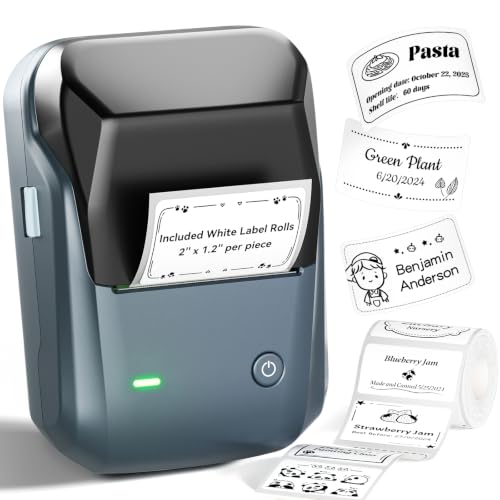
NIIMBOT B1 Label Maker Machine
Clip art, fonts and pre sized templates fill the companion app, aimed at pantry and storage labels. Text and simple graphics print cleanly at this size. Branded rolls are the only supported media, so check availability before committing to the ecosystem.
Pros
- Simple app built for quick home labels
- Wide range of decorative label roll styles
- Small enough to store in a drawer
Cons
- Locked to NIIMBOT branded media
- Not built for shipping or product volume

POLONO PL60 Label Printer
Address labels, jar labels and barcodes print from a phone or laptop without any ink to buy. Setup takes only a few minutes out of the box. Width and colour options stay limited, making this a starter printer rather than a long term shipping solution.
Pros
- Lowest price point among these seven
- No ink or toner required to operate
- Quick setup on phone or laptop
Cons
- Narrow print width with no colour
- Software feels basic next to rivals
Side by side
| # | Model | Technology | Best for | Score | Price |
|---|---|---|---|---|---|
| 1 | Brother VC-500W Versatile Compact Color Label Printer | ZINK zero ink colour | Best overall | 9.4 | Check price |
| 2 | MUNBYN ITPP941 Thermal Label Printer | Direct thermal, monochrome | Best for shipping labels | 9.2 | Check price |
| 3 | Phomemo M110 Label Maker Machine | Direct thermal, monochrome | Best value | 9.0 | Check price |
| 4 | ROLLO Wireless Label Printer X1040 | Direct thermal, monochrome | Best for small businesses | 8.8 | Check price |
| 5 | Brother P-touch Cube Plus PT-P710BT Label Maker | Thermal transfer on laminated tape | Best for waterproof labels | 8.6 | Check price |
| 6 | NIIMBOT B1 Label Maker Machine | Direct thermal, monochrome | Best for home organisation | 8.3 | Check price |
| 7 | POLONO PL60 Label Printer | Direct thermal, monochrome | Best budget | 8.0 | Check price |
How to choose
What separates thermal, thermal transfer and ZINK printers Direct thermal printers heat coated paper directly, so there is no ink to buy and running costs stay low. That convenience trades off against fading, since heat and sunlight degrade the print over months. Thermal transfer pushes pigment through a laminate layer, which is why P-touch tape survives water and abrasion for years. Full colour needs either a cartridge based inkjet or a cartridge free system such as ZINK, where the dye sits inside the paper itself.
Why media cost matters more than the printer’s price A bargain printer tied to proprietary rolls can cost more within a year than a pricier machine built for standard stock. Four inch thermal labels are a commodity, sold by dozens of suppliers, which keeps shipping focused printers cheap to run long term. Compact craft printers often lock you into branded rolls instead, so check third party availability before buying. Reordering ease matters as much as the sticker itself once volume picks up.
Matching print width to the sticker you actually need Two inch printers cover jar labels, cable tags and small product stickers, but cannot produce a full shipping label. Four inch models handle shipping, larger product labels and most craft projects without cropping. Decide the largest sticker size first, then pick a printer that comfortably exceeds it. Working around a narrow print head gets tedious fast once a project grows.
Picking the right printer for small business, crafting or waterproof needs Small sellers printing shipping labels daily should prioritize four inch thermal models with wireless support and standard media, like the ROLLO X1040 or MUNBYN ITPP941. Crafters and home organisers lean toward phone first apps with templates, such as the NIIMBOT B1 or Phomemo M110. Anyone labelling items headed outdoors, into a freezer or through a dishwasher needs laminated tape rather than plain thermal stock. Match the use case first, then let budget narrow the final choice.
Good to know
Do sticker printers need ink?
Direct thermal models need none, since heat alone activates the coated label stock. Colour printing needs either an inkjet with cartridges or a cartridge free system like ZINK, where dye sits inside the paper.
Are thermal stickers waterproof?
Standard direct thermal labels are not, and both heat and sunlight fade them over time. Laminated tape systems such as the P-touch Cube Plus resist water and abrasion far better for outdoor or freezer use.
Which sticker printer is best for a small business?
The ROLLO X1040 and MUNBYN ITPP941 both handle four inch shipping and product labels at volume on standard media. Either suits daily order fulfillment better than a compact craft printer.
Can I print full colour stickers at home?
Yes, either with a ZINK printer like the Brother VC-500W or by printing on adhesive paper with a regular inkjet and cutting shapes by hand. Most dedicated label printers are monochrome only.
What print width do I actually need?
Two inches suits jar labels, cable tags and small product stickers. Four inches is required for shipping labels and gives more room for larger craft designs.
Is a phone first label printer worth it for crafting?
For small batches, yes, since apps like Phomemo’s or NIIMBOT’s include templates and clip art built for quick jobs. Larger print runs or complex artwork still work better from a desktop layout tool.
MUNBYN vs ROLLO for shipping labels, which is better?
Both print four inch thermal labels on standard stock at similar speeds. ROLLO adds broader wireless app support, while MUNBYN often costs less for the same core function.
How long do thermal labels last before fading?
Kept indoors and away from direct sun, print stays legible for a year or more. Heat, sunlight and friction speed up fading, so long term labels need laminated tape or synthetic stock instead.
Do label printers work with shipping platforms and marketplaces?
Four inch thermal models generally integrate with major carrier and marketplace label formats. Confirm the specific model appears on a platform’s supported printer list before buying for that purpose.
Our take
Brother’s VC-500W remains the standout for anyone who wants colour stickers without managing ink. Shipping and product label volume favors the MUNBYN ITPP941 or ROLLO X1040, both built around cheap standard media. For casual crafting or waterproof needs, Phomemo, NIIMBOT and the P-touch Cube Plus each solve a narrower job well, so match the printer to the label’s real destination before buying.
Jake Monroe
Jake worked as a residential contractor for over a decade before shifting to full-time writing. He evaluates power tools, hand tools and workshop gear through the lens of someone who has actually used them on job sites, not just read the box.