Smart Plug In Dimmers for Lamps Without Rewiring
Lutron Caseta PD-3PCD-WH leads on dimming quality, holding a low glow on dimmable LEDs without flicker, though a Smart Bridge is required. GE Enbrighten 28167 fits Z-Wave homes and repeats the mesh for distant sensors. Leviton DW3HL-1BW needs only 2.4 GHz Wi-Fi and the My Leviton app.
Lutron Caseta PD-3PCD-WH handles most lamp dimming jobs best. Clear Connect radio keeps commands off the crowded Wi-Fi band, and the bottom of its range stays steady enough for bedside reading. Renters gain the most, since nothing gets wired into a wall. Plan for the Smart Bridge, which ships separately.
LED bulbs are where this category goes wrong. Many flicker complaints owners report trace back to a bulb that was never marked dimmable, not to the dimmer in the outlet. We compared published dimmable LED load ratings, radio protocol, outlet layout, hub requirements and app features. Aggregated owner feedback on buzzing, minimum brightness and setup time broke the ties.
What we recommend

Lutron Caseta Smart Lamp Dimmer PD-3PCD-WH
Clear Connect RF carries the signal instead of Wi-Fi, so commands land while the router streams video. Two controlled outlets let a matched pair of table lamps fade as one. Owners report a genuinely low dim floor, the detail that separates a reading lamp from a night light.
Pros
- Holds very low brightness without visible flicker
- Two outlets drive a matched lamp pair as one group
- Dedicated radio sidesteps Wi-Fi congestion in apartments
Cons
- Smart Bridge is a separate purchase
- A 100 W dimmable LED cap rules out big lamp clusters

GE Enbrighten Z-Wave Plus Plug-In Smart Dimmer 28167
Jasco splits the outlets: one dims, one stays always on, so a lamp and a clock radio share a single receptacle. Because it draws mains power, it repeats Z-Wave traffic for door sensors sitting further down the hall. Hubitat, SmartThings and Home Assistant all pair with it.
Pros
- Always on outlet keeps a second device powered
- Repeats Z-Wave traffic and strengthens the mesh
- Pairs with Home Assistant, Hubitat and SmartThings
Cons
- Does nothing without a Z-Wave controller
- Body blocks the second socket on tight wall plates

Leviton Decora Smart Wi-Fi Plug-In Dimmer DW3HL-1BW
Setup runs through the My Leviton app over 2.4 GHz Wi-Fi, with no bridge or controller anywhere in the chain. One dimmed outlet carries a floor lamp up to 100 watts of dimmable LED. Linking the account adds Alexa and Google Assistant voice control in a few taps.
Pros
- Needs no hub, bridge or second radio
- Schedules and away mode live in the free app
- Responds from outside the house over the internet
Cons
- Leans on a stable 2.4 GHz band
- A cloud outage stops remote commands

Lutron Caseta Smart Lamp Dimmer Starter Kit P-BDG-PKG1P
One box holds the Smart Bridge, a plug in lamp dimmer and a Pico remote. Adding the bridge at the start saves reconfiguring later when a second Caseta device joins the network. Apple Home, Alexa and Google Home connect once the bridge is on the router.
Pros
- Pico remote gives guests a physical dimmer
- Bridge unlocks Apple Home scenes and automations
- Room to add Caseta wall switches and shades later
Cons
- Bridge occupies a free ethernet port on the router
- More kit than one lamp ever needs

Leviton Decora Smart Z-Wave Plus Plug-In Dimmer DZPD3-2BW
A slim white shell wraps one dimmed outlet and nothing else. Inclusion usually takes a single button press on SmartThings or Hubitat. Mains power means it relays signals for battery sensors parked at the edge of the mesh, the same as any wired Z-Wave node.
Pros
- Compact body clears the neighbouring socket
- Fast inclusion on SmartThings and Hubitat
- Local control survives an internet outage
Cons
- No second outlet for an always on device
- Needs a Z-Wave controller to function at all
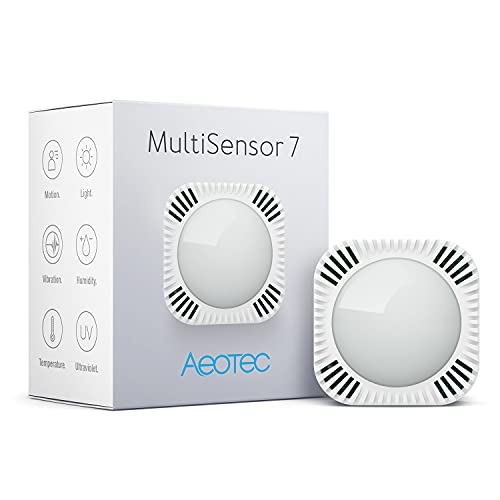
Aeotec Smart Dimmer 6
Live watts and cumulative kWh flow back to the hub alongside the dim level, which shows what a halogen torchiere really costs to run. A multicolour LED ring on the face doubles as a status or alert light. Dimming is smoothest on incandescent and halogen loads, less predictable on cheap LED bulbs.
Pros
- Reports live wattage and kWh to the hub
- LED ring flashes for alerts and scene feedback
- Carries heavier incandescent and halogen fixtures
Cons
- Dim quality swings by LED bulb brand
- Chunky body wants a clear outlet below it

Minoston Z-Wave Plus Plug-In Dimmer MP21ZD
Minoston fits a 700 series Z-Wave chip, trimming standby draw and stretching range past older 500 series nodes. One dimmed outlet takes up to 100 watts of dimmable LED. Holding the face button dims manually, which saves the evening when the hub is mid reboot.
Pros
- Newer 700 series radio reaches further
- Face button dims without opening an app
- Small shell sits flat against the wall plate
Cons
- Smaller user community than Leviton or Jasco
- Documentation assumes existing Z-Wave knowledge
What to look for
What to look for in a plug in dimmer Read the dimmable LED rating, not the incandescent figure printed larger on the box. Almost every model here stops at 100 watts of LED, which covers two or three ordinary table lamps. Outlet layout comes next, because some units dim both sockets while others keep one always on for a clock or speaker. Shell size matters more than buyers expect: a bulky body like the Aeotec Smart Dimmer 6 can cover the second receptacle on a duplex outlet.
Wi-Fi, Z-Wave or Lutron Clear Connect Wi-Fi models such as the Leviton DW3HL-1BW ask for nothing beyond your router, so setup takes minutes. Z-Wave units demand a controller, but they keep responding when the internet drops and they extend the mesh for other devices. Lutron runs traffic on its own Clear Connect band, meaning lamp commands never queue behind a video call. Choose the protocol your house already speaks rather than adding a third ecosystem.
Dimming bedside and reading lamps at the low end A dimmer earns its keep in the bottom tenth of its range. That is where budget circuits drop out, buzz or jump in visible steps. Owners aim fewest low end complaints at the Lutron PD-3PCD-WH and the Enbrighten 28167. Pairing a dimmer with a warm-dim or high quality dimmable bulb helps more than any app setting. Still stuttering near zero? Many hubs expose a minimum brightness value, and raising it a few points usually settles the flicker.
Bulb compatibility and why LEDs flicker Only bulbs printed dimmable belong on these outlets. A standard LED will strobe, hum or refuse to fade, and no firmware fixes that. Mixing brands on one dimmed socket produces uneven steps, so match the bulbs in a pair of lamps. Keep total load well under the rated wattage as well, since running near the ceiling makes the low end unstable. Smart bulbs remain the better answer for colour changing or for a fixture holding several sockets.
Compared at a glance
| # | Model | Protocol | Best for | Score | Price |
|---|---|---|---|---|---|
| 1 | Lutron Caseta Smart Lamp Dimmer PD-3PCD-WH | Lutron Clear Connect RF | Best overall | 9.4 | Check price |
| 2 | GE Enbrighten Z-Wave Plus Plug-In Smart Dimmer 28167 | Z-Wave Plus 500 series | Best value | 9.2 | Check price |
| 3 | Leviton Decora Smart Wi-Fi Plug-In Dimmer DW3HL-1BW | 2.4 GHz Wi-Fi | Best for homes with no hub | 9.0 | Check price |
| 4 | Lutron Caseta Smart Lamp Dimmer Starter Kit P-BDG-PKG1P | Smart Bridge, lamp dimmer, Pico remote | Best starter kit | 8.8 | Check price |
| 5 | Leviton Decora Smart Z-Wave Plus Plug-In Dimmer DZPD3-2BW | Z-Wave Plus 500 series | Best for Z-Wave hub owners | 8.6 | Check price |
| 6 | Aeotec Smart Dimmer 6 | Z-Wave Plus | Best for energy reporting | 8.3 | Check price |
| 7 | Minoston Z-Wave Plus Plug-In Dimmer MP21ZD | Z-Wave Plus 700 series | Best budget | 8.0 | Check price |
Good to know
What does a smart plug in dimmer actually do?
It sits between a wall outlet and a lamp cord, varying brightness rather than only switching power. Commands arrive from an app, a remote or a voice assistant. No wall box, wiring or landlord permission is involved.
Do you need a hub for a plug in smart dimmer?
Only for some. Leviton DW3HL-1BW joins Wi-Fi by itself, while Z-Wave units such as the Enbrighten 28167 require a controller. Lutron Caseta falls between the two and needs its own Smart Bridge.
Can you use any LED bulb with a plug in dimmer?
No. Packaging must state that the bulb is dimmable. A standard LED will flicker or buzz on a dimmed circuit, and that behaviour comes from the bulb driver rather than the dimmer.
Which smart plug in dimmer is best for renters?
Leviton DW3HL-1BW suits renters best, needing no hub, no bridge and no wiring. Unplug it on moving day and the apartment looks exactly as you found it.
Lutron Caseta vs Z-Wave plug in dimmers: which is better?
Caseta wins on low end smoothness and native Apple Home support. Z-Wave makes more sense when a Hubitat or SmartThings hub already runs, since you gain local control and mesh repeating from the same device.
How many lamps can one plug in dimmer control?
Count watts, not lamps. A 100 W dimmable LED rating covers roughly ten 9 watt bulbs, and a two outlet model like the PD-3PCD-WH divides that budget across both sockets.
Do smart dimmers work with Alexa and Google Assistant?
Every pick here does, by different routes. Leviton links through its own cloud account, Lutron passes commands via the Smart Bridge, and Z-Wave models rely on the hub’s voice integration.
Is a plug in dimmer better than a smart bulb?
For a lamp and shade you already like, yes, because one dimmer controls whatever bulb you fit. Smart bulbs pull ahead when you want colour, or when a fixture holds several sockets that would otherwise share one level.
Why does my lamp buzz when it is dimmed low?
Buzzing usually comes from the bulb driver reacting to the dimming waveform. Swap in a different dimmable bulb first. If the noise persists, raise the minimum brightness in your hub settings or move the lamp onto a Lutron unit.
The verdict
Lutron Caseta PD-3PCD-WH takes the top slot for its steady low end and two controlled outlets, provided you accept the Smart Bridge as part of the purchase. Households with no hub and no plans to build one should choose the Leviton DW3HL-1BW, since Wi-Fi setup is finished in minutes. Anyone already running Z-Wave gets more from the GE Enbrighten 28167, which adds an always on socket and repeats the mesh at the same time.
Marcus Chen
Marcus covered consumer electronics for enthusiast tech publications for six years before joining ChoiceCrest. He specializes in translating manufacturer spec sheets into plain-language buying advice, with a focus on audio, computing accessories and smart-home gear.