Which Smart Power Strip Actually Cuts Standby Energy Use?
The Kasa HS300 leads this comparison because all six outlets switch independently and each one reports its own energy use. The compact Kasa KP303 suits tight spaces, and the Meross MSS425F adds Apple Home support for households split between phone platforms and their app choices.
The Kasa HS300 switches six outlets independently and tracks each one’s power draw, making it the strip to buy first. The Kasa KP303 shrinks that same control down for tight spaces. The Meross MSS425F adds Apple Home support for mixed platform households.
Some products labeled smart power strips only switch the whole bar as one unit, which turns them into an expensive smart plug rather than a true strip. Surge protection ratings on the joule scale range from a few hundred to several thousand, and a low number offers little real protection. We compared these seven models on whether outlets switch independently, whether energy monitoring covers each outlet or just the total, USB port count and output, published surge ratings and supported voice assistants, based on manufacturer specifications and feedback owners report after months of use.
How to choose
What makes a power strip actually smart A smart power strip connects to Wi-Fi and lets an app or voice assistant switch outlets on and off. Independent outlet control separates a real smart strip from a power strip attached to one smart plug. Some listings market a strip as smart while every outlet still switches as one group. Check the number of separately controlled outlets before buying, since USB ports are often on one shared switch even when AC outlets are not.
How surge protection ratings work A joule rating estimates how much energy a strip can absorb before its protection wears out. Ratings across this category range from a few hundred joules to several thousand. Equipment like televisions, computers and network gear benefits from a higher rating and a connected equipment warranty. Protection degrades with every surge event and gives no visible warning, so replace an older strip rather than assume it still works.
Is energy monitoring worth paying for Per outlet monitoring shows which device draws power overnight and confirms an outlet actually switched off. Aggregate monitoring across the whole strip tells you far less about individual devices. Anyone trying to track standby draw or the running cost of one appliance gets real value from per outlet data. Buyers who only want scheduled on and off control can skip this feature.
Which appliances should avoid a smart strip Space heaters, air conditioners, kettles and other heating appliances draw current close to a circuit’s limit. Manufacturers advise against plugging these into any power strip, smart or not. Relays and electronics inside a smart strip make overloading a bigger risk, not a smaller one. Add up the wattage of everything plugged in against the strip’s rated total, and give heating appliances their own wall outlet.
Our top picks
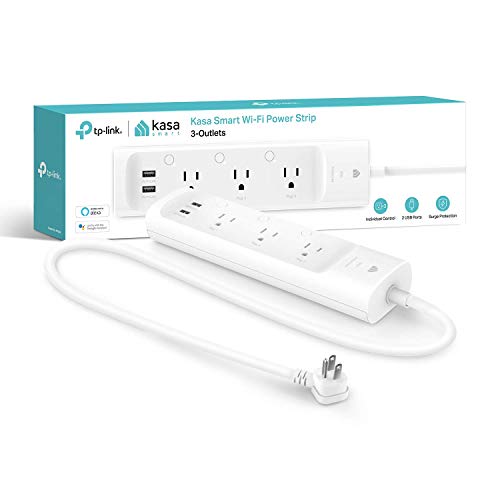
Kasa Smart Wi-Fi Power Strip HS300
Six outlets on the HS300 switch on separate schedules, while three USB ports share a single output bus. Energy monitoring works per outlet, so a lamp left on overnight shows up as its own line item. Scheduling, away mode and outlet grouping run through the Kasa app without a subscription fee.
Pros
- Every outlet switches on its own schedule
- Per outlet energy data pinpoints standby draw
- Kasa app requires no subscription
Cons
- Long body needs clearance behind furniture
- No Apple Home support
Kasa Smart Wi-Fi Power Strip KP303
The KP303 shrinks the HS300’s independent switching into a body with three outlets and two USB ports. Its smaller footprint fits behind a TV stand or under a desk where the six outlet model will not. Energy monitoring is absent entirely on this model.
Pros
- Compact enough to hide behind a TV
- Same Kasa app and scheduling as the HS300
- Independent control on all three outlets
Cons
- No energy monitoring feature
- Only three controlled outlets total

Meross Smart Wi-Fi Surge Protector MSS425F
Apple Home compatibility sits alongside Alexa and Google Assistant on the MSS425F, which suits households split across phone platforms. Four outlets switch independently and four USB ports handle charging duty for a typical desk. Build quality feels plainer than the Kasa lineup, and the app favors function over polish.
Pros
- Apple Home support alongside Alexa and Google
- Four USB ports cover a full desk
- Independent switching on every outlet
Cons
- App interface lags behind Kasa’s
- No energy monitoring
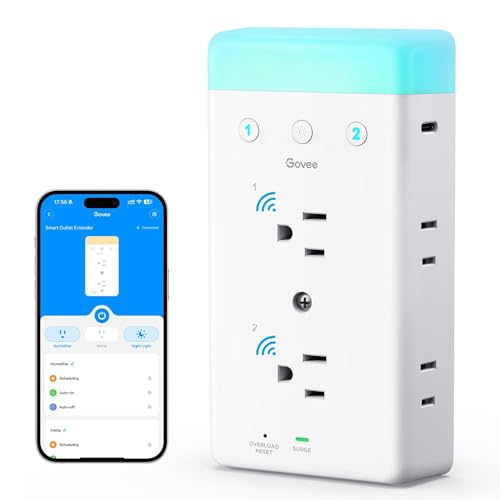
Govee Smart Power Strip
Households already running Govee lights can control this strip from the same app instead of juggling two. Three independently switched outlets and three USB ports suit a media console or nightstand. Pairing takes a few minutes, though the strip offers little advantage outside the Govee ecosystem.
Pros
- Shares scenes and schedules with Govee lighting
- Setup finishes in a few minutes
- Compact size suits a nightstand
Cons
- Limited benefit outside the Govee app
- Only three controlled outlets

TESSAN Smart Power Strip with USB Ports
AC outlets and a bank of USB ports share space on the TESSAN strip, aimed squarely at charging phones and tablets. An extended cord reaches sockets other strips cannot, and a bedtime schedule cuts charging power overnight. USB ports switch together as one group rather than individually.
Pros
- Balances AC outlets with USB charging ports
- Cord reaches farther than most rivals
- Scheduling automates overnight charging cutoffs
Cons
- USB ports switch as one group, not individually
- Surge protection rating is modest
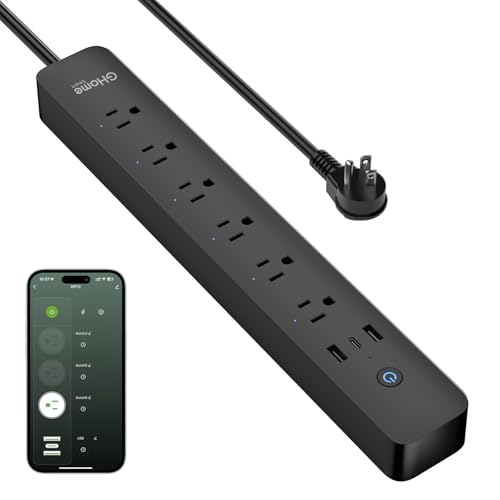
GHome Smart WiFi Power Strip
GHome offers independently controlled outlets at the lowest outlay in this lineup, in a compact body with four AC outlets and four USB ports. Scheduling, countdown timers and outlet grouping cover what most buyers need day to day. Materials feel plainer and the cord runs shorter than on premium brands.
Pros
- Lowest cost route to independent outlet control
- Four AC outlets plus four USB ports
- Countdown timers and outlet grouping included
Cons
- Plastic housing feels less durable than premium brands
- Shorter cord limits placement options
Refoss Smart Power Strip
Refoss covers similar ground to Meross, with independently switched outlets and support for Alexa, Google Assistant and Apple Home. It works as a reasonable substitute when stock or color options push shoppers away from bigger names. Energy monitoring is absent, so treat it as a control device rather than a measurement tool.
Pros
- Supports Alexa, Google Assistant and Apple Home
- Independent control across four outlets
- App setup takes only a few steps
Cons
- Smaller support community than major brands
- No energy monitoring
The lineup, side by side
| # | Model | Outlets | Best for | Score | Price |
|---|---|---|---|---|---|
| 1 | Kasa Smart Wi-Fi Power Strip HS300 | 6 individually controlled | Best overall | 9.4 | Check price |
| 2 | Kasa Smart Wi-Fi Power Strip KP303 | 3 individually controlled | Best compact | 9.2 | Check price |
| 3 | Meross Smart Wi-Fi Surge Protector MSS425F | 4 individually controlled | Best for Apple Home households | 9.0 | Check price |
| 4 | Govee Smart Power Strip | 3 individually controlled | Best for Govee lighting setups | 8.8 | Check price |
| 5 | TESSAN Smart Power Strip with USB Ports | 3 individually controlled | Best for charging stations | 8.6 | Check price |
| 6 | GHome Smart WiFi Power Strip | 4 individually controlled | Best budget | 8.3 | Check price |
| 7 | Refoss Smart Power Strip | 4 individually controlled | Best alternative pick | 8.0 | Check price |
Frequently asked questions
What makes a power strip smart?
It connects to a home network so an app or voice assistant can switch outlets, set schedules and often show energy use. The better models switch each outlet independently, letting one device power down while its neighbors stay on.
Do smart power strips control each outlet separately?
Every strip in this comparison switches its AC outlets independently. USB ports usually share one switch even on premium models, so plan around that if timed charging on a single port matters.
What is the difference between a smart power strip and a smart plug?
A smart plug controls one device plugged into a single outlet. A smart power strip extends that control across several outlets in one unit, and the better ones switch each outlet on its own rather than as a group.
Do smart strips work without Wi-Fi?
Outlets keep supplying power and physical buttons still function. App control, voice control and cloud schedules stop until the connection returns, and anything already switched on stays on.
Can a smart power strip lower an electricity bill?
It can cut standby draw by fully powering down idle devices, and per outlet monitoring helps identify the worst offenders. Savings on modern low standby electronics tend to be small, so treat this as a convenience feature with a side benefit.
Is it safe to plug a space heater into a smart power strip?
No. High draw heating appliances belong in a wall outlet directly. This rule applies to any power strip, and manufacturers state it explicitly for air conditioners, kettles and similar appliances.
What surge protection rating is enough?
Lamps and small chargers do fine with a modest rating. Computers, televisions and network equipment benefit from a higher joule rating and a connected equipment warranty. Protection wears down over time, so replace an aging strip rather than trust it indefinitely.
Which smart power strips work with Apple Home?
The Meross MSS425F and Refoss models here support Apple Home alongside Alexa and Google Assistant. Kasa and Govee strips in this comparison focus on Alexa and Google Assistant only. Check the specific model rather than the brand, since support varies within a lineup.
Can multiple smart power strips be used together in one home?
Yes, and most apps let you group strips so one command controls a whole room. Avoid daisy chaining one strip into another, which is a safety hazard regardless of whether either strip is smart. Give each strip its own wall outlet.
Our pick
The Kasa HS300 remains the strip to beat, since six independently switched outlets with per outlet energy reporting cover both control and measurement in one unit. Buyers with tight spaces get the same control from the smaller Kasa KP303, and the Meross MSS425F fits mixed platform households that need Apple Home support.
Marcus Chen
Marcus covered consumer electronics for enthusiast tech publications for six years before joining ChoiceCrest. He specializes in translating manufacturer spec sheets into plain-language buying advice, with a focus on audio, computing accessories and smart-home gear.


