How to Choose a Smart Lock for Your Front Door
August’s Wi-Fi Smart Lock 4th Generation keeps your existing deadbolt and keys, making it the strongest all-around pick. Yale’s Assure Lock 2 delivers the best value through a swappable radio module. Schlage’s Encode Plus leads for Apple Home households that want tap-to-unlock access from an iPhone or Watch.
Keep your current deadbolt and every key still works with the August Wi-Fi Smart Lock 4th Generation, which mounts inside your existing door hardware. Want a keypad instead? The Yale Assure Lock 2 swaps in a full replacement with a radio module you can change later. iPhone owners chasing tap-to-unlock access should look at the Schlage Encode Plus.
Every smart lock listing bundles three separate decisions into one product page. First, retrofit or full replacement. Second, how you unlock it: code, fingerprint, key or phone. Third, how it talks to your home, through Wi-Fi, Bluetooth, Z-Wave or Matter. We compared install method, unlock options, published battery life, whether a physical key survives, and how each lock behaves when the network drops.
The top picks, ranked

August Wi-Fi Smart Lock 4th Generation
Mounting inside an existing deadbolt, this lock leaves your door’s exterior untouched and every current key still turns. Built-in Wi-Fi skips the need for a separate bridge, so remote locking works out of the box. Owners report the install takes under half an hour with just a screwdriver.
Pros
- Existing keys and exterior hardware stay untouched
- Remote access works without a separate bridge
- Reversible install suits renters and lease terms
Cons
- No keypad, so guests need the app or a key
- Interior housing sits bulkier than a standard thumbturn

Yale Assure Lock 2
A slim touchscreen keypad replaces the entire deadbolt here, and a removable radio module lets you pick Wi-Fi, Z-Wave or Matter after purchase. Both keyed and key-free versions ship. Cold weather doesn’t slow the touchscreen down, according to owner feedback, and codes take only seconds to add or delete.
Pros
- Connectivity swaps later by changing the module
- Slim keypad profile fits most door styles
- Codes for family and cleaners take seconds to manage
Cons
- Radio modules cost extra on some bundles
- Keyed version means new keys during replacement

Schlage Encode Plus Smart WiFi Deadbolt
Apple Wallet home keys let an iPhone or Watch unlock this deadbolt with a tap, and access keeps working even at low phone battery. Built-in Wi-Fi handles remote control without a hub. Schlage rates the deadbolt itself at ANSI Grade 1, the top residential security tier, and owners call the tap-to-unlock response the fastest of the group.
Pros
- Tap-to-unlock through iPhone or Apple Watch
- ANSI Grade 1 rating on the deadbolt hardware
- Remote control needs no separate hub
Cons
- Standout features favor Apple over Android households
- Exterior escutcheon runs bulkier than slim rivals

Level Lock Plus Smart Lock
Level’s motor sits inside the bolt itself, so the door keeps an ordinary thumbturn and keyway with no visible smart hardware. Apple home key support joins app and physical key access. One household wanting zero visible technology on the front door called it the only lock that fit the brief, per owner reports.
Pros
- Looks identical to a standard deadbolt from outside
- Apple home key access built into the mechanism
- Compact fit with no bulky interior housing
Cons
- No keypad and limited features outside Apple devices
- Bluetooth-only range means a hub is needed for remote access

eufy Security Smart Lock S230 Touch and Wi-Fi
A fingerprint reader joins keypad codes and app control here, and recognition is fast enough to beat pulling out a phone. Wi-Fi ships built in, so remote locking skips a separate bridge. Family members including children unlock reliably by fingerprint, according to owner reports, which is usually the weak point on cheaper readers.
Pros
- Fingerprint unlock reads fast and reliably
- Wi-Fi included rather than sold as an add-on
- Priced below comparable name-brand keypad locks
Cons
- Exterior housing runs bulkier than premium slim locks
- Wet fingers can trip up the reader

Aqara Smart Lock U100
Fingerprint, keypad, Apple home key and app access combine here, plus Matter support through an Aqara hub for cross-platform routines. Standard deadbolt bore preparations fit without modification, and a keyway remains as backup. Mixed device households, running Apple, Google and Alexa together, report it as the lock that talks to everything.
Pros
- Works across Apple, Google and Alexa ecosystems
- Emergency USB port powers the lock if batteries die
- Multiple unlock methods built into one device
Cons
- Matter routines require adding an Aqara hub
- App setup takes longer than simpler single-purpose locks
Kwikset Halo Wi-Fi Smart Lock
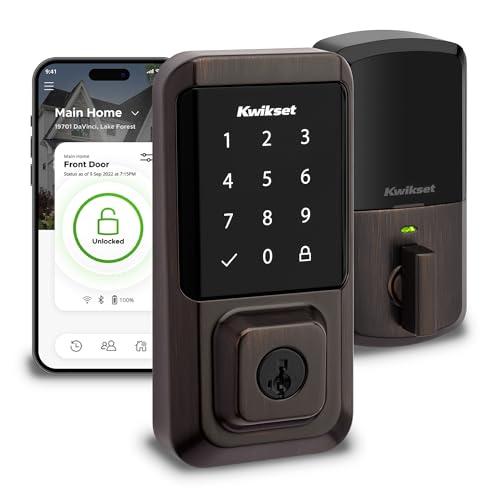
Built-in Wi-Fi and keypad codes come at a lower cost than premium names here, and Kwikset’s SmartKey system lets you rekey the cylinder yourself if a key ever goes missing. Setup runs through a straightforward app. Owners report it covers core smart lock functions well, without the polish of pricier competitors.
Pros
- Wi-Fi built in at a lower price point
- Cylinder rekeys at home in minutes with SmartKey
- Guest codes are simple to add and remove
Cons
- Battery life runs shorter than Bluetooth-only locks
- Bulkier and noisier operation than premium alternatives
Before you buy
Retrofit or full replacement: which fits your door? A retrofit lock like the August fits over your existing deadbolt’s interior. Nothing on the outside changes, every key still works, and the mount is reversible for renters. Full replacement locks, including Yale, Schlage, eufy, Aqara and Kwikset here, swap the entire deadbolt for a version with a keypad or fingerprint reader built in. Renters or anyone keeping their current keys should start with retrofit. Anyone ready to stop carrying keys should look at replacement models instead.
How do Wi-Fi, Bluetooth, Z-Wave and Matter compare? Bluetooth-only locks work when your phone is near the door and need a bridge for remote access, which saves battery. Built-in Wi-Fi lets you lock up and check status from anywhere without extra hardware, though it drains batteries faster. Z-Wave and Thread-based Matter locks join a home automation hub and fit best if you already run one and want the lock inside routines. Aqara’s U100 needs its own hub for Matter, while August and Schlage skip a hub entirely for Wi-Fi.
What happens when batteries or Wi-Fi go down? Every lock in this list runs on batteries, and batteries eventually die at an inconvenient moment. A physical keyway is the simplest backup, and Aqara’s U100 adds an emergency USB port to jump the electronics directly. Keypad codes keep working during an internet outage since they’re stored on the lock itself, not in the cloud. Decide your backup plan before installing, and keep a spare key somewhere accessible.
Does a smart lock fit your existing door? Smart locks fit standard deadbolt preparations, but door thickness, backset and bore hole size all need to match the spec sheet. A strike plate you currently muscle past by hand will jam a motorized bolt. Check that the bolt throws freely with one finger before buying, and confirm your door’s thickness against the manufacturer’s published range, since thick or custom doors often need a separate kit.
How they stack up
| # | Model | Install | Best for | Score | Price |
|---|---|---|---|---|---|
| 1 | August Wi-Fi Smart Lock 4th Generation | Retrofit over existing deadbolt interior | Best overall | 9.4 | Check price |
| 2 | Yale Assure Lock 2 | Full deadbolt replacement | Best value | 9.2 | Check price |
| 3 | Schlage Encode Plus Smart WiFi Deadbolt | Full deadbolt replacement | Best for Apple Home | 9.0 | Check price |
| 4 | Level Lock Plus Smart Lock | Full deadbolt replacement with in bolt motor | Best invisible design | 8.8 | Check price |
| 5 | eufy Security Smart Lock S230 Touch and Wi-Fi | Full deadbolt replacement | Best for fingerprint access | 8.6 | Check price |
| 6 | Aqara Smart Lock U100 | Full deadbolt replacement | Best for Matter smart homes | 8.3 | Check price |
| 7 | Kwikset Halo Wi-Fi Smart Lock | Full deadbolt replacement | Best budget Wi-Fi | 8.0 | Check price |
Good to know
Are smart locks actually secure?
Graded deadbolt hardware underneath is the same as a conventional lock; the electronics only add encrypted access on top. Weak codes, careless sharing and unsecured phone accounts cause most real world risk. Use a strong account password, turn on two factor authentication, and revoke codes once people no longer need them.
Can a smart lock be hacked remotely?
Remote attacks on reputable brands are rare and usually require the attacker to be nearby or to already control your account. Door frames, glass and spare keys under a mat cause far more break ins than exotic hacks. Account security and physical door reinforcement matter more than defending against remote exploits.
What happens if the batteries die?
Apps warn you well ahead of a dead battery, often with an audible alert at the door too. A physical key, an emergency USB port, or a keypad backup, depending on the model, gets you inside if warnings go unheeded. Keeping spare batteries in a kitchen drawer solves most of this in advance.
Do smart locks work without Wi-Fi?
Local functions keep running. Keypad codes, fingerprints and Bluetooth unlocking all happen on the lock itself, independent of internet access. Remote locking, status checks and push notifications pause until the connection returns, but the door still opens.
Can I install a smart lock myself?
Retrofit models such as the August need only a screwdriver and take under half an hour. Full replacements are also DIY friendly on a standard prepared door. Check backset, door thickness and that the existing bolt moves freely before starting either type of install.
Which smart lock works best with Apple Home?
Schlage’s Encode Plus and Level’s Lock Plus both support Apple Wallet home keys for tap-to-unlock access from an iPhone or Watch. Aqara’s U100 adds Apple home key support too, alongside fingerprint access and Matter compatibility for households running mixed ecosystems.
Smart lock keypad vs fingerprint: which is faster?
Fingerprint readers, like the one on eufy’s S230, typically unlock in under a second once a print is registered. Keypads need a four to eight digit code entered each time, which takes a couple seconds longer. Fingerprint access also avoids anyone watching a code get typed at the door.
How long do smart lock batteries last?
Expect several months to about a year, depending on connectivity and door traffic. Bluetooth-only locks last longest since they skip constant Wi-Fi radio use. A busy front door opened many times daily always needs batteries sooner than a rarely used side entrance.
Will a smart lock fit my existing deadbolt?
Retrofit models work with most standard single cylinder deadbolts and keep your current keys intact. Replacement locks need a standard bore hole plus a matching backset and door thickness, all published by the manufacturer. Measuring your door before ordering avoids a return.
Final word
August’s Wi-Fi Smart Lock 4th Generation stays the easiest to live with, adding remote access without touching your keys, exterior hardware or lease agreement. Yale’s Assure Lock 2 suits anyone wanting a keypad now with room to change connectivity later, while Schlage’s Encode Plus fits iPhone households chasing genuine tap-to-unlock speed. Budget shoppers and Matter-focused smart homes have solid picks too, in Kwikset’s Halo and Aqara’s U100 respectively.
Marcus Chen
Marcus covered consumer electronics for enthusiast tech publications for six years before joining ChoiceCrest. He specializes in translating manufacturer spec sheets into plain-language buying advice, with a focus on audio, computing accessories and smart-home gear.