Smart curtain openers for rods, rails and bay windows
SwitchBot Curtain 3 wins for most homes, clipping onto round rods, I-rails and U-rails without new hardware. Aqara Curtain Driver E1 fits Apple Home setups that already run a Zigbee gateway. Wide windows with lined blackout panels call for a SmartWings Motorized Curtain Track instead.
SwitchBot Curtain 3 suits renters and anyone keeping the hardware already on the wall, since three fitting kits cover round rods, I-rails and U-rails. Mounting takes minutes and needs no drilling. Pull power is its ceiling, so thick lined blackout panels travel slowly and drain the battery faster.
Hardware compatibility decides this category, not app features. Rod diameter, rail profile and ring spacing rule out half the market before any feature list matters. We compared published fitting charts, pull ratings, power options and hub requirements across seven models. Owner feedback on motor noise and curtains stalling mid-track shaped the order.
What we recommend

SwitchBot Curtain 3
Three fitting kits ship in the box, covering round rods, I-rails and U-rails. Bluetooth handles control in the room, while Wi-Fi, Matter and voice commands route through a SwitchBot hub. A clip-on solar panel mounts beside the motor and trickle charges the internal battery.
Pros
- Covers the three common curtain hardware types
- A light tug on the fabric starts a full cycle
- Solar accessory ends recharging on a sunny window
Cons
- Voice control and remote access need a SwitchBot hub
- Lined blackout drapes slow travel noticeably

Aqara Curtain Driver E1
Zigbee 3.0 pairs the driver to an Aqara hub, which then exposes it to Apple Home, Alexa and Google Home. Rod and track versions are sold as separate products, so match the version to your window before ordering. Low Zigbee power draw stretches the gap between charges past most Wi-Fi motors.
Pros
- Reaches Apple Home natively once a hub is paired
- Zigbee mesh stays responsive across rooms
- Open position sets by percentage, not just open or shut
Cons
- Does nothing at all without an Aqara gateway
- Rod and track versions are not interchangeable

SmartWings Motorized Curtain Track
Rather than clamping to a rod, this replaces the rail outright and arrives cut to your measurement. Belt drive tows the lead carrier, so pinch pleat and lined blackout panels glide instead of dragging. Wi-Fi and Zigbee versions both exist, letting you match the radio your home already runs.
Pros
- Moves heavy lined drapes without stalling
- Belt drive stays quiet across long spans
- Single draw or center split both offered
Cons
- Needs careful measuring and a real installation
- Custom builds take longer to arrive than a clip-on motor

Yoolax Motorized Curtain Track
Rails bend to order here, which solves bay and corner windows that no rod-clamp robot can follow. Ceiling and wall brackets both come in the box, so the mounting surface stays your choice. A bundled remote keeps working when Wi-Fi drops, alongside app, Alexa and Google control.
Pros
- Curved and bay rails are rare in this category
- Brackets for either mounting surface are supplied
- Remote keeps working independently of the network
Cons
- A custom width cannot move to another window
- Installation takes far longer than a rod clamp

Zemismart Zigbee Curtain Robot
Tuya and Smart Life drive this motor, so it drops into a house already running Tuya plugs, switches and sensors. It rides the rod and tows the lead ring, and a manual pull registers as a start command. Zigbee and Wi-Fi variants are both listed, and only the Zigbee one depends on a gateway.
Pros
- Joins existing Tuya scenes without a bridge app
- Pulling the fabric triggers a full cycle
- Schedules run without any subscription
Cons
- App translations read awkwardly in places
- Zigbee variant is useless without a gateway
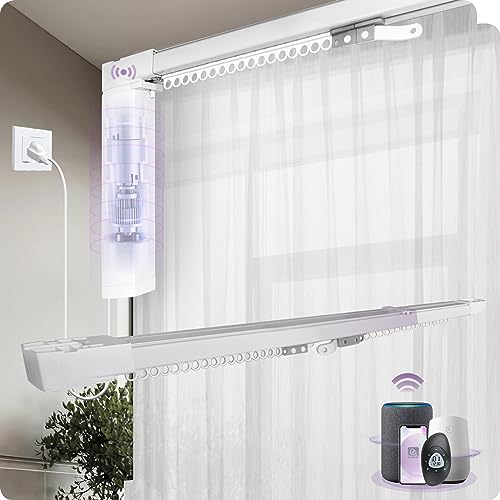
Graywind Motorized Curtain Track
Mains power takes recharging out of the routine, which fits a media room that closes drapes every evening. Rails arrive cut to size in single draw or center split. Wiring is the catch, since an outlet or junction box has to sit within reach of the window.
Pros
- No battery to recharge at any point
- Travel speed holds steady under heavy fabric
- Center split suits wide patio doors
Cons
- Requires power available at the window
- Cannot be relocated to another window later

Mecree Smart Electric Curtain Opener
A clamp and two drive rollers make up the whole installation, so one bedroom window takes a few minutes. App scheduling and a bundled remote cover everyday use on sheers and medium panels. Pull capacity is where it gives ground, and thick lined drapes sit outside its rating.
Pros
- Fastest installation of anything ranked here
- Remote included, with nothing extra to buy
- Scheduling in the app stays simple to set
Cons
- Struggles with thick blackout fabric
- Housing feels lighter than the major brands
Compared at a glance
| # | Model | Mounts to | Best for | Score | Price |
|---|---|---|---|---|---|
| 1 | SwitchBot Curtain 3 | Round rod, I-rail, U-rail | Best overall | 9.4 | Check price |
| 2 | Aqara Curtain Driver E1 | Zigbee 3.0, Aqara hub required | Best for Apple Home | 9.2 | Check price |
| 3 | SmartWings Motorized Curtain Track | Full replacement motorized track | Best for wide windows | 9.0 | Check price |
| 4 | Yoolax Motorized Curtain Track | Custom cut motorized track | Best for bay and curved windows | 8.8 | Check price |
| 5 | Zemismart Zigbee Curtain Robot | Tuya and Smart Life | Best for Tuya smart homes | 8.6 | Check price |
| 6 | Graywind Motorized Curtain Track | Plug-in or hardwired AC | Best for daily heavy use | 8.3 | Check price |
| 7 | Mecree Smart Electric Curtain Opener | Round rod clamp | Best budget | 8.0 | Check price |
What matters most
What to check before you buy a smart curtain opener Measure the rod first. Diameter, rail profile and the gap between rings settle compatibility before any feature list does. Fabric weight comes second, because a lined blackout panel can outweigh a sheer several times over. Decide early whether recharging a battery every few weeks is acceptable or an outlet sits within reach. Ceiling-mounted rails also need clearance above the bracket, which low-profile windows rarely have.
Rod clamp or replacement track: which one fits your window Clip-on motors ride existing hardware and move to another window whenever you do. Replacement rails ask for an installation, then repay it with quieter travel and far more pulling force. Renters almost always want the clamp. A twelve foot living room span with lined drapes wants a belt-driven track instead, since a wheel gripping a pole runs out of traction long before the fabric runs out of weight.
Working with Apple Home, Alexa and Google Home Platform support usually lives in the hub, not in the motor. Aqara routes through its own gateway to appear in Apple Home. SwitchBot needs Hub 2 or Hub Mini before voice commands or away-from-home control work at all. Zemismart leans on Tuya and Smart Life rather than native HomeKit. Check the bridge you already own, then choose the brand that speaks to it.
Noise, speed and living with a schedule Quiet modes buy a lower hum by slowing travel, which matters next to a bed on a weekday morning. Owners report that overloaded motors creep or stop short of the end stop, so leave headroom against the stated pull rating rather than buying exactly to it. Sunrise and sunset routines need your location set in the app before they fire correctly. Set a partial open percentage for rooms that get harsh afternoon glare.
Frequently asked questions
Do smart curtain openers work with any curtain rod?
No. Each motor lists supported rod diameters and rail profiles. Round rods, I-rails and U-rails all take different fitting kits, so measure yours and check ring spacing first.
Can a smart curtain opener handle heavy blackout curtains?
Light clip-on motors slow down or stall on thick lined panels. Belt-driven replacement rails such as SmartWings or Graywind pull that weight far more comfortably.
Do you need a hub for a smart curtain opener?
Often yes. Aqara Curtain Driver E1 will not function without its gateway. SwitchBot Curtain 3 runs over Bluetooth alone, though voice control and remote access still require a SwitchBot hub.
How long does the battery last between charges?
Owners report roughly a month of normal use, shifting with curtain weight and cycles per day. A solar panel on a sunny frame mostly removes the charging chore.
Is a smart curtain opener worth it?
Worth it if you close drapes daily, run schedules for heat or privacy, or own tall windows that are awkward to reach. For a window you rarely touch, the case is thin.
SwitchBot Curtain 3 vs Aqara Curtain Driver E1: which is better?
SwitchBot fits more hardware types and works out of the box over Bluetooth. Aqara wins in a Zigbee house where native Apple Home control through its gateway matters more.
Can you still open the curtains by hand?
Yes. Every pick here allows a manual pull, and most read that tug as an instruction to finish the cycle under power.
Are motorized curtain tracks noisy?
Belt-driven rails make a low steady hum. Rod-mounted robots run louder, because a wheel has to grip the pole to generate traction. Quiet settings cut the noise by slowing travel.
Which smart curtain opener works for a bay window?
Only a custom-bent rail follows a bay or corner. Yoolax builds curved tracks to measurement, while rod-clamp robots cannot pass an angle in the pole.
Can renters install a smart curtain opener?
Clip-on models mount without drilling, so SwitchBot Curtain 3, Zemismart and Mecree all suit a rental. Replacement tracks need brackets screwed into wall or ceiling.
Our take
SwitchBot Curtain 3 takes the top spot for fitting the widest range of hardware already on the wall, with no new rail and no drilling. Pick the Aqara Curtain Driver E1 when the house already runs Zigbee and Apple Home control is the priority. Wide spans of lined blackout fabric should skip clip-on robots entirely and go to a SmartWings track cut to size.
Marcus Chen
Marcus covered consumer electronics for enthusiast tech publications for six years before joining ChoiceCrest. He specializes in translating manufacturer spec sheets into plain-language buying advice, with a focus on audio, computing accessories and smart-home gear.
You might also need
Smart Fountain Pens That Blend Classic Writing with Digital Capture

Top Kids Smartphones for Safe First Phones
Smart Home Hubs That Actually Tie Your Devices Together