Top Kids Smartphones for Safe First Phones
The Pinwheel T2 leads our list as the best overall kids smartphone, offering a locked-down, distraction-free environment with robust parental controls, making it ideal for parents prioritizing safety. However, its limited app ecosystem may frustrate older kids seeking mainstream apps.
Choosing the first smartphone for your child is a big decision. You want to keep them safe online, but also give them a device that grows with them. This roundup compares the top kids smartphones available on Amazon today.
We evaluated each phone on its parental controls, build quality, battery endurance, and suitability for different ages. From dedicated kid-safe devices to feature-packed Android phones, we cover options that balance safety and functionality.
Our top picks
Pinwheel T2
The Pinwheel T2 is a dedicated kid-safe smartphone that runs on a custom Android OS with no internet browser or social media. Parents manage everything through a web portal, including app approvals and time limits. Its durable design and long battery life make it a top pick for younger kids.
Pros
- No access to social media or web browsing
- Excellent parental controls via admin portal
- Sturdy build and good battery life
Cons
- Limited app catalog compared to mainstream phones
- Requires subscription for full admin features

Gabb Phone Plus
The Gabb Phone Plus offers a safe smartphone experience with no internet, no social media, and no app store. It supports calling, texting, and a few pre-installed educational apps. The phone is built with safety in mind, including emergency SOS features and GPS tracking for parents.
Pros
- Completely internet-free
- Simple interface ideal for younger kids
- Includes emergency SOS and GPS tracking
Cons
- No camera app on the phone (only via Gabb Music app)
- Limited functionality for older kids

Troomi Wireless Troomi Phone
The Troomi Phone is a kids’ smartphone that runs on a secure Android platform. Parents control which apps are available from the Troomi app store, and kids can earn access to more features over time. The phone has no internet browser, and all communications are monitored for safety.
Pros
- Parental controls allow gradual app introduction
- No browser or social media
- Good battery life
Cons
- App selection is limited to Troomi’s approved list
- Requires Troomi service plan
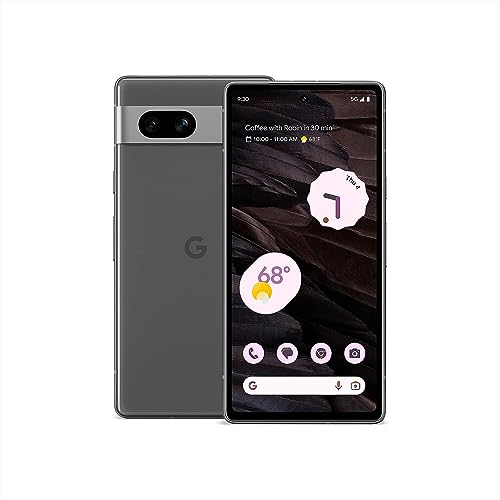
Google Pixel 7a with Family Link
The Google Pixel 7a is a powerful Android phone that, when paired with Google’s Family Link app, offers extensive parental controls, including app limits, content filtering, and location sharing. It provides access to the full Google Play Store, making it suitable for older kids who need a real smartphone.
Pros
- Full Android experience with access to all apps
- Excellent camera and performance
- Family Link provides strong parental controls
Cons
- May be too advanced for younger kids
- Higher price point

Samsung Galaxy A15 5G
The Samsung Galaxy A15 5G is an affordable Android phone that includes Samsung Kids mode, which offers a child-friendly interface and parental controls. It provides access to a wide range of apps and robust build quality, making it a solid choice for families on a budget.
Pros
- Affordable with solid features
- Samsung Kids mode offers easy controls
- Large battery and good display
Cons
- Parental controls not as granular as dedicated kids’ phones
- Requires Google Play setup

Moto G Play 2024
The Moto G Play 2024 is a budget-friendly smartphone with a water-repellent design and a long-lasting 5000 mAh battery. When combined with parental control apps, it can be a great starter phone. Its price is low, making it a good option for kids who may be rough on devices.
Pros
- Water-repellent coating adds durability
- Excellent battery life
- Very affordable
Cons
- No built-in kids mode; requires third-party apps
- Performance is basic
Samsung Galaxy A05s
The Samsung Galaxy A05s offers a large 6.7 inch display and Samsung Kids mode, which lets parents set time limits, approve apps, and monitor activity. It is an economical option with expandable storage, suitable for kids who enjoy media consumption.
Pros
- Large screen for media
- Samsung Kids mode is easy to use
- Expandable storage up to 1 TB
Cons
- Lower resolution display
- Plastic build may not withstand heavy drops
What to look for
How they stack up
| # | Model | Display | Best for | Score | Price |
|---|---|---|---|---|---|
| 1 | Pinwheel T2 | 5.8 inch HD+ | Best overall for safety and parental control | 9.4 | Check price |
| 2 | Gabb Phone Plus | 5.5 inch HD | Best for kids who need calling and texting without distractions | 9.1 | Check price |
| 3 | Troomi Wireless Troomi Phone | 5.7 inch HD+ | Best for parents who want to gradually introduce apps | 8.9 | Check price |
| 4 | Google Pixel 7a with Family Link | 6.1 inch OLED | Best for tech-savvy families who want a mainstream phone with robust parental controls | 8.7 | Check price |
| 5 | Samsung Galaxy A15 5G | 6.5 inch Super AMOLED | Best budget Android phone for kids with Samsung Kids mode | 8.5 | Check price |
| 6 | Moto G Play 2024 | 6.5 inch HD+ | Best for active kids due to its durable design | 8.2 | Check price |
| 7 | Samsung Galaxy A05s | 6.7 inch HD+ | Best for families who want a large screen and easy parental controls via Samsung Kids | 8.0 | Check price |
Good to know
What is the best kids smartphone for a 10 year old?
The Pinwheel T2 or Gabb Phone Plus are excellent choices for a 10 year old because they provide a safe, distraction-free environment with strong parental controls and no access to social media or the open internet.
Can I put parental controls on a regular smartphone?
Yes, you can use apps like Google Family Link on Android phones or Apple’s Screen Time on iPhones. These tools allow you to set app limits, filter content, and track location.
Are dedicated kids phones worth the cost?
Dedicated kids phones are worth the cost if you prioritize safety and simplicity. They come with specialized software and support, but they may require a monthly service plan and have limited app ecosystems.
What age should a child get their first smartphone?
There is no one-size-fits-all answer. Many experts suggest waiting until at least 10 to 12 years old, but it depends on your child’s maturity, the need for communication, and your ability to monitor usage.
Do kids smartphones have emergency calling features?
Most kids smartphones include emergency SOS features that allow children to call pre-set contacts or emergency services. Some also have GPS tracking for parents to know their child’s location.
Can kids smartphones access the internet?
Dedicated kids phones like Gabb and Pinwheel have no internet browser or social media apps, but they may allow limited internet through approved educational apps. Standard smartphones with parental controls can restrict internet access.
Which kids smartphone has the best battery life?
The Samsung Galaxy A15 5G and Moto G Play 2024 both have 5000 mAh batteries, which typically provide up to two days of usage. Among dedicated kids phones, the Pinwheel T2 offers strong battery life as well.
Are these phones compatible with all carriers?
Most phones sold on Amazon are unlocked and work with major carriers like AT&T, Verizon, and T-Mobile. However, dedicated kids phones often require their own service plans, so check compatibility before purchasing.
How do I manage screen time on a kids smartphone?
You can manage screen time through the parental control app that comes with the phone. For example, Google Family Link, Samsung Kids, or the dedicated kids phone’s web portal allow you to set daily limits and schedule downtime.
Final word
For most families, the Pinwheel T2 is the best choice because it offers the strongest parental controls and a safe, distraction-free experience. If you prefer a mainstream phone that can grow with your child, the Google Pixel 7a with Family Link is a versatile alternative, but it requires more active monitoring.
Marcus Chen
Marcus covered consumer electronics for enthusiast tech publications for six years before joining ChoiceCrest. He specializes in translating manufacturer spec sheets into plain-language buying advice, with a focus on audio, computing accessories and smart-home gear.


