Fast, Reliable SD Cards for Photographers and Video
SanDisk’s Extreme PRO SDXC UHS-I fits nearly every camera and covers stills plus 4K reliably. Sony’s TOUGH-G Series SDXC UHS-II earns its price in rough weather and long professional bursts. Samsung’s PRO Plus SDXC UHS-I handles everyday 4K shooting at a friendlier cost than the professional cards above it.
SanDisk’s Extreme PRO SDXC UHS-I suits most cameras and most shooting styles right out of the box. Sony’s TOUGH-G Series SDXC UHS-II is built for professional bursts and rough conditions, at a real cost premium. Samsung’s PRO Plus SDXC UHS-I covers everyday 4K work without that premium.
Card packaging highlights read speed, the number that only affects how fast files transfer to a computer afterward. Write speed and video speed class decide whether a buffer clears or a recording stops mid clip. We compared published specifications, owner feedback on burst and video performance, and durability reports across seven current listings.
The best picks, ranked

SanDisk Extreme PRO SDXC UHS-I
Most consumer cameras are effectively built around cards like this one. V30 sustained write clears burst buffers on UHS-I bodies without stutter, and handles 4K video cleanly. SanDisk backs it with recovery software and a reputation earned over more than a decade on the market.
Pros
- V30 sustained write for reliable UHS-I performance
- Long track record for dependable operation
- Recovery software included with purchase
Cons
- Bus speed capped by UHS-I limits
- Counterfeits circulate, so buy from trusted sellers

Sony TOUGH-G Series SDXC UHS-II
Sony molds this card from a single piece of plastic, removing the write protect switch and the ribs that typically crack. V90 write speed keeps pace with long bursts on high resolution bodies. Field durability, not price, is the reason working photographers choose it.
Pros
- V90 write speed clears deep buffers fast
- Toughest physical build in this lineup
- Rated against water and dust exposure
Cons
- Among the priciest cards per gigabyte
- Full speed requires a UHS-II camera and reader

Lexar Professional 2000x SDXC UHS-II
Lexar matches V90 write performance near the flagship tier at a friendlier cost. Packs typically include a UHS-II reader, which is otherwise a separate purchase. Sports and wildlife shooters filling buffers repeatedly get professional throughput here.
Pros
- V90 performance at a lower cost than flagship rivals
- UHS-II reader included in most packs
- Handles long raw bursts without slowing
Cons
- Conventional build, less rugged than Sony’s card
- Runs warm during extended video recording

ProGrade Digital SDXC UHS-II V60
V60 sits in the sweet spot for 4K and many 6K codecs, and ProGrade prioritizes steady sustained write over headline peaks. Each card carries a serial number and an individual test record, which matters for paid shoots. Cost stays below V90 cards while comfortably covering video needs.
Pros
- Very consistent sustained write under load
- Priced sensibly for serious video work
- Refresh utility available from ProGrade
Cons
- V60 falls short for the deepest raw bursts
- Harder to find than major retail brands

Samsung PRO Plus SDXC UHS-I
A V30 UHS-I card handles 4K recording and moderate stills bursts at a lower cost than professional lines. Samsung rates it against water, extreme temperature, magnets and X-ray exposure, covering most travel scenarios. Weekend mirrorless shooters rarely need more than this.
Pros
- Strong value for the price per gigabyte
- Handles 4K recording without dropped frames
- Rated against water, heat, magnets and X-ray exposure
Cons
- Buffer clears slower than UHS-II alternatives
- Not suited to high bitrate raw video

Kingston Canvas React Plus SDXC UHS-II
Kingston targets photographers shooting long raw sequences with V90 write speed that keeps a buffer moving. Bundles often add a reader and a hard case. Construction stays conventional, without the ruggedized shell Sony builds into its TOUGH line.
Pros
- V90 write speed keeps buffers moving
- Bundles often include a reader and case
- Solid sustained performance for video capture
Cons
- Fewer capacity options than larger rivals
- Standard build without ruggedized protection
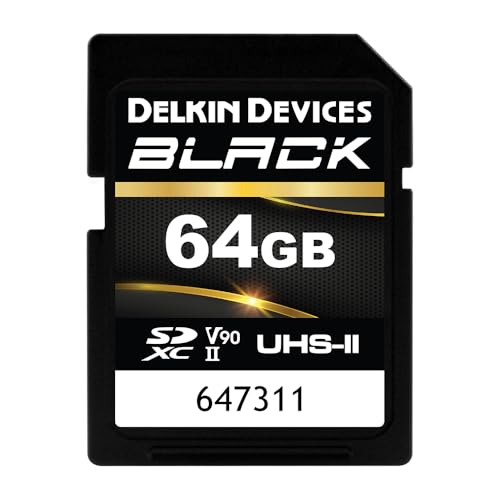
Delkin Devices Black SDXC UHS-II V90
Delkin builds the Black line for working professionals and backs it with a lifetime warranty that includes replacement, a rare policy in this category. V90 performance holds steady under sustained load rather than chasing peak numbers. Buyers choose it for peace of mind over bragging rights.
Pros
- Lifetime warranty with replacement coverage
- Consistent write performance under sustained load
- Built specifically for demanding professional use
Cons
- Expensive relative to gigabyte capacity
- Harder to find in stock than SanDisk or Lexar
How they compare
| # | Model | Bus | Best for | Score | Price |
|---|---|---|---|---|---|
| 1 | SanDisk Extreme PRO SDXC UHS-I | UHS-I | Best overall | 9.4 | Check price |
| 2 | Sony TOUGH-G Series SDXC UHS-II | UHS-II | Best for professional use | 9.2 | Check price |
| 3 | Lexar Professional 2000x SDXC UHS-II | UHS-II | Best value UHS-II | 9.0 | Check price |
| 4 | ProGrade Digital SDXC UHS-II V60 | UHS-II | Best for video | 8.8 | Check price |
| 5 | Samsung PRO Plus SDXC UHS-I | UHS-I | Best value | 8.6 | Check price |
| 6 | Kingston Canvas React Plus SDXC UHS-II | UHS-II | Best for burst shooting | 8.3 | Check price |
| 7 | Delkin Devices Black SDXC UHS-II V90 | UHS-II | Best for reliability | 8.0 | Check price |
How to choose
What actually matters when choosing an SD card Manufacturers print maximum read speed in large type because it looks impressive on a shelf. Read speed only affects how fast files copy off the card later. Sustained write speed, shown as a speed class like U3, V30, V60 or V90, decides whether your camera’s buffer clears during a real shooting burst. Bus type matters too: UHS-I and UHS-II cards look identical but use a different number of electrical contacts.
Is UHS-II worth it in your camera UHS-II cards add a second row of contacts that unlocks a much faster bus. Drop one into a UHS-I only camera and it still works, just capped at UHS-I speeds. That gap means you pay for headroom the camera body can never use. Check your camera’s manual before spending extra on a UHS-II card; if the body maxes out at UHS-I, a solid V30 card is the smarter buy.
Which video speed class matches your footage V30 handles typical 4K recording at consumer bitrates without dropped frames. V60 adds headroom for higher bitrate 4K and several 6K modes. V90 targets raw video, high frame rate capture and photographers who empty deep burst buffers often. Buying above your codec’s requirement wastes money; buying below it risks a recording that halts mid clip, which no amount of editing fixes afterward.
How many cards should you carry, and how do you keep them healthy A single large card turns into a single point of failure for an entire shoot. Most working photographers rotate several mid capacity cards instead of relying on one. Format every new card inside the camera rather than on a computer, since that writes the exact file structure the body expects. Retire any card that throws a write error or a corrupted file rather than continuing to trust it.
Questions worth asking
What SD card speed do I need for 4K video?
V30 covers standard 4K recording at typical consumer bitrates without dropped frames. Higher bitrate 4K and some 6K modes call for V60. Check your camera manual, since certain recording modes specify a minimum class.
Is UHS-II worth it, or does UHS-I do the job?
UHS-II only helps inside a camera body built with the second row of contacts. In a compatible body it clears burst buffers noticeably faster and speeds up offloading with a matching reader. In a UHS-I camera, it delivers zero shooting benefit.
UHS-I vs UHS-II: what’s the real difference day to day?
UHS-I tops out around 104 MB per second on the bus itself, while UHS-II can exceed 300 MB per second with the right reader. Most photographers only notice the difference during long bursts or video with a deep buffer. Casual stills shooters rarely reach that ceiling.
How big of an SD card should I buy for a camera?
Stills shooters often rotate 64GB or 128GB cards, which limits how much a single failure can cost. Video work generally needs 128GB or larger given typical file sizes. Rotation beats one giant card for most working photographers.
What do V30, V60 and V90 actually mean?
Each label guarantees a minimum sustained write speed, in megabytes per second: 30, 60 and 90 respectively. That guaranteed minimum is what prevents a recording from stopping partway through a clip.
Should a new card be formatted in the camera or on a computer?
Format it in the camera every time. That process builds the exact directory and file system structure the camera body expects, avoiding subtle incompatibilities computer formatting can introduce.
How can I avoid buying a counterfeit SD card?
Buy from the manufacturer’s own store or a well known retailer rather than an unfamiliar marketplace seller. Treat unusually low prices on high capacity cards as a warning sign. Run a card testing utility on any new card to confirm its real capacity.
How long do SD cards typically last?
Cards wear out through write cycles rather than simple age, so one used heavily for several years becomes a replacement candidate. Retire any card immediately once it produces a write error or a corrupted file.
Can I use a microSD card with an adapter in my camera?
It physically fits most SD slots and often works, but the adapter adds a connection point that can fail. Most microSD cards also carry lower sustained write performance than full size cards. A dedicated full size card remains the more dependable choice for camera use.
Final word
SanDisk’s Extreme PRO SDXC UHS-I remains the one answer that fits nearly every camera, backed by strong sustained write and a long reliability record. Step up to Sony’s TOUGH-G Series for professional bursts in rough conditions, or choose Samsung’s PRO Plus for everyday 4K without that extra cost.
Marcus Chen
Marcus covered consumer electronics for enthusiast tech publications for six years before joining ChoiceCrest. He specializes in translating manufacturer spec sheets into plain-language buying advice, with a focus on audio, computing accessories and smart-home gear.


