How to Pick a Scientific Calculator for Class or Work
Students who need broad exam approval do well with the Texas Instruments TI-36X Pro, thanks to its four-line MultiView display and deep function set. Budget shoppers should look at the Casio fx-991EX ClassWiz for its function count. The TI-30XS MultiView suits younger students learning fraction and decimal entry.
A scientific calculator earns its keep through exam approval, not extra buttons. The TI-36X Pro covers the widest range of standardized tests without stepping into banned graphing territory. Engineering students lean toward matrix support, while younger students need a forgiving fraction display.
Exam rules change by board and by year, which makes this category harder to shop than it looks. We compared display format, function count, listed exam approvals and power source across seven models, then checked how each one handles fractions, matrices or RPN entry based on manufacturer specifications.
Before you buy
Confirm exam approval before anything else Exam boards publish specific lists of approved calculators, and graphing models get rejected far more often than basic scientific ones. Check the current policy for the SAT, ACT or state test in question before buying. A calculator with hundreds of functions is useless if a proctor turns it away at the door. Standardized testing bodies update these lists periodically, so a model approved last year is worth reconfirming.
Display type changes how fast you work Four-line MultiView and WriteView displays show an entire multi-step problem at once, which cuts down on retyping. Two-line displays, like the one on the HP 35s, show less context but keep the unit compact. Natural textbook display formats render fractions and exponents the way they appear in a printed book. Students moving between algebra and calculus benefit most from the extra display lines.
Match functions to your field of study Engineering students need matrix and vector operations, which narrows the field to models like the fx-115ES PLUS. General coursework rarely needs more than trigonometry, statistics and basic constants. A model with 500 or more functions sounds impressive but often duplicates capability that most users never open. Buying based on function count alone can mean paying for menus that stay unused.
Power source and entry style affect daily reliability Solar-plus-battery designs stay powered under normal classroom or office lighting and rarely die mid-exam. Battery-only models like the HP 35s need periodic replacement but avoid solar panel glare in bright environments. RPN entry, used on the HP 35s, speeds up long calculation chains once learned, though it takes longer to master than algebraic entry. Professionals doing repetitive math tend to prefer RPN once the initial learning curve passes.
The shortlist, ranked

Texas Instruments TI-36X Pro
The TI-36X Pro packs advanced scientific functions into a four-line MultiView display that shows multiple calculations at once. Solar and battery power keep it running without swapping cells mid-test. It covers trigonometry, statistics and built-in constants without the graphing tools that many exam boards restrict.
Pros
- Deep function set for advanced coursework
- Textbook-style input matches how problems are written
- Accepted across most major standardized exams
Cons
- Menu depth takes time to learn
- No graphing functions for calculus visualization

Casio fx-991EX ClassWiz
Casio packed over 500 functions into the fx-991EX without inflating the price much past entry-level models. Its high-resolution LCD renders fractions and equations more clearly than older dot-matrix screens. A built-in spreadsheet mode handles basic tabulated data, though it stays simple compared to dedicated software.
Pros
- Crisp screen makes long expressions easy to read
- Massive function library for the price
- Fast menu navigation between modes
Cons
- Not permitted in some standardized exam settings
- Spreadsheet mode lacks advanced formulas

Texas Instruments TI-30XS MultiView
Middle and high school students generally pick up the TI-30XS MultiView faster than higher-function models. Its four-line display and one-touch fraction-to-decimal toggle simplify early algebra work. Broad exam acceptance means students rarely need to switch calculators between grade levels.
Pros
- Straightforward layout for new users
- Well suited to standard schoolwork
- Solid acceptance across school exam policies
Cons
- Fewer advanced functions than pro-level models
- Plain build compared to higher tiers
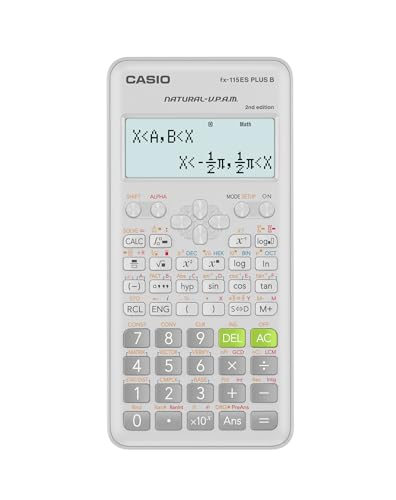
Casio fx-115ES PLUS
Engineering coursework leans on matrix and vector operations, and the fx-115ES PLUS handles both natively. Its natural textbook display renders equations closer to how they appear in a printed problem set. Over 280 built-in functions cover most first- and second-year engineering math without extra add-ons.
Pros
- Strong fit for engineering-level math
- Natural display matches textbook notation
- Handles matrices and vectors without extra modes
Cons
- Interface feels dense next to newer models
- Smaller screen than the ClassWiz series
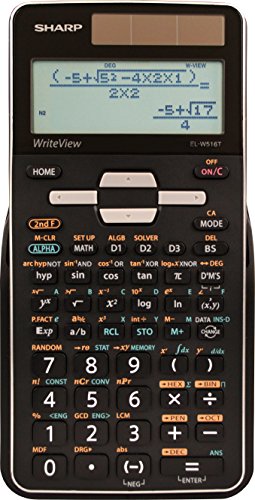
Sharp EL-W516TBSL WriteView
Sharp’s WriteView display shows expressions across four lines exactly as they would appear on paper, which helps when editing multi-step problems. Over 600 built-in functions edge out most competitors in this category. Multiple memory registers let users store several intermediate results at once.
Pros
- Very readable multi-line display
- Highest function count in this lineup
- Good for editing multi-step calculations
Cons
- Layout feels unfamiliar to longtime TI users
- Buttons require firmer presses than rivals
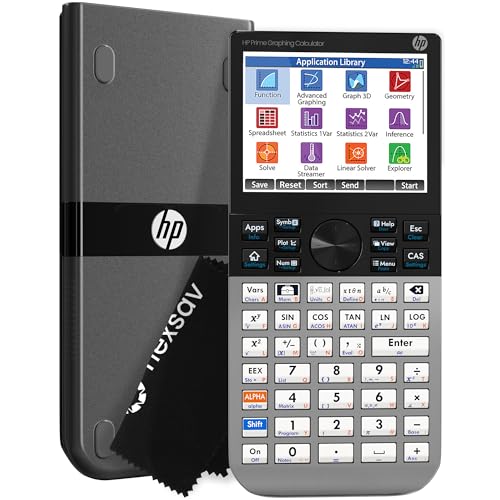
HP 35s Scientific Calculator
The HP 35s supports both RPN and standard algebraic entry, a combination that working engineers and surveyors often prefer for speed. Its two-line display is smaller than newer four-line models but pairs with large program memory for custom routines. Build quality favors tactile, deliberate keypresses over flashy displays.
Pros
- RPN entry speeds up complex sequential math
- Programmable for repeated custom calculations
- Excellent tactile keys for heavy daily use
Cons
- Steeper learning curve for RPN newcomers
- Two-line display shows less context than MultiView models

Casio fx-300ES PLUS 2nd Edition
The fx-300ES PLUS covers natural textbook display and over 250 functions at the lowest price point in this roundup. Solar and battery power keep it running without frequent replacements. It commonly appears on approved-calculator lists for entry-level and middle-school testing.
Pros
- Very affordable for the function set
- Natural display eases equation reading
- Good acceptance for school-level exams
Cons
- Basic feature set next to higher-tier models
- Smaller screen limits multi-step editing
Side by side
| # | Model | Display | Best for | Score | Price |
|---|---|---|---|---|---|
| 1 | Texas Instruments TI-36X Pro | Four-line MultiView | Best overall | 9.4 | Check price |
| 2 | Casio fx-991EX ClassWiz | High-resolution LCD | Best value | 9.1 | Check price |
| 3 | Texas Instruments TI-30XS MultiView | Four-line MultiView | Best for students | 8.9 | Check price |
| 4 | Casio fx-115ES PLUS | Natural textbook display | Best for engineering | 8.7 | Check price |
| 5 | Sharp EL-W516TBSL WriteView | WriteView four-line | Best display | 8.5 | Check price |
| 6 | HP 35s Scientific Calculator | Two-line | Best for professionals | 8.3 | Check price |
| 7 | Casio fx-300ES PLUS 2nd Edition | Natural textbook display | Best budget | 8.0 | Check price |
Frequently asked questions
Which scientific calculators are allowed on the SAT and ACT?
Most standard scientific calculators without graphing or internet connectivity are permitted, including the TI-36X Pro, TI-30XS MultiView and Casio fx-300ES PLUS. Always check the current approved list from the testing organization before exam day, since policies can change.
Is the Casio fx-991EX ClassWiz banned from some exams?
Yes. Some standardized testing programs restrict the fx-991EX ClassWiz because of its spreadsheet mode and expanded function set. Check the specific exam’s calculator policy before relying on it for a proctored test.
What is the difference between a scientific and a graphing calculator?
A scientific calculator handles arithmetic, trigonometry, statistics and algebra without plotting functions or storing programs visually. A graphing calculator adds a plotting screen, function graphing and often more memory, which some exams restrict or ban entirely.
Do multi-line displays actually help with calculations?
Four-line displays like MultiView and WriteView show an entire equation and its history at once, reducing retyping during multi-step problems. Two-line displays show less context but work fine for shorter calculations.
What does RPN mean on the HP 35s?
RPN stands for Reverse Polish Notation, an entry method where operators follow their operands instead of sitting between them. It speeds up long calculation chains for users who learn it, though it has a steeper learning curve than standard algebraic entry.
Are solar-powered scientific calculators reliable?
Solar-plus-battery models, used on most calculators in this comparison, draw from ambient light and fall back to battery power in dim conditions. This combination generally prevents mid-exam power failure better than battery-only designs.
Which scientific calculator is best for engineering students?
The Casio fx-115ES PLUS supports matrix and vector operations natively, which covers most first- and second-year engineering coursework. Its natural textbook display also matches how equations appear in engineering textbooks.
How long do scientific calculators typically last?
Solar-plus-battery models can run for years of regular use since the solar cell offsets most battery drain. Battery-only models like the HP 35s need periodic battery swaps but otherwise have similar mechanical lifespans.
Do I need a scientific calculator or a graphing calculator for calculus?
Many introductory calculus courses accept scientific calculators, but courses covering function graphing or calculus visualization often require a graphing model. Check the course syllabus or exam policy before deciding.
What should students look for besides function count?
Exam approval status, display type and power source matter more day-to-day than raw function count for most students. A calculator with fewer functions but broader exam acceptance is often the safer choice.
The bottom line
For most students and test-takers, the TI-36X Pro balances function depth with broad exam approval better than any model here. Engineering students should prioritize the fx-115ES PLUS for its matrix support, while professionals doing repetitive math get more long-term value from the HP 35s. Budget shoppers can rely on the fx-300ES PLUS without giving up core exam acceptance.
Marcus Chen
Marcus covered consumer electronics for enthusiast tech publications for six years before joining ChoiceCrest. He specializes in translating manufacturer spec sheets into plain-language buying advice, with a focus on audio, computing accessories and smart-home gear.