Printer Stands That Free Up Desk Space and Add Storage
VASAGLE’s Printer Stand with Storage Shelves is the top pick for its steel frame and shelves deep enough for a full-size laser printer. Mount-It!’s MI-7972 Rolling Printer Cart suits anyone moving a printer between rooms. FITUEYES delivers the most storage in the smallest footprint.
VASAGLE’s Printer Stand with Storage Shelves leads this list, pairing a steel frame with shelves deep enough for a full-size laser printer plus paper reams. Mount-It!’s MI-7972 Rolling Printer Cart makes more sense if the printer needs to move between rooms. FITUEYES squeezes the most storage into the smallest footprint of the seven.
Printer stands look interchangeable in listings, yet the details that matter rarely show up in photos. Shelf depth decides whether a printer sits flush or overhangs the edge, and stated weight capacity ranges from around 40 to over 200 pounds. Cheap casters bind under load too. We compared published dimensions, load ratings and materials against what owners report about wobble and long-term stability.
What we recommend
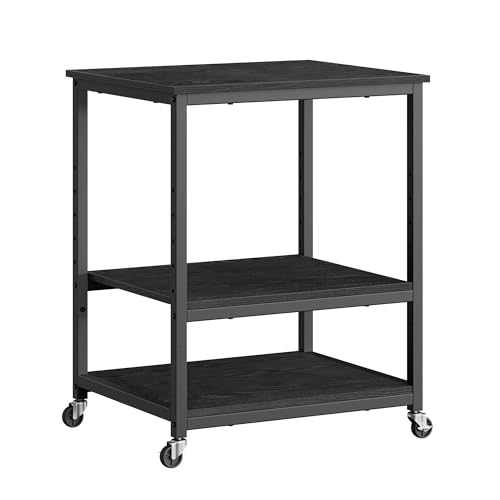
VASAGLE Printer Stand with Storage Shelves
Engineered wood shelves sit on a welded steel frame, avoiding the sag that plagues all-wood stands under a heavy laser printer. The middle shelf clears enough height for paper reams and a small shredder. Adjustable feet level the unit on uneven floors, a detail owners mention often.
Pros
- Steel frame resists racking better than wood-only stands
- Deep shelves fit full-size laser printers
- Levelers help on uneven or carpeted floors
Cons
- Assembly takes longer than the instructions suggest
- No wheels, so repositioning needs two people
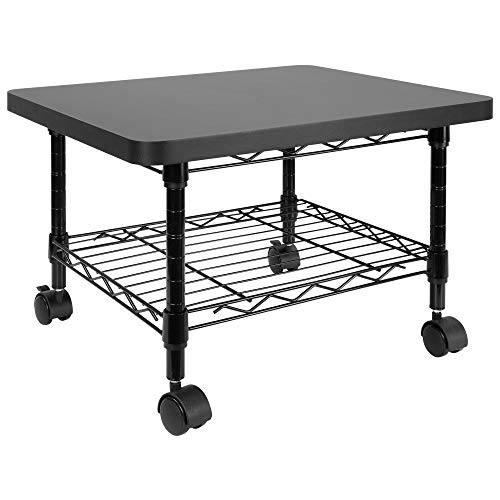
Mount-It! MI-7972 Rolling Printer Cart
Four casters, two of them locking, keep this cart from drifting while a printer feeds paper. The upper tray stays flat under load without tilting. A full case of paper fits on the lower shelf, which suits shared offices where the printer changes rooms.
Pros
- Rolls smoothly on hard floors and low pile carpet
- Locking casters stop drift during printing
- Low profile fits under most desks
Cons
- Lower load capacity than fixed steel stands
- Casters struggle on thick carpet
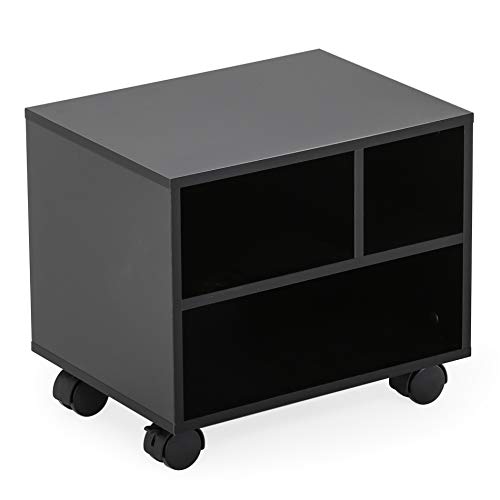
FITUEYES Printer Stand with Wheels
Three usable tiers plus a pull-out tray fit into a narrow footprint, which suits small home offices well. Wood grain laminate reads more like furniture than office equipment. Owners suggest reserving the pull-out tray for paper and supplies rather than heavier hardware.
Pros
- Strong storage for the footprint
- Wheels remove if a fixed stand is preferred
- Finish blends into home office decor
Cons
- Pull-out tray is light duty
- Laminate edges can chip during assembly

VIVO Height Adjustable Printer Stand
Adjustable shelf height solves a common problem: a printer that won’t clear a desk return or a low window sill. Steel construction feels stiffer than the price suggests. Storage runs lower than a three-tier stand, so treat this as a positioning tool rather than a storage cabinet.
Pros
- Height adjustment fits awkward under-desk spaces
- Steel build stays rigid under a heavy printer
- Small footprint suits tight rooms
Cons
- Limited storage compared to shelf units
- Height changes require partial disassembly
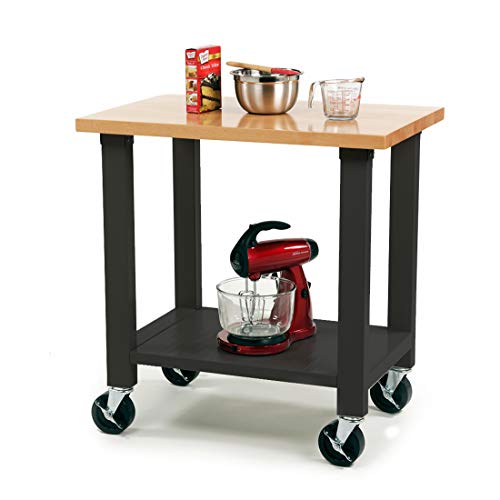
Seville Classics UltraHD Rolling Utility Cart
This workshop-grade cart gets pressed into office duty for large laser or wide-format printers. Steel shelves shrug off weight that would bow particleboard over time. Its industrial look won’t suit every room, but the load capacity is hard to match at this price.
Pros
- Highest load capacity in this comparison
- Steel shelves resist sagging over time
- Rolls easily even when fully loaded
Cons
- Industrial appearance stands out in a home office
- Heavier unit, harder to carry upstairs

Safco Products Scoot Machine Stand
Safco builds this for shared workplaces, pairing a laminate top with a steel base and a lower shelf sized for supplies. Construction meets commercial furniture standards more than most consumer stands attempt. Styling stays plain, and size options run narrower than home-focused competitors.
Pros
- Built to commercial furniture durability standards
- Stays stable under mid-weight multifunction printers
- Assembly is straightforward
Cons
- Styling is plain compared to home options
- Fewer size and finish choices

SONGMICS Printer Stand with Drawer
A built-in drawer gives toner, cables and spare labels a home instead of a desktop pile. Build quality suits inkjets and compact laser printers rather than heavy office machines. Based on specifications, keeping the load modest lets it hold up well over time.
Pros
- Drawer hides consumables and cables from view
- Lowest cost entry that still looks tidy
- Compact footprint suits small rooms
Cons
- Not built for heavy office printers
- Drawer slides feel basic
The lineup, side by side
| # | Model | Frame | Best for | Score | Price |
|---|---|---|---|---|---|
| 1 | VASAGLE Printer Stand with Storage Shelves | Powder coated steel | Best overall | 9.4 | Check price |
| 2 | Mount-It! MI-7972 Rolling Printer Cart | Four, two locking | Best for mobility | 9.2 | Check price |
| 3 | FITUEYES Printer Stand with Wheels | Three shelves plus tray | Best value | 9.0 | Check price |
| 4 | VIVO Height Adjustable Printer Stand | Adjustable in steps | Best for tight clearances | 8.8 | Check price |
| 5 | Seville Classics UltraHD Rolling Utility Cart | Steel, two tiers | Best for heavy printers | 8.6 | Check price |
| 6 | Safco Products Scoot Machine Stand | Laminate over steel base | Best for offices | 8.3 | Check price |
| 7 | SONGMICS Printer Stand with Drawer | Drawer plus open shelf | Best budget | 8.0 | Check price |
What matters most
How do you measure a desk for a printer stand? Printer stand listings quote outer dimensions, not usable shelf space. Measure the printer’s footprint including the rear paper feed and any trays that extend when open, then add two inches per side. Check clearance height too, since a stand that fits the printer but blocks the paper path becomes a daily annoyance.
How much weight capacity does a printer stand need? Inkjet printers usually weigh under 20 pounds, but a color laser multifunction machine can pass 60 pounds. A stand rated near that limit will sag over time. Look for capacity comfortably above the printer’s weight plus a case of paper, which adds roughly 40 pounds on its own. Steel-framed stands generally outlast all-wood construction at the same size.
Wheels or fixed legs: which is better for a printer stand? Casters make sense when a printer moves between rooms or needs space behind it for cables and jam clearing. They trade away some rigidity and capacity to get there. Fixed legs with levelers stay steadier under a heavy machine and suit uneven floors. Anyone choosing wheels should insist on at least two that lock.
Do printer stands need drawer or shelf storage? A stand that lasts long term also holds paper, spare toner and cables, not just the printer. Three-tier stands and drawer units keep supplies off the desk, which is often the real reason people shop for one. Owners report the lower shelf gets used most, so check its clearance against a standard ream box before ordering.
Frequently asked questions
How much weight can a printer stand hold?
Capacity varies widely by construction. Light engineered wood stands typically rate near 40 to 55 pounds, mid-range steel-framed units sit around 100 to 120 pounds, and heavy-duty steel carts exceed 150 pounds. Check the per-shelf rating rather than the total, since the top shelf usually rates lower.
Will a printer stand fit under a standard desk?
Many low-profile rolling carts slide under a desk with roughly 24 to 26 inches of clearance, but measure the actual desk height minus any drawers or crossbars first. Confirm the printer’s own height fits under that clearance once it sits on the stand.
Do printer stands need locking wheels?
Yes, if the stand has wheels at all. Printers vibrate during paper feed, and a free-rolling cart can creep away from the wall and tug cables. Two locking casters cover most setups, and four helps more on smooth floors.
Are wood or metal printer stands better?
Metal-framed stands generally offer higher capacity and better long-term rigidity. Engineered wood units look more at home in a living space. A hybrid with a steel frame and wood shelves, like VASAGLE’s design, is a reasonable middle ground.
Can a printer stand hold a scanner or shredder too?
Often yes, provided the total weight rating isn’t exceeded. Shredders weigh more than they look, so placing one on the bottom shelf keeps the load low and the center of gravity stable. Check clearance for the shredder bin to slide open.
How long does printer stand assembly take?
Most flat-pack stands take 30 to 60 minutes with cam locks or bolts. Steel-framed models usually take longer since there are more fasteners. Owners suggest a screwdriver over a drill to avoid stripping the pre-drilled holes in engineered wood.
Do printer stands work well on carpet?
Fixed-leg stands with levelers handle carpet fine. Casters struggle on medium and thick pile, so a carpeted office calls for either a fixed stand or larger-diameter wheels. Some carts include removable casters for switching between the two.
What size printer stand fits a home office?
A stand roughly 24 to 30 inches wide and 16 to 20 inches deep handles most home printers plus supplies. Compact inkjets fit smaller units around 20 inches wide, while wide-format and office multifunction machines usually need 30 inches or more.
Our take
VASAGLE’s Printer Stand with Storage Shelves stays the safest choice for most home and small offices, since its steel frame and deep shelves handle a heavy printer plus supplies without sagging. Pick Mount-It!’s MI-7972 Rolling Printer Cart when the printer needs to move, or Seville Classics UltraHD Rolling Utility Cart for a large laser machine. FITUEYES remains the value option when storage per square foot matters most.
Marcus Chen
Marcus covered consumer electronics for enthusiast tech publications for six years before joining ChoiceCrest. He specializes in translating manufacturer spec sheets into plain-language buying advice, with a focus on audio, computing accessories and smart-home gear.