7 Mini PCs Small Enough for Any Desk or Shelf Setup
The Beelink SER5 MAX leads for everyday desktop work thanks to its eight core Ryzen chip and quiet cooling. The Apple Mac mini M4 suits creative editing. The GEEKOM Mini IT13 pairs the strongest port selection with generous memory headroom.
Browser tabs, office apps and occasional editing run smoothly on the Beelink SER5 MAX, which is why it tops this list. Sustained creative work favors the Apple Mac mini M4 instead. Connectivity per cubic inch goes to the GEEKOM Mini IT13.
Two mini PCs sharing a chip name can behave completely differently once cooling, memory configuration and port layout enter the picture. We compared published specifications, chassis size, upgrade paths, and what owners report about fan noise and thermal throttling under long workloads.
Before you buy
What to check before buying a mini PC Core count, memory ceiling, upgrade path and port selection decide whether a mini PC suits your desk. Two machines can share a chip name yet perform differently once cooling and RAM speed are accounted for. Start by matching the chip class to your actual workload rather than the marketing tier.
Matching the chip to daily work versus heavy tasks Browser heavy work with dozens of tabs, video calls and office apps runs fine on six to eight cores, while an efficient four core chip handles streaming and file serving. Code compiles and video exports favor the Ryzen 9 and M4 class machines, since sustained performance is where budget boxes fall behind.
Upgradeable versus fixed configurations Windows mini PCs generally use standard SODIMM memory and M.2 storage, so a 16GB machine can double later for a modest outlay. Apple’s unified memory is soldered, meaning the configuration at purchase is permanent. A second M.2 slot is often the cheapest upgrade path available.
Ports, heat and where the box will sit Work out how many displays you need and whether they connect by HDMI or USB C before buying. USB4 or Thunderbolt ports let a single dock carry a monitor, drives and power delivery together. A small chassis has nowhere to dump heat, so mounting behind a monitor with a VESA bracket can trap warm air against the panel.
The top picks, ranked

Beelink SER5 MAX Mini PC
An eight core Ryzen 7 chip fits inside a palm sized shell, making this the mini PC most people should start with. Memory and storage stay user accessible, so it grows with you instead of aging out in two years. Owners report it stays quiet during browsing and office work, with the fan only spinning up under sustained load.
Pros
- Strong multi core performance for the size
- Memory and storage are both upgradeable
- Runs three displays without a dock
Cons
- Integrated graphics limit serious gaming
- Fan is audible under long renders

Apple Mac mini (M4)
Apple pairs the M4 chip with hardware media engines that make video timelines feel smoother than the chassis size suggests. Normal use rarely pushes the cooling system hard, so it runs near silent. Memory and storage are fixed at purchase, though, so the configuration you choose is the one you keep for good.
Pros
- Excellent sustained performance per watt
- Very quiet even during exports
- Front facing ports are genuinely useful
Cons
- No upgrades after purchase
- Base storage fills quickly for video work
GEEKOM Mini IT13
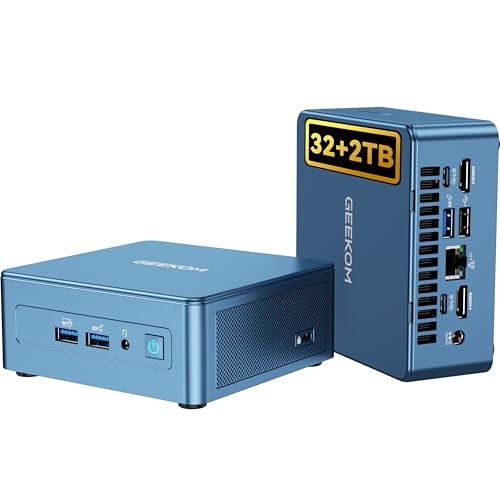
Connectivity is where this model earns its place, with dual USB4 alongside HDMI and the legacy USB A ports older peripherals still need. A 13th generation Intel chip handles multitasking well and drops to low power states when idle. Owners report the small chassis warms up in enclosed spaces, so give it room to breathe behind a monitor.
Pros
- Two USB4 ports handle docks and external drives
- Second storage slot for cheap expansion
- 2.5G Ethernet is useful for home servers
Cons
- Warm chassis in tight enclosures
- Bundled power brick is bulky

MINISFORUM UM790 Pro
A Ryzen 9 chip gives this machine the most raw multi threaded headroom in the group, useful for code compiles and virtual machines. Radeon integrated graphics handle casual gaming at modest settings. Extra performance comes with extra heat, and the fan profile reflects that trade.
Pros
- Best multi threaded performance here
- Radeon 780M handles light gaming
- DDR5 memory keeps it current
Cons
- Noticeable fan noise under load
- Runs warmer than the competition

ASUS ExpertCenter PN53
ASUS built this one for desks that need reliability over headline speed, including a VESA mount and business management features out of the box. The base panel opens without special tools, which keeps serviceability high. Document and browser workloads are exactly what its mid pack performance is aimed at.
Pros
- Easy to open and service
- VESA mount included in the box
- Solid port variety including serial options
Cons
- Often sold as a barebones unit
- Not the fastest chip at this level
Beelink EQ12 Mini PC
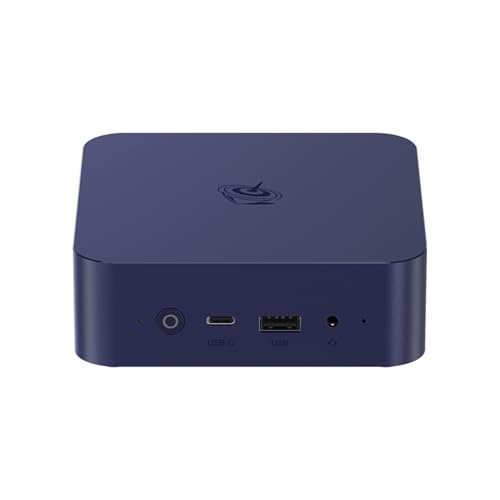
An efficient Intel N series chip sips power and stays silent, making the EQ12 a natural fit for a media box or small home server. Video renders will strain it, but web apps, streaming and file sharing run without complaint. Dual Ethernet ports are an unusual bonus at this price level.
Pros
- Very low power draw for always on use
- Dual Ethernet suits router and NAS projects
- Effectively silent in normal use
Cons
- Weak for heavy editing or compiling
- Single memory slot on some versions

Intel NUC 13 Pro
Few machines pack a full desktop experience into a footprint this small, and the 13 Pro keeps the tidy internal layout the NUC line is known for. Thunderbolt 4 makes external graphics and storage straightforward to add. Its compact chassis does mean the fan spins up sooner than on the larger boxes here.
Pros
- Genuinely tiny footprint
- Thunderbolt 4 expandability
- Clean internal layout for upgrades
Cons
- Fan spins up readily under load
- Frequently sold without memory or storage
Compared at a glance
| # | Model | Processor | Best for | Score | Price |
|---|---|---|---|---|---|
| 1 | Beelink SER5 MAX Mini PC | AMD Ryzen 7 5800H, 8 cores | Best overall | 9.4 | Check price |
| 2 | Apple Mac mini (M4) | Apple M4, 10 core CPU | Best for creative work | 9.2 | Check price |
| 3 | GEEKOM Mini IT13 | Intel Core i7 13620H | Best value | 9.0 | Check price |
| 4 | MINISFORUM UM790 Pro | AMD Ryzen 9 7940HS | Best for power users | 8.8 | Check price |
| 5 | ASUS ExpertCenter PN53 | AMD Ryzen 7 mobile series | Best for office deployment | 8.6 | Check price |
| 6 | Beelink EQ12 Mini PC | Intel N100 or N305 depending on model | Best budget | 8.3 | Check price |
| 7 | Intel NUC 13 Pro | Intel Core i5 or i7 13th generation | Best for compact desktop replacement | 8.0 | Check price |
Questions worth asking
Can a mini PC replace a full desktop tower?
For office work, browsing, streaming and photo editing, yes. Eight core models match mainstream towers on everyday responsiveness. Towers still win with a dedicated graphics card, so serious gaming and 3D rendering remain a weak spot.
How much memory do I need in a mini PC?
16GB covers browsing and office work comfortably. Move to 32GB for virtual machines, dozens of open browser tabs alongside creative apps, or a machine you plan to keep for five years or more.
Do mini PCs run hotter than towers?
Yes, because there is less air volume inside the chassis. That is normal rather than a fault. A few centimeters of clearance around the vents makes the biggest difference to sustained performance.
Which mini PC is best for light gaming?
The Radeon 780M inside the MINISFORUM UM790 Pro handles older and esports titles at modest settings. Current demanding titles need an external graphics enclosure over Thunderbolt or USB4, which adds cost and bulk.
Are barebones mini PCs worth buying over complete units?
They are if you already own spare memory and an SSD, since you avoid paying twice for parts. Starting from nothing, a complete unit is usually simpler and often costs about the same once components are added up.
How many monitors can a mini PC drive?
Most models here handle two displays comfortably, and several support three by combining HDMI outputs with USB C or Thunderbolt. Check the resolution and refresh rate limits per port, since maximums often differ across outputs.
Is a mini PC good for a home server?
Low power Intel N series models suit it well. They draw very little power for always on use, and dual Ethernet on the Beelink EQ12 opens up router, firewall and network storage projects.
What should I look for in a mini PC power supply?
Most mini PCs use an external brick, and size varies a lot between models. Higher performance units need larger adapters that can be awkward to hide behind a monitor. Some accept USB C power delivery instead, simplifying cable management.
Mini PC vs laptop for a permanent desk setup: which makes more sense?
A mini PC generally costs less for equivalent desktop performance and separates the screen from the compute, so you can upgrade one without the other. A laptop wins if portability matters at all, since a mini PC stays tethered to a monitor and power.
Do mini PCs support Windows 11 without issues?
Current generation Intel and AMD chips in this list meet Windows 11 requirements, including TPM 2.0. Older or budget N series chips should be checked individually, since some early models needed a firmware update to enable it.
Our pick
The Beelink SER5 MAX fits the widest range of desks, balancing eight core performance, upgradeable memory and manageable noise. Pick the Apple Mac mini M4 when creative applications dominate your day, or the GEEKOM Mini IT13 when port variety and expansion slots matter most. For always on, low power duties, the Beelink EQ12 does the job for far less.
Marcus Chen
Marcus covered consumer electronics for enthusiast tech publications for six years before joining ChoiceCrest. He specializes in translating manufacturer spec sheets into plain-language buying advice, with a focus on audio, computing accessories and smart-home gear.